Search

Super Library Marketing: Practical Tips and Ideas for Library Promotion

Category

library marketing advice

The Tiny Little Mistakes That Ruin Your Library Marketing Emails AND How to Fix Them!

NEW LIVE LIBRARY MARKETING SHOW ON INSTAGRAM! I’ve decided to try a new thing! I’ll be doing a live Instagram Q&A and discussion about Library Marketing. The sessions will be every Tuesday at noon ET (10 a.m. Central and 9 a.m. Pacific) beginning Tuesday, June 25. Join me to talk about library marketing topics for about 20 minutes each week. My handle is Webmastergirl. You can email questions and topic suggestions ahead of time. Just fill out this form below. See you there!

← Back

Thank you for your response. ✨

I get a lot of library marketing emails. I love to see what other systems are doing. So, I go to their websites and I see if I can get on their mailing lists! It’s fun and it helps me to find new things to promote and new ways to communicate with my audience.

I also get a first-hand look at some of the small boo-boos that other library marketers make in their emails. Email is hard. I’ve been doing email marketing for so long (feels like forever!) that I have made all of these mistakes myself! And I love email marketing, so I’m weirdly obsessed with learning about it. Some of the positive text and design choices that work for library marketing in other promotional pieces, like posters, flyers, websites, and blogs, do not work in email marketing.

The good news is that these little problems are easily fixed! Tiny adjustments in the text and design of your email can improve your click-through rates and effectiveness. Check this list against what you’re doing now and start reaping the benefits of improved email design!

Problem: too many images: A clean design is crucial to engagement. Too many images or too much text is off-putting to your email recipient.

The most common email programs like Yahoo and Outlook will NOT automatically download images. In fact, only Gmail downloads images automatically. With all other providers, the email recipient receiver must consciously click a prompt in order to download an image. That means if your image is conveying most of the key message in your email, your receiver likely won’t see it.  They will miss the information and the call to action, and your email is useless.

Solution: Create an email that is mainly text-based. I have found an 80-20 mix works best: 80 percent of my email is text, 20 percent is image-based. The image I use compliments the text. Its purpose is to create emotion or set the mood of the email. It’s there to inspire. It doesn’t convey key messages and it doesn’t contain the call to action.

Problem: too much text. An email that contains several long paragraphs of information is off-putting to recipients. It gives the impression that your email will take a long time to read.

The email scheduling platform Boomerang studied results of about 20 million emails sent using their software. They found that the optimal length of a marketing email is between 50 and 125 words. A study by Constant Contact of more than 2.1 million customers found emails with approximately 20 lines of text or 200 or so words had the highest click-through rates.

Excessive text can also send negative signals to spam filters. Too much text added to excessive punctuation or large images could keep your emails from ever arriving in an inbox.

Solution: Limit your email text to 200 words or less. The recipient should be able to read all the information in your email in about 15 seconds. If you have more information to share, use your call to action to indicate that there’s more to know about your subject. Then send your recipient to a landing page where they can get all the information they need.

Problem: Text that is too small. Keep in mind the growing number of people who will read your email on a mobile device. You want to make sure they can actually see your words. An 11 or 12 point font size is too small to be seen clearly on a screen.

Solution: Increase your text size.  Email font should never be below 18 point in size.  You should also use the bold option to make the most important information stand out.

Problem: Wishy-washy calls to action.  A compelling call to action is one of the best ways to increase the click-through rates of your library marketing. Some library marketing emails also contain too many CTAs.

Solution: Use positive, active language in your CTA. “Register” “Read This Book”, “Learn More”, “Join Us”, “Donate”, and “Get Started” are some of my favorites. I put my CTAs in a square red box that looks like a button to compel my recipients to click on them. I embed the CTA in my image as well and use the “alt text” to convey the CTA in case someone’s eye skims the email. I try to keep my CTAs to one per email.
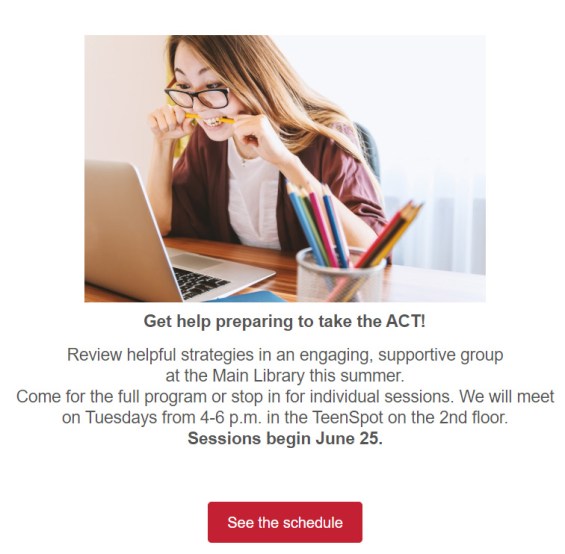
One image, with the main text in bold at 18 point found. A few sentences and a clear call to action.

Problem: Ignoring mobile responsiveness.  Mobile opens accounted for 46 percent of all email opens according to the latest research from Litmus. If your emails aren’t optimized for mobile, you are missing a huge potential audience, particularly women and young people.

Solution: Optimize your emails for mobile to make them responsive. Most email marketing programs offer mobile responsive templates. My library uses Savannah by OrangeBoy. We switched to all responsive templates in January of this year. I’ve seen a nine percent increase in click-through rates. I count that as a win!

Problem: No system for proofing your emails in different kinds of email boxes. Your email design might look great in your creation software. But if you send it without testing it, you may find that your email becomes a kind of monster creature! It may show up a a jumbled mess of images and text. This happens because every email inbox will convert your email differently.

Solution: Test your email to make sure your message displays correctly for your recipients. Find people that you trust you have different providers… someone with Gmail, someone on Outlook, someone on Yahoo, and so on. Send them the message and ask them to check for warped images, font problems, and extra spaces.

Subscribe to this blog and you’ll receive an email every time I post. To do that, click on “Follow” button in the bottom left-hand corner of the page. Connect with me on Twitter, Instagram, and LinkedIn.  

Four Sneaky Ideas to Insert Marketing Tactics Into Your Everyday Work as a Librarian

I need your help! In a few weeks, I’m giving a short online seminar to library directors about marketing! I have 15 minutes to convince them to throw their full support behind library marketing. I really want this talk to impact the way library directors think about your work. So… please let me know what you want library directors to know about library marketing. Fill out the form before you even read this post. It’s anonymous! Thank you!

← Back

Thank you for your response. ✨

Librarians are busy folks. You’re on the front lines, trying to work with cardholders and community members. You’re looking up information. You’re connecting people with social service resources. You’re filling out paperwork, creating curriculum for story time, and putting up displays. And you’re doing about 100 other things that I don’t know about because I’m not a librarian.

I worry about how much libraries lean on librarians to do their own marketing. Senior staff might believe spending money to hire staff for marketing is not a good use of their limited funds. But it’s not good for the librarians and it’s not good for the library.

I also can’t change the world in one blog post. What I can do is help the librarians in my readership to strategize to make marketing part of their regular duties. Here are four things that you can do that are already part of your job. These are marketing tactics, though you may not have thought of them that way before!

Merchandising. Merchandising is a form of marketing that focuses on presenting the items in your branch in the way that will compel people to interact with them. Every display, every sign, every decision on the arrangement space in your branch is a chance to market your library.

I know that the decision many libraries made to switch from using the Dewey Decimal system to a more categorized approach for arranging items pains library purists. But it pays off.  Library visitors are accustomed to browsing in stores by categories. By mimicking that display effect, libraries make it easier for people to find the items they want and need. We want to be as easy to use (or easier) than our for-profit competitors.

It’s a time-consuming process but I’ve put merchandising first on this list because it is the most important and impactful way that librarians can market their branch. If you haven’t thought about re-arranging the materials in your branch, now is a great time to start. And to get some help, I recommend the slides from a presentation from Allison Fiscus of the Toledo Lucas County Public Library. She recently did an online seminar. Her presentation includes data that shows how merchandising positively effects the customer experience. She included a lot of visuals to help you understand her concepts. You can find them here.

Exceptional customer service. A lot of big brands have focused on improving customer service as a marketing tactic. If you are working on the front-line of your library, you have a unique opportunity to interact with cardholders.

The marketing buzz phrase for doing this is “surprise and delight.” We want to surprise our cardholders with service that exceeds their expectations. When we do that, they feel delighted with us! (Isn’t that just a sunny thought?) Delighted cardholders are more likely to spread the word to their friends and family about our system and the services we provide. They may be compelled to talk about us positively on social media, give us great reviews on Google Business, and support our work through donations or volunteerism. These are all marketing wins!

Good customer service is a competitive edge for libraries. If we can create an environment of inclusive and open access where people truly feel supported and cared for, we’ll have the clear advantage over for-profit competitors. One-on-one help is time-consuming, but it will pay off. We’ll build a reputation as a warm and inviting space. When’s the last time you heard Amazon or Best Buy described in those terms?

Library staff must make the commitment to provide good customer service. It’s not a skill that comes naturally to everyone. To help you, I love this free guide from Hubspot. It’s got templates and a ton of great information that you can use to improve your own customer service skills.

I also recommend you read this interview with Dan Gingiss, an expert at customer service. He’s written a great book with tips about customer service in social media and his interview has lots of ideas for improving library customer service to make our industry more competitive.

Word of mouth promotion. I get a lot of requests from librarians in my system who want our marketing department to promote their event or service. Posters and emails and fliers work, but the most effective method of marketing, in my experience, is word of mouth. You need to be telling your cardholders about your branch, events, and services. Talk to them!

Librarians are in a better position to sell people on their services and events than a for-profit business. That’s because you are a trusted member of the community. Librarians are admired and your opinions are valued more than the average person. Use that advantage to help “sell” the things that your branch offers!

I know word of mouth promotion seems time-consuming.  But consider this. Data tells us that you have to get your message in front of your cardholder an average of SEVEN TIMES before they’ll be compelled to act on it. But when you have a direct conversation with a cardholder about your library, you are making a compelling and personal case. 75 percent of people don’t believe the advertisements they read but 92 percent believe brand recommendations they receive from trusted sources. Librarians are trusted! So just talk to people.

Sharing on your personal social media. Yes, you should be sharing posts from your library’s social media channels on your own personal channel. There’s no right or wrong way to do it. Just pick the promotions you feel most personally passionate about. Hit the “share” button and add a line about why this particular event or service is meaningful to you.

Your recommendations are trusted because of your position. It’s not unethical to share your employer’s promotional social posts. I know you feel passionate about the work your library is doing. Don’t be shy. Share your enthusiasm!

Subscribe to this blog and you’ll receive an email every time I post. To do that, click on “Follow” button in the bottom left-hand corner of the page. Connect with me on Twitter, Instagram, and LinkedIn.  

The Five Most Pressing Social Media Problems Faced by Every Library Marketer

This may mean I’m weird but one of my favorite things to do is check for information about social media on the Social Media Today website. And I’m a little obsessed with their monthly statistics report, which they publish in easy-to-digest infographic form. I spend a few minutes each month looking that report over just to make sure my library is still justified in posting on social media. I can also get new ideas for library marketing engagement on social media based on trends. This is fun for me. So yeah, I’m weird.

Data is always helpful. But social media is moving target. And many library marketers are busy doing other tasks as part of their job descriptions. We want to use our time efficiently.  And we want to be effective.

I’ve gathered the most pressing questions about social media from some of my readers. Let’s lay out some answers and resources to help make your job easier.

What social media platforms should we post on? The answer to this really comes down to your strategy. What is your library trying to accomplish? Who is your target audience?

I love that monthly report from Social Media Today because it tells me why people use each social media platform. You can use that report to decide where you should post based on your library’s strategy and goals.

You must also consider how much time your library is willing to invest on social media. My library posts on Twitter, Facebook, Instagram, LinkedIn, and Pinterest because each of those platforms aligns with some portion of our library’s overall strategy. But I am not going to lie to you: that’s a lot of work. I’m lucky to have several staffers who work together to post. And it’s still really hard for us to keep up.

Smaller libraries will want to concentrate on the platform or platforms that will give their library the most benefit. Quality is better than quantity. It’s okay to only post on one platform!

Further reading

The Top 21 Social Media Sites to Consider

How often should I post on social media? Posting on social media is a scientific attempt. You should set a reliable cadence. You’ll want to be consistent with your posts. Track the results and adjust your posting schedule based on the results.

Based on our experience at my library, here’s what I recommend as a starting point:

Facebook: No more than once a day

LinkedIn: Once or twice a day

Instagram stories: At least once a day

Instagram feed: Two to three times a week

Twitter: Five to 12 Tweets a day, plus retweets and responses. On Twitter, you should repeat tweets at intervals. The feed is a moving target and unless someone is scrolling through at the exact moment your tweet goes out, they’ll miss it. Users rarely go to a page to see a library’s full schedule of Tweets!  It’s also okay to post 24 hours a day. There are people who are awake at 2 a.m. scrolling through Twitter!

Pinterest: Several organic Pins each day (something created by you and leading to your library’s website) plus as many curated Pins as you need to stay aligned with your strategy. An easy way to get those organic Pins onto your boards is to Pin the best new books from your collection. If you have a blog, you can also post content from that.

Further reading

How Often to Post on Social Media

The Truth about How Often to Post on Social Media

Does our library need to buy a Facebook ad to get any organic reach and, if so, how much should we spend? The short answer to this is yes. You’ll need to spend money on Facebook ads or boost your Facebook posts to see any significant organic traffic for your other Facebook posts. That’s the sad fact of it. (can you tell my enthusiasm for Facebook is waning?)

That said, you don’t have to spend much money at all. Most libraries can spend about $2-3 a day to boost a post or promote an event and see results. Facebook gives you a lot of control and help in choosing a target audience. As always, you’ll have to look at your library’s overall strategy to determine which posts to spend money on.

Further reading

Facebook for Nonprofits-10 Tips

Why Facebook is a Waste of Time and Money for Nonprofits

How can I get more followers on my social media accounts? Please stop focusing on follower counts. I want libraries to focus instead on engagement. It’s kind of like speaking at a conference. You might be thrilled at the prospect of talking to a huge group of people. But if half of your audience is yawning or looking at their phones, what is the point? It’s much more meaningful to speak in front of a small room of people who are riveted by what you have to say.

That’s how I look at social media followers. I don’t care how many followers my library has on any social account. I want people who want to engage with our content. Focus on shares, likes, and comments for posts and not the number of followers.

Further reading

Why You Social Media Follower Count Doesn’t Matter

Should we have a team of people posting to social media or should we take a centralized approach? I am an advocate of centralized social media posting. If you have one or two staffers who post to all your social media accounts, you can preserve the brand voice and protect the security of your accounts. However, one or two people cannot know everything that’s going on in your library system. So create a team of contributors, who send post suggestions, photos, and videos.

Further reading

Protect Your Library Social Media Accounts From a Security Breach

Subscribe to this blog and you’ll receive an email every time I post. To do that, click on “Follow” button in the bottom left-hand corner of the page. Connect with me on Twitter, Instagram, and LinkedIn. I talk about library marketing on all those platforms!

The Big Things You Must Do to Land a Job in Library Marketing

I never like to see a staff member resign. But when they do, it’s usually to take the next step in their marketing career, and that’s something to be proud of.

However, I suffer through several days of worry after I receive a resignation letter. Will I find a good person to fill this role? How long will it take? How hard will it be to orient them to the bureaucratic workings of my library?

In truth, despite the worry, I love to hire new people. A new employee can bring new ideas and energy to your library. Staff recruitment and nurturing is one of my favorite parts of the job. It’s also one of the hardest things to do. Hiring a manageable, long-term, qualified candidate who meshes well with your current team is crucial to the success of your library. The wrong hire can cause issues for you for a long time. So it’s important to get it right.

A job in library marketing is fun. It isn’t glamorous but it’s fulfilling. It’s also a popular field. For my last open position, I received more than 130 resumes in seven days. And many of those resumes were from candidates with the right degree and experience. But many of my candidates neglected to do some simple things that could have helped them land my open job.

I want to share some of the things I look for in a good library marketing candidate. These aren’t the things you’re told are important when you’re taking that college job placement class. Confession: I do want my candidates to have a degree but I don’t care where it’s from. These are the things that really, truly improve your chances of landing a job in library marketing.

And, if you hire library marketing candidates or hire for positions in your library in which marketing is part of the job description, look for candidates who have these qualifications.

A complete LinkedIn account. Your LinkedIn profile should include an updated photo of a professional nature. List your school and work experiences. Make sure you mention any professional organizations to which you belong. If you have writing or artistic samples, post them on your profile or include a link to your online portfolio or blog.

Most importantly, ask relevant professional peers to write recommendations of your work before you start applying for jobs. The candidates who got past my first round of resume culling where those who had at least one professional recommendation on their LinkedIn profile. And the more positive recommendations they had, the more likely I was to consider their resume.

A completed automatic application form. My library’s application asks questions that are usually answered in a candidates’ resume. Many of my candidates skipped the application step. I assume it’s because they felt it was redundant. However, it’s important to fill out the application for two reasons.

Many libraries use software to comb the online application for certain keywords to identify qualified candidates. They can’t do that search on a resume. If you don’t fill out the application, you’re automatically disqualified. Filling out the application form also shows you can follow directions.

A cover letter, particularly if the job you’re applying for involves writing. This is your chance to shine. Avoid using clichés such as “I’m a great fit for this position.” Write in your own voice. Be creative and personal.

The person I hired for my last open position began her cover letter by telling me the story of the library in her childhood–how her mother used to bring her to the library every night for activities and homework help because she was such an active and energetic child. That story stuck in my mind and demonstrated her writing skills. She wrote conversationally yet was professional in her tone. And it worked… she got the job!

Spelling and grammar are accurate on EVERYTHING, especially if your new job involves writing. This demonstrates professionalism and attention to detail. I eliminated some qualified candidates because they misspelled words or made grammar errors in their resume, application, or cover letter.

Writing samples. Generally, I would have two or three samples linked to your resume, and two or three more in your back pocket to send in if the recruiter needs them to help winnow down the pool of candidates. Prove you can write a variety of content including blog posts, press releases, emails, and long-form articles.

Social media accounts.  If you’ve worked on a social media account for another brand, nonprofit, or volunteer organization, include a link to those accounts in your resume. If you don’t have professional experience, you should have personal accounts and you need to be active on them. This demonstrates you have knowledge of how social media works. If you aren’t actively on social media, the recruiter will assume you don’t have a complete understanding of how the social landscape works.

Video examples. In TV news, we used to call this the “demo reel.” Make two or three videos to show your shooting style, and to show you know how to edit and upload videos. Put them on YouTube or your personal blog, and link to them in your resume.

Research the heck out of the library you want to work for. The more you know about the library, the better your chances will be of landing the job. Look at the library’s social media accounts, website, and mobile app, then visit a branch. Pick up some print marketing materials and pay attention to displays, signage, and customer service. This prepares you for the classic questions “What are we doing well and what would you like to improve on, if you were hired for this position?” The inability to answer that question is an automatic disqualifier for me.

Subscribe to this blog and you’ll receive an email every time I post. To do that, click on “Follow” button in the bottom left-hand corner of the page. Connect with me on Twitter, Snapchat, and LinkedIn. I talk about library marketing on all those platforms!

Five Totally Doable Things That Make Your Library Content More Shareable

Every content creator fears no one will read their work. By contrast, the most exhilarating thing you can do in marketing is to write something that people read, share, and comment on. I speak from experience. There is no better compliment.

Last week, I told you about the upcoming keynote I’m giving on content marketing and shared some reasons why your library should be creating content. The more I write for this blog, the more I learn about the kinds of content my audience will read AND share. That second part is important. You want to reach new people and make them library fans. But what makes your content shareable?

I have five simple ideas for you. Each of these increase the likelihood that your content gets shared.

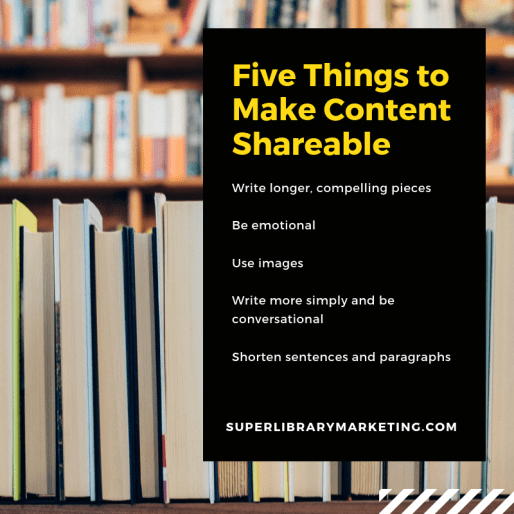
Write longer, compelling pieces. Seriously, the whole thing about how your audience only has the attention of a goldfish is bunk. They will read a 2,000-word post from you if it’s compelling.  People read whole books with 50,000 plus words! I don’t know why this myth of the “too-long content piece” exists when there is literally hundreds of years’ worth of proof that it’s not true.

If you tell a story in long form, with authentic quotes, an emotional arch with conflict and resolution, and a clear beginning, middle, and end, it will not feel like a long read. And a piece of content with all of those characteristics is also likely to be memorable. Great stories stick in our minds long after we read them. And memorable posts get shared!

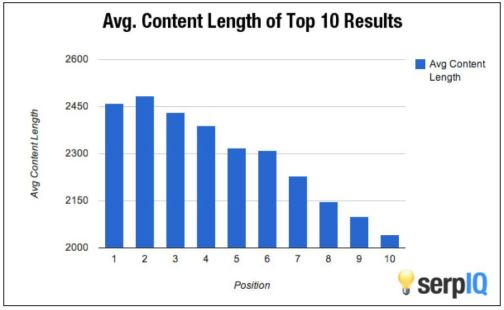
Long form content is also better for your library’s search results. Back in 2012, serpIQ conducted a study involving more than 20,000 keywords. The results showed that the average content length of the top 10 search results was more than 2,000 words.

I have some evidence that this works personally. In 2018, I purposefully started writing longer blog posts here. Most of my posts land at around 1,000 words… not quite up to serpIQ’s standards but about 200-300 more words per post than I wrote in 2017. And guess what happened? My engagement stats increased by nearly 215 percent over 2017!

My library just started a blog two weeks ago. We will experiment with post length. And you can bet that I’ll push our writers to put out longer and more compelling stories, even if that means we have to publish fewer total posts. Write longer, more interesting posts and people will respond.

Be emotional. According to research from the journal Psychological Science, our emotional responses to content play a huge role in our decision to share that content. But all emotions are not created equal. The study shows people will share content that makes them feel fearful, angry, or amused. There is also a ton of evidence to suggest that people like to share content that inspires or contains a surprise.

Conversely, you should avoid creating content with negative emotions like sadness or even contentment, which tend to cause inaction. We don’t want that!

Insert images in your content. You may have noticed I’ve started inserting more images into my posts on this blog. That’s because adding images to your content is proven to increase the likelihood that it is seen and shared. My post popular post ever is this one, which contains three images. Those three images are strategically placed to emphasis the meaning of the words. They also break up the text for a visually pleasing read.

You must also use images on social media when promoting your content. This rule applies to all platforms. Your audience is visual and they want to see images in addition to your important words. The right image–one that evokes emotions or really serves to succinctly illustrate whatever you are saying in your content–will also make your content more shareable.

Write simply and conversationally. The more your audience understands what you’re trying to say, the most likely they are to share your posts. Define unfamiliar or difficult words, titles, or services. Go through the draft of your material and highlight words or terms that may confuse your audience. Then, find a better way to say or explain those words.

Never take it for granted that your reader has been a lifelong user or follower of the library. Words used by librarians to describe services, programs, catalogs, and databases may seem common to you and your staff. They are not common to your reader. Always explain. Then, ask a non-library employee to read your work. I often take my stuff home and ask my husband or my teenage daughter to read it. If they find anything to be confusing or convoluted, I know I need to change it.

Shorten your sentences and paragraphs. Shorter sentences will make it easier for your reader to understand and absorb what you are saying. The same is true with paragraphs. A piece of material with lots of long paragraphs looks thick and off-putting. Readers will skip lengthy paragraphs, according to British grammarian H. W. Fowler. In addition, the Poynter Institute’s Eyetrack Study shows people are more likely to read an entire web page when the paragraphs are short. And if you can get the reader to look at the entire post, it’s more likely that they’ll share the content.

Subscribe to this blog and you’ll receive an email every time I post. To do that, click on “Follow” button in the bottom left-hand corner of the page. Connect with me on Twitter, Snapchat, and LinkedIn. I talk about library marketing on all those platforms!

Eight Major Reasons To Add Content To Your Library Marketing {Infographic}

I’m so excited to be the keynote speaker for the Illinois Library Association Marketing Forum Mini-Conference in Chicago in a few weeks. My brain is entirely engulfed in content marketing as I formulate the talk. There are also some big content changes afoot at my library. I’ll talk more about those when we have our campaigns up and running. But, let’s just say that most of my marketing focus in my professional life is on content–why we should do it, how to make it work better, and how to be efficient in our content creation.

The most important part of the speech I’ll give next month is the “why.” Why is content marketing important to libraries? This was actually the focus of one of my early posts here on blog. The argument for content marketing hasn’t changed. You can make all the posters and fliers you want. People don’t pay attention to those push promotional tactics. That’s why marketing seems frustrating.

You want desperately to break through the noise of life and become a subconscious part of your cardholders’ thought process. You want them to think of you every time they face a problem. You want them to remember they can come to you for pretty much anything they need. This is the common struggle for libraries everywhere, no matter their size, staffing, or service area. Honest to goodness, the only way to achieve that is through content marketing. I know this from experience.

There is now a lot of data to back up the assertion that content works. I want to share some of that with you. I’m hoping that, if you are hesitant or nervous about working content marketing into your overall library marketing strategy, these stats will convince you. I truly believe this is an opportunity for libraries that cannot be missed. If we are to survive and thrive as an industry, we need to do more content marketing.

Here are the facts for why content is key to library marketing.

Why Content is Key to Library Marketing

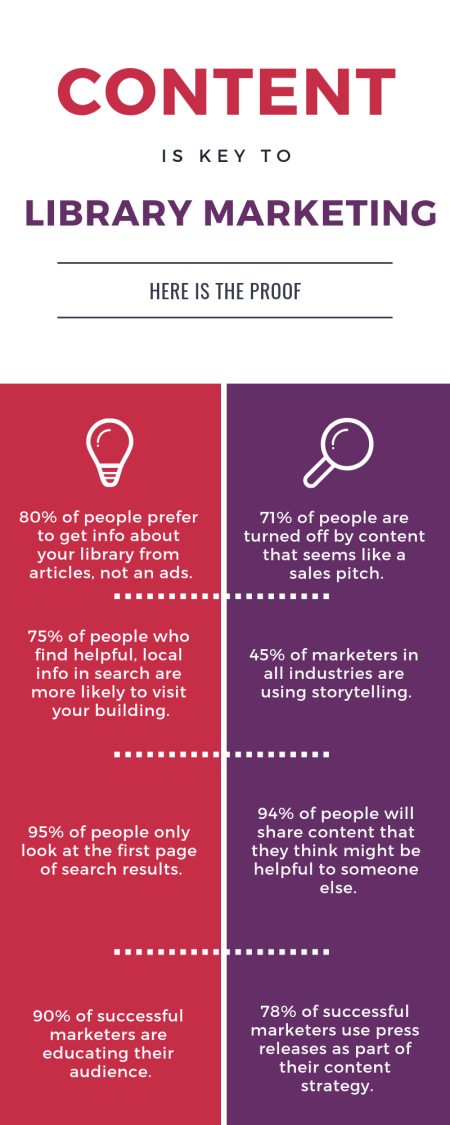
80 percent of people prefer to get information about your library from a series of articles versus an advertisement.

71 percent of people are turned off by content that seems like a sales pitch. Which means, if you are doing mostly traditional promotional marketing, it’s not working.

75 percent of people who find local, helpful information in search results are more likely to visit a physical building. We want to get more bodies inside our libraries. Content is the key.

Only 45 percent of marketers are using storytelling to create a relationship with their audience. Most big brands are still running ads and push promotion. This is our open door. It’s a huge opportunity for libraries. This is how we sneak in and take away audience share… by telling stories. And who doesn’t love a good positive story about a library?

95 percent of people only look at the first page of search results. Optimized content (that’s content that uses keywords that are likely to be picked up by Google and other search engines) is incredibly helpful. If your library’s content appears on the second page or later, people won’t see it.

Blog posts are the content that get the most shares. And if your post is helpful to others, it’s more likely to be shared. 94 percent of readers share a blog post because they think it can be useful to someone they know. And the more often you publish blog content, the more often your content will show up in search, which increases the likelihood that people will find your library while doing a search. Amazing, right?

90 percent of the most successful marketers prioritize educating their audience over promotion their company’s promotional messages. Education is our main industry. Libraries are perfectly aligned to make this work for us.

But here’s a stat that really surprised me. 78 percent of effective content marketers use press releases as part of their strategy. Yep, press releases can be content marketing too. Use your releases to be informative but to really pitch amazing story ideas to the media. If you have a great story and you can make all the elements available to the media, you can let them tell it and take advantage of their built-in audience to spread the word about your library.

These stats come from a variety of great blogs including Impact, Marketing Profs, OptinMonster, Elite Copywriter, Cision, and Forbes. I hope they’ve convinced you to do content marketing at your library.

Subscribe to this blog and you’ll receive an email every time I post. To do that, click on “Follow” button in the bottom left-hand corner of the page. Connect with me on Twitter, Snapchat, and LinkedIn. I talk about library marketing on all those platforms!

Seven Podcasts that Will Make You a Better Library Marketer

An exciting thing happened this week! The library marketing profession is now the subject of a podcast. It’s called Library Figures. It’s produced by Piola, a company which designs library websites.

Many smart and strategic library marketing professionals including Kimberly Crowder of the Indianapolis Public Library (featured in this Super Library Marketing post last year) are guests on the pod. Each episode focuses on a successful library marketing strategy. The host and guest dissect the implementation, tools, success measurements, and results. I amhonored to be featured on episodes one and four. Maybe it’s silly, but I’m just beyond thrilled that we’ve got our own podcast corner where we can share and learn.

I’m a huge podcast fan. My podcast player is overflowing with episodes. I’d love to share my list with you and explain a bit about why listening to these shows will make you a better library marketer.

The Science of Social Media

This is a new discovery for me. This show, produced by Buffer, focuses on data, insight, trends, tips, and more. Anyone who works on social media for any library will find value in listening to these episodes, which cover subjects for everyone from beginners to those with advanced social media skills.

Marketing School

I just discovered this podcast last month and I’m catching up on back episodes (there are more than 900!) but I really love it. The creators release one ten-minute episode every day focused on one nugget of great marketing wisdom. Past subjects include blogs, event marketing, crisis communications, and generating great content ideas.

Brand Newsroom

This show, produced by a content marketing agency in Australia, bills itself as “the show for anyone who has a say in how companies are communicating.” The hosts use a round-table discussion format to dissect topics like crisis communications, branding, and networking.  The most interesting episodes involve disagreement between the hosts. They all have a different perceptive on marketing, and I find that they help me to consider issues from different angles. They also have a fun segment at the end of each episode called “On my Desk” where they share something they’re really excited about, from apps to software to new books.

Marketing over Coffee

As its name implies, each weekly show is recorded in a coffee shop. The two hosts talk casually about all kinds of marketing topics including writing, influencer marketing, SEO, and other relevant marketing problems and solutions. They also take listener questions, which I really love. And the episodes are short, so they’re easy to listen to during a typical 20-minute commute.

Social Media Marketing Podcast

Michael Stelzner, who runs the Social Media Examiner website, is the host of this show. His guests have a range of backgrounds and answer questions about all kinds of social media topics and tactics. Mike is really good about digging down and getting the basics about each topic. He also shares a new app at the beginning of each show. Most of his discoveries are free or very inexpensive and they’re all designed to help make marketing easier and more fun.

Unpodcast

I’m going to end in an unconventional spot by recommending this podcast, hosted by husband and wife team Scott Stratten and Alison Kramer. I have seen Scott speak at Content Marketing World several times. He’s hilarious and brutally honest about the faults and triumphs of marketing. Alison is his partner in crime and besides being the cutest couple in marketing,  their observations are always spot on. Some episodes dissect customer service, some talk about marketing mistakes, and sometimes they talk about innovation and entrepreneurship. They really make me think. Just trust me and subscribe.

And of course, we support our fellow library marketers producing podcasts. Read the back stories about how those shows are produced and then subscribe to the library podcasts on this list.

And if you have a podcast you want to recommend, please let me know in the comments!

Subscribe to this blog and you’ll receive an email every time I post. To do that, click on “Follow” button in the bottom left-hand corner of the page. Connect with me on Twitter, Snapchat, and LinkedIn. I talk about library marketing on all those platforms!

How to Hook New Cardholders and Make Them Loyal with Email

We talk a lot about emailing our cardholders with information about new products, services, and collection items. But you can also use your email list in a powerful way to reach people who have just signed up for a library card.

Most libraries take a minimalist approach to “on-boarding” a new cardholder.  Once a person fills out a library card application, we hand them a card, a welcome brochure, and send them on their way. We’re friendly and we’re genuinely excited to welcome them to our system. But we make a mistake that’s common for a lot of businesses and organizations. We know our system inside and out and we often forget that our new cardholders know nothing about what we offer. We assume they can find their way to the things they need.

It’s important to help those cardholders learn to navigate the behemoth number of resources and items available at the library. A solid on-boarding campaign retains new cardholders and turns them into lifelong loyal users of the library. The first 90 days of a new library cardholder’s experience is crucial to determining their feelings of connection and loyalty to the library.

It also makes good business sense. Studies show it costs five times as much to gain a new customer than it does to retain them. A library marketer practicing good stewardship will want to do their best to keep new cardholders coming back to use the library.

The most effective way to on-board a new cardholder is through email marketing. Many libraries create a campaign with specific emails sent to new cardholders at a pre-determined pace. Those emails slowly introduce them to new features and inspire them to try out all the library has to offer. It’s easy to do this using some mail systems, like OrangeBoy and MailChimp.

My library has a 90 day on-boarding campaign set to run automatically through OrangeBoy. Creating it was a bit of process. But the effort was worth it. In addition to retaining customers, the on-boarding emails reduce unsubscribes for future targeted promotional emails. Here’s how we did it and what we learned about doing it well.

First, make a list of the services, events, and collection types that get the most use at your library. You’ll want to include information about the most popular features you offer in your emails to new cardholders.

Then, make a list of the services, events, and collection types that are interesting or unique to your library but don’t get a lot of use. These are the gold nuggets of your on-boarding campaign. You’ll have the attention of your new cardholder. The relationship is fresh. Why not use that to showcase the hidden treasures at your library.

Finally, create an outline of your campaign, mapping out each message, when it will be sent, and what it will say. Look at the two lists you’ve created and narrow your focus. Try to promote no more than four things per on-boarding message. You don’t want to overwhelm your new cardholder. Rather, you’ll want to introduce people to the library in small doses. Pick a theme for each message with a specific call to action. Keep the language simple, conversational, and free of industry jargon.

Create, test, and release the messages. This part took me nearly as long as creating the plan did! But you’re almost there.

Track results. Of course, you’ll want to use a Google URL tracker or Bitly link to see which services and items get the most interest from your new cardholders. You can also track unsubscribe rates, and if you have the ability to divide cardholders into clusters, you can see where your new cardholders land after they finish the on-boarding process.

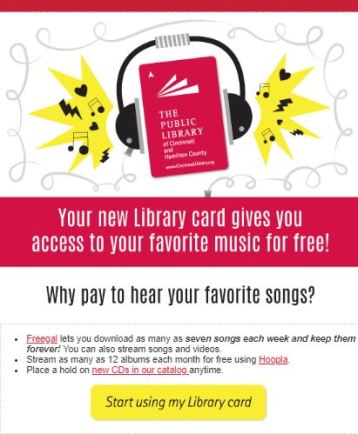
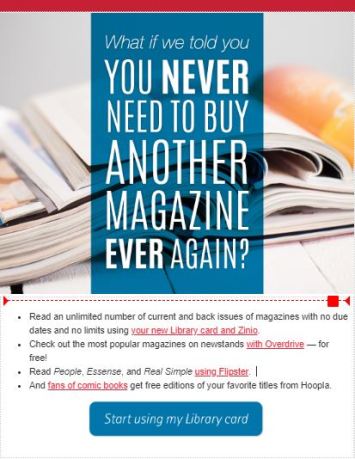
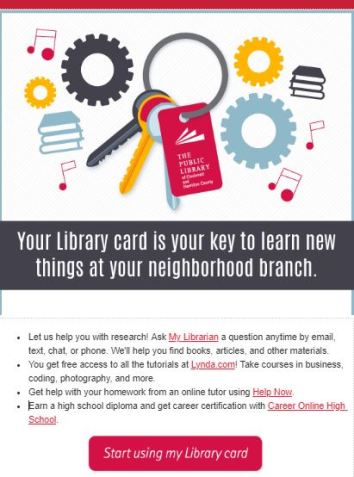
Here are a couple of examples of my library’s on-boarding emails so you can see what we do.

How do new cardholders react to these messages? They definitely don’t hate them. Our unsubscribe rate is 0%. We’re a large system and we’ve sent these for several years to thousands of new cardholders. Over the course of our campaign, we’ve had a couple of hundred people unsubscribe.

We send six emails over 90 days. The first email gets a lot of engagement, which is not a surprise.  The fifth email about using your neighborhood branch (see the image above) is the second most engaging email for us. Overall, about half of the new cardholders we sign up end up becoming loyal library customers. Most use our computers but the rest are checking out physical and digital items or using our MakerSpace.

If your library is doing something to on-board cardholders, I’d love to hear about it. Please take this poll and tell me about what you are doing in the comments.

Subscribe to this blog and you’ll receive an email every time I post. To do that, click on “Follow” button in the bottom left-hand corner of the page. Connect with me on Twitter, Snapchat, and LinkedIn. I talk about library marketing on all those platforms!


Sensational and Free (or Cheap) Social Media Scheduling Tools

A well thought out social media strategy is only half the battle for library marketers looking to reach audiences without spending budget. Once you decide who you will talk to, and what you will say, it’s time to figure out how to physically get those posts scheduled.

I’ve scoured the web for scheduling tools and tried them out to see which ones will work for libraries. Some tools are better for people who must share accounts with lots of contributors. Others work best for single person teams. Some work well for libraries posting on only a few social media platforms. Some are meant for larger systems with wide strategies.

My list does not include schedulers that only allow you to schedule posts on one platform, like Tweetdeck. That is inefficient for any library system. I also recommend some paid plans, but only the ones that offer the most features for the least amount of money.

Before we get to the list, I want to address a myth about scheduling social media posts. I’ve heard lots of marketing “experts” say that it’s wrong for brands to pre-schedule social media posts. Their argument is that a pre-loaded social media platform is inauthentic. I call bullshit. Your cardholders don’t care if you are posting something live or using a scheduler. If the post comes across as inauthentic, it’s because it’s not written well!

There are good, data-driven reasons for scheduling social media posts. If you’re watching the data and engagement of past posts, you can use your scheduler to give your audience what they want, when they want it. You don’t have to worry that you’ll forget or get distracted. Pre-scheduling also gives you time to create honest and meaningful text and graphics. It’s not lazy. It’s incredibly smart.

Now, there in one warning I must share about scheduling posts in advance. You may run into a situation where you’ve pre-scheduled a post and something happens that makes the post irrelevant. For instance, if you schedule a post to promote an event at a branch and then something happens that causes that branch to close unexpectedly. That’s just something to keep in mind as emergencies arise in your system. Your checklist of things to do in an emergency should include checking your pre-scheduled social media posts.

Here are the tools I think are best for social media post scheduling.

Hootsuite

The free plan lets you schedule on three platforms. You can pre-load 30 messages at a time. My favorite feature is the boost plan. If you have money for social media ads, you can boost posts through Hootsuite instead of going to each individual platform. That’s super convenient. There are also analytics and free social media courses.

Buffer

This site’s free plan also lets you post on three platforms. You can pre-load 10 messages per platform. It includes a link shortener, an image creator, and the ability to upload videos or GIFs. If you want more capability, their most basic “Pro” plan is $10 a month and lets you post on eight platforms and schedule up to 100 posts in advance. One note: you must pay the Pro rate for the analytics capability on Buffer. Analytics are not included in the free plan.

Zoho Social

Their standard plan is the most robust I found in my research. For a little more than $8 a month, two team members can post on eight different channels. The plan includes analytics, the ability to pause and resume posts, a link shortener, and other features. There is a free plan, which lets one person post on all the channels, but you can’t schedule posts ahead of time.

Friends + Me

This site’s free option gives you the ability to schedule on two platforms, with up to five posts on each platform. That’s not super helpful unless you have time every day to schedule posts or are not active on social media. However, the site’s bottom tier paid plan is $7.50 a month and gives you a ton of features– you can pre-load as many as 500 posts to five platforms. 10 people can also use the platform on this plan. I think that’s a good deal.

Crowdfire

Crowdfire’s free plan lets one person post on the big four social media platforms (Twitter, Facebook LinkedIn, and Instagram) with up to ten pre-loaded posts per platform. But I would actually recommend the first level paid plan, call Plus. For about $7.50 a month, you get access to Pinterest and 100 pre-loaded posts, plus a pretty robust analytics tracker, hashtag recommendations, and no ads on the mobile site.

Subscribe to this blog and you’ll receive an email every time I post. To do that, click on “Follow” button in the bottom left-hand corner of the page. Connect with me on Twitter, Snapchat, and LinkedIn. I talk about library marketing on all those platforms!


A WordPress.com Website.

Up ↑