In this episode, I’ll share three headlines about social media and how they affect your work at the library. They include a case study comparing ads on Instagram Reels vs. TikTok, a new Instagram feature, and a new way to track your Twitter analytics.
Kudos in this episode goes to Asotin County Library. Watch to find out why they’re being recognized.
Do you have a suggestion for a topic for a future episode? Want to nominate someone for kudos? Let me know in the comments. And subscribe to this series to get a new video tip for libraries each week.
In this episode, I’ll lay out a three-point argument for why it may be time for libraries to consider moving away from posting on Facebook. I know this feels likes it’s in opposition to my post about Facebook best practices, but hear me out.
I know you’ll have a lot to say about this topic, so share your thoughts in the comments.
Kudos in this episode goes to Morrisson-Reeves library. Watch the episode to see why they’re being recognized.
Do you have a suggestion for a topic for a future episode? Want to nominate someone for kudos? Let me know in the comments. And subscribe to this series to get a new video tip for libraries each week.
Thanks for watching!
Subscribe to this blog and you’ll receive an email every time I post. To do that, enter your email address and click on the “Follow” button in the lower left-hand corner of the page.
I love libraries. I work with libraries. I talk to library staff every single day. I like, share, and comment on library social media posts.
But every time I open my app for any of the platforms, I NEVER see content from libraries.
Why?
The odds are never in our favor, thanks to algorithms.
It’s a daily battle that libraries face. Social media is free and easy.
But it’s also not free and easy.
It’s incredibly, insanely difficult to figure out what works on social media when the rules are constantly changing. If you don’t have time or staff to keep up, it can be exhausting and demoralizing.
But like it or not, libraries must use social media to promote their services, collection, and events. We must do our best to work with the algorithms, for better or worse.
Starting next week, I’ll begin my annual six-part series laying out best practices for the top platforms used for promotion by libraries.
I chose these platforms because of a survey you, dear readers, so graciously answered. Nearly 300 library staffers let me know which social media platforms your library uses for promotion.
Before the platform best practice series begins, it’s important to set your library up for success by creating a social media style guide.
This is different than a social media policy, which lays out guidelines for how your staff will use social media to communicate with the public and sets rules for how the community interacts with you and others on your library’s social media accounts.
A social media style guide will ensure your posts are clear and consistent, no matter what platform you post on. It will take the guesswork out of many aspects of posting and make your work more efficient.
A social media style guide has seven parts. Here are the key decisions you should make now to ensure future success on social.
Make a list of all your social media accounts
Include your library’s handle on each platform. This will give you get a clear picture of the naming conventions you’ve used for your accounts.
Are the names consistent across channels? If not, choose a style and note it in your style guide.
Then, the next time a new social media platform is launched, you can claim and name your new account in a way that will make it easily discoverable for your existing fans.
Identify your library’s demographics for each platform.
Look at the insights for each of the platforms. Who is interacting with your posts? Your audience will be different for every platform. Make a list of the different audiences.
Because of the algorithms, you have very little control over who sees your post on any given platform. But you can get to know your available audiences and create content that will engage them.
If you are struggling with time management and you want to cut down on the number of social media posts you do, you can look at your lists of demographics. Identify the platforms with the audiences that will help you achieve your overall library and marketing goals. Post to those platforms and put the rest on hold.
Create a mission statement for each platform.
Look at your library’s goals for the year and what you know about each platform. Then write a one or two sentence mission statement for each of the social media platforms, lining up your library’s goals with the currently available audience for that platform.
For example:
LinkedIn: Discover career advice, business tips, and free resources that will help you succeed at work.
Twitter: Get regular updates on our collection, library events, and the literary and entertainment world.
Instagram: Photos tell the library’s story, one snapshot at a time.
These platform-specific mission statements, combined with the demographics you identified in the previous step, will help you visualize your audience every time you post. You’ll be able to connect with them because you’ll know who they are, and what they expect from you.
Decide the voice and tone you’ll use for each platform.
You want to use the same language and tone across platforms for consistency. The goal is to make sure your audience recognizes your posts no matter which platform they are on. Some things to consider include:
Whether your library will use formal or conversational text.
The words, phrases, and names that are specific to your library and can be used in posts. For instance, does your Maker Space or your Bookmobile have a specific branded name? Include that in your list.
Make a list of the acronyms your library commonly uses internally, along with the full spelled-out versions of what they stand for. Decide whether it’s appropriate to use the acronyms on each social channel, or if the full terms should be used.
Include parameters for inclusive language that will be standard for your library. For example, will your library remove the use of pronouns to be inclusive to all genders? How will you refer to people living with disabilities?
Choose an expert to make grammar and punctuation choices for you.
This decision will take the guesswork out of your library’s use of serial commas, headline capitalization, dash style, dates and times, and more.
Define the aesthetics.
This section will lay the groundwork for the visual portion of your posts. Decisions to be made here include:
Will you use your library’s defined brand colors?
Which fonts will your library use in images, cover photos, and for short-form social media posts like Instagram Stories and Reels?
How will your library’s logo be used on social media? Will it be used as the profile photo for your platforms? Can it be added to images? If so, where will it be placed and how large should it be?
Will you use emojis, GIFs, and memes? Which ones? How many? On what channels? How often?
Will you include a call to action in every post? What kinds of action words will you use in your call to action?
How often will you include links in your posts? Will you use a URL shortener?
Which hashtags will you use? How many hashtags are acceptable on each platform?
Will your library use filters and effects in your posts?
Formalize curation
Your library can share the blog posts, infographics, case studies, and interesting posts created by other organizations on your platforms. This is a great way to add value for your available social media audiences without creating new content of your own. Some key decisions to make around curated content include:
Subscribe to this blog and you’ll receive an email every time I post. To do that, enter your email address and click on the “Follow” button in the lower left-hand corner of the page.
In this episode, we’ll share the latest social media platform headlines and break down what they mean for libraries. That includes a new scheduling feature for Instagram, a new, easy way for your Facebook followers to find your content, and new data on the use of Twitter by Gen Z.
Kudos go to the Invermere Public Library. Watch the video to find out why they were nominated by author Elinor Florence.
Do you have a suggestion for a topic for a future episode? Want to nominate someone for kudos? Let me know in the comments.
And subscribe to this series to get a new video tip for libraries each week.
Thanks for watching!
Subscribe to this blog and you’ll receive an email every time I post. To do that, enter your email address and click on the “Follow” button in the lower left-hand corner of the page.
In this episode, I’ve got three big updates for libraries that will affect your ability to post to social media.
Kudos go to the University of North Carolina Libraries for their free racial equity challenge syllabus.
Do you have a suggestion for a topic for a future episode? Want to nominate someone for kudos? Let me know in the comments. And subscribe to this series to get a new video tip for libraries each week.
Subscribe to this blog and you’ll receive an email every time I post. To do that, enter your email address and click on the “Follow” button in the lower left-hand corner of the page.
In this episode, I’ll share three easy design tips for your library’s social media graphics.
Kudos in this episode go to the Carmel Clay Public Library for turning a vacant supermarket into a super cool library space.
Do you have a suggestion for a topic for a future episode? Want to nominate someone for kudos? Let me know in the comments.
And subscribe to this series to get a new video tip for libraries each week.
Thanks for watching!
Subscribe to this blog and you’ll receive an email every time I post. To do that, click on the “Follow” button in the bottom left-hand corner of the page.
It’s time for social media updates for libraries! We’ll highlight three headlines and talk a bit about their impact on library social media.
Kudos in this episode go to the Columbus Library for their help with Operation Backpack.
Special note
I'm hosting a live Twitter chat next Tuesday, August 31 at 12 p.m. ET. It's on changing public perception through storytelling. To join, follow #CMWorld on Twitter. We'll ask five questions during the chat. You can answer using the hashtag. I want to make sure libraries are represented in this chat. See you there, friends!
Do you have a suggestion for a topic for a future episode? Want to nominate someone for kudos? Let me know in the comments. And subscribe to this series to get a new video tip for libraries each week.
Subscribe to this blog and you’ll receive an email every time I post. To do that, enter your email address and click on the “Follow” button on the lower left-hand corner of the page.
Instagram is super popular right now, especially with people under the age of 34. That’s a key demographic for library marketers.
According to Web Hosting Rating, 60 percent of users log in daily, and more than half of those people log in more than once a day. Best of all, the average U.S.-based Instagram user spends a whopping 53 minutes a day on the app. (That’s me! 🙋)
If your library posts to Instagram, it’s time to take it up a notch. To drive your engagement stats, there are two things you can do.
Instagram takeovers and Instagram highlights are an easy way to get more reach on your Instagram account.
Instagram takeover
An Instagram takeover is when you arrange for a partner organization, library department, senior leader, or fan to take over your account for a day or during a special event.
A takeover will expose your library to a new audience of potential followers. It will also give your library external credibility.
A takeover can be done without giving your takeover partner the password to your account.
Ask your takeover partner to save each individual story slide to their camera roll.
Next, they’ll email the slides to your library.
Then, you’ll upload them, one by one, to your Instagram story.
Before you agree to a takeover, be sure to establish some guidelines.
Be specific about what you want in terms of content and number of slides.
Set a deadline.
Put all of that in writing.
Here’s a template you can use to set up the guidelines for your own library’s Instagram takeover.
My former library did an Instagram takeover with a nearby library system, with whom we had a reciprocal lending agreement. It gave each participating library access to a new audience. And people loved it! Each story got an average of 605 views.
Patrick Kinsella, Library Communications Coordinator for the library at the University of Salford in Manchester had even more success with his Instagram takeover success story.
He said, “As our Library is in the final stage of a £6.2 million redevelopment, we decided to run a campaign to promote our study spaces outside our main library. We have five main study spaces outside of Clifford Whitworth, our main library, that could give students a place to study and help make up for the reduction in space in Clifford Whitworth.”
“We also decided to take over our university’s main Instagram account to give their followers a tour of what lies beyond Clifford Whitworth. Followers were also invited to send pictures of themselves studying outside Clifford Whitworth in exchange for £5 worth of printer credits.”
“The Instagram story was viewed over 1,200 times and 14 students sent us pictures of themselves studying outside Clifford Whitworth. The cross-promotion of our Instagram account @salfordunilibrary through the story also gained us more than 20 new followers. The user-generated content that we received also allowed us to build a Twitter campaign displaying their images.”
Instagram highlights
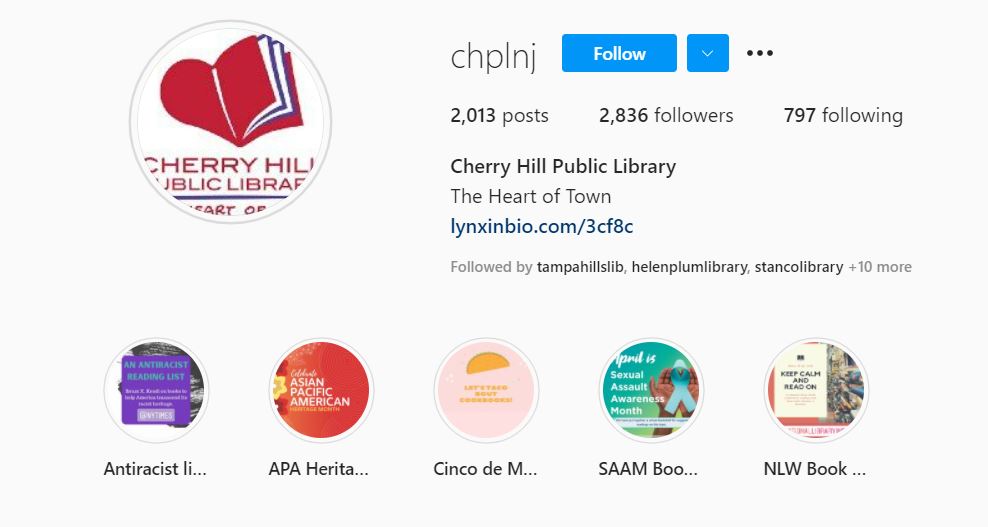
Highlights are custom containers for similarly themed Instagram stories. After you add content to your story, you can choose to highlight that content by saving it to one of these containers.
Unlike regular Instagram stories, which disappear after 24 hours, highlights live on your Instagram profile forever, or until you delete them.
Highlights showcase the best of your previous Instagram content to new followers. And they create an archive of content, especially those stories that contain “evergreen” content that never expires and is always relevant. Instagram highlights are a great place to save library FAQs, book reviews, tutorials, and other wide-ranging topics.
To create a highlight from an active Instagram story:
View the story.
Click on “Highlight” in the bottom tool bar.
Click on the plus icon to create a new highlight container or add to a highlight container you have already created.
Click on “Add”. You’re done!
You can add photos or videos to each of your highlight containers any time you want. There is no limit to how many photos and videos each highlight container can hold.
Springville Library uses highlights, and they’ve created icon-based covers for each container.
You can change the title of your highlights containers at any time. Just open the highlight, and then tap on the name of the highlight container in the upper left-hand corner. You’ll be given the option to edit.
Share your tips for library Instagram success! Click on the Feedback button to tell me about what you’re doing on Instagram. I’ll share your tips with others on Twitter, Instagram, and YouTube!
Subscribe to this blog and you’ll receive an email every time I post. To do that, click on the “Follow” button in the bottom left-hand corner of the page.
In this episode, I share two social media updates that are relevant for libraries. I’ll tell you about YouTube’s “New to You” feature and Facebook explained how its algorithm works!
Kudos in this episode go to the ten libraries in the UK who participated in the “Creating Space for Kindness” Project.
Do you have a suggestion for a topic for a future episode? Want to nominate someone for kudos? Let me know in the comments. And subscribe to this series to get a new video tip for libraries each week.
Thanks for watching!
Subscribe to this blog and you’ll receive an email every time I post. To do that, click on the “Follow” button in the bottom left-hand corner of the page.