
I was scrolling through LinkedIn when a post by a librarian named Kaitlyn Carpenter, who works at a high school in Houston, Texas caught my attention. She said:
“One of my favorite things that Houston Independent School District library services implemented this year has been our monthly infographics! I love digging into data and understanding trends in my library like:
- Wednesdays are always our busiest days.
- Ninth and 10th graders are often the most likely to visit the library.
- Comparing how circulation fluctuates throughout the school year.”
“Infographics like these allow libraries to market to their school and district to show impact! I have made it a part of my practice to include marketing images and graphics in every weekly eNews that goes out.”
Kaitlyn knows the power of infographics
The content management company Marq.com has compiled a ton of research on the value of infographics. Among their findings:
- About 90 percent of the information transmitted to the brain is visual. Infographics are a perfect way to turn static, boring information into visuals. And that’s important because…
- People remember 65 percent of information when it’s paired with an image. In contrast, they remember just 10 percent when they hear it or read it without an image.
Most libraries use infographics to share statistics, like summer reading participation and impact. But your library can use an infographic to demonstrate much more than numbers!
10 innovative ways to use infographics in your library marketing
Storytelling
Use infographics to tell a story about a patron’s journey and how the library affected their life. The visuals can depict all portions of the story.
You can introduce your patron as a main character. Show the problem they face. Illustrate the solution available at the library. And then end with graphics that show how your patron’s life was impacted by their interaction with the library.
Explain Your Strategic Plan
An infographic is an engaging way to easily explain the complex information contained in most library strategic plans.
You’ll want to start with an overview of your mission and vision, followed by specific goals and the steps to achieve them. Use graphics to demonstrate the timeline for the planned work.
Here’s a great example from the Winnipeg Public Library and another from my former employer, The Public Library of Cincinnati and Hamilton County. When I worked at the library, we used this infographic to explain the strategic pillars to staff and to the public.
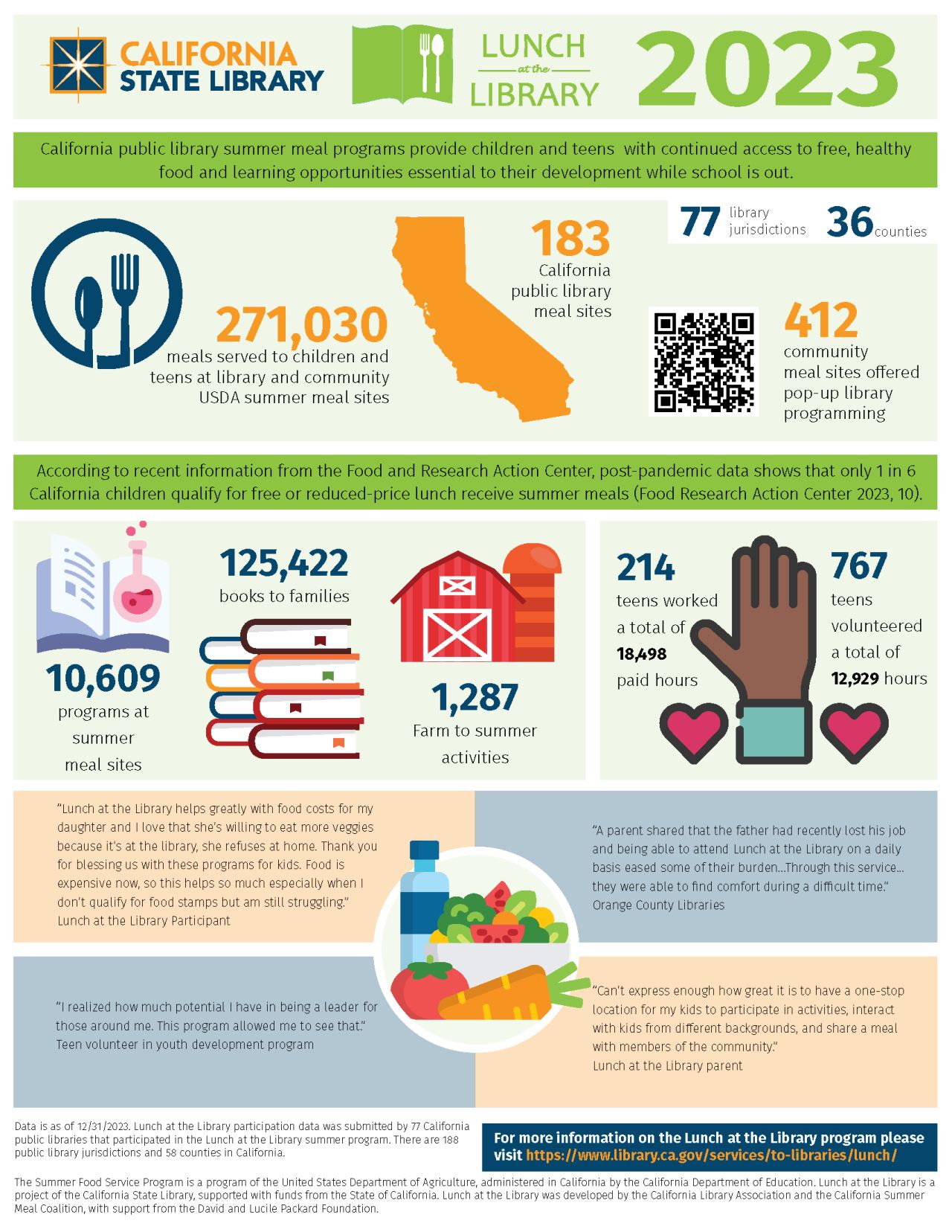
Testimonials and Quotes
Want to share powerful quotes about the importance of a library program or service? Include testimonials from patrons and community members in your infographic. This adds some humanity to the data.
Tutorials
We know some community members have difficulty using library resources like databases or vendor apps. (Remember how many people struggled with the Libby App?) Some members of the public may find long, text-based tutorials to be to complex.
You can turn those text instructions into a visual how-to guide to help community members ingest the information. Here’s a fun, two-page infographic from Falvey Library at Villanova University. It explains everything a student needs to know about the library as they start a new school year.
Compare and Contrast
Instead of just sharing statistics, use an infographic to compare metrics before and after library interventions. The visuals go a long way to clearly illustrating the impact of your library work.
You can also use an infographic to explain why library services are superior to other resources.

Service Bundles
Create a flowchart showing how a patron uses multiple services.
For example, your patrons may start by visiting your library’s website, where they sign up for a cooking program. When they get to the branch to attend the program, they may pick up a cookbook from a book display. Inside the cookbook, they may find a bookmark promoting the library of things.
An infographic illustration of that patron journey helps explain the interconnectedness of library services to board members, lawmakers, and potential partners.
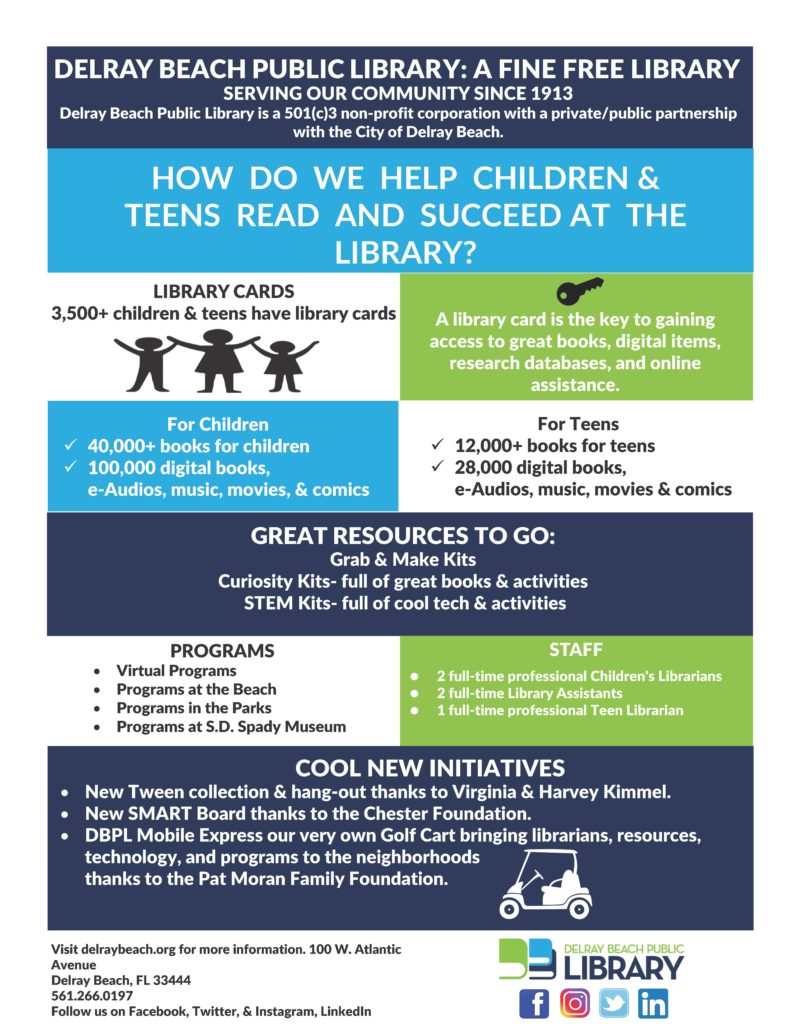
Visualizing Partnerships
Use an infographic to show how the library collaborates with other local organizations, schools, and businesses. This will demonstrate how the library actively engages with the community, which builds trust and awareness. It can also highlight additional services and programs available through these partnerships.
Here’s a great example from the Tampa Bay Library Consortium explaining how the Institute of Museum and Library Services Funds help Florida library programs.
Library Accessibility
Your library can use an infographic to illustrate how the library makes resources accessible to different demographics. This includes children, seniors, and non-English speakers.
For example, if your library knows that 95 percent of seniors who attend tech skills programs learn to use tech fluently, you can demonstrate that with graphics.
Bonus tip: For accessibility of your infographic, create a downloadable alt-text document for the infographic. This allows people who use screen readers to consume the infographic. Here’s an example from EBSCO. Scroll to the bottom of the illustration and you’ll see the prompt to download the alt-text version of this infographic.
Environmental Impact
Show the library’s efforts in sustainability and green initiatives. Use visuals to demonstrate eco-friendly programs, such as recycling, energy-saving measures, and community gardening projects.
If your library has undergone a renovation or built a new building and you’re Leed-certified, use an infographic to show your community how that designation saves money and the planet.
Volunteer Contributions
Infographics easily explain the impact of volunteers on a library. The visuals can help you clearly show the number of volunteer hours. They also illustrate the types of activities volunteers assist with. Additionally, they convey the value volunteers add to the library.
Need help creating your infographic?
I am not an artist. I can barely draw stick figures. So creating an infographic is daunting to me. This post explains the process I use to plan and create an infographic.
Hey library marketing friends: I’m teaching a pre-conference workshop at LMCC this year with my amazing coworker Caleigh Haworth. It’s all about marketing your collection. Registration is open now.
P.S. You might also find this helpful
Subscribe to this blog and you’ll receive an email whenever I post. To do that, enter your email address and click on the “Follow” button in the lower left-hand corner of the page. You can also follow me on the following social media platforms:


 Super Library Marketing: Practical Tips and Ideas for Library Promotion