Angela Hursh leads an outstanding team of marketing and training professionals at NoveList, a company dedicated to helping libraries reach readers. A 2023 Library Journal Mover & Shaker, she has also created courses on LearnwithNoveList.com designed to help library staff learn how to create effective marketing. Before her job at NoveList, Angela led the content marketing team for the Public Library of Cincinnati and Hamilton County. She also has more than 20 years of experience as an Emmy-award-winning broadcast TV journalist.
In this episode, I’ll answer a question from Dianne at the Pottsboro Area Public Library. She has been trying to drive attendance to her library events using Facebook events. It’s not working. So she wondered what else she can do?
Kudos in this episode go to the Nashua Public Library. Watch the video to find out why they’re being recognized.
Do you have a suggestion for a topic for a future episode? Want to nominate someone for kudos? Let me know in the comments. And subscribe to this series to get a new video tip for libraries each week.
Thanks for watching!
Subscribe to this blog and you’ll receive an email every time I post. To do that, enter your email address and click on the “Follow” button in the lower left-hand corner of the page.
“Language is one of the most important parts of any culture. It is the way by which people communicate with one another, build relationships, and create a sense of community.”
Kelsey Holmes, Greenheart Club Program Assistant.
One of the ways we can best make all our community members feel welcome and safe is to use inclusive language in our library marketing and promotions.
What is inclusive language?
The University of Oregon has the best definition of inclusive language that I’ve found. In their editorial guidelines, they say “For communication to be effective, it needs to appropriately address all audiences for which it is intended. Inclusive language acknowledges diversity, conveys respect to all people, is sensitive to differences, and promotes equitable opportunities.”
Why inclusive language is important to your library
When your library uses inclusive language in print and digital marketing materials, on your website, and in conversation at the front desk, you are fulfilling the library’s core mission. You are giving people the signal that your library is a safe space.
A lack of inclusivity reflects negatively on your library and values. It affects library staff morale. Worst of all, it can hurt the community’s perception of your library, affecting donations and fundraising efforts.
You must make time to check all your promotions for inclusive language. Every email, social media post, blog post, digital sign, bookmark, and brochure must be examined. You must make sure you aren’t excluding someone in your patron base.
The latest on inclusive language
Inclusive language changes and evolves. Since this post was originally published, I’ve written an update on the NoveList blog which you can read here.
Subscribe to this blog and you’ll receive an email whenever I post. To do that, enter your email address and click on the “Follow” button in the lower left-hand corner of the page.
In this episode, I’ll share the latest social media updates for January 2022, including a new way to filter analytics on YouTube and a new way to share video clips from Facebook to your stories. We’ll talk about what all of this means for libraries. Plus a study that may make you rethink the way you spent ad $$ for Summer Reading and other big library programs.
Kudos in this episode go to the ten winners of a huge award given by the American Library Association! Watch the video to see why they’re being recognized.
Do you have a suggestion for a topic for a future episode? Want to nominate someone for kudos? Let me know in the comments. And subscribe to this series to get a new video tip for libraries each week.
Thanks for watching!
Subscribe to this blog and you’ll receive an email every time I post. To do that, enter your email address and click on the “Follow” button in the lower left-hand corner of the page.
My mother believes the old-fashioned way is the best way to do most things.
She prefers mixing cookie dough with a spoon rather than using her KitchenAid mixer. She likes wrapping gifts with paper rather than using gift bags. She hangs her towels on the clothesline in the summer, rather than using the dryer.
I’m the complete opposite. If there is an easier way to do my household and cooking chores, I’m in. Give me all the gadgets. Hand me the tools. Machines are my friends.
For the past few months, I’ve been collecting a list of tools for those of us working in library promotion. They will help your library with video production, social media, writing, and content creation. Best of all, they are all free.
I’m listing the first 13 tools in alphabetical order. And I’ve included one bonus tool at the end of the list. It’s not related to marketing. However, it is the coolest thing since sliced bread.
Have a tool that you use to make your work easier? Let me know in the comments.
Animoto is an online video maker that makes it easy to create videos for your website or social media. The free account lets you edit on a desktop or a mobile device at 720p quality with 50 music tracks, three fonts, 30 color swatches, unlimited sharing on social platforms. There is a watermark on the videos.
For libraries that can afford it, the basic package, at $96 a year, removes the watermark, gives you unlimited downloads, and increased your video quality to 1080p.
This is my go-to URL shortener. I’ve had a free account for years. It helps me to track all the clicks on different platforms, including email and social media. That’s an important step to make sure you track the effectiveness of your marketing.
You can make 100 links a month with the free account, and you can customize the back half of your URL. For libraries that can afford it, the basic package is $348 a year and includes branded links and QR codes.
Whenever I need to schedule a meeting with someone who doesn’t work for my company, I use Calendly. It’s easy to integrate it with your calendar and a host of other apps, including Zoom. I cannot tell you the number of back and forth emails this tool has saved me!
Calendly also allows you to create rules for when someone can claim a block of your time. For instance, if you know you’ll be working the checkout desk every day from 12-1 p.m., you can block that off. You can also embed the link in your emails.
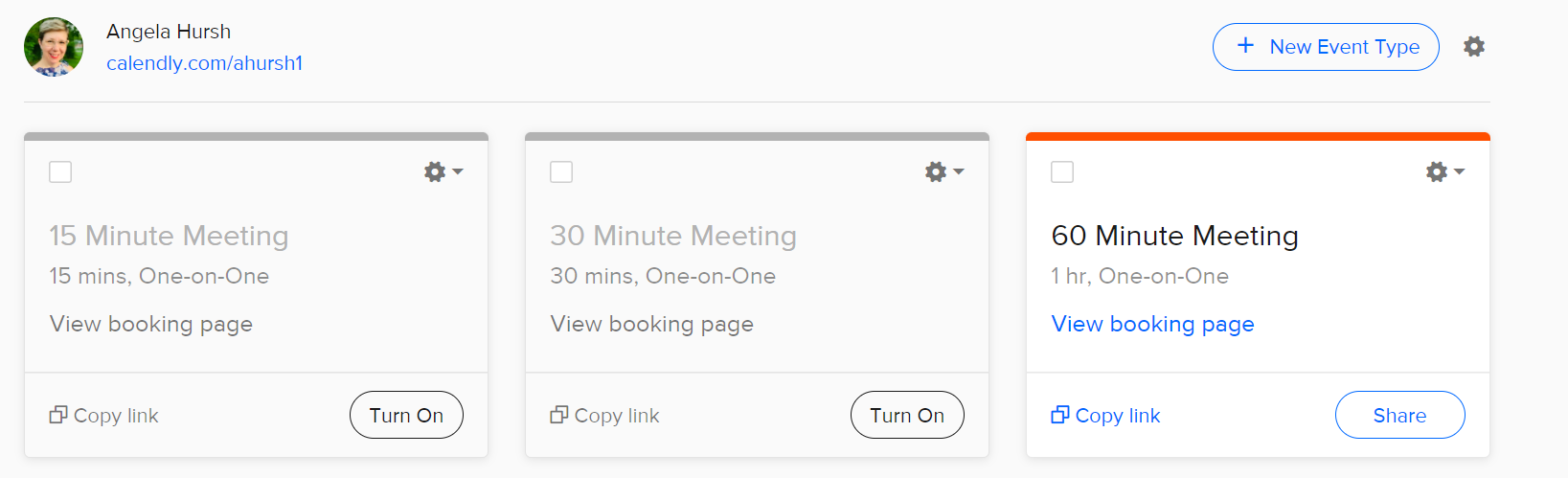
The free account only lets you share one length of meeting at a time (15, 30, or 60 minutes) but switching back and forth between the types is easy. You just flip a switch, share the link with the person you need to meet with, and you’re done!
I can switch between these three meeting lengths easily, depending on the circumstance.
Coolers is a color scheme generator that lets you explore and test thousands of color palettes for your print and digital graphic design projects. It’s saved me a ton of time. And it helps me, the girl with no artistic abilities, to make sure everything I create looks beautiful.
You can save palettes, create a collage, or find colors from photos. It also has settings for color blindness and a built-in contrast checker for accessibility.
This is my favorite place to find free emojis for any social media post and email. It’s easy to search. Once you find what you want, just copy, and paste and you’re done.
Emojis are a great way to catch the attention of your social media followers. They also work great in emails. 😉
If your library’s calendar is unreliable or if Facebook events aren’t generating registrations for you, Eventbrite is a great option.
You can use it for free when your event is free (as most library events are). Plus, there’s a mobile app to help you manage registrations. And you get listed on Eventbrite and its partner sites, which can increase the reach of your programs.
I cannot, for the life of me, match fonts when making graphics. This site is a lifesaver.
Once you find a base font that you love, use this site to identify matching fonts for sub-headers and smaller text. I used this site when I revamped Super Library Marketing to be more accessible.
Giphy lets you create animated video GIFs and GIF slideshows with captions. You can get your GIFs in a variety of formats or as stickers.
A new feature lets you create custom backgrounds for online video conferencing. How cool would it be to have a moving library background for your next program?
My life has been changed since I started using this tool. The free version is perfectly wonderful for checking your written work for common and complex grammatical mistakes, spanning everything from subject-verb agreement to article use to modifier placement.
If you use Chrome, download the extension. With that, Grammarly can check everything you type in real-time, from emails to blog posts to social media posts.
I don’t know why but finding an easy and free way to screen record is hard. I finally found this site when a vendor I work with used it to send me a screen recording explaining how to fix a technical issue.
You can record your whole screen or crop to just one area. You can even annotate with text, arrows, and shapes. There are mouse effects! And you can trim your recording.
SnapWidget allows you to display your Facebook, Twitter, YouTube, and Instagram photos in collage format on your website or blog. The free plan gives you unlimited widgets that refresh every 15 minutes.
Project management is a pain. When I worked at the Public Library of Cincinnati and Hamilton County, this was the tool we used to coordinate projects across teams.
It’s easy and intuitive to use. There are boards, lists, and cards that enable your organization to prioritize your most important projects. Everything is drag and drop and shareable.
The free account gives you 10 boards, unlimited storage, custom backgrounds and stickers, an activity log, and the ability to assign team members and set due dates. It was plenty for my team and we never had to upgrade to a paid plan.
This free resource lets you capture, organize, and share multi-media resources with anyone. Save lists, do research, bookmark websites, and curate content for your newsletters, social media posts, and more.
This tool will not make your life in marketing better (unless you are looking for a better job!) But it was made by a librarian at the Allen County Public Library, and it is remarkably helpful for your patrons.
Simply fill in all the appropriate information that you would put into a resume, press a button, and viola. It’s not fancy but it certainly makes a professional and polished resume. Seriously, how cool is this?
Subscribe to this blog and you’ll receive an email every time I post. To do that, enter your email address and click on the “Follow” button in the lower left-hand corner of the page.
Do you have a suggestion for a topic for a future episode? Want to nominate someone for kudos? Let me know in the comments.
And subscribe to this series to get a new video tip for libraries each week.
Thanks for watching!
Subscribe to this blog and you’ll receive an email every time I post. To do that, enter your email address and click on the “Follow” button in the lower left-hand corner of the page.
I’m 100 percent certain that everyone who reads this blog has heard of the book, “The 7 Habits of Highly Effective People” by Stephen Covey. Written in 1989, this self-help book has sold more than 25 million copies worldwide.
Covey’s approach to attaining goals is to follow what he calls “true north” principles. Those principles are based on seven character ethics that he says are universal and timeless.
It’s a great book. But, because I’m a weirdo, I read it and thought, “There needs to be a list like this specifically for people who work in library promotion.” No joke. My internal monologue is strange.
We need some true north principles for library marketing now more than ever. We face uncertainty in every corner. Algorithms and budget shortfalls and virus variants can make our job seem impossible.
It may feel like the whole world is working against you and your library. So here are my true north principles for doing your best and most effective work.
Be good to yourself.
This is first on my list because it’s the most important and frankly, most library staffers could use a little morale boost. This year, I want you to celebrate the work you do. Every. Single. Week.
By the way, my boss gets full credit for this idea.
It’s pretty simple: At the end of the week, write down all the things you did. Then, pick a “gold star moment“: one thing that you did that stands out for some extra recognition.
Send your list to your boss or keep it for yourself. It doesn’t matter. What matters is that you take the time to acknowledge all the work you’ve done in the last week.
And, rather than focusing on what you didn’t get done from your to-do list, recognize all the work you did do.
You’ll be surprised at how much better you’ll feel at the end of a workweek. And you’ll be motivated or excited about the work coming in the following week.
Be constantly learning.
I know that most library staffers are incredibly overworked. You’re promoting your library in addition to 100 other tasks, including cleaning the restrooms and acting as security. The idea of spending any time learning more about marketing feels overwhelming.
How does someone fit personal professional development into their schedule?
Set a learning appointment for yourself every single day. All you need is five minutes. Spend that very short but important block of time reading a blog, a book on marketing, or an email newsletter on marketing. If you’re a visual learner, watch a YouTube tutorial on marketing or work on a self-paced marketing course online.
For the typical, full-time library staffer working five days a week with two weeks of vacation, that will add up to 1,150 minutes or 19 hours of learning in a year! That’s plenty of time to stay on top of marketing and social media trends and learn new ways to engage your audience more effectively on all channels.
Best of all, at the end of that year of learning, you’ll feel more confident in your work and of course, your library’s promotional efforts will improve.
Need help finding places to learn about marketing in a short amount of time? Here’s a great list.
Be hyper-focused on your library’s overall goals.
What is your library trying to accomplish right now? Are you hoping to increase your circulation to pre-pandemic numbers? Are you helping to bridge the pandemic educational gap for elementary school students? Are you implementing a step-by-step plan to ensure your library is truly accessible to everyone? Are you undergoing a facilities improvement project?
Your promotions should be centered on whatever your library is trying to accomplish this year.
When you focus your marketing with precision on your library’s strategy, your marketing will be more effective. You will avoid spreading your message thin. You’ll be using your precious time and energy more efficiently.
Every piece of marketing you do needs to be in service of reaching your library’s strategic goals. They are the reason you come to work every morning. Make certain there is a solid connection between your promotional efforts and your library’s overall strategy.
Be a fan of data.
Block off five minutes in every workday to gather or analyze the metrics of your marketing and promotions. Just like with the professional development appointment you’re making each day, schedule this into your calendar.
This simple step will give you a very clear sense of what is working and what isn’t. You’ll have the numbers to back yourself up when you make decisions about which promotions to do and which ones to drop.
Be constantly experimenting.
One of my favorite parts of working in marketing is experimentation. There are so many ways we can test promotions to find the most effective means of communicating with our audiences.
I want you to think of yourself as a kind of scientist. Your experiments don’t have to be complicated.
For example, when you send emails, try sending on different days of the week and different times of the day.
When you want to promote an item in your collection or a service provided by your library, post on all your library’s social media channels. Then look at the insights to see where you get the highest engagement.
When you write blog posts, try experimenting with the length of the post, the length of the title, or the number of images you insert in the piece. Then look at views to see if your metrics are impacted by changing any of those factors.
Experimenting is fun. And it can lead you to create more effective promotions. Need some ideas about where to experiment with your promotions? Here’s a list of things to try.
Be open to change.
How many times have you heard someone say, “But we’ve always done it that way” in your library? Reject this phrase.
I think many times we get stuck promoting our library the same way we always have. Don’t be afraid to look at the data and say to your boss or co-workers, “This isn’t working. Let’s try this instead.”
In library marketing, change isn’t a bad thing. It means you are being responsive to your community’s needs and meeting them where they are as their lives are changing.
Sometimes it takes a while for fellow co-workers, senior staff, and your community members to respond to your ideas.
Effective library marketers set a timeline for how long they think it will take to increase engagement or reach a certain target audience with a message across multiple channels. A good rule of thumb is to give any new promotion about three months to catch on. If it’s not working by then, experiment with something else.
Subscribe to this blog and you’ll receive an email every time I post. To do that, enter your email address and click on the “Follow” button in the lower left-hand corner of the page.
In this episode, I’ll answer a viewer question from Victoria at the West Bloomfield Township Public Library. She asked, “Aside from the obvious budgetary considerations if public libraries use themes from a national Summer Reading organization (CSLP, iRead, etc.), is it better for us to (1) create a unique set of graphics for our library’s use that differ from year-to-year, (2) create a unique and on-brand set of graphics for our library to reuse each year, or (3) rely on the national organization’s original themed artwork as part of a unified national library marketing campaign?”
I’ll share my opinion and the 3 reasons why I came to that decision.
Kudos in this episode go to the Geauga County Public Library. Watch the video to find out why!
Do you have a suggestion for a topic for a future episode? Want to nominate someone for kudos? Let me know in the comments. And subscribe to this series to get a new video tip for libraries each week. Thanks for watching!
Subscribe to this blog and you’ll receive an email every time I post. To do that, enter your email address and click on the “Follow” button in the lower left-hand corner of the page.
A librarian from Sweden is celebrating a victory after her library’s Facebook page was disabled, without warning, by Meta. Isabelle, a communications librarian, fought for months to get her library’s Facebook page back online after it was taken down by the platform.
Isabelle began working as a librarian in 2006 and took on a communications role in August of 2021. The lengths her library had to go through in order to get their page back are pretty mind-boggling.
Isabelle was kind enough to share the saga, in hopes that she might help other libraries.
How was your library was using Facebook for promotion before your account was disabled?
We mostly used it as a platform for promoting events, exhibitions, storytime sessions, and reading recommendations. It was also used for crucial information that had to be communicated to the public, like if our system was down and how it would impact the service we could provide to them. In short: it was used for both important and entertaining content. It was also a bit of measurement for what our patrons were satisfied with.
When was the account disabled and how did you first realize what had happened?
The first page got disabled before my time, on inexplicable grounds. It had been so for almost six months. I launched a brand-new page that also got disabled after two weeks in October 2021. I got notified by email from the “Facebook team” in a no-reply email. The email also contained the message “If you think your page was wrongly disabled, click here”, providing a broken link.
Tell me about the process of trying to get your account re-enabled.
At first, I tried to get in touch with the Swedish branch of Meta by writing an explanatory public post on LinkedIn. I tagged the Swedish country director Sam Rihani and the corporate communications manager, Lukasz Lindell. None of them replied although people of course reacted to my post. Our library wasn’t the only one whose Facebook page had been disabled by Meta.
After many fruitless attempts to get in touch with Facebook and some of its employees, I turned to the communications team at the council house in my municipality. It was obvious that we needed to take this case to another level.
Two communication specialists were consulted and one of them had a Facebook Business account. It was the only way to get in touch with some kind of non-automated customer support (i.e., an actual human being.) I made one communication specialist an admin of the disabled Facebook page, and a couple of months later, our Facebook page was finally re-enabled.
During the process, Meta wanted us to give them specific information about why the previous Facebook page was shut down. This was information that I didn’t have because nobody knew the circumstances even when it happened, and I wasn’t employed by the library at the time. If pages and accounts get disabled with no more specific information than “violation of community standards”, that’s all the information we can give.
How did being disabled from Facebook impact your library’s ability to reach your community?
It was a bit of a blow, considering that we had invested so much time in promoting the page to our patrons. Some of them wondered where we had gone when the page was disabled.
On top of that, it happened the day before we were to release the much-awaited news about our printer/copy machine being re-installed. People who needed help applying for jobs, residential permits, and other urgent matters had been asking us for months. I had promised them that I would break the news on our Facebook page as soon as it was possible to print again.
But we still had Instagram and our website. I thought that if Meta didn’t want us on Facebook, I would downgrade its importance to being an optional channel more than something essential. I invested a lot of work in upgrading our library website so that all the information that the public needed was to be found there.
Even though not all our patrons have access to the internet, it was still a bit reassuring for them to know that all the information they needed about the library, events, and more could be found in that one place. That’s where we channeled everything that also should have been posted on our Facebook page. No information was lost, but it was a bit scattered instead of concentrated on the Facebook page.
I also make posters and flyers that are popular amongst people with limited access to the internet. When Facebook re-enabled our Facebook page, I was like: “Oh? OK. Let me just get this thing out on the library website first.”
What lessons or advice do you have for other libraries, having been through this tumultuous process?
Don’t put all your eggs in one basket, especially not when it comes to social media. Your content never really exclusively belongs to you and can be taken down by external agents who have no clue about your job.
I would advise librarians to invest time, money, and energy into building up their own websites where they can control and own their content. Direct patrons to that one website primarily for important news.
Also, don’t underestimate the usefulness of analog information like posters and flyers. They are essential for many patrons who lack the ability to search the web. It’s way too easy to believe that “everyone’s on the internet” or “everyone’s on Facebook” but that isn’t true.
Use social media for lighter content: info bites, book recommendations, humorous posts, and the like. I think that’s what people expect to find on Facebook anyway.
Libraries are the epitome of quality content and should not bow to corporations that choose to disable them.
Subscribe to this blog and you’ll receive an email every time I post. To do that, enter your email address and click on the “Follow” button in the lower left-hand corner of the page.
In this episode, I’ll share three tips to help you update your library marketing plans for 2022. This exercise will help you to promote your library in a way that is strategic and focused but also flexible.
Kudos in this episode go to the Saline County Library. Watch the video to find out why they’re being recognized.
Do you have a suggestion for a topic for a future episode? Want to nominate someone for kudos? Let me know in the comments. And subscribe to this series to get a new video tip for libraries each week.
Thanks for watching!
Subscribe to this blog and you’ll receive an email every time I post. To do that, enter your email address and click on the “Follow” button in the lower left-hand corner of the page.






 Super Library Marketing: Practical Tips and Ideas for Library Promotion