Library friends, we did it! We made it through 2025. We faced numerous issues and threats to libraries, yet we celebrated many triumphs. I’m proud of you. I’m proud of this community. And if no one has told you this lately, GOOD JOB YOU!
And now, we look forward to a new year and new chances to grow the connection between your library and your community.
Want to make 2026 your best year yet? Let’s start by learning from the content your fellow library marketers found most helpful this year.
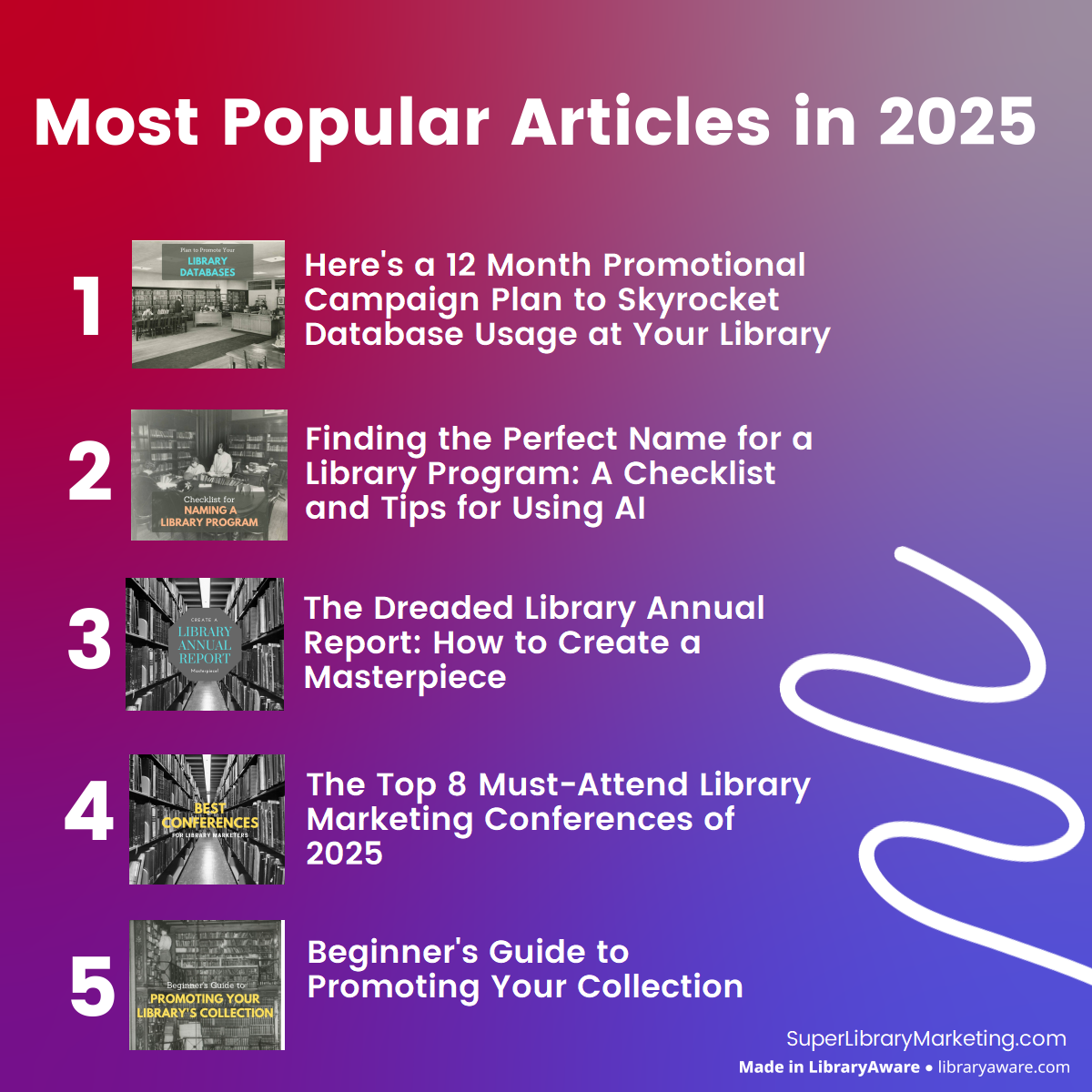
Most Popular Super Library Marketing Articles of 2025
I hope you are looking forward to 2026 as much as I am. My next post will be on Monday, January 5, when I’ll unveil the State of Library Marketing. I’ve got a calendar full of posts and videos featuring tips to make your work easier, as well as profiles of libraries to inspire you. Happy holidays!
Photo courtesy Cincinnati and Hamilton County Public Library
Key Takeaways:
AI is changing how people search, and libraries are seeing a drop in website traffic as a result.
Simple formatting changes like clear titles, bullet points, and question-based headings can help your content appear in AI summaries.
Add credibility cues like staff names, job titles, and internal and external links to boost your site’s authority with AI and search engines.
Have you noticed a slight change in the blog posts here? Most now include a list of three quick takeaways at the top. Here’s why I started doing this, and why your library should consider it too.
AI impacts website traffic
A few months ago, I attended a webinar featuring three of the leading experts on Search Engine Optimization, or SEO. SEO is the practice of improving a website’s visibility and authority in organic search results to attract more visitors.
But AI has introduced a new wrinkle in SEO.
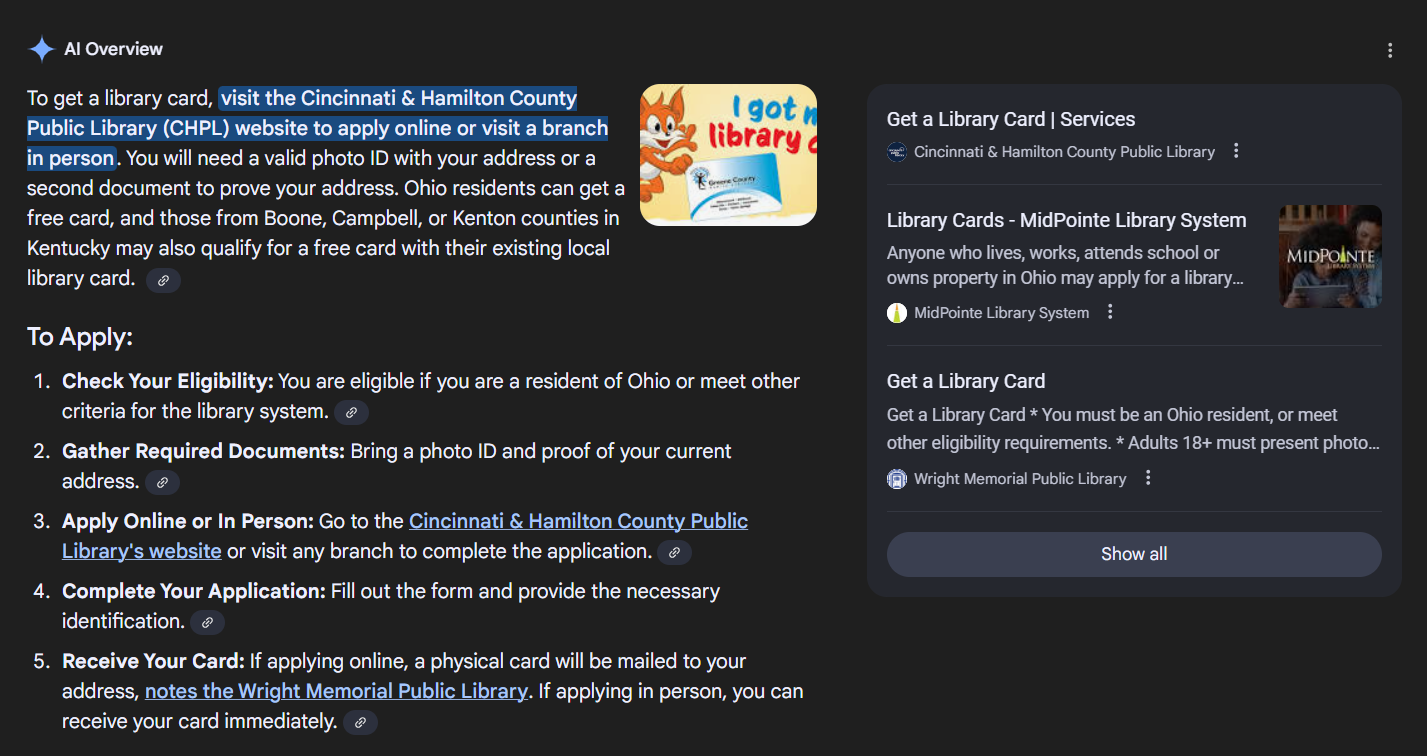
In May 2024, Google introduced AI Overviews (formerly called AI Summaries). These appear at the top of search results and provide a summarized answer to a user’s search, often pulled from multiple sources.
An example of an AI Overview for the search, “How can I get a library card?”
Once AI Overviews were introduced, searchers stopped clicking through to a website because their question was fully answered by the AI Overview. As a result, many libraries (and other websites, including this one) noticed a decrease in their organic web traffic.
In addition, a survey by Adobe Express says 25 percent of people use ChatGPT as their first choice for search over Google. Gen Z is particularly drawn to AI as a search engine. That likely means the popularity of using AI for search will continue to rise.
What does all this mean for your library?
You’ll need to adjust the way you structure your library’s website and blog to surface more often in AI searches and to show up in the AI Overview. It’s not as difficult as it sounds. Here are the changes I’ve implemented. I recommend you try these and monitor your web traffic over several months to see if the changes make an impact.
Titles should be clear, not clever.
Tell readers exactly what they’ll find on the page. For example:
Author Visit
❌ Clever Title:“An Evening of Literary Magic”
✅ Clear Title:“Meet Author Jasmine Guillory at the Library – October 24”
Why it works: The clear title includes the type of event, the author’s name, and the date. Those are the keywords that AI tools and search engines can easily match with user queries.
Craft Program
❌ Clever Title:“Get Your Glue On!”
✅ Clear Title:“Fall Craft Workshop for Teens – Make Your Own Bookmarks”
Why it works: It specifies the audience (teens), the season, and the activity.
Educational Workshop
❌ Clever Title:“Brain Boost Bonanza”
✅ Clear Title:“Free SAT Prep Workshop for High School Students”
Why it works: It uses direct language that matches what a student or parent might search for, like “SAT prep” or “high school test help.”
Wellness Event
❌ Clever Title:“Zen in the Stacks”
✅ Clear Title:“Free Yoga Class at the Library – All Levels Welcome”
Why it works: It clearly states what the event is, where it’s happening, and who can attend.
Include a bullet list of key takeaways or what you’ll learn at the top of the page.
This helps both readers and AI quickly understand the content. Try this on blog posts and key webpages.
Here’s how you might structure key takeaways at the top of a library card sign-up page.
A library card is free to all residents of Tree County.
Applicants need to fill out a form and have one document with proof of residence. The form can be sent to the library via email or presented at any library location.
Applications presented in person will be processed immediately. Applications sent via email will take 1-2 days to process.
Once an application is accepted, you’ll be given a card, which you will you to check out items, reserve meeting rooms, and register for programs.
Ask ChatGPT to provide you with a list of keywords or frequent questions around your topic. You can also search for your topic on Google and look at the ‘People Also Ask’ section. The website Answer the Public can provide you with some frequently asked questions as well.
Structure your content with bullets, steps, or lists.
Clean formatting makes it easier for AI to scan and summarize your content. You’ve probably noticed this post has been full of bullets and lists. That’s intentional! The bonus benefit is that it makes your blog and website easier to read.
Write in natural, conversational language.
Avoid jargon. Focus on being clear and helpful. Remember that searchers will not use jargon to look for answers to questions that may lead them to your library. Try to imagine what your community would put into the search bar, and then use those words in your blog or landing page.
When possible, include a staff member’s name and job title on a page.
AI looks for expertise or credentials when scanning pages. This is easy for a blog… just include the name of the author and their title in the post. For a landing page, consider adding a line like this: “Need help signing up? Email Maria Lopez, Library Services Manager, with 15+ years of experience helping patrons, at mlopez@treelibrary.org.”
Ask your partners to link to your website and blog.
When other trusted sites link to your content, it signals credibility to AI and search engines.
Use internal links whenever possible.
Link to related blog posts or pages on your site to help AI understand your content’s structure and relevance. That has the added benefit of keeping people on your page longer, which improves your trust and credibility to Google and AI, which means you’ll show up in search more often!
Try to stay within best practice lengths for word count.
BlueHost.com says for blogs, the ideal range is between 1,500 and 2,500 words. This gives readers comprehensive coverage of a topic. It’s also easier to include keywords and internal links for longer posts.
But… here’s something to remember: Google and AI tools prioritize quality over length (and so do most readers!) Don’t try padding your posts, as that can hurt your ranking.
Neil Patel, who is a trusted expert on SEO, says that for landing pages, word count isn’t a direct ranking factor. Rather, you should focus on the user’s experience and provide enough information for a community member to act.
Has your library’s website traffic taken a hit? Are you using any other methods to drive more traffic to your library’s website? Let me know in the comments.
Subscribe to this blog, and you’ll receive an email whenever I post. To do that, enter your email address and click on the “Follow” button in the lower left-hand corner of the page. You can also follow me on the following social media platforms:
April 2026 might sound far off, but big accessibility changes are coming — and they’ll directly affect how you market your library.
The new regulations aren’t just a compliance issue; they’re an opportunity to make your marketing better for everyone. Yet, I’m not seeing many libraries getting ahead of this.
So in this episode of The Library Marketing Show, let’s talk about what’s changing, why it matters, and what you should be doing right now.
Plus, I’ll give kudos to a library with a one-of-a-kind video for National Library Card Sign-up Month.
Do you have a suggestion for a future episode’s topic? Do you want to nominate someone for kudos? Let me know here.
Subscribe to this blog, and you’ll receive an email whenever I post. To do that, enter your email address. Then, click the “Follow” button in the lower left-hand corner of the page. You can also follow me on the following social media platforms:
Subscribe to this blog, and you’ll receive an email whenever I post. To do that, enter your email address. Then, click the “Follow” button in the lower left-hand corner of the page. You can also follow me on the following social media platforms:
Are you looking to increase clicks on your library’s emails, social media, and websites? The secret may be the faces that you choose in your promotions!
In this episode of The Library Marketing Show, I’ll reveal the one thing that makes stock photos actually work… and this is backed by science.
Plus, I’ll give kudos to a library that started a basic service but promoted it in a not-so-basic way!
Do you have a suggestion for a future episode’s topic? Do you want to nominate someone for kudos? Let me know here.
Subscribe to this blog, and you’ll receive an email whenever I post. To do that, enter your email address. Then, click the “Follow” button in the lower left-hand corner of the page. You can also follow me on the following social media platforms:
Is your library’s online content working as hard as it could? Google has released some guidelines to help you create content that’s not only helpful for your patrons but also gets noticed by search engines, including Google, of course!
I’ll break down the latest advice in this episode of The Library Marketing Show.
Plus, we’ll share kudos with a library that went above and beyond on social media!
Do you have a suggestion for a future episode’s topic? Do you want to nominate someone for kudos? Let me know here.
Subscribe to this blog, and you’ll receive an email whenever I post. To do that, enter your email address. Then, click the “Follow” button in the lower left-hand corner of the page. You can also follow me on the following social media platforms:
You may have noticed, but QR codes are everywhere these days. A new report has just been released, packed with information on how to use QR codes to enhance your library’s marketing effectiveness.💡 So…
I’m going to share that new data with you in this episode of the Library Marketing Show! Plus, we’ll give kudos to a library with a brilliant strategy for sharing stories of connection and library impact.
Do you have a suggestion for a future episode’s topic? Do you want to nominate someone for kudos? Let me know here. Thanks for watching!
Subscribe to this blog, and you’ll receive an email whenever I post. To do that, enter your email address. Then, click the “Follow” button in the lower left-hand corner of the page. You can also follow me on the following social media platforms:
Photo courtesy Cincinnati and Hamilton County Public Library
Where I live, the air is thick and humid right now, the fault of something called “corn sweat.” That’s the process of corn plants releasing moisture into the atmosphere through transpiration, similar to how humans sweat. My friend from my TV days, meteorologist John Gumm, says the corn crop in my area is releasing billions of gallons of water daily. Fun, right?
To cool off, I swim laps at the local YMCA. And underwater, I have a lot of time to think. Lately, I’ve been using that time to figure out how to help my library friends prepare for what will come when the weather turns cooler.
In the United States, the full ramifications of the loss of the Institute of Museum and Library Services and its funding will hit in September. For libraries in Canada, the United Kingdom, Australia, and New Zealand, funding cuts and intellectual freedom challenges are making work more difficult and threatening the core mission of libraries.
Longtime readers may already know that I’m not the kind of person who says, “There’s nothing I can do about it” very often. Action is how I deal with my anxiety. So, here’s the plan of library marketing action for the coming months.
The Big Problems We Face
Library marketers face a lot of obstacles. But in the coming months, the big threats are:
Decline or elimination of funding for libraries, which leads to…
No money for marketing or promotions, which impacts the effectiveness of our marketing, making it seem like marketing is no longer valuable. That often leads to…
Hiring freezes or the elimination of dedicated library marketing staff, which leads to…
Less use of the library, which leads to…
More funding cuts and library closures.
We do not want to get caught in that vicious circle.
What Library Marketers Need to Do
1. Lead with your value.
As we face the prospect of shrinking budgets and rising scrutiny, your library’s value must be front and center. And you must create a plan that communicates that value clearly and consistently, not just during certain times of the year like Library Works Week or National Book Month, but all year long.
Use every channel you have to reinforce how your library improves lives. Share patron success stories, promote your most-used services, and highlight how your library supports literacy, learning, and community connection.
2. Focus on the most cost-effective promotions.
We still have a good many low-cost, high-impact channels for promotions. But focus is the key.
This fall, I want my library marketing friends to spend their time and precious money on the following:
Email marketing: This is still one of the most effective tools for engagement. Targeted, opt-in messages are the most effective means of communication, with no algorithm to circumvent. So, get a plan together to grow your subscriber list now. And, as you put your emails together, think of them as a conversation between you and your audience. Try to keep your messages short and enticing. And offer your email recipients a way to email you back with feedback and questions. It will make them feel valued, and that feedback will make your messages stronger and more effective.
Collection marketing: Books are the heart of what you do. And we know most people come to the library for the collection. Don’t shy away from books! They’re your brand. Promote your books, databases, and digital resources through curated lists, displays, and themed promotions.
Strategic partnerships: Work with local organizations to amplify your reach without spending more money. Partnerships can take time to cultivate, but the investment is worth it. Your partners can strengthen your library’s offerings and give you access to audiences you’ve never reached before.
Organic social media: I put this last because of my mixed feelings about it. Social media effectiveness overall is declining. But posts that tell stories, highlight staff, or have some kind of interactive element like a poll or question, do boost visibility. So don’t use your social media accounts to highlight programs. I know that’s going to be upsetting to some readers, but the data shows it doesn’t work. Instead, think of your social media as an effective way to build relationships and reinforce your library’s personality.
3. Make it easy for new users to engage.
The moment someone signs up for a library card is critical for library marketing. It’s your first chance to make a good impression and use that person’s “new cardholder” status to convert them to a lifelong fan! You should:
Create a “New Here?” section on your website with the same information as the email series.
In those emails and on that website section, highlight services that are easy to access and immediately useful, like eBooks, streaming movies or music, or personalized reading recommendations.
4. Empower your front-line staff.
Your staff are your best ambassadors. Train them to talk about services, recommend materials, and encourage sign-ups for newsletters or events. Give them talking points so they can highlight personalized services like readers’ advisory, chat reference, and book bundles. These human touches build loyalty and word-of-mouth buzz and reinforce the message that your library is filled with helpful people.
5. Track what matters — and act on it.
No more excuses… stop doing what doesn’t work, even if it’s something you’ve always done. That means:
If your supervisor pushes back, ask them to message me. Seriously.
6. Experiment.
All marketing is an experiment. And some people shy away from experimentation during tough times. But now is the perfect time to try innovative approaches!
Try sending your videos in an email to see if you get more views.
Launch a blog or podcast.
Pilot a new format for your newsletter.
Test a new tone or voice in your messaging.
7. Streamline your approval process.
If internal red tape is slowing you down, advocate for a more efficient workflow. There are a lot of things you can do to make the approval process less painful,
Use templates to speed up content creation.
Set clear deadlines and expectations.
Build trust with leadership by showing how faster approvals lead to better results.
What are you doing to prepare your library and yourself for the challenges ahead? Let me know in the comments.
Subscribe to this blog, and you’ll receive an email whenever I post. To do that, enter your email address and click on the “Follow” button in the lower left-hand corner of the page. You can also follow me on the following social media platforms:
Did you know there are seven things that you can learn by taking a marketing survey? I believe library marketers should be taking surveys from brands and companies because you can learn a lot about how to survey!
I’m going to share some tips with you and why I think it’s really important to take those surveys in this episode of The Library Marketing Show.
Plus, we’ll give kudos to a library that received press attention for a unique outreach program.
Do you have a suggestion for a topic for a future episode? Do you want to nominate someone for kudos? Let me know here. Thanks for watching!
Subscribe to this blog, and you’ll receive an email whenever I post. To do that, enter your email address. Then, click the “Follow” button in the lower left-hand corner of the page. You can also follow me on the following social media platforms:


 Super Library Marketing: Practical Tips and Ideas for Library Promotion