Subscribe to this blog and you’ll receive an email whenever I post. To do that, enter your email address. Then click on the “Follow” button in the lower left-hand corner of the page. You can also follow me on the following social media platforms:
A war is being waged 10 feet from my office window.
I love watching birds feed and listening to them chirp, squawk, and sing. I have a feeder that I’ve positioned so I can see the birdies enjoying their meal as I work.
But something is ruining my relationship with my feathered friends.
Some mornings, I come outside to find my oversized bird feeder, which I always fill the night before, COMPLETELY EMPTY. The seed is scattered all over the ground. And a scurry of squirrels are gorging themselves on the spoils.
The first time this happened, I did what anyone does in this modern era. I turned to the internet for help.
I typed “how to keep squirrels off my bird feeder” into Google. Suddenly I found myself down a rabbit hole (pun intended) with all the squirrel battle content you could ever want.
Repellant. Special bird feeders. Tips for installing slinkies on the pole to prevent climbing. SPIKES. Videos, advice, and products galore.
Why is it so hard to find tips on fighting squirrels?
The internet is a giant swirling vortex of content. According to Master Blogging, there are 7.5 million blog posts published every single day. (Thanks for reading this one!)
When you factor in social media posts, videos, website content, emails, etc., it’s no wonder your library has a hard time breaking through the noise. A search by anyone for anything is likely to turn up hundreds of results.
So how do you make sure your library content reaches the people who need it most?
Keywords are the key
When a community member is online, trying to find the source that will help them write a research paper, add branches to their family tree, or make a decision about whether to purchase a car, they need us to speak their language.
That’s where keywords come into play.
Keywords help search engines and social media algorithms understand what your content is about. They use those keywords to categorize your content and then match your content to people who are searching for it.
The right keywords make it more likely that the content you write will end up on the computer or mobile phone screen of the person who needs it most.
But you don’t have to guess at what keywords to use! There are tools to help find keywords to weave into your content. Here are my five favorites. They’re reliable, efficient, and free. I’ve made a video tutorial for each to show you exactly how to use them.
The Google search bar allows you to see what content is rising to the top of Google’s algorithm. You can work keywords or phrases from those top-performing content pieces into your promotions.
Don’t forget to scroll to the bottom to see “people also search for,” which I find to be extremely valuable as a source of more keywords.
You can also use Google’s more robust Keyword Planner to search for keywords. The Keyword Planner is intended as a tool for buying Google ads but I find it to be an insightful way to find keywords for my website and social media.
Here’s a quick video to show you how both the regular Google search bar and the Google Keyword Planner work for sourcing keywords for library promotions.
This free tool gives you 25 keywords… more if you’re willing to provide them with your email. They’ll also show you the search volume for the phrase and the level at which you’ll compete with other content for attention. Type in your opening phrase and choose “All industries” for the best results.
This free keyword tool shows top suggestions, monthly volume, organic click-to-open rate, and difficulty ranking for any key phrase you search. You can get more robust suggestions if you hand over your email.
Whatever tool you use, the keywords you uncover should be placed in your blog headlines, in the text on your website, and in your social media posts.
But Angela, did you defeat the squirrels?
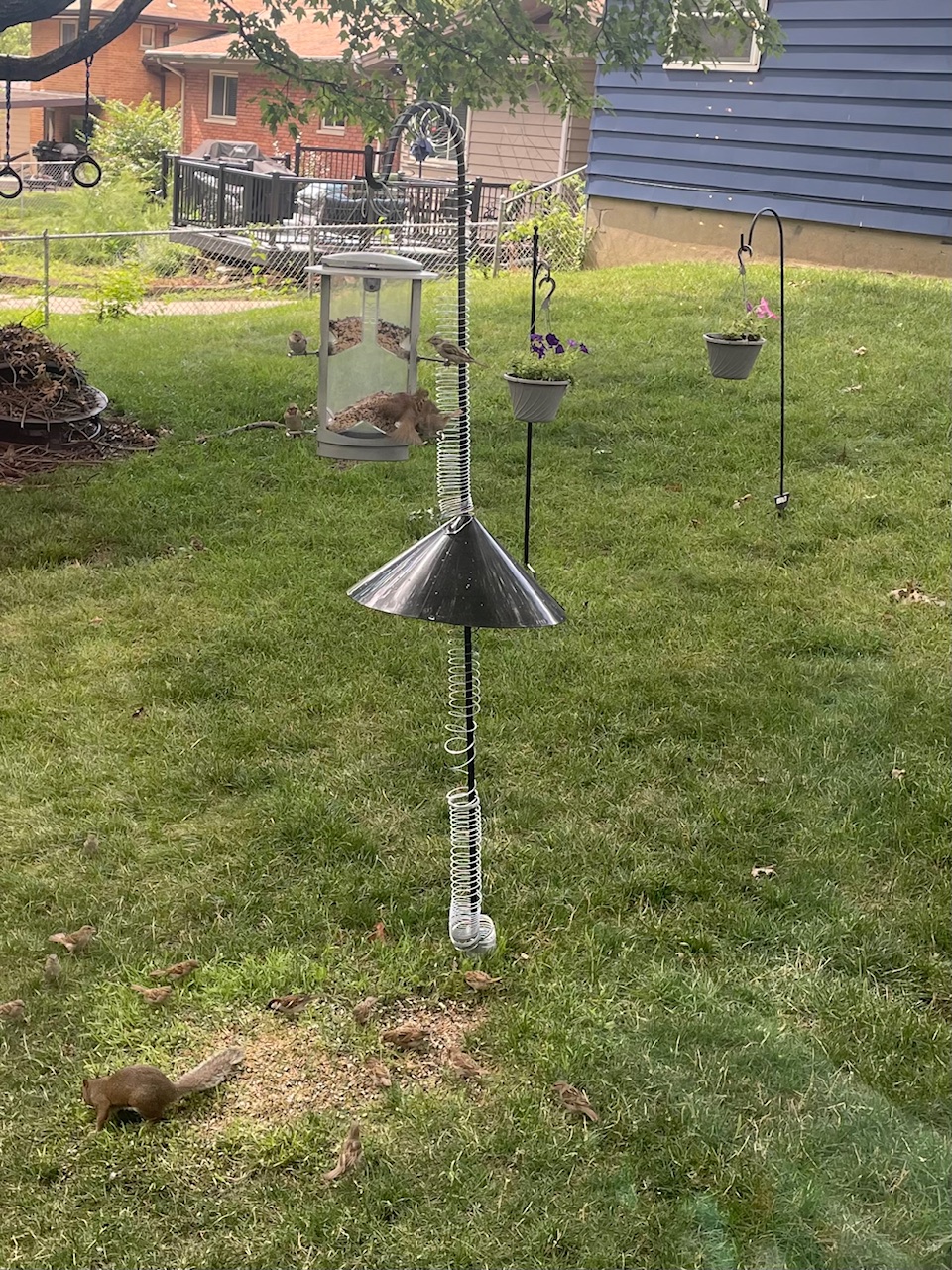
Yes, I did with the help of three slinkies, a 7-foot pole, and a baffle, which is a cone-shaped device that stops the squirrel from climbing up your pole to your feeder. I knew of the existence of baffles, but I had no idea that’s what it was called. But thanks to keyword research and placement by the vendor, I found it. Now my birds can eat in peace.
Note Mr. Squirrel, who is now relegated to picking up seeds from the ground.
Subscribe to this blog and you’ll receive an email whenever I post. To do that, enter your email address and click on the “Follow” button in the lower left-hand corner of the page. You can also follow me on the following social media platforms:
Library marketers want to make sure that their entire community knows everything the library has to offer. That’s a tall order.
Is it even possible? I have some advice about that today that may surprise you. We’ll get into it in this episode.
Plus we’ll give away kudos to a library that created a one-of-a-kind QR code with a complimentary campaign to educate the community about their offerings!
Do you have a suggestion for a topic for a future episode? Want to nominate someone for kudos? Let me know here. And thanks for watching!
Subscribe to this blog and you’ll receive an email whenever I post. To do that, enter your email address and click on the “Follow” button in the lower left-hand corner of the page. You can also follow me on the following social media platforms:
Here’s a shocking headline: It turns out that young people are not using Google to find your library!
How do we know this? There’s a new study from Forbes that may have you rethinking your strategy on search and where you post your library promotions. I’ll share the results with you in this episode of The Library Marketing Show.
Plus we’ll give kudos to a library system offering a much-needed service for its community.
Do you have a suggestion for a topic for a future episode? Want to nominate someone for kudos? Let me know here. And thanks for watching!
Subscribe to this blog and you’ll receive an email whenever I post. To do that, enter your email address and click on the “Follow” button in the lower left-hand corner of the page. You can also follow me on the following social media platforms:
We are going to put a common library marketing fear to rest, once and for all.
Here’s the concern: Are you inadvertently leaving people behind when you target people with your email marketing? Let’s get into it in this episode of The Library Marketing Show.
Plus kudos go to a library that was the focus of a blog post by a local country radio station DJ!
Do you have a suggestion for a topic for a future episode? Want to nominate someone for kudos? Let me know here. And thanks for watching!
Subscribe to this blog and you’ll receive an email whenever I post. To do that, enter your email address and click on the “Follow” button in the lower left-hand corner of the page. You can also follow me on the following social media platforms:
Sometimes in these videos, I give you a list of tips to help set you up for library marketing success.
But in today’s episode, I’m only going to share one task you’ll want to do once a year (yep, that’s it!) to ensure that your library’s email marketing continues to be successful.
Plus I’ll give kudos to 27 libraries who won a major award, and I’ll tell you where you can meet them in a few weeks!
Do you have a suggestion for a topic for a future episode? Want to nominate someone for kudos? Let me know here. And thanks for watching!
Subscribe to this blog and you’ll receive an email whenever I post. To do that, enter your email address and click on the “Follow” button in the lower left-hand corner of the page. You can also follow me on the following social media platforms:
“My office is where the Children’s Department used to be,” recalls Ann. “When I started working here 18 years ago, some of the librarians from my childhood still worked here, and I remember feeling excited to meet them on my first day, almost as if I were meeting celebrities.”
“I consider myself very lucky that I have been able to work in a library. It’s not hard to market a product you love.”
Ann is the library’s Marketing and Public Relations Manager. Her team includes a full-time graphic designer, a part-time writer, and an assistant. Her library has one location, which has a distinct benefit, according to Ann.
“It’s very easy to get information and collaborate with co-workers,” she notes. “I work closely with our director, and fortunately, our library did a strategic plan two years ago. It was quite a process, but it has made my job easier in that there is a clear path forward with our marketing efforts.”
Ann is a rare library marketer in that she and her team have been tracking metrics on her library promotions for nearly two decades!
“The metrics we gather have evolved over time with the advancements in technology,” explains Ann. “We are now able to gather more information about the tools we use to achieve our marketing goals. And the dashboards on targeted emailing, social media performance, and Google Analytics are very telling.”
That data not only informs the promotions that Ann and her colleagues create, but it also helps stakeholders to understand the value and impact of their library marketing.
“We share these reports with the Board of Trustees monthly to inform them about our work and how we make data-driven decisions,” says Ann. “This helps them better understand our department’s operations.”
“I used these reports to justify my department’s size and marketing efforts. Our reports also include the number of printed brochures, rack cards, bookmarks, and more we produce. I used this information to advocate for adding an electric trimmer, folder, banner printer, and our department’s industrial copier. I was able to justify these purchases when I compared them to outside costs and estimated saved staff time.”
Her team uses many tools to create reports and analyze monthly metrics, including their email dashboard, social media scheduling platform, and website analytics dashboard. The whole process takes about 8 hours from start to finish.
“You might think that sounds like a lot, but this is time and effort that’s well spent,” states Ann. “We analyze the results and plan our path forward with this information. We can see what’s working and just as importantly, what’s not. We can quickly adjust to make our time more productive and impactful.”
“Every time your leadership team reads these, you are documenting the value of what you are doing. Their importance cannot be overstated.”
Those metrics come in handy as Ann plans marketing for the rest of the year. Her library recently purchased a bookmobile and is creating a new Outreach department.
“Our department is responsible for creating the bookmobile wrap, which is fun!” exclaims Ann. “We are in the process of a massive parking lot reconfiguration and addition. And we are also doing a tear out and reconfiguration of our circulation department.”
“Keeping our customers informed and up to date with these changes has been our first priority. And it’s our 100th anniversary this year. We have our work cut out for us!”
For inspiration, Ann just keeps her eyes open all the time.
“I’m always looking for great design and marketing,” says Ann. “It’s all around us! And there’s some bad stuff too. The trick is how to incorporate the good in your library efforts.”
Subscribe to this blog and you’ll receive an email whenever I post. To do that, enter your email address and click on the “Follow” button in the lower left-hand corner of the page. You can also follow me on the following social media platforms:
Photo courtesy Cincinnati and Hamilton County Public Library
Last week, we discussed the pros and cons ofemail marketing automation. If your library chooses a program that requires a more hands-on approach to email marketing, this post is for you. These time-saving tips will let you create high-quality emails that resonate with your audience without spending all day on your emails. (Although, how fun would that be?!)
Time-saving Tip #1: Use templates.
This is the most effective way to save time when creating library marketing emails. If your email program doesn’t offer templates and you must make them yourself, here’s how to do it.
Decide on your buckets.
What kind of emails does your library need to send? Look at your library’s overall strategic goals and your marketing goals. Then, break your emails down into categories, like this:
Promote programs
Promote the collection
Promote services that bring people into our physical branches
Announcements like holiday closures, new services, renovations, service outages, etc.
Email to donors and legislators
Create one template for each category.
The ideal template will have sections with space for text, an image, and a call to action button. Here’s a great example of a library marketing email from Eisenhower Public Library made from a template.
Populate and send.
When it comes time to send the email, make a copy of your template. Insert the copy, images, and appropriate call to action, and hit send!
Time-saving Tip #2: Keep your emails short.
Emails that include no more than 4 topics perform best. If you have more to say, you can always send another email!
Keep the text in your email to a minimum. Think of your text as a tease. You want to write 1-3 enticing lines that compel your recipient to do something, like register for a program or put a book on hold.
Time-saving Tip #3: Target your messages to specific audiences.
It takes time to write copy that’s generic enough to appeal to everyone in your community. By comparison, it’s easier and faster to write text and find images when you know exactly what your audience is looking for in your library emails.
And, by targeting your message, you are more likely to say something that matters significantly to your cardholders, which makes them more likely to act, which makes your email more successful!
Targeted email marketing for libraries is effective because it serves the right message to the right group of people. And it works for all kinds of messages.
Also, your library should make your emails opt-in. This ensures your emails are going to community members who want your content.
Time-saving Tip #4: Let the robots help you with your subject line.
You should never rely on Artificial Intelligence tools like ChatGPT to do all the work for you when it comes to library email marketing. But they are a great starting point! Instead of staring at the wall trying to brainstorm ideas for the best subject line, ask the AI to get you started.
To show you, I ran this example using Microsoft’s Copilot.
Once you have a place to start, you can tweak the subject line to match the tone of your library. Move, change, or remove the suggested emoji. And then, run the subject line through one of the free analyzers below. Each has its own algorithm for predicting the success of a subject line. But all will help you get to a subject line that works for your target audience.
Time-saving Tip #5: Plan as much as humanly possible.
Plan your email campaigns in advance using an editorial calendar. This helps you stay organized and maintain consistency.
And, if you know ahead of time when you are sending emails, you can set aside time in advance to create them and get them approved. Have a few spare minutes at the beginning or end of your shift? Work on emails coming up in the next few months!
Time-saving Tip #6: Reuse and repurpose.
You don’t have to reinvent the wheel every time you create an email. If you wrote a social media post or a blog that did really well, steal the text you’ve already written and insert it into your email. Use the same image or graphics, sized correctly for your email of course, and hit send!
Time-saving Tip #7: Watch your metrics.
If you take an hour each month to analyze the performance of your library emails, you’ll soon start to get a clear picture of what works for your audiences. That will make you more efficient as you create your emails. You won’t waste time creating emails that your recipients won’t read.
Subscribe to this blog and you’ll receive an email whenever I post. To do that, enter your email address and click on the “Follow” button in the lower left-hand corner of the page. You can also follow me on the following social media platforms:
I have a bummer of a report to share with you today. However, it’s imperative because it may impact the way you use your library’s social media accounts to promote other content offerings from your library.
Buckle up! We will dive into that in this episode of The Library Marketing Show.
Plus, kudos go to a library that uses email to show off its accomplishments and prove its value to key stakeholders.
Do you have a suggestion for a topic for a future episode? Want to nominate someone for kudos? Let me know here. And thanks for watching!
Subscribe to this blog and you’ll receive an email whenever I post. To do that, enter your email address and click on the “Follow” button in the lower left-hand corner of the page. You can also follow me on the following social media platforms:


 Super Library Marketing: Practical Tips and Ideas for Library Promotion