Do you have a suggestion for a topic for a future episode? Want to nominate someone for kudos? Let me know in the comments.
Thanks for watching!
Subscribe to this blog and you’ll receive an email whenever I post. To do that, enter your email address and click on the “Follow” button in the lower left-hand corner of the page. You can also follow me on the following social media platforms:
The #LibraryMarketing Show, Episode 181: You are a solo librarian. You have only five minutes every day to promote your library. WHAT ON EARTH DO YOU DO?
That was a question submitted by one of you in the Super Library Marketing survey a few months ago. The answer to this question is the focus of this episode.
Plus we’ll give away kudos to public libraries in two states.
Do you have a suggestion for a topic for a future episode? Want to nominate someone for kudos? Let me know in the comments.
And please subscribe to this series on YouTube or follow me on LinkedIn to get a new weekly video tip for libraries. Thanks for watching!
Subscribe to this blog and you’ll receive an email whenever I post. To do that, enter your email address and click on the “Follow” button in the lower left-hand corner of the page. You can also follow me on the following social media platforms:
Photo courtesy Cincinnati and Hamilton County Public Library
The best customer service experience I ever had was with a cell phone provider. No kidding.
I was having issues getting my contacts to transfer to a new phone. The provider’s website offered no solutions. So, with great trepidation, I called the customer service line.
The woman who answered was a delight to work with. She welcomed me in a friendly manner and assured me she wouldn’t hang up until she’d solved my problem. She was patient with me as I explained my issue. She was friendly, asking me questions about my day as she worked. And she thanked me with sincerity when our call is over.
A successful and delightful customer service interaction is rare. And it’s increasingly difficult for people to contact a human customer service agent. Earlier this year, Vox published a story about the death of customer service lines. Companies like Frontier Airlines, Facebook, and Amazon are cutting costs by eliminating their phone-based customer service lines in favor of email forms and chatbots.
When I read that, I thought, “That’s a huge opportunity for libraries!”
Our community is our customers. And our unique value proposition is that we offer personalized service provided by a real-life person, always.
Library staff is not chatbots. We’re not email forms.
We listen, and we help solve problems. In fact, we’re proud of our problem-solving skills.
So why don’t we spend more time marketing our unique, valuable customer service experience?
Good customer service is a competitive edge for libraries. We can build a reputation as a warm and inviting space. When was the last time you heard Amazon or Best Buy described in those terms?
Building your library’s reputation for customer service will increase visits and use of your library. And for many of you, that can be valuable in budget and funding discussions.
And delighted community members are more likely to spread the word to their friends and family about our system and the services we provide. They are compelled to talk about us positively on social media, give us great reviews on Google Business, and support our work through donations or volunteerism.
Here are 3 ways to use your library’s customer service as a marketing tool. Scroll to the bottom of the post for a great real-world example of customer service guidelines for staff from the University of Illinois.
Make it incredibly easy for people to contact you.
Your library’s address, phone number, and email address should be easy to find on our website. I’d recommend adding it to your page’s footer, as well as your “about” section. You might also add a “Contact us” page to your website.
It’s okay to have your contact information in more than one location! Don’t make your community members jump through hurdles to reach you. Remember, your competitive advantage is the ease of using the library.
You must also keep your library’s information updated on Google. And add your contact information to your bio or “about” page on all your social media accounts.
Finally, consider sharing your contact information at the top of your email newsletters, at the beginning of each video you produce, and even at the beginning of each program you hold. A simple statement like, “Our library is here to help you! Ask us any question, anytime by calling 555-5555 or emailing us at questions@mylibrary.org” is sufficient.
And if you do this anytime you interact with a group of community members, over time your concerted and consistent effort to share your contact information will convey the message that your library is a place where community members can seek help.
Promote your library as a place that helps people solve problems.
In your marketing, emphasize that your library is on the community’s side.
Your promotions should drive the following messages:
That your staff works collaboratively with users.
That you take your time to listen to problems and find the best solutions.
That your community members’ problems are your problems!
That you care about the outcome of your interactions.
One way to do this is to collect stories of the library solving patron problems. You might have to get out of your comfort zone to ask after a casual conversation but it’s worth it. Most people will be more than happy to allow you to use their feedback as a jumping-off point for a story. People love to talk about themselves. Use that to your advantage!
You’ll likely need to train your staff on how to do this. It sounds complicated, but here is an easy framework for staff to keep in mind.
If you think there is an opportunity for a patron to share a story with you, don’t wait until the end of your interaction to ask. Ask questions when the moment presents itself, even if that’s toward the beginning of your interaction. Listen for the community member to say something like, “Oh that was helpful!” That’s your cue to ask permission from the community member to share the story of your interaction.
Avoid broad questions that can be answered with a simple yes or no, like “Would you recommend the library to friends and family?” or “Did you benefit from our work together?”
Instead, ask the patron specific questions that require a bit of engaging explanation.
“What are some reasons you’d recommend the library to your friends and family?”
“How is your life different now that you’ve received help from the library?”
When you ask these more specific questions, you’re setting up your patron to offer a bit of narrative and a back story. Remember that hearing more about another person’s journey can help a potential library user visualize the difference their life could have if came to the library for help.
Look for stories everywhere… in emails to your library, in social media comments or messages, and of course, in person. When you actively look for stories, it will get easier and become second nature.
Finally, create a story bank. Collected stories have little value if they can’t be molded into something you can. Use whatever technology your budget will allow.
You can keep track of all the major details with a simple spreadsheet in Excel or Google Docs. Some libraries even use Trello, which is free, to gather and share patron stories.
Promote your staff as problem solvers
Other companies have employees. Libraries have experts who truly care about the work they are doing and the impact they have on the community.
That’s why your staff is one of your most valuable resources. They are what makes your library stand out from your competitors. Augusta Public Library did this in a fantastic Facebook post.
And when you highlight specific staff, your community members will begin to feel as if they know the employees. They’ll be more comfortable coming into your physical buildings because they’ll recognize the face at the desk or in the stacks. They’ll feel more open about asking you for help!
Subscribe to this blog and you’ll receive an email whenever I post. To do that, enter your email address and click on the “Follow” button in the lower left-hand corner of the page. You can also follow me on the following social media platforms:
The #LibraryMarketing Show, Episode 179: It’s time to work on your calls to action!
How do you motivate people to interact with your library promotions? It’s time to supercharge your call to action or CTA game! You’ll find tips to do that in this episode.
Do you have a suggestion for a topic for a future episode? Want to nominate someone for kudos? Let me know in the comments.
And please subscribe to this series on YouTube to get a new weekly video tip for libraries.
Thanks for watching!
Subscribe to this blog and you’ll receive an email whenever I post. To do that, enter your email address and click on the “Follow” button in the lower left-hand corner of the page.
The #LibraryMarketing Show, Episode 178: A viewer issues a plea for help!
Grace wrote in with this request:
“I am interested in working on our YouTube channel but I am really struggling with content ideas. In the past, no one held the only marketing position at my library so everyone made content (especially during the pandemic). This was good because subscribers were hearing book reviews, storytime programs, etc. directly from librarians and programmers.
Now that I am in the sole marketing position, I would like to do videos, but I don’t think folks want to get their book reviews, book recommendations, etc. from a marketer. And now, post-pandemic(ish), our librarians are back in-person doing traditional library roles and don’t have time to support much with content creation.
Any recommendations for the best approach to take to YouTube if a library marketer has limited access to our very busy librarians?“
I’ll share five tips for coming up with great ideas for YouTube videos.
Kudos in this episode go to a school librarian named Lucas Maxwell.
Do you have a suggestion for a topic for a future episode? Want to nominate someone for kudos? Let me know in the comments.
And please subscribe to this series on YouTube to get a new weekly video tip for libraries.
Thanks for watching!
Subscribe to this blog and you’ll receive an email whenever I post. To do that, enter your email address and click on the “Follow” button in the lower left-hand corner of the page.
Photo courtesy Cincinnati and Hamilton County Public Library
I do my best writing in the darkness.
I wake up most workdays around 5:30 a.m. I pour coffee and add enough creamer to turn the liquid from black to beige. Then my coworker Scarlett and I stumble a few steps through the backyard to my office to begin the day.
I turn on the twinkle lights. I scratch my coworker behind the ears. She crawls into her office bed for another two hours of snoozing (lucky dog).
And then I begin.
The early morning, when my brain is empty and uncluttered by the tasks of the day, is when I do my best writing.
Library marketing often means cranking out text for a variety of promotional pieces. You’re likely writing blog posts, emails, speeches, press releases, talking points, and more.
Writing is difficult. But clear, concise text is essential as your library works to position itself in a world full of content.
Maybe you have been thinking about posting less on social media. You may consider turning to other, more content-rich and impactful tactics like blogs and print newsletters. If that’s the case, you’ll need to make sure your writing is readable, relatable, and memorable.
That’s where online writing tools come in handy. They can help your writing have more of an impact. They can help you craft sentences that are clear and concise, even when the subject matter is not. They can help you figure out a headline that will draw readers in. They can help you discover the right word to make your meaning clear.
And no matter what time of day you do your best writing, these tools will help you perfect your work. I use them every day on everything I write (including this blog post). Here are my favorites! They’re all free.
Sometimes the most difficult part of writing is coming up with an idea. This site has thousands of fill-in-the-blank prompts that can help you brainstorm your next topic. It’s a great place to visit when you’re suffering from writer’s block.
To demonstrate, I went to the site and typed in library marketing, then selected is an industry. Here are the suggestions it gave me.
You can save the suggestions and download them if you are willing to subscribe to their newsletter. And if you hit refresh, it will keep giving you ideas until you find one you like.
This is a very simple tool that shows you new keywords and performance data to use in your text.
I typed in reading recommendations and then chose Education & Instruction and the United States for my search parameters. Here are the results.
You’ll want to use this tool to see what phrasing to use when you are creating content. So if you were looking to promote your library’s reading recommendations, you may use phrases like “Best Books of All Time” in your email and in your blog posts to drive lots of traffic to your library’s website.
This fantastic tool measures searches from Google, the most popular search engine. You’ll get to see if your ideas play well in terms of topic, queries, and regions. It can help you to decide if a certain topic is something your audience in your community is searching for.
This text editor is helpful for creating copy that is clear, clever, bold, and easy to understand. You can either write inside the program or you can copy and paste your draft into the site.
The Hemingway App highlights complex phrases and errors. It grades your text and prompts you to break up sentences and replace words to clarify your meaning.
For example, originally, the eighth paragraph of this blog post went like this:
And if you’ve been thinking about the advantages of ramping down your library’s social media posts, and turning to other, more content-rich and impactful tactics like blogs, you’ll need to make sure your writing is readable, relatable, and memorable.
The Hemingway App led me to change the paragraph to this:
Maybe you have been thinking about posting less on social media. You may consider turning to other, more content-rich and impactful tactics like blogs,. If that’s the case, you’ll need to make sure your writing is readable, relatable, and memorable.
This tool is designed to help you write more conversations. It’s based on the premise that clear writing stays within the bounds of the ten-hundred most commonly used words in the English language. Use it to review the language you are using in any piece of text to make certain your writing makes sense.
Here’s how it works: You copy and paste a bit of text, or type directly into the tool, and then hit enter. The tool will point out all words you should change to be more conversational.
To demonstrate, I typed this sentence into the editor: Books help readers understand their place in the world. They can open new perspectives and new experiences for readers and enrich their lives.
Up-Goer suggested I replace these words: readers, perspectives, experiences, readers, enrich.
Obviously, you don’t have to change your text based on every suggestion. I changed several of the words in that paragraph for the final draft of this post and ignored the rest of the suggestions.
And even though I don’t always take all of its suggestions, this tool forces me to rethink the way I write. It makes me consider whether my words are truly the best way to express my thoughts and feelings to my library marketing audience.
I am not certain I would survive without this tool. It catches spelling and grammar errors, sentence structure problems, run-on sentences, and punctuation issues that are missed by the Microsoft Word editor.
Grammarly also lets you add words using the personal dictionary function, which is helpful for those quirky instances that may be part of your library style guide. For instance, I work for NoveList, and that capitalized L in the middle of the sentence always gets flagged as an error in other editors. But I’ve added it to my personal dictionary in Grammarly.
This browser extension is a mix between Grammarly and the Hemingway App. It gives you seemingly endless ways to rewrite sentences in a more creative fashion. It’s great for when you’re exhausted (hello Fridays!).
To demonstrate, I typed this sentence into the editor: Books help readers understand their place in the world. They can open new perspectives and new experiences for readers and enrich their lives.
The editor gave me more than six alternative ways to phrase that paragraph, including these:
WordTune integrates with Google Docs, Gmail, Slack, Facebook, Twitter, Web Outlook, Facebook, Twitter, LinkedIn, and WhatsApp.
There is a free version and a 30 percent discount for nonprofits and academia on paid plans. To take advantage of the discount, go here and scroll down to the point about discounts.
This tool highlights clichés in your text so you can avoid overused expressions. If clichés are your pet peeve (as they are mine), then this tool will be your new favorite!
This free tool trains you to write clear, catchy headlines with powerful, uncommon, and emotional words. It also shows you how your headline will look in a Google search and in an email on a desktop or mobile device.
Subscribe to this blog and you’ll receive an email every time I post. To do that, enter your email address and click on the “Follow” button in the lower left-hand corner of the page.
Photo courtesy Cincinnati and Hamilton County Public Library
Your subject lines play a significant role in the success of your library email marketing campaigns. They’re the first thing your recipients notice about your emails.
And a good subject line is crucial because you can’t get email recipients to take an action, like registering for a program or downloading a book, unless they open your email.
The subject line is also the most difficult part of the email to create, at least for me! So today I’m going to share the tricks I use to write better subject lines. I’ve shared these tips with the libraries I’ve worked as well as my own staff at NoveList. We’re using these tips to increase open and click-through rates.
And I want to issue a challenge.
I want to see your best library marketing subject lines! When you write a great subject line, just forward the email to ahursh@ebsco.com.
At the end of every month, I’ll recognize the best subject lines from libraries in the Kudos section of The Library Marketing Show.
Here are 8 tips to help you create those irresistible library marketing email subject lines. Scroll down to the bottom of the post for 6 free online tools to help you make sure your subject line is the best it can be.
Tip #1: Write the subject line AFTER you create the email.
If you write the body of the email first, you’ll have the tone, the graphics, and the call to action decided by the time you get to the subject line. Those elements will help you write a subject line that works well for the email. By the time you get to it, the subject line might write itself!
Tip #2: Be personal.
Many libraries don’t have the budget for the automated personalization of emails. But that doesn’t mean you can’t still add a personal touch to your subject line.
Email marketing expert Jay Schwedelson says open rates increase when you add a personal touch. According to Jay’s research, here are some specific examples of exactly how much open rates increase when you add this bit of personalization.
Geography: 26 percent. Example: Join other readers in Smithville and take the Winter Reading Challenge.
Life Event: 31 percent. Example: High school seniors get an extra boost of confidence with the library’s online college prep course.
Hobby or interest: 22 percent. Example: Knitters… we want to help you create your next project!
Generation: 25 percent. Example: Gen Xers—get a dose of movie nostalgia with Kanopy!
Personalization signals to your community that a real person was thinking of them when they sent this email.
Tip #3: Say something urgent.
Urgency can create the “fear of missing out”(FOMO) effect in your emails.
For example, you can use urgent language to promote the Big Library Read promotions from Overdrive. This is a limited-time offer and using urgent language in the subject line is appropriate. Phrases like Hurry, Limited time offer, and Ending soon will increase participation.
You can also use urgent language to promote programs with a registration cap. Phrases, like Grab your seat now, will prompt people to open your library’s emails and increase registration and attendance.
Tip #4: Start with an “alert” phrase.
Using words like Alert, Sneak peek, First look, and Hey there to stop email recipients from scrolling past your message in their inbox. You might think they’re so overused by big brands that there is no way a library cardholder will engage with that language. You’d be wrong.
Cardholders are honestly accustomed to very serious library emails which avoid alert language. So, when you do use it, it grabs their attention.
Tip #5: Use sentence case.
Your library emails should be written to connect with people. For everyone but the President of the United States or the King of England, that means a more conversational tone.
Sentence case will make your library email seem like it’s coming from a friend. For example: Do this one last thing for your library in 2022 or If you love free books, you’ll want to open this email.
Tip #6: Use emojis.
Emojis work because the brain processes visual information 60,000 times faster than text. More than 90 percent of the information that we process is visual.
The emoji drawing stands out in a line of letters. And if your recipient is using a device that adds color to the emoji, that also makes your subject line pop.
For example, 🎵 Now THIS sounds like a fun Tuesday night! Or Best 👏 book 👏 ever! 👏
Tip #7: Attempt alliteration.
Alliteration can break the monotony for someone scanning through their inbox. It’s catchy and memorable.
And you don’t have to do it for every word in your subject line. Use it on two or three keywords and watch your open rate increase. For example, Fast fixes for the winter reading blahs or Grandparents get groovy at the library’s new exercise class.
Tip #8: Use a subject line analyzer.
There are lots of free choices. Each has its own method for predicting the success of a subject line.
A good rule of thumb is to run your subject line through two or three analyzers. If you consistently get a good score, you’ve got a good subject line!
Subscribe to this blog and you’ll receive an email every time I post. To do that, enter your email address and click on the “Follow” button in the lower left-hand corner of the page.
The Library Marketing Show, Episode 174: I received the best out-of-office message EVER from a librarian! And part of the reason it was the best was that it contained a marketing message.
Find out how you can promote your library even when you’re not at the library.
Do you have a suggestion for a topic for a future episode? Want to nominate someone for kudos? Let me know in the comments.
Thanks for watching!
Subscribe to this blog and you’ll receive an email whenever I post. To do that, enter your email address and click on the “Follow” button in the lower left-hand corner of the page.
Photo courtesy Public Library of Cincinnati and Hamilton County
The house I grew up in was surrounded by cornfields.
The nearest town was four miles away. It featured a grain elevator, a tiny country store, a barber shop, and a post office. A traffic light was installed after a tractor damaged the bridge from the town to the surrounding area.
Photo of the old bridge, courtesy BridgeHunter
I’m a product of small-town America. So small towns fascinate me. So do small libraries.
According to the Institute of Museum and Library Services’ annual Public Library Survey, 57 percent of libraries in the United States have five or fewer staff members. 27 percent have one or fewer full-time employees!
If you are working in a small library, you are doing everything, from working with readers to cleaning the bathrooms. Promoting your library is likely just one more thing on your to-do list, something you’ll get to if you get time.
But of course, we want people in our community to use our library. We need them to use it. So how do you market your library when you are pressed for time or staff resources?
Marketing is really not a job for one person. But that’s the reality for so many of my readers.
So here are the very focused, strategic steps you should take to consistently and effectively promote your library if you are working alone or with a tiny staff.
Set one, SMART goal.
You will need to be hyper-focused in your promotional efforts. Pick one thing you want to work on. Then set a Specific, Measurable, Attainable, Relevant, and Time-bound goal for that work.
The village of Wayne, Ohio has a population of about 900 people. It is very much like the small town I grew up in, with one notable exception: it has a library!
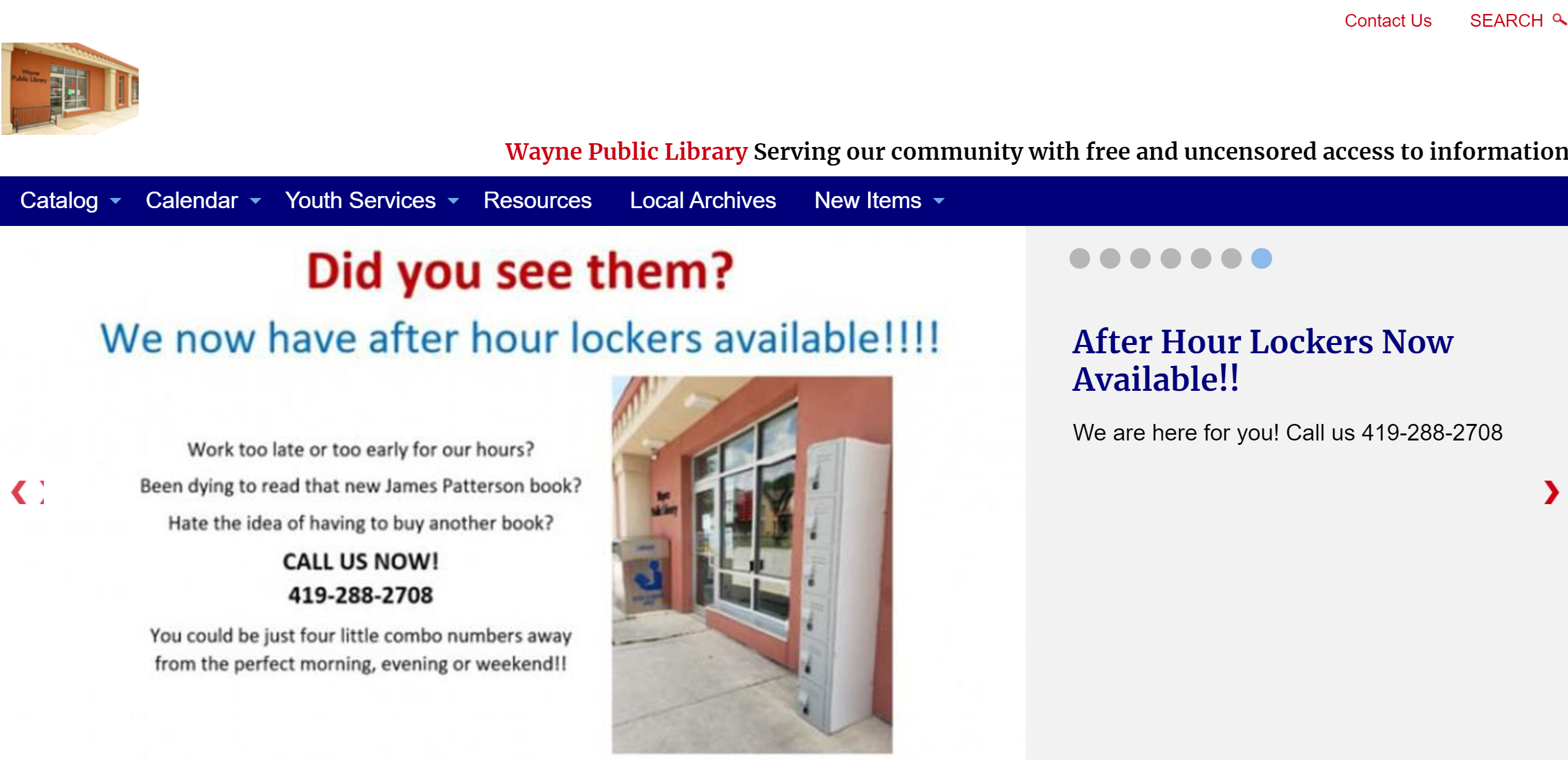
Driving through town a few weeks ago, I noticed the library has purchased an outdoor locker so patrons can pick up holds when the library isn’t open. They want people to use the locker, of course. So, they’ll want to promote it.
I don’t know anyone on the 7-person staff of the Wayne Library. But, if I were working with them, I would encourage them to set a SMART goal like this:
We will get 30 people a month to request their holds pickup via the outdoor locker. We’ll do this by promoting the locker on our website and by specifically asking patrons if they’d prefer to pick up their holds via the locker when we place holds for them. This goal is important because it will prove the value of this investment and will increase circulation. We’ll track and record the total the number of locker users at the end of each month.
You can see this goal contains specific numbers. It sets the context for why this promotion is important. And it lays out how the staff will measure success.
A SMART goal will help you organize your promotions and keep you accountable. It will give you a sense of direction for your work.
Focus on tactics that work best to reachsmall communities.
Make a list of all the ways you can promote your library: your website, email lists, social media, in-person interactions, print, partners, signs… etc. Then take a highlighter and pick the 2-3 things that work best for your community. Those are the tactics you should use to reach your SMART goal.
Every library community is different. And small libraries often find promotional success in places that are different from their larger counterparts.
For example, if your library is located by a major road, use outdoor signage to attract the attention of passing motorists. If your school is a significant community hub, ask teachers to send home promotional bookmarks and fliers in kids’ backpacks. If your town has a little restaurant where residents come for breakfast every Saturday, ask the restaurant owners to give out a promotional print piece like a bookmark or flier with the check.
Wayne Public Library uses its website to promote its lockers.
Live and die by an editorial calendar.
An editorial calendar will help you decide what, where, and when to publish. After those decisions are made, the editorial calendar will help you assign tasks and keep up to date on deadlines.
First, you’ll create your calendar. Then you’ll decide how to populate it with content that will ensure you reach your promotional goals.
Repurpose content.
When your staff is small, you’ll need to work smarter, not harder. A smart way to maximize your time and efforts is by repurposing content.
Repurposing content is the act of finding new ways to recycle your existing content. It’s basically taking one piece of content, say an email newsletter, and re-formatting it for different mediums like social media, a blog post, and an email
You can do this with any piece of content, from your website graphics to your annual report. Break the content down into pieces and spread them across all your available platforms. In this way, you can make sure everyone in your community sees your message. You also can make sure the work you are doing right now will have maximum impact.
Technology can be your best friend if you are working on promotion all by yourself. Schedule your emails, blog posts, and social media posts as far in advance as possible.
There are several great social media schedulers that have free plans. This post is an excellent list of each of those options.
For blogs, I recommend WordPress. You can get a free account and you can schedule posts to go out whenever you like. Plus, patrons who follow your blog will get an automatic email every time you post. That means you don’t have to create an email to let them know you’ve published new content.
You will have to invest in an email platform. But once you do, you can create and schedule emails to go out to your patrons as far in advance as you like.
Learn from larger libraries but don’t compare your success.
The success or failure of a library’s marketing has nothing to do with the size of its staff. In fact, I would argue it might be easier for a small library to create successful library promotions.
Small libraries have more freedom to experiment. Their staff tends to be personally connected with patrons. They have a deeper understanding of what their community wants and needs from their library.
So, follow those large library systems on social media. Sign up for their emails. Look at their websites. Visit large libraries when you travel. Make a list of ideas that you want to try at your smaller library.
But remember, the key to success is a library’s ability to connect with its own community. Any library can do that, no matter how large or small the staff.
I was recently the guest on a new podcast called Library Marketing for Library Marketers. Listen to that episode here.
Subscribe to this blog and you’ll receive an email every time I post. To do that, enter your email address and click on the “Follow” button in the lower left-hand corner of the page.