Search

Super Library Marketing: Practical Tips and Ideas for Library Promotion

Tag

instagram for libraries

The 2026 Guide to Instagram for Libraries: New, Creative Ways to Grow Engagement

Photo courtesy Cincinnati and Hamilton County Public Library

This is part of the 2026 series of library social media guides. In addition to this post, be sure to bookmark these new guides:

Next week, I’ll wrap up the series with tips for Facebook.

Instagram for libraries

According to the 2025 Super Library Marketing survey, 93 percent of libraries say they post to Instagram, making it the second-most-popular social media platform for library marketing. However, the number of libraries using Instagram dropped by 5 percentage points in 2025.

I have a few guesses as to why this happened:

  • Some libraries faced privacy concerns about using Meta-owned platforms.
  • Instagram’s increasing emphasis on paid ads makes it difficult for libraries to reach their community organically.
  • Budget cuts mean fewer staff, which may have led some libraries to scale back their Instagram use.
  • The inability to insert links into posts remains a major downside for Instagram users.

How are people using Instagram right now?

Here are some statistics from Backlinko, Teleprompter, and Digiexe.

  • Instagram is the most popular app for 18-24-year-olds, a key demographic for libraries.
  • The average Instagram user now spends 33 minutes a day on the platform. But, for 18-24 year olds, the average time spent on Instagram per day is much higher, atย 53 minutes per day.
  • 90 percent of Instagram users watch Reels.
  • Instagram users remain evenly split by gender.

How much success can libraries expect to see on Instagram?

  • Reels: The average engagement rate is 2.46 percent, according to Sprout Social.
  • Carousel posts: According to Social Media Today, the average engagement rate is 2.4 percent.
  • Stories: Stories are shown to existing followers, so they’re not a tool for discovery. It’s difficult to get Instagram to give up engagement rates for Stories. However, Sprout Social says the average engagement rate is generally lower than for other types of content, at 0.8 to 1.2 percent.

The Instagram algorithm for 2026

Here are the updated Instagram ranking signals according to Sprout Social. Note: Nearly ALL the Reels ranking signals have changed in the last year. Also, Instagram now uses the same ranking signals for the Feed and Stories. That’s a huge change. (Gotta love social media!)

Instagram Reels Ranking Signals

  • Engagement velocity: The more likes, comments, and shares you can get on your video within the first hour of posting, the more reach you’ll get.
  • Completion rate: The more people watch your Reel all the way through, the more reach you’ll get.
  • Audio trends: Using trending audio will increase your reach.
  • Content quality: Edit your Reels in an app like Edits to post without a watermark. Never repost your TikTok videos directly from TikTok to Reels. Doing so will suppress your reach.
  • Consistency: The algorithm rewards accounts that post regularly.

Instagram Feed and Instagram Stories Ranking Signals

  • Content popularity: Instagram will reward you for getting engagement quickly, for tagging other people or organizations, for tagging the location, and for the timeliness of the post. However, here’s something to consider: Instagram tries to avoid showing too many people from one account to users in a row. So, that means you don’t want to post too often on Instagram!
  • Relationship: The algorithm will show you feed posts and stories to people who normally engage with your content first. The more your followers interact with the post, the more often they’ll see your content and the more reach you’ll get outside your library followers.
  • Behavior: Instagram tries to predict how likely someone is to spend time reading your post, commenting, liking, resharing, or tapping on your library’s profile picture for more information.

4 ways to get the best organic reach for your library’s Instagram account in 2026

#1: Lean into searchability.

Instagram is increasingly functioning like a search engine. Users, especially younger users, will use the search bar to find what they need, like “cozy books for winter reading” or “family activities near me.” Here’s how to make sure your library’s content gets seen:

  • Write captions using natural language. Think about how you would say what you want to say if the person were standing in front of you at the desk. For example, “Looking for cozy books for winter reading? Here are our five favorites!” Try to avoid stuffing your captions with keywords.
  • Use alt text for accessibility and to optimize search results. For feed posts and Reels, you’ll find the alt text box under “Advanced Settings”. You cannot add alt text to Stories unless you add it straight to the screen using captions or a text overlay.
  • Add the location tag to every post.
  • Be super strategic with hashtags. Use 3-5 relevant ones, such as #WinterReading #CozyBooks #PinetreeLibrary

#2: Prioritize video, but be strategic about it.

Reels are a priority for Instagram, so they need to be one for you, too! However, the algorithm doesn’t care as much about how many videos you post. It favors watch time and completion rates.

To boost your videos, you should:

  • Keep your Reels under 30 seconds to boost completion rates.
  • Add captions and on-screen text for accessibility and silent viewing.
  • Use trending audio when appropriate.
  • End with a call to action asking viewers to “Save this Reel for your next visit to the library!

#3: Post when your audience is active.

This year, timing will be critical because the algorithm prioritizes newer content. You’ll want to:

  • Use your insights and check often to find the peak engagement time for your account. Then, schedule your posts during those windows.
  • Post to Stories right before your scheduled feed or Reels posts to keep your account active and visible.
  • Share your feed or Reels post to your Stories once it’s live to ensure your followers see it and engage with it, which will boost your reach.

#4: Have fun with interactive micro-content.

The Instagram algorithm favors interaction signals because they indicate that people are interested in your content. To help boost this signal, you can:

  • Add polls, quizzes, and emoji sliders in Stories.
  • Use carousel posts with prompts to swipe through all the pictures to get to something exciting at the end of the carousel.
  • Ask questions to encourage commenting.

When to post on Instagram

According to Sprout Social, the average best time to post to Instagram is between 9 a.m. and 1 p.m. local time. But as always, check the insights on your libraryโ€™s account. Post when you notice your followers are engaging most often with your content.

And remember that being consistent is key. Pick a schedule that your library staff can stick to.


P.S. Want more help?

The Secret to Library Instagram Success? Start With the Story, Not the Promo

Subscribe to this blog, and youโ€™ll receive an email whenever I post. You can also follow me on the following social media platforms:
The Secret to Library Instagram Success? Start With the Story, Not the Promo

Photo courtesy Cincinnati and Hamilton County Public Library

Key Takeaways

  1. Start with a video concept, not a promotion. Focus on an engaging idea first, then connect it back to library services. This approach makes Reels feel authentic rather than like an advertisement.
  2. Keep production simple and relatable. Using an iPhone, a tripod, and free tools like CapCut or Instagramโ€™s Edits app creates approachable videos that audiences find more trustworthy than overly polished content.
  3. Engagement matters more than views. The most successful Reels spark conversation, shares, and community pride. Your library wants impact that goes beyond vanity metrics.

Emily Bradshaw was a book lover from an early age.

โ€œSome of my favorite library memories were from the Scholastic Book Fairs at school,โ€ Emily recalls. โ€œOur school librarians did such a great job getting us excited about books, and the book fairs were the pinnacle of that excitement.โ€

Emily, who grew up in the far southwest suburbs of Chicago, came to work in a library in a roundabout way. First, she became a high school English teacher. Then, she got her MLIS. She spent about five years as a Reference Librarian whose โ€œother duties as assignedโ€ included marketing. Marketing was her favorite part of the job, so she started to look for marketing-specific library jobs.

Thatโ€™s how, three years ago, she landed a job as the Content Coordinator at Helen Plum Library in Lombard, Illinois. Among her responsibilities is the libraryโ€™s Instagram account

Now, hereโ€™s something I probably shouldnโ€™t confess. But I want to be fully transparent.

I love scrolling Instagram. But Iโ€™m finding that itโ€™s tough for one person working in a remote office to create engaging content, particularly videos, for Instagram.  (Know your weaknesses, dear readers!)

A few months ago, after watching hilarious/inspiring/creative posts on the Helen Plum account, made by Emily, I emailed her and begged her for help. She looked at the account I am trying to build and sent me a list of tips. (Thank you!)

Then, I asked her if she would also share her expertise with my readers. Here is her interview. Scroll to the end for the tips Emily shared with me for making engaging, effective Instagram Reels.

What inspired you to start creating Instagram videos for Helen Plum Library?

I started at Helen Plum in September of 2022, and short-form video was quickly becoming the most popular form of social media, so I knew we had to start consistently making videos. My job includes the management of our social accounts, so I always just considered it a regular part of my job from the beginning.

How do you decide what content to feature in your videos? 

I always start with a video concept instead of starting with a promotional need (with a few exceptions). Maybe this is a hot take (and perhaps a difficult argument to make to your admin), but I find that starting with โ€œHow can we promote XYZ serviceโ€ usually results in less engaging, less effective content.

If you flip the order and start with a video concept, then try to make it relevant to your services and organizational mission, the promotional aspect will follow.

The few times Iโ€™m asked to promote a specific program or service, I spend a lot of time thinking about how I can make it engaging and not appear โ€œpromotional,โ€ because no one likes being advertised to.

-Emily Bradshaw

For instance, this videoโ€™s concept started with an audio clip I liked from BBCโ€™s The One Show of Harlen Coben discussing the benefits of reading. The original video went viral, and I thought it was a compelling audio clip to use over shots of our collection. I didnโ€™t start with โ€œhow can I promote our collection,โ€ but this video does promote our collection by nature.

What tools or apps do you use to film and edit your videos?

I film on an iPhone, which works well for the persona we present on social media. Weโ€™re a mid-sized, friendly hometown public library, not filmmakers or professional advertisers. So I donโ€™t want our videos to look overly produced or fancy. I honestly think having an overly polished look for Reels puts people off since it makes you look less relatable and more like an ad.

I also use a basic tripod. You should always use a tripod for stationary shots. You may not realize how big a difference it makes until you see it.

For audio, I use lapel mics for on-camera speaking if itโ€™s appropriate for the video. To record voiceovers, weโ€™re lucky enough to have a recording booth in our makerspace. But before we had that, the voice memos app on my iPhone worked just fine!

Editing tools depend on how complex the video is. If itโ€™s simple, I use the Edits mobile app, which is Instagramโ€™s answer to CapCut. If the video requires more labor-intensive editing, I use the free desktop version of CapCut because editing on a tiny phone screen gets difficult. After Iโ€™m finished in CapCut, I still use Edits to add captions, audio, or other features before posting to Instagram.

Adam Moserri has said that Instagram is giving a slight boost right now to Reels that use Edits, so I take advantage of that. (Aside: everyone should follow Adam on Instagram โ€“ he is constantly giving updates on Instagram tools, algorithms, and more!)

Do you use a script or storyboard before filming, or is it more spontaneous?

It depends: the more complex the video, the more thorough my planning. For shorter, simpler videos, the storyboard just lives in my head. For others, I simply write down a list of shots I need.

If Iโ€™m doing a voiceover video, I write a script and a shot list to go with it. And for the most complex videos, I have a detailed outline of shots, timing, which people are in which shots, etc.

But sometimes the result is a bit different than my original plan. I always film more than I need so that while Iโ€™m editing, I have options for what works best.

How do you get your coworkers excited about participating in videos?  

This is a common struggle. From my experience, if you start making engaging content that people enjoy, your coworkers will earn your trust and become more comfortable. When I started two and a half years ago, I was on my own, but now that we have a booming Instagram account, I have coworkers asking to be in videos!

It takes time, but that time pays off. If youโ€™re still on your own, there are a lot of ways to make videos without coworker participation, such as POV (point of view) videos.

What types of videos have gotten the most engagement from your audience?

Our most engaging videos have messages that resonate with readers or library lovers. Readers are passionate and want to share that passion, so they share these types of videos with their friends and followers.

An example is our video about โ€œreading what you enjoyโ€ rather than what anyone thinks you should be reading. And more recently, with libraries in the U.S. under funding threats, this video about how we provide free services resonated so much that James Patterson posted it to his feed.

Other types of videos that get lots of engagement include anything humorous (see our spoof of The Bear) and anything in which viewers can share their own opinions. Our series of โ€œReal Librarians Rating Fictional Librariansโ€ has the most fun and lively comments sections of any videos Iโ€™ve ever posted, with folks debating the merits of favorite (and not-so-favorite) librarians from pop culture.

How do you measure the success of your videos? 

The number of views is the first thing I measure since itโ€™s what Instagram measures before anything else. However, I still consider many of our lower-view videos successes based on comments and shares.

For instance, I expect videos that are more specific to our local community to get fewer views simply because they are targeted to a smaller population to begin with (like our Lilac Time video). So, with those, I look at the number of comments and shares.

I have also been asked if weโ€™ve seen an impact on our local community. Since weโ€™ve had so much success, do our videos reach actual cardholders, or is the reach too broad? The answer is yes, we are reaching our community. We regularly receive comments at our service desks about how much our patrons enjoy our videos.

How do you stay inspired and avoid burnout when creating content regularly?

I get inspired by other content creators across many industries. I do a lot of scrolling. I save videos that inspire me into an โ€œIdeasโ€ collection on our account, so I have a trove of inspiration there if I need it. These not only include libraries, but also other reader-related accounts โ€” Bookstagram influencers, publishers, etc. โ€” as well as other companies and organizations I follow, especially local ones (all our Chicago-area museums, DuPage County Forest Preserve, etc.).

What advice would you give to a library just starting to create short-form videos for social media?

Scroll. Get a pulse on whatโ€™s happening in your content area and in your local community. Then try participating in a trend that you can make relevant to your organization and your target audience. Trends are easy and low-pressure, and they are good starter videos to try if youโ€™re a beginner developing filming and editing skills.

Once you start to feel comfortable with simple videos, donโ€™t be afraid to try your own original content ideas. Your library is unique, so show off whatโ€™s unique about it.

-Emily Bradshaw

This is easier said than done, of course, and like anything, it takes time and persistence. But originality will take you to the next level. Try new things, and donโ€™t take yourself too seriously.

Emilyโ€™s 6 tips for creating Reels

  1. Using sound bites from Bookstagram creators helps me save time and can have powerful effects. No audio to edit! Here’s an example.
  2. For many videos in which I appear, itโ€™s just me and a tripod with no other people to help (hereโ€™s an example of that.) I typically hide an earbud in my ear if I’m lip-syncing or have the audio playing on a separate device nearby.
  3. Creating a video clip content bank of reusable B-roll is incredibly useful in a pinch! I have about two dozen various shots of our adult stacks alone. Batch-filming can also help if you have the time to block out for shooting a bunch of stuff all at once to use later.
  4. Consistent scheduling: I post one video per week for Helen Plum Library, which works for me. Typically, Iโ€™m working on next weekโ€™s video the week before, so Iโ€™m always one week ahead. I find this to be the perfect balance of making sure I have something lined up while still being timely and flexible enough for the content to vibe with the current social media climate.
  5. One of the most valuable things to me is literally scrolling through Instagram and saving videos that inspire me. It also helps me to see what works and what doesnโ€™t.
  6. If youโ€™re looking to expand your audience, I recommend using trial Reels, which will share out your Reel only to non-followers and give you insights. Then you can decide whether to share it with your followers after 24 hours.

Need more inspiration?

Should You Start an Instagram Account at Your Library Just for Teens? Hereโ€™s the Pros and Cons List.

Subscribe to this blog, and youโ€™ll receive an email whenever I post. To do that, enter your email address and click on the โ€œFollowโ€ button in the lower left-hand corner of the page. You can also follow me on the following social media platforms:

There Are 4 Major Updates to the Instagram Algorithm. ๐Ÿ˜ฒ#3 May Be a Deal Breaker for Some Libraries!

Watch this video now

#LibraryMarketing Show, episode 248

Instagram has made four major changes to its algorithm! One of these changes might be a deal-breaker for your library, especially if you are a team of one person. We’ll unpack the four new things you’ll have to keep in mind when posting to Instagram and how those changes impact the work of your library marketing in this episode.

Plus we’ll give kudos today to a library that won’t have to worry about changing their Instagram strategy because they’re already following best practices for one of these four new Instagram algorithm changes.

Do you have a suggestion for a topic for a future episode? Want to nominate someone for kudos? Let me know here. And thanks for watching!โ€‚


Miss the last episode? No worries!

Will I see you soon?

Subscribe to this blog and youโ€™ll receive an email whenever I post. To do that, enter your email address and click on the โ€œFollowโ€ button in the lower left-hand corner of the page. You can also follow me on the following social media platforms:
๐Ÿ‘ŽEngagement on Instagram Reels Is Going Down the Drain! Can It Be Fixed? Hereโ€™s the Latest Advice for Your Library.

Watch this video now

#LibraryMarketing Show, episode 235

You’re not imagining it: Engagement on Instagram Reels is going DOWN. And it’s happening not only to libraries but to content creators from all industries. What is going on?! And is there anything we can do to reverse this trend? We’ll dive into it in this episode of the Library Marketing Show.

Plus, kudos go to a library that’s been doing something that received coverage on a national television news program.

Do you have a suggestion for a topic for a future episode? Want to nominate someone for kudos? Let me know here. And thanks for watching!โ€‚


Miss the last episode? No worries!

Will I see you soon?

Subscribe to this blog and youโ€™ll receive an email whenever I post. To do that, enter your email address and click on the โ€œFollowโ€ button in the lower left-hand corner of the page. You can also follow me on the following social media platforms:

Three Big Pieces of News About Instagram That Could Have Huge Implications for Library Marketing

Watch the Video Now

The Library Marketingโ€‹โ€‹โ€‹โ€‹โ€‹โ€‹โ€‹โ€‹ Show, Episode 144: In this episode, we’ve got our monthly social media headlines, and this month, we’re going to focus exclusively on Instagram. The platform is testing some new features and they could have significant implications for library marketing on the app.

Kudos in this episode go to the Coos Bay Library. Watch the video to find out why they’ve been recognized.

Do you have a suggestion for a topic for a future episode? Want to nominate someone for kudos? Let me know in the comments. And subscribe to this series to get a new video tip for libraries each week.

Thanks for watching!


Subscribe to this blog and youโ€™ll receive an email every time I post. To do that, enter your email address and click on the โ€œFollowโ€ button in the lower left-hand corner of the page.

Two Brilliant and Easy Ways to Get More Reach for Your Library’s Instagram Account

Library employee examining newspapers, circa 1926. Photo courtesy 	
Cincinnati & Hamilton County Public Library.

I may be addicted to Instagram.

The social media platform is my favorite place to scroll and post.

It’s fun. It’s heartwarming. It’s filled with great content. It’s inspiring and beautiful.

I follow a lot of libraries on Instagram. They are doing a great job, sharing user-generated content, promoting their collection, highlighting their patrons and volunteers, and using humor and cute stuffed puppies to drive engagement.

Instagram is super popular right now, especially with people under the age of 34. That’s a key demographic for library marketers.

According to Web Hosting Rating, 60 percent of users log in daily, and more than half of those people log in more than once a day. Best of all, the average U.S.-based Instagram user spends a whopping 53 minutes a day on the app. (That’s me! ๐Ÿ™‹)

If your library posts to Instagram, it’s time to take it up a notch. To drive your engagement stats, there are two things you can do.

Instagram takeovers and Instagram highlights are an easy way to get more reach on your Instagram account.

Instagram takeover

An Instagram takeover is when you arrange for a partner organization, library department, senior leader, or fan to take over your account for a day or during a special event.

A takeover will expose your library to a new audience of potential followers. It will also give your library external credibility.

A takeover can be done without giving your takeover partner the password to your account.

  • Ask your takeover partner to save each individual story slide to their camera roll.
  • Next, they’ll email the slides to your library.
  • Then, youโ€™ll upload them, one by one, to your Instagram story.

Before you agree to a takeover, be sure to establish some guidelines.

  • Be specific about what you want in terms of content and number of slides.
  • Set a deadline.
  • Put all of that in writing. 

Here’s a template you can use to set up the guidelines for your own library’s Instagram takeover.

My former library did an Instagram takeover with a nearby library system, with whom we had a reciprocal lending agreement. It gave each participating library access to a new audience. And people loved it! Each story got an average of 605 views.

Patrick Kinsella, Library Communications Coordinator for the library at the University of Salford in Manchester had even more success with his Instagram takeover success story.

He said, “As our Library is in the final stage of a ยฃ6.2 million redevelopment, we decided to run a campaign to promote our study spaces outside our main library. We have five main study spaces outside of Clifford Whitworth, our main library, that could give students a place to study and help make up for the reduction in space in Clifford Whitworth.”

“We also decided to take over our universityโ€™s main Instagram account to give their followers a tour of what lies beyond Clifford Whitworth. Followers were also invited to send pictures of themselves studying outside Clifford Whitworth in exchange for ยฃ5 worth of printer credits.”

“The Instagram story was viewed over 1,200 times and 14 students sent us pictures of themselves studying outside Clifford Whitworth. The cross-promotion of our Instagram account @salfordunilibrary through the story also gained us more than 20 new followers. The user-generated content that we received also allowed us to build a Twitter campaign displaying their images.”

Instagram highlights

Highlights are custom containers for similarly themed Instagram stories. After you add content to your story, you can choose to highlight that content by saving it to one of these containers.

Unlike regular Instagram stories, which disappear after 24 hours, highlights live on your Instagram profile forever, or until you delete them.

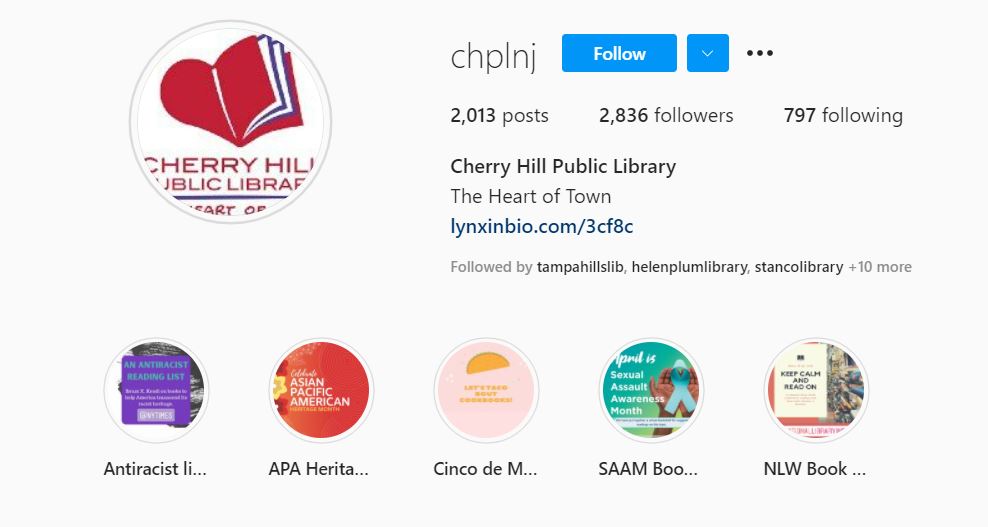
Cherry Hill Public Library uses highlights to save important Instagram stories.

Highlights showcase the best of your previous Instagram content to new followers. And they create an archive of content, especially those stories that contain “evergreen” content that never expires and is always relevant. Instagram highlights are a great place to save library FAQs, book reviews, tutorials, and other wide-ranging topics.

To create a highlight from an active Instagram story:

  • View the story.
  • Click on “Highlight” in the bottom tool bar.
  • Click on the plus icon to create a new highlight container or add to a highlight container you have already created.
  • Click on “Add”. You’re done!

You can add photos or videos to each of your highlight containers any time you want. There is no limit to how many photos and videos each highlight container can hold.

Screen capture showing the Instagram highlights for Springville Library.
Springville Library uses highlights, and they’ve created icon-based covers for each container.

You can change the title of your highlights containers at any time. Just open the highlight, and then tap on the name of the highlight container in the upper left-hand corner. You’ll be given the option to edit.

Share your tips for library Instagram success! Click on the Feedback button to tell me about what you’re doing on Instagram. I’ll share your tips with others on Twitter, Instagram, and YouTube!


Subscribe to this blog and youโ€™ll receive an email every time I post. To do that, click on the โ€œFollowโ€ button in the bottom left-hand corner of the page.

You May Also Want to Read These Posts

Social Media News About Twitter, Instagram, and Facebook That Your Library Needs To Know!

The 2021 Guide to Social Media for Libraries: Instagram

Angela’s Latest Book Review

Four Hundred Souls edited by Ibram X. Kendi and Keisha N. Blain

A WordPress.com Website.

Up ↑