Search

Super Library Marketing: Practical Tips and Ideas for Library Promotion

Tag

library email marketing

Teens Read Emails. Here’s How To Make Sure They Notice Yours!

I live with two teenagers. They love their mobile devices. They are avid users of social media. They also check their email often.

You might think that’s a fluke. For a long time, I did! I thought that my nagging insistence that was necessary to check their email accounts was paying off. I was a parenting genius! But over the course of the past year, I’ve discovered that most teens are reading their emails… even the teens who aren’t living in my house. So, I’m not a parenting genius. But I can see a huge opportunity for library marketing.

Research backs up my observation. The Pew Institute 2018 study of teens, social media, and technology found that 95 percent of teenagers have access to a smart phone. About 45 percent report they’re using that phone nearly all the time. Email marketing agency Adestra surveyed teens and found that 78 percent use email, while nearly 53 percent admit they buy things from marketing emails! Adestra’s survey also found that more than 67 percent of teens prefer communications from brands to come in email form, especially from a brand they love.

I’m not surprised by this statistic, because it bears out in my work. Every month for the past year, I’ve sent a librarian-recommended book title to teens in an email. Adults get one too. In 2018, the average click-thru rate for the adult email was five percent. But our teen cardholder email had a consistent click-thru rate average of 35 percent.  Even more exciting, the teen title increased in circulation between 300 and 400 percent during most months in 2018. In comparison, the adult title increased in circulation by 150 to 200 percent.

You can make emails work for your teen audience too. I understand it’s intimidating, particularly if you don’t live with teenagers. They can seem like otherworldly creatures. But they are just people, too. Here’s what I’ve learned about emails and teenage cardholders.

Send consistently good content to teens. Your teen cardholders are some of the most dedicated library users in your service population. They love you, and they want to hear from you. Use that to your advantage!

Teen cardholders typically are readers, so send them a monthly email to give them a heads-up about the newest items in your collection. Ask one of your teen librarians to pick out some titles, if you’re not comfortable doing it (I’m certainly not!).

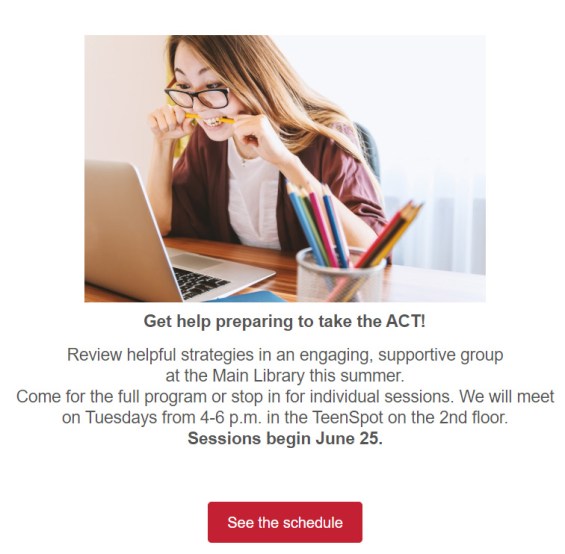
You can also email teens to promote events but be picky. My experience is that teens respond to emails about events like coding classes, free summer camps, and anything involving food. They ignore emails about recurring programs, movie nights, crafting events, or homework or test prep sessions.

Don’t send too many emails. Resist the temptation to send email messages several times a week to your teen audience. I try to only send two or three emails a month to my teen cardholders, no more. So, when they see an email from my library, they know it’s important.

Watch formatting and check every email on a mobile device. Don’t include a bunch of links in your teen emails–to them, it looks like spam. Adestra’s survey of teens and email found that teenagers are more likely to unsubscribe when they see badly formatted text, broken links, or emails that just don’t look clean on their mobile devices. Include no more than three links in each email. Keep the text short. And check every message on your mobile device, because that’s where most teenagers will read their email.

Use emojis, texting language, and puns sparingly–or not at all. This advice feels counter-intuitive. Don’t we want to write in teen’s language? My answer is… no. Teens want to be treated like adults. Frankly, they find it “cringey” when an adult tries to sound like a teenager by using slang or texting language. Resist the urge.

You can appeal to teens by helping to relieve their pain points. For instance, I recently sent an email promoting a new book in our collection that was getting a lot of buzz on the YA reading lists. As I was constructing the email, I overheard one of my daughter’s friends complaining about assigned reading in her English class. So, in my email, I said, “When you’re done reading your assigned book, wouldn’t it be great to finally read something that you actually like?”  It was an effective message. It was clear. And it spoke to my teen cardholders by appealing to their emotional frustrations over assigned reading, without using emojis or hashtags or trying to be cool.

Send email later in the evening. In my three years of email marketing experience, I have noticed that messages sent to teens after 9 p.m. get the best engagement. I started sending my emails late in the evening after a conversation with one of my daughter’s friends. He was sharing his daily schedule with me. He told me about his after-school activities and job and mentioned that he doesn’t get to his homework until 9 p.m. or later. So, I started sending email late in the evening. And it worked!

Adestra’s study says teens will randomly check their email throughout the day and will save emails that seem interesting to them. You may want to test sending emails to teens at different times of the day. But in all my testing, late night emails work best… and I suspect they will for you too!

Subscribe to this blog and you’ll receive an email every time I post. To do that, click on “Follow” button in the bottom left-hand corner of the page. Connect with me on Twitter, Snapchat, and LinkedIn. I talk about library marketing on all those platforms!


This Advice Will Boost Your Library Marketing Email Click-Thru Rates

A few months ago, I wrote a post about email vanity metrics. Those are the statistics like open rates that make us feel good. But if we’re being honest, they’re relatively meaningless.

The meaningful metrics like click-thru and conversion rates are harder to obtain and must be tied to your library’s overall strategy to provide any meaning. Humans naturally like doing the easy stuff! But it’s the hard metrics that make our work valuable and worthwhile.

So, I want to spend the next two posts sharing some of my strategies for improving your library email click-thru and conversion rates. I learned most of these tips through trial and error and a lot of failures. Remember that failure is okay! It teaches us lessons that lead to success.

This week we’ll focus on improving your click-thru rates. The click-thru rate is the percentage of people who, after opening your email, will click on a link. Here’s what I’ve learned about how to improve that rate.

Promote the best possible content. Don’t send an email to promote every program or service your library carries. Choose your promotions strategically. Put the best content into your emails to make it more likely that your cardholders will click on your links.

For collection-based marketing, make sure the books you choose to promote in your email are buzz-worthy, newer, have a great cover (you’d be surprised how much the cover art affects click-thru rates!). For program promotions, of course you’ll choose events that are fun and interesting. But the programs you promote through email should either in demand by your cardholders or unavailable at any other organization or community group in your area. If you are asked to promote new or existing services like databases, movie streaming platforms, or reading recommendation services, pick the best of parts of those services to promote. For example, I recently did a three-month series of emails promoting the Great Courses section of the Kanopy video platform. Instead of trying to promote the entire Great Courses section, I promoted three specific video series–yoga, family history research, and weight loss. Promoting parts of a service makes it easier to target your message. Speaking of which…

Target your message. Click-thru rates skyrocket when the message you send is targeted to the audience most likely to be interested in it. Sounds like common sense, yes? But I still hear from lots of libraries who are afraid to stop sending emails to all their cardholders. If you have the technology to segment your audience, you should do so. Try to target your email messages to about ten percent or less of your existing email list. Don’t worry if that number seems small. If that audience is getting an email about something they’re interested in. you’ll see results in big click thru rates and engagement.

Here’s my strongest example. A few months ago, my library started a short, monthly eNewsletter targeted specifically at young professionals. This newsletter goes to about 300 people once a month. For my library, an email sent to just 300 people is really tiny… that’s only about .10 percent of our total email list. But it pays off! This email gets huge engagement numbers because those 300 people are really, really interested in the contents of the email. In October, the click-thru rate was 37 percent. I wish all my emails were that successful.

Give yourself time to create and revise your emails. This is the maybe the most important step. Plan your email schedule as far in advance as possible. Set aside time to write the copy. Then, walk away.  Come back later-preferably another day-and look over your work. Revise it. Walk away again. Repeat this process until the copy and structure of your email is as good as it possibly can be. Too many of us (myself included) rush through the creative process.

If you recognize that you are the kind of creative person who feels like he or she can never release anything into the word because it’s never perfect enough, set some boundaries. Give yourself a deadline for when you’ll send the email up the chain for approval and tell your supervisor when to expect it so he or she can hold you accountable. That will help you break the endless cycle of revision!

Write like a Buzzfeed blogger, not like a librarian. Write to entice. Make the text interesting. Use conversational language within your emails. Write short sentences. And don’t write too much! Less copy is better. Make your cardholders curious to find out more and then give them the means to do it by doing this next step, which is…

Embed clickable links in more than one location within the email. My personal rule of thumb is to include a link to the book, program, or service about three times in varying places within the email. This gives your cardholder the chance to act at various points as their eyes or mouse or thumbs roam your message. It also increases the chance that they’ll be able to act, if they so choose, by making it super easy for them.

Next read: How to improve your library email marketing conversion rate!

Finally, would you be so kind as to answer a question for me?

Subscribe to this blog and you’ll receive an email every time I post. To do that, click on the “Follow” button in the bottom left-hand corner of the page.  

Avoid Email Vanity! Here Are the Results You Should Measure

I love email marketing. It’s one of the most effective tools in the modern library marketer’s toolbox. Emails are a direct way to interact with your cardholders and your community. They are easy to create. You can share stories, collection items, explain new services, and promote events directly with your audience. And library cardholders love getting emails from us. We don’t have to worry about unsubscribe rates the way other industries do.

Many libraries are now emailing their cardholders. And they’re reporting success with those campaigns. I’m so happy! But I’m also worried about something I hear often in conversation with other library marketers. I’m worried that we’re focused on the wrong measure of success–open rates. I’ve attended two events with other library marketers this summer. At both, there were deep and interesting discussions about success in email marketing. But at both events, the conversation about success centered on how to raise open rates.

Now, I have a confession to make. When I started targeted email marketing back in January of 2015, I was obsessed with my email open rates. And so were thousands of marketers in industries across the world. During my first trip to Content Marketing World, I attended several sessions on email marketing and every speaker mentioned open rates as a measure of success.

Open rates do mean something. They are a sign of customer loyalty. A high open rate means that your cardholders are eager to see what you’ve sent them. And that’s good. But it’s kind of like buying a house because it’s got a beautiful exterior. You may sign all the paperwork, open the front door and find all the walls are unfinished! Open rate is a vanity metric. It makes you feel good. But it’s what happens AFTER your cardholders open your email that counts.

I’m not suggesting you ignore open rates. They do give you information you can use to improve your emails. If your open rates are high, and your click-thru rates are low, you can be certain that you are writing compelling email subject lines (Good job, you!). You have a loyal and eager audience. But the content you are sending to your cardholders isn’t what they want. Now you can fix that problem!

Keep tabs on your open rate. But you should focus on two other valuable ways to really measure the success of your emails.

Click-through rates: The higher this number is, the more excited I get. It means that my cardholders opened an email, saw something they liked, and took an action! Most of the time, my library emails direct cardholders to do one of two things: click a link for a specific item in our collection or go to the event calendar where they can register or put an upcoming event on their calendar. Convincing a cardholder to take one of those actions is a huge victory. It also gives me data about what that particular cardholder is interested in. And I can use that information to craft future emails that are also compelling for that cardholder.

Conversion rates: A conversion rate is the most accurate way to measure email effectiveness. It is the percentage of people who take an action after clicking through an email. For example, let’s say 100 people click-through to look at a book I’ve promoted by email. If 50 of those 100 people put the book on hold, my conversion rate is 50 percent. Once I know what my average conversion rate is for a certain type of email, I can set goals to raise that conversion rate. I can  accurately compare my emails to one another.  I might see a high conversion rate for a certain genre of book and look for similar books to market to that cardholder. I might notice a spike in registration rates for a particular kind of program coming from an email and look for similar kinds of programs to market to my cardholders. Conversion rate is the most accurate measurement for determining the likes and dislikes of your cardholders.

For more on tracking the success of your email marketing, you can also read this article. And if you want to learn more about targeted email marketing and get more secrets for library email success, don’t forget the free webinar 

Subscribe to this blog and you’ll receive an email every time I post. To do that, click on “Follow” button in the bottom left-hand corner of the page. Connect with me on Twitter, Snapchat, and LinkedIn. I talk about library marketing on all those platforms!

A WordPress.com Website.

Up ↑