Subscribe to this blog and you’ll receive an email whenever I post. To do that, enter your email address. Then click on the “Follow” button in the lower left-hand corner of the page. You can also follow me on the following social media platforms:
Photo courtesy Cincinnati and Hamilton County Public Library
I was scrolling through LinkedIn when a post by a librarian named Kaitlyn Carpenter, who works at a high school in Houston, Texas caught my attention. She said:
“One of my favorite things that Houston Independent School District library services implemented this year has been our monthly infographics! I love digging into data and understanding trends in my library like:
Wednesdays are always our busiest days.
Ninth and 10th graders are often the most likely to visit the library.
Comparing how circulation fluctuates throughout the school year.”
“Infographics like these allow libraries to market to their school and district to show impact! I have made it a part of my practice to include marketing images and graphics in every weekly eNews that goes out.”
Kaitlyn knows the power of infographics
The content management company Marq.com has compiled a ton of research on the value of infographics. Among their findings:
About 90 percent of the information transmitted to the brain is visual. Infographics are a perfect way to turn static, boring information into visuals. And that’s important because…
People remember 65 percent of information when it’s paired with an image. In contrast, they remember just 10 percent when they hear it or read it without an image.
Most libraries use infographics to share statistics, like summer reading participation and impact. But your library can use an infographic to demonstrate much more than numbers!
10 innovative ways to use infographics in your library marketing
Storytelling
Use infographics to tell a story about a patron’s journey and how the library affected their life. The visuals can depict all portions of the story.
You can introduce your patron as a main character. Show the problem they face. Illustrate the solution available at the library. And then end with graphics that show how your patron’s life was impacted by their interaction with the library.
Explain Your Strategic Plan
An infographic is an engaging way to easily explain the complex information contained in most library strategic plans.
You’ll want to start with an overview of your mission and vision, followed by specific goals and the steps to achieve them. Use graphics to demonstrate the timeline for the planned work.
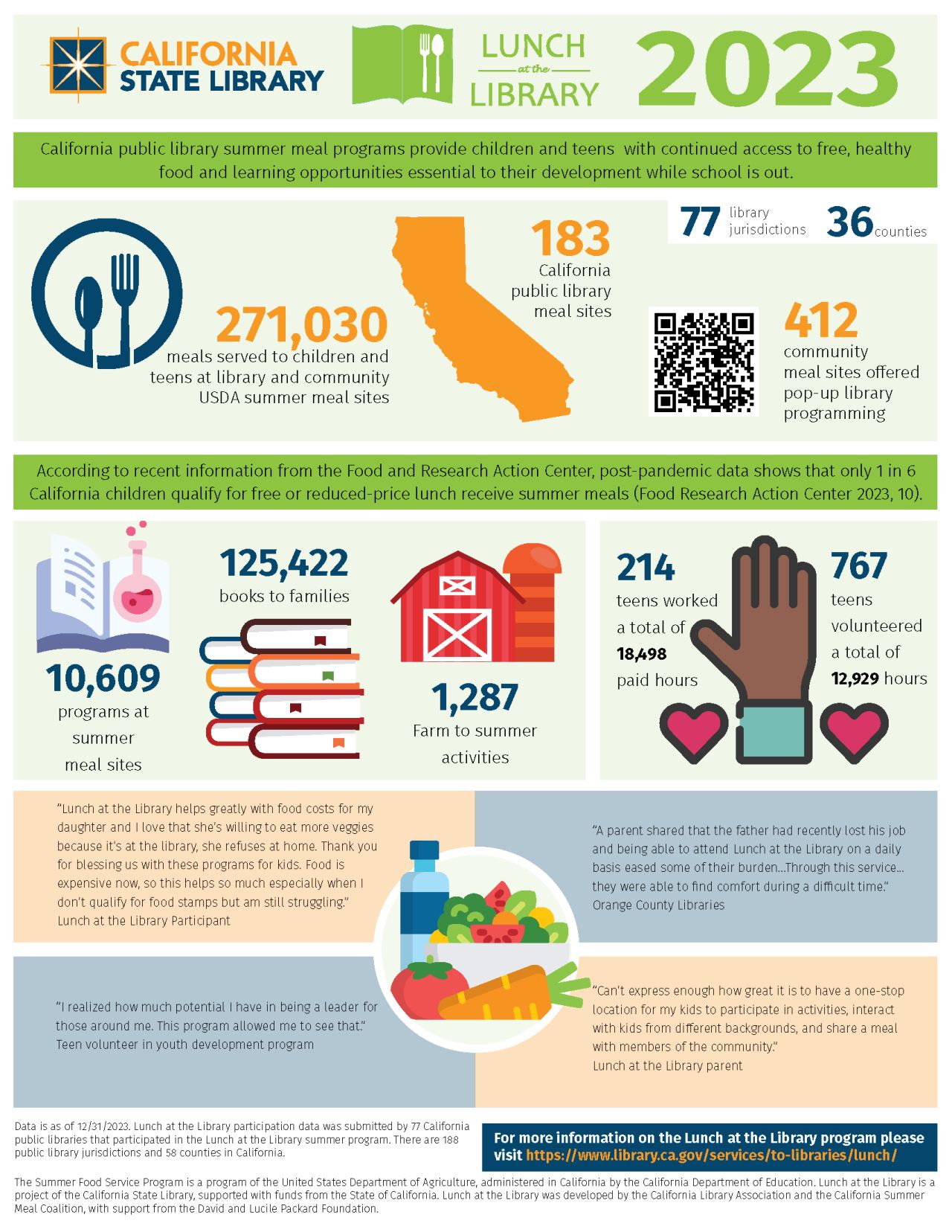
Want to share powerful quotes about the importance of a library program or service? Include testimonials from patrons and community members in your infographic. This adds some humanity to the data.
California State Library added testimonials to their infographic explaining the impact of free lunch services.
Tutorials
We know some community members have difficulty using library resources like databases or vendor apps. (Remember how many people struggled with the Libby App?) Some members of the public may find long, text-based tutorials to be to complex.
You can turn those text instructions into a visual how-to guide to help community members ingest the information. Here’s a fun, two-page infographic from Falvey Library at Villanova University. It explains everything a student needs to know about the library as they start a new school year.
Compare and Contrast
Instead of just sharing statistics, use an infographic to compare metrics before and after library interventions. The visuals go a long way to clearly illustrating the impact of your library work.
You can also use an infographic to explain why library services are superior to other resources.
Arkansas River Valley Library System’s infographic shows the free library services that can replace paid subscription services.
Service Bundles
Create a flowchart showing how a patron uses multiple services.
For example, your patrons may start by visiting your library’s website, where they sign up for a cooking program. When they get to the branch to attend the program, they may pick up a cookbook from a book display. Inside the cookbook, they may find a bookmark promoting the library of things.
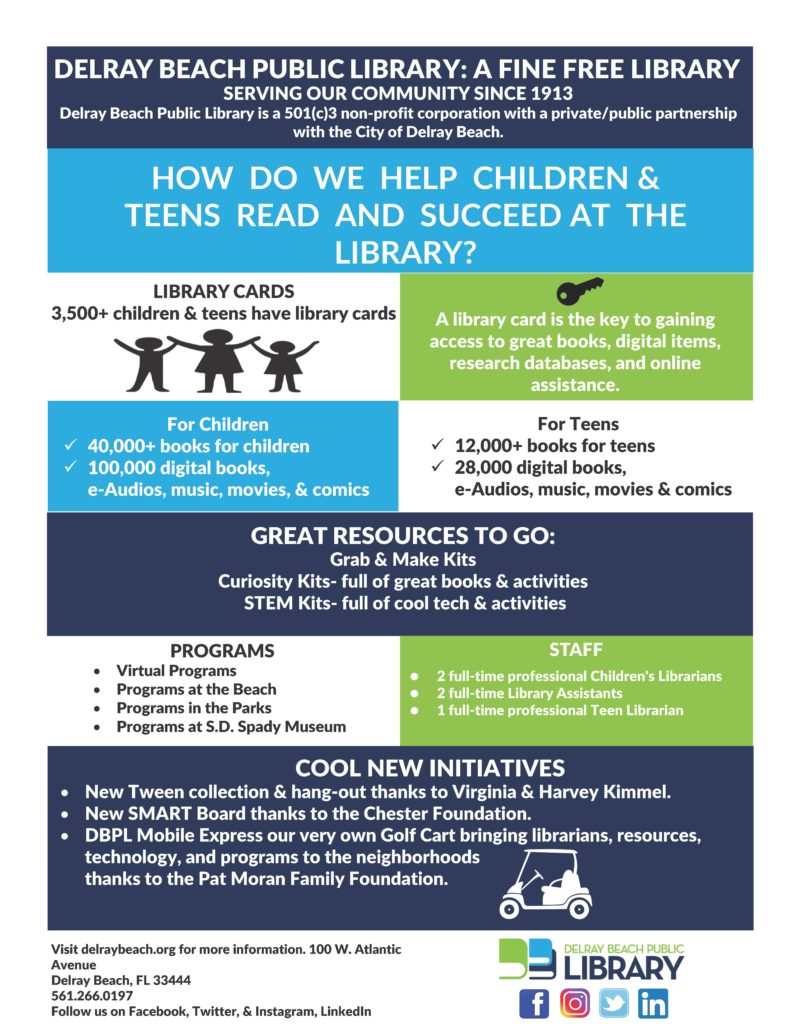
An infographic illustration of that patron journey helps explain the interconnectedness of library services to board members, lawmakers, and potential partners.
Delray Beach Public Library explains the interconnectedness of its services in this infographic.
Visualizing Partnerships
Use an infographic to show how the library collaborates with other local organizations, schools, and businesses. This will demonstrate how the library actively engages with the community, which builds trust and awareness. It can also highlight additional services and programs available through these partnerships.
Here’s a great example from the Tampa Bay Library Consortium explaining how the Institute of Museum and Library Services Funds help Florida library programs.
Library Accessibility
Your library can use an infographic to illustrate how the library makes resources accessible to different demographics. This includes children, seniors, and non-English speakers.
For example, if your library knows that 95 percent of seniors who attend tech skills programs learn to use tech fluently, you can demonstrate that with graphics.
Bonus tip: For accessibility of your infographic, create a downloadable alt-text document for the infographic. This allows people who use screen readers to consume the infographic. Here’s an example from EBSCO. Scroll to the bottom of the illustration and you’ll see the prompt to download the alt-text version of this infographic.
Environmental Impact
Show the library’s efforts in sustainability and green initiatives. Use visuals to demonstrate eco-friendly programs, such as recycling, energy-saving measures, and community gardening projects.
If your library has undergone a renovation or built a new building and you’re Leed-certified, use an infographic to show your community how that designation saves money and the planet.
Volunteer Contributions
Infographics easily explain the impact of volunteers on a library. The visuals can help you clearly show the number of volunteer hours. They also illustrate the types of activities volunteers assist with. Additionally, they convey the value volunteers add to the library.
Need help creating your infographic?
I am not an artist. I can barely draw stick figures. So creating an infographic is daunting to me. This post explains the process I use to plan and create an infographic.
Hey library marketing friends: I’m teaching a pre-conference workshop at LMCC this year with my amazing coworker Caleigh Haworth. It’s all about marketing your collection. Registration is open now.
Subscribe to this blog and you’ll receive an email whenever I post. To do that, enter your email address and click on the “Follow” button in the lower left-hand corner of the page. You can also follow me on the following social media platforms:
There’s a very simple trick that you can use to get more views on your YouTube channel. It takes about 10 seconds of your time. I will show you exactly what to do in this episode of The Library Marketing Show.
Plus we’ll give kudos to a library that drew a lot of attention to a very delicious-sounding event.(Here’s a hint: 🥒)
Do you have a suggestion for a topic for a future episode? Want to nominate someone for kudos? Let me know here. And thanks for watching!
Subscribe to this blog and you’ll receive an email whenever I post. To do that, enter your email address. Then click on the “Follow” button in the lower left-hand corner of the page. You can also follow me on the following social media platforms:
The subject of today’s episode may surprise you. I want to talk about expert marketing advice. As a library marketer, you should take the advice of experts, including myself, with a grain of salt. I’ll explain in this episode.
Plus our kudos will be given to a library that did some promotional work AFTER an event. I’ll show you why this is a brilliant strategy.
Do you have a suggestion for a topic for a future episode? Want to nominate someone for kudos? Let me know here. And thanks for watching!
Subscribe to this blog and you’ll receive an email whenever I post. To do that, enter your email address. Then click on the “Follow” button in the lower left-hand corner of the page. You can also follow me on the following social media platforms:
“I went to a new concept charter school in downtown Winston Salem that was housed in the basement of an office building,” explains Megan. “The school didn’t have many amenities, like a gym or library.”
“This meant that we got to go on regular walking field trips to the main branch of the Forsyth County Public Library. We even got to decorate our own cotton tote bags to use carting our book finds back and forth. My dad worked in an office downtown and would often pop into the school or library for fun surprise visits.”
Megan went on to work in corporate marketing before getting her MLIS from the University of Denver. She initially intended to work in an academic setting but was more interested in the public library world. She ended up at the Natrona County Library in March of 2019, working as a part-time Children’s Librarian.
“I found it truly astonishing what all public libraries were able to do for their communities in response to immediate needs and in anticipation of future needs,” recalls Megan. “No other large organization can pivot and change that quickly. Plus, they were doing it all for free and for everyone.”
“As a marketer, I realized there was a major need here. Public libraries are these bastions of creativity, advancement, support, and acceptance, but not enough people know about these free services. I wanted to find a way to put my skillset to use promoting public libraries, and it wasn’t long after I started working at Natrona County Library that their marketer decided to move on to new ventures. In October of 2019, I stepped into my current role as head of Marketing and PR.”
Natrona County is the second-most populous county in Wyoming, with 80,000 residents. The library has a main branch in downtown Casper and a branch about 40 miles away in a small town called Edgerton. They also have a bookmobile.
Megan says nearly a third of Natrona County residents have an active library card, and the library enjoys high visitor and circulation rates and robust program attendance. That may be due in part to the work Megan has done in marketing.
At her library, Megan is a team of one, overseeing all social media, public relations, website development and management, advertising, graphic design, and branding.
“I do ask that our programmers and other library staff try to keep a ‘marketing mindset’ to help capture photographs at programs or throughout the library space that could be used for social media,” shares Megan. “I am all about efficiencies and delegation, so I have licensed programs like LibraryAware and Canva which come pre-populated with professional-looking templates that staff can use to make their own bookmarks, flyers, signs, handouts, and more.”
I reached out to Megan after seeing the Natrona County Library’s website. It’s clean and modern, with a thoughtful layout and what I can only describe as a “cool” vibe. I told Megan it doesn’t really look like a typical library website.
“The website (as I inherited it) was broken and battered. It had been built before mobile devices were a thing,” recalls Megan. “We needed to start fresh with a ‘mobile first’ mindset, simplify the navigation structure, integrate new event software that made our program calendar more visually appealing, and incorporate a blog to position ourselves as thought leaders in our community and the larger Wyoming library community.”
A screenshot of the Natrona County’s website homepage before the rebuild.
Megan partnered with a local creative agency on the website rebuild in 2021, thanks to the generous support of her library Foundation.
“Because of my extensive web background, we had an unusual arrangement where I worked side-by-side with their web guy as we built it out,” explains Megan. “As you know, library websites have a LOT of pages, which can make a new website a costly build. Because I was able to tackle about 75 percent of the pages (using templates, structures, and design influence from the agency-built pages) myself, it cut the cost in half, which is how we ended up with such a professional-looking website on a public library budget.”
Natrona County Library’s website includes real photos of the library, conversational language, call to action buttons, and their newsletter signup is right on the home page.
For some libraries, the website can be a point of contention: everyone has different opinions about what should be featured on the homepage and drop-down menus. Megan needed to make decisions based on her knowledge of her customers. Later, analytics let her know if her instincts were correct.
“There are a couple of items that live in multiple places in the menu, like the Bookmobile, to accommodate multiple thought processes or visitor types,” explains Megan. “My goal, ultimately, is to put things that make the most sense to our staff, because they are the ones referencing the pages the most.”
“But we are all in agreement that the most important pieces of information are to be at the very top of the homepage. Static across the entire site is the search functionality for our catalog, log-in to one’s account, library hours, and our phone number. I treat our website like a database in that sense.”
“Anecdotally, and through analytics, we’ve come to realize that our patrons don’t spend a whole lot of time on our website. They mostly come for hours, contact information, and to get to our catalog. They may also enter through digital ads, social media, or from other places directly to landing pages, but don’t tend the linger.”
The website is also the home of Natrona County Public Library’s blog, Library Stories.
“Our blog is a byproduct of our bygone print newsletter,” explains Megan. “It was important to me that we have a way to not only highlight that content for larger audiences but also share it differently, as blog articles can be interacted with much differently than print pieces.
“The blog is a great place to put press releases or share important library updates without building individual landing pages that disappear over time. Depending on the content, I do find that the blog articles drive traffic, especially if the blog article is about the library itself.”
“For example, we shared a press release about a recent exploration of a bank building as a potential new location for the library, and it got a lot of visitors (as well as a lot of commentary on social media). The same thing happened when we increased the number of security guards and shared that information with the community.”
“The blog is an excellent resource for the media and can be a great way to remind our community of our policies, procedures, and things like funding sources, as these are things that seem to come up often in social dialogue.”
Megan says if your library is considering a website refresh, make sure you make that digital space as welcoming and friendly as your physical locations.
“Also, when you’re talking to your staff, stakeholders, and patrons about the library website, they have no idea that there is often a difference between your website and your catalog,” adds Megan. “I realize that some libraries have their site and catalog combined, but that is not the case for us.”
“Our website is built on WordPress, and our catalog is through ByWater Solutions’ Aspen. We also have integrations with LibCal for our event calendar, room booking, appointments, and Library of Things. Patrons have no idea that these are all separate things, and a patron can shut down during conversation if you start talking about them as such.”
“That’s why it was super important that all these disparate–but integrated–sites feel cohesive so that patrons and end users don’t even realize when they’re navigating away from one and can easily and seamlessly navigate back to where they came from.”
You can read more about the rebuild of the Natrona County Library website here.
Hey library marketing friends: Every promotion you create brings the joy of your library to someone new. That’s something to be proud of!
Subscribe to this blog and you’ll receive an email whenever I post. To do that, enter your email address and click on the “Follow” button in the lower left-hand corner of the page. You can also follow me on the following social media platforms:
Artificial intelligence, or AI, has many implications for library marketing. And now, AI is changing how people search for your library on the internet. But…
There is one, relatively easy thing you can do to ensure people find your library when searching for it on ChatGPT, Google’s Perplexity, and Microsoft’s CoPilot. We’re going to get into it in this episode of The Library Marketing Show.
Plus we’ll give kudos to a library that’s cross-posting videos from one social media platform to another. Normally, this is a no-no but there is an exception… and this library is taking advantage of it!
Do you have a suggestion for a topic for a future episode? Want to nominate someone for kudos? Let me know here. And thanks for watching!
Subscribe to this blog and you’ll receive an email whenever I post. To do that, enter your email address and click on the “Follow” button in the lower left-hand corner of the page. You can also follow me on the following social media platforms:
In a few weeks, kids in your community will head back to school. This time of year is a marketing opportunity for all libraries! Lucky for us, one of the major social media platforms just published a guide for marketing to back to school. I’ll share the top three takeaways for library marketing during back-to-school time in this episode.
Plus we’ll share kudos for a library that did something extraordinary by harnessing the power of their loyal library fans.
Do you have a suggestion for a topic for a future episode? Want to nominate someone for kudos? Let me know here. And thanks for watching!
Subscribe to this blog and you’ll receive an email whenever I post. To do that, enter your email address and click on the “Follow” button in the lower left-hand corner of the page. You can also follow me on the following social media platforms:
A war is being waged 10 feet from my office window.
I love watching birds feed and listening to them chirp, squawk, and sing. I have a feeder that I’ve positioned so I can see the birdies enjoying their meal as I work.
But something is ruining my relationship with my feathered friends.
Some mornings, I come outside to find my oversized bird feeder, which I always fill the night before, COMPLETELY EMPTY. The seed is scattered all over the ground. And a scurry of squirrels are gorging themselves on the spoils.
The first time this happened, I did what anyone does in this modern era. I turned to the internet for help.
I typed “how to keep squirrels off my bird feeder” into Google. Suddenly I found myself down a rabbit hole (pun intended) with all the squirrel battle content you could ever want.
Repellant. Special bird feeders. Tips for installing slinkies on the pole to prevent climbing. SPIKES. Videos, advice, and products galore.
Why is it so hard to find tips on fighting squirrels?
The internet is a giant swirling vortex of content. According to Master Blogging, there are 7.5 million blog posts published every single day. (Thanks for reading this one!)
When you factor in social media posts, videos, website content, emails, etc., it’s no wonder your library has a hard time breaking through the noise. A search by anyone for anything is likely to turn up hundreds of results.
So how do you make sure your library content reaches the people who need it most?
Keywords are the key
When a community member is online, trying to find the source that will help them write a research paper, add branches to their family tree, or make a decision about whether to purchase a car, they need us to speak their language.
That’s where keywords come into play.
Keywords help search engines and social media algorithms understand what your content is about. They use those keywords to categorize your content and then match your content to people who are searching for it.
The right keywords make it more likely that the content you write will end up on the computer or mobile phone screen of the person who needs it most.
But you don’t have to guess at what keywords to use! There are tools to help find keywords to weave into your content. Here are my five favorites. They’re reliable, efficient, and free. I’ve made a video tutorial for each to show you exactly how to use them.
The Google search bar allows you to see what content is rising to the top of Google’s algorithm. You can work keywords or phrases from those top-performing content pieces into your promotions.
Don’t forget to scroll to the bottom to see “people also search for,” which I find to be extremely valuable as a source of more keywords.
You can also use Google’s more robust Keyword Planner to search for keywords. The Keyword Planner is intended as a tool for buying Google ads but I find it to be an insightful way to find keywords for my website and social media.
Here’s a quick video to show you how both the regular Google search bar and the Google Keyword Planner work for sourcing keywords for library promotions.
This free tool gives you 25 keywords… more if you’re willing to provide them with your email. They’ll also show you the search volume for the phrase and the level at which you’ll compete with other content for attention. Type in your opening phrase and choose “All industries” for the best results.
This free keyword tool shows top suggestions, monthly volume, organic click-to-open rate, and difficulty ranking for any key phrase you search. You can get more robust suggestions if you hand over your email.
Whatever tool you use, the keywords you uncover should be placed in your blog headlines, in the text on your website, and in your social media posts.
But Angela, did you defeat the squirrels?
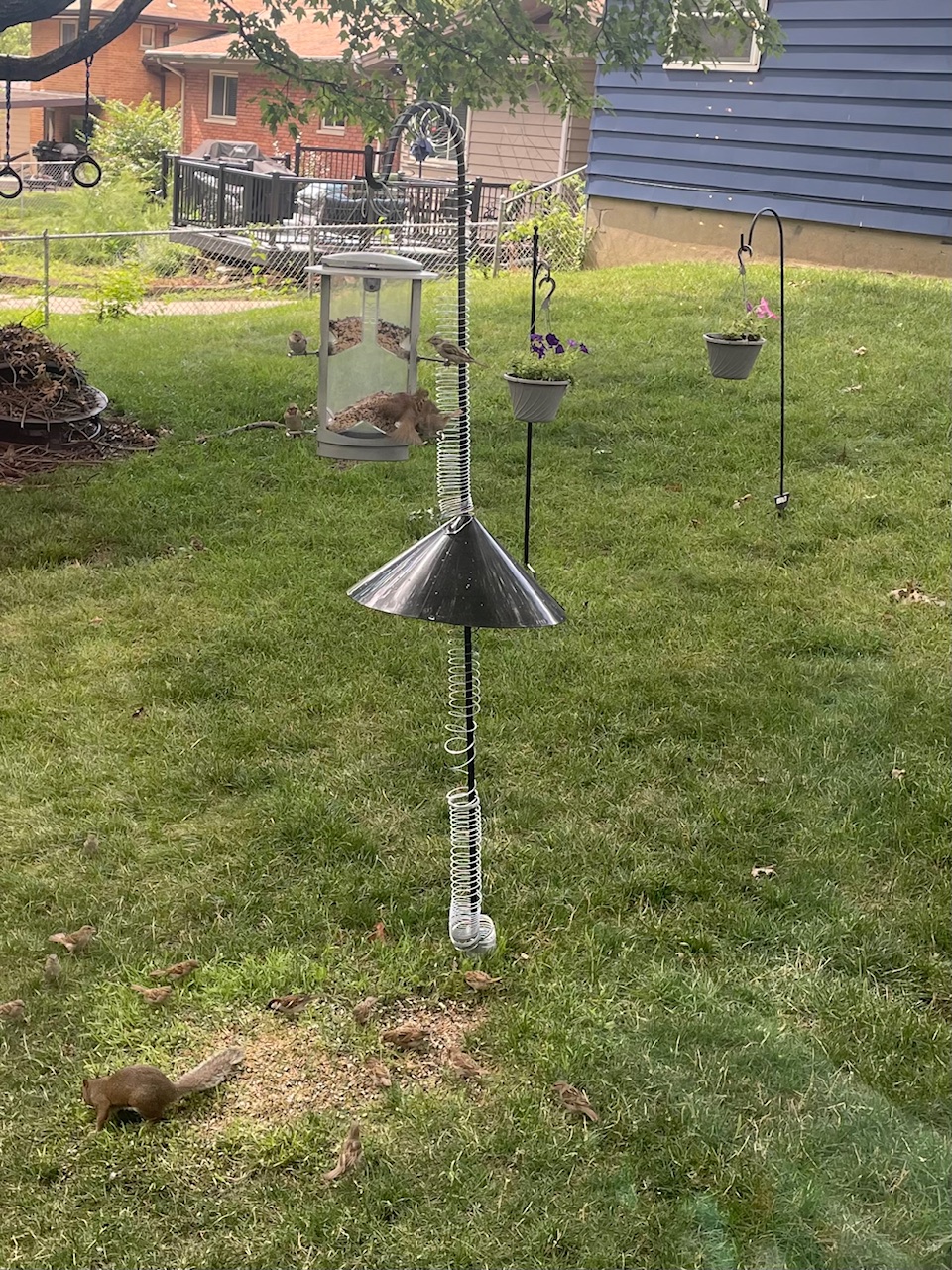
Yes, I did with the help of three slinkies, a 7-foot pole, and a baffle, which is a cone-shaped device that stops the squirrel from climbing up your pole to your feeder. I knew of the existence of baffles, but I had no idea that’s what it was called. But thanks to keyword research and placement by the vendor, I found it. Now my birds can eat in peace.
Note Mr. Squirrel, who is now relegated to picking up seeds from the ground.
Subscribe to this blog and you’ll receive an email whenever I post. To do that, enter your email address and click on the “Follow” button in the lower left-hand corner of the page. You can also follow me on the following social media platforms:
Library marketers want to make sure that their entire community knows everything the library has to offer. That’s a tall order.
Is it even possible? I have some advice about that today that may surprise you. We’ll get into it in this episode.
Plus we’ll give away kudos to a library that created a one-of-a-kind QR code with a complimentary campaign to educate the community about their offerings!
Do you have a suggestion for a topic for a future episode? Want to nominate someone for kudos? Let me know here. And thanks for watching!
Subscribe to this blog and you’ll receive an email whenever I post. To do that, enter your email address and click on the “Follow” button in the lower left-hand corner of the page. You can also follow me on the following social media platforms:




 Super Library Marketing: Practical Tips and Ideas for Library Promotion