Search

Super Library Marketing: Practical Tips and Ideas for Library Promotion

Tag

marketing tools

The Complete List of Free Online Tools to Help You Do Your Job as a Library Marketer

Your work as a library marketer is no walk in the park in the best of circumstances. But it’s especially difficult right now.

I started compiling a list of tools for library marketers before COVID-19 turned our world upside down. Now I want to share them.

Each tool is free. And I hope they make it easier to do your job, wherever you are.

But first, I have a question.

Tools for Writing

Grammarly. Grammerly is a plug-in. It scans what you are writing as you write it. It points out common grammatical mistakes, like subject-verb agreement, article use, and modifier placement. You can also upload documents for scanning. For remote workers or library marketers handling all the work alone, it’s a lifesaver.

Hemingway Editor.  The Hemingway Editor grades your writing for readability and points out the excessive use of adverbs, passive voice, and complex sentences. Use it to improve your social media posts, web content, blog posts, and press releases.

I have a love/hate relationship with this website. I love it because it forces me to become a better writer. I hate it because every time I use it, it’s clear what an awful writer I am without it!

BrainyQuote. A directory of inspirational quotes for web, email, and social media content. This is a great site to visit when you’re feeling creatively drained. They verify all quotes. There are plenty of quotes about literature, books, reading, and learning.

The Secret Language of Books by NoveList. This little guide helps you create engaging emails and social media posts about books. It can help you craft language for genres, mood, and styles. It expanded the vocabulary I used to entice readers to check out our collection.

Disclaimer: I work for NoveList. But, I got my first copy of this handbook last year, before I worked for them, and it changed my life.

Tools for Graphics, Videos, and Photos

Emojim. This website is my go-to source for finding emojis. I search what I need and then hit copy. Then I insert the emoji in my platform of choice. The selection on this site is better than Emojipedia.

Use of emojis on social media platforms like Instagram increases engagement by 48 percent. My own data from my time at my former public library job showed that the use of an emoji in an email subject line increased open rates by as much as 60 percent.

HTML Color Codes. Use it to find the exact HTML color of any section on an existing graphic or photo. Upload a photo or graphic, then hold your mouse over the section you want to match and click. The HTML code will appear in the box.

When I worked at the Public Library of Cincinnati and Hamilton County, I would use this to create a call to action button for my emails that matched the accompanying graphic or photo.

Iconfinder. Iconfinder is a database of almost one million icons. Don’t be fooled by the priced sets at the top of the page. Scroll down to find their selection of free downloadable icon sets. Right now, they have lots of free choices for hand washing, social distancing, and public health.

Trace by Sticker Mule. This tool will let your library remove a background from a picture.

Giphy GIF Maker. This site allows you to easily create animated video GIFs and GIF slideshows with captions.

Lumen5. Lumen5 is a video content creator. There is a free version that lets you create five videos each month. You can choose clips from a standard video library and get access to free music.

RecordScreen.io. This site lets you record your screen and your webcam at the same time. There are no bells and whistles and no other features. It’s great for demos and tutorials you might want to create to help patrons learn how to navigate your digital resources.

Tools for Organization

Otter. This cool app is a transcription service. It lets you record meetings or conversations on your phone or browser and then turn those conversations into notes that can be shared. The free plan lets you record 600 minutes of conversations per month.

Andrew and Pete’s Content Editorial Calendar. Andrew and Pete run a marketing agency in the UK. I had the pleasure of meeting them in person at Content Marketing World in 2018. They are sweet, funny, and smart. They created this free template for download. I know many library marketers who can put it to use to organize and manage their editorial calendar.

URL List. This website is a revelation. It creates one URL for a list of pages. For instance, I entered all the articles I’ve written on Super Library Marketing about COVID-19 before today and created this URL: https://www.theurlist.com/covid19. It also generates a QR code for use on print materials. To keep your URL lists, just create an account. Use this to promote multiple blog articles or programs happening at multiple branches in your library system.

Subscribe to this blog and you’ll receive an email every time I post. To do that, click on the “Follow” button in the bottom left-hand corner of the page. Connect with me on YouTube, Twitter, Instagram, and LinkedIn.  

The Top Eight Free Websites to Spy on Competitors and Get Ahead in the Library Marketing Game!

Eight Free Websites to Use to Spy on Your Library Marketing Competition

Library marketers are asked to make a lot of miracles happen. We are asked to grow circulation, drive attendance at programs, and increase the visibility of our libraries.

To reach your goals for 2020, your library marketing needs to stay ahead of your competitors. Who are you competing with? You’re fighting with independent bookstores, Amazon, Audible.com, video streaming services like Netflix, museums or other local attractions, genealogy websites like Ancestry.com, language apps like Duolingo, retail stores, and co-working spaces for your cardholders’ time and attention.

But don’t be discouraged! You can spy on your competitors and identify their areas of weakness. Then, you can use those weaknesses as an opportunity to promote your library. And you don’t have to pay to find out how to target your competitors.

I found eight websites that will help you gather intelligence on your competition’s website and social media presence. Most of these sites require you to sign up with an email and password for free access but their information is extensive. They also have paid plans (most are very affordable) that give you access to more data. I use all of them.

Here are my top picks to help you spy on your competitors in 2020!

SEMrush: This is my favorite tool. I check it frequently. Their analytics are incredibly robust. You can compare your own website and your competitors’ website in several areas, including keywords, traffic, where your page ranks on Google, what websites are sending traffic to your library’s website, and so much more. The colorful charts will tell you how well your website is positioned on the internet in comparison with your competitors. And it will even show you the cost, in dollars, that your library is losing in traffic to other websites. That’s a great statistic to have if you’re trying to advocate for additional resources for your library’s online presence.

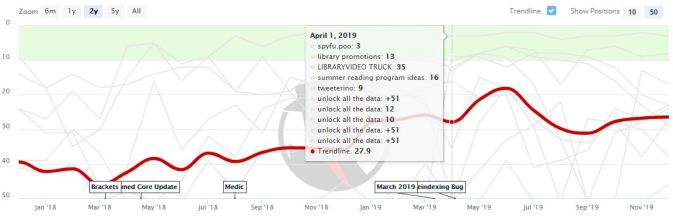
SpyFu:  Use this tool to check how high your competitors rank in SEO keyword search. Get insight on keywords that lead people to your competitors’ site, including any paid keywords they may be using. You can plot the reach of any website on a timeline, giving you an idea of when the site is seeing a spike in traffic. The graphic below shows you what that looks like for this website!

My favorite feature on SpyFu is the keyword analysis. I found out that people searching for “free downloads,” “free download music,” and “free faxing” are most likely to end up at my library’s website. Now I know that I need to make sure the word “free” appears frequently on every page of my library’s website to drive more traffic!

Social Searcher: This real-time social media search engine allows you to quickly pull all recent mentions of a competitor from the major social media platforms and the internet together into one dashboard. You can search for keywords and hashtags to see recently published posts. You can also set up email alerts to keep track of what people are saying about your library, a competitor, or a service, like Audible or DuoLingo.

SimilarWeb: This tool reminds me of Google Analytics, but with prettier graphics. You can see all kinds of useful information about your competitors including where their customers live, how much of their website traffic comes from social media, what keywords people are using to find their website and more. You can also see the top five “interests” of visitors to your competitors’ websites. And of course, you can compare that with your library’s website.

Moz: The site is focused on links and can tell you how other websites are linking to your competitors’ website, and how your competitor is using anchor text to drive traffic. You can also download their reports for free as a CSV file. You can also find out your website’s Spam Score!

Alexa:  This site will show you how your bounce rate and traffic sources compare with your competitors, as well as how much of your audience overlaps with that of your competition. Best of all, Alexa will identify keywords to drive more traffic to your website, based on what people in your area are searching for on Google and Amazon (Alexa is owned by Amazon).

TalkWalker: An alternative to Google Alerts, it lets you search blogs, websites, and news for posts about your competitors. You can have the alerts delivered to your inbox once a day or once a week.

MarketGrader: This free tool from Hubspot grades your website or your competitors on factors like how fast the pages load, keyword ranking, and security.

I did an analysis of this website and found that 30 percent of my traffic comes from mobile devices. That’s incredibly important information because that means that I must make sure everything I do on this website is responsive. This tool also gave me tips on how to increase my SEO ranking and security. All of those tips would be invaluable for my library’s website as well.

Check the Upcoming Events page for a list of webinars and conferences where I’ll be next. Let’s connect! Plus, subscribe to this blog and you’ll receive an email every time I post. To do that, click on the “Follow” button in the bottom left-hand corner of the page. Connect with me on YouTube, Twitter, Instagram, and LinkedIn.   

Part One of the Library Marketer’s Definitive Guide to Creating an Editorial Calendar That Actually Works!

I don’t know about you, but I spend the majority of my day as a library marketer making decisions. I answer probably two dozen or more questions a day from co-workers, staff, and friends about everything from the title of our library’s next blog post to the photo used in an email campaign to the kind of swag we give out at library events. This may be why my poor husband often has to choose the restaurant when we go out to eat. By the end of the day, I’m tired of making decisions!

Library marketing often feels like air traffic control. So how can a library marketer work effectively without losing their ever-loving mind? Organization, my friends. And the best way to get organized is to live and die by a working editorial calendar.

An editorial calendar will define and control the process of creating content, from the creation of an idea through writing and publication. A good editorial calendar will help you decide which content ideas to publish, where to publish, and when to publish. After those decisions are made, the editorial calendar will help you assign tasks and keep up to date on deadlines.

The editorial calendar is literally the heart and soul of the library marketer. Mine is open all the time, as long as I’m at work at my desk. It’s a score card, to-do list, and road map all rolled into one. Without it, I’d be lost.

A number of readers have asked me how they can create an editorial calendar that will lead to effective marketing. I’ve broken it up into two parts. First, let’s go through the steps to setting yourself up for success by funneling your team and tasks into one tool. You need to pick the tool, define your process, and learn how to work your calendar in your role as the project manager.

The Library Marketer’s Definitive Guide to Creating an Editorial Calendar, Part One: How to Pick Your Tool and Use It

Step #1: You need a tool that will help you keep track of everything… and I mean everything! You should consolidate all of your team’s tasks into one place. That means anyone who has anything to do with creating content for your blog, social media, video, email, print, press release, digital signage, or newsletters is on the same tool.

The one tool approach will help everyone to know where each promotion is at any given time. It will also help to maintain a consistent voice and message throughout all of your marketing. Working off the same tool will also maximize the effective use of every piece of content. The one tool approach will also help you, as project manager, to minimize overlap and mistakes.

Set expectations with your team early. Tell them you’ll do your best to pick the right tool for your team. Then make it clear that there will come a point at which everyone will be expected to have transitioned to the new tool.

Step #2: Get your team involved in picking your tool. First, you’ll want to explore how the new system will make their jobs and their lives easier. You can do this by asking your team to list the problems they have right now with content creation. Then, ask them to prioritize them. Which problems cost your team the most time and energy?

How to create an editorial calendar in Google Calendar

Marketing Strategy Bundle from CoSchedule (includes editorial calendar)

Free Excel Spreadsheet-based templates from Smartsheet

Step #3: Enforce compliance. Once you pick the right tool for your team, you have to delete all your other calendars and tools. I’m not being harsh. Your team may need that extra push to use one tool. And it’s likely there may be someone on your team who doesn’t like whatever tool you end up choosing. You cannot allow them to go rogue. In order for this to work, everyone has to use the same base.

Step #4: Make checking your editorial calendar a part of your daily ritual. As the project manager, your job will be to keep everyone on track using your new tool. Some days, this task will take five minutes. Some days it will take longer.

I add promotions into my calendar as soon as I learn about them. I have some promotions planned six months in advance. Advance planning helps me to visualize the promotions I’m doing and make sure everything gets the proper attention it needs. I can still be flexible and change things around as needed. But if I know what my marketing will look like in October during the month of July, I’ll have a better chance of getting everything done in time. That also gives me time to think about what’s coming up and to work on creative and innovative ideas to make those promotions better.

Step #5: Leave plenty of room for data. Measure the results of your content so you can adjust the editorial calendar and improve the effectiveness of future promotions.

Analytics should drive most of the decisions in your editorial calendar. I say most because I believe analytics should be responsible for 75 percent of the decisions. The other 25 percent is experimentation, gut instinct, and a deep knowledge of your audience.

Measuring results has two benefits: It helps you to decide what to do and it helps you decide what to drop. If you find a particular content subject or format isn’t getting the results you want for your library, you have data to back up your decision to drop it. Likewise, when something is working well, you can use data to reinforce your decision to that thing more often!

Read this next!

Part Two of the Library Marketer’s Definitive Guide to Creating an Editorial Calendar That Actually Works!

Subscribe to this blog and you’ll receive an email every time I post. To do that, click on “Follow” button in the bottom left-hand corner of the page. Connect with me on Twitter, Instagram, and LinkedIn.  

A WordPress.com Website.

Up ↑