Infographics are visual marketing pieces that help explain facts and figures or lay out a complex set of information in a way that is easy to understand. They’re an incredibly effective marketing tactic.
Until recently, I thought infographics were a relatively new marketing tactic. I remember deciding in 2013 to create an infographic, the first for my library, to promote a readalikes list. I thought I was so innovative!
Turns out, infographics have been around for hundreds of years. Fun fact: The first known instance of infographics as we know them today dates to the late 1700s with a chart of wheat process and labor wages.
Frankly, I love infographics. They appeal to my visual and creative nature. They work well on social media. But they take a lot of time and planning. So, for libraries with a limited marketing staff, it can seem daunting to create one. But it’s worth it.
Why use infographics in library marketing?
Infographics grab attention. Our brains are hard wired for visuals. The human eye can process 36,000 visual messages per hour. That’s 60,000 times faster than the brain can process text. 60,000 times. Whoa.
A good infographic will trigger a reaction in the human brain, sometimes even before the person consciously realizes and processes that reaction.
Think about what happens to you when you see a photograph of a beloved family member or friend. The photo instantly makes you cry, laugh, or long for that person to return to your life. An infographic can trigger the same kind of emotional response. And emotional responses are the best kind of marketing, because they are memorable.
Infographics can explain complex ideas and convey a lot of information in a simple way that is accessible to many audiences. Libraries deal with a lot of data. Our products and services are sometimes difficult to break down into steps. A good infographic will take facts and figures, difficult instructions, or confusing concepts and present them in a way that everyone can understand.
Infographics will position your library as an expert in a way that words can’t. A good visual will demonstrate your library’s subject-matter expertise. It can boost your credibility. It shows that you care about effective communication with your community. And that builds trust with your visitors, community members, and stakeholders in a way that feels more genuine that fancy words.
Three ways to use infographics in your library marketing
Promote your collection. Use infographics to promote a themed collection series, such as new dystopian fiction, the best book club reads, or mystery authors.
You can recruit your collection development department to come up with a list or, if your library is a NoveList client, you can use the NoveList database to find books within a theme. Use the infographic to drive traffic to those titles in your catalog. This works really well on social media.
Explain difficult information. Create an infographic to help you explain something to your cardholders, like how to download an eBook, how to pay a fine, how your library uses taxpayer funding, or why summer reading is vital to childhood literacy.

Show that your library is fun! Have your content team come up with a great idea for a fun promotion, like 20 signs that you might be a bookworm or how to make a bookmark out of an old book.
How to design a library marketing infographic
Create an outline. An outline can help you to lay out the pieces of the infographic and cut your ideas down to the essential elements.
Decide which points are essential for getting your message across. Is there a story to be told in the data or concept you are trying to convey? Is there a beginning, a middle, and an end to that story?
Once your outline is set, your other design elements will become clear to you. What is your theme? Will you use charts or graphics, lists or numbered elements, photos, shapes, or icons? Write those decisions down next to each section in the outline to help you organize your thoughts.
Plan your layout. You’ll want to make sure all the elements of your infographic are balanced. But that doesn’t mean everything has to be symmetrical!
For instance, if your infographic is explaining something that has a lot of considerations at the beginning of the process and works toward one end result, you could consider a funnel-design: making the number of visuals heavy at the top and lighter as the eye moves down.
If you are explaining something on a timeline, you can arrange your elements evenly from top to bottom but not directly across from one another.
It’s good to sketch your layout out before you go into a design program. This saves time in the actual process of creation and gives you space to make changes at a stage where it’s easy to fix.
You will also want to plan out any places in your infographic where you might need a visual break, like a solid block of color or a line or shape. Finally, be sure to leave white space. You want your infographic to look uncluttered.
Decide your color scheme. A good rule of thumb is to design your infographic with two or three main colors. Then choose a few minor color accents.
The subject of your infographic will have a bearing on your color decision. Some colors work better for explaining data, and some work better for explaining processes.
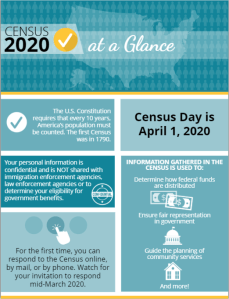
Take your branding into consideration when you decide on your color scheme, to avoid clashing with your logo.
Pick your fonts. You’ll want to make sure your type is accessible to all audiences. Avoid script-type fonts. Keep in mind that an infographic is visual, and the amount of text will be minimal, so the font you choose must compliment the design elements of the infographics.
Limit your use of fonts to just two or three types. It’s good design to pick a font for the header, one for the main body text, and a third for the complimentary or subtext.
Write a headline that hooks your target audience. As you would with emails or blog articles, the headline or title of your infographic will need to convey the general theme of your visual and catch the attention of your potential audience. Be descriptive and catchy. The title should be shorter than a headline you may use for other content—only a few words long.
Subscribe to this blog and you’ll receive an email every time I post. To do that, click on the “Follow” button in the bottom left-hand corner of the page. Connect with me on YouTube, Twitter, Instagram, and LinkedIn.



 Super Library Marketing: Practical Tips and Ideas for Library Promotion