Search

Super Library Marketing: Practical Tips and Ideas for Library Promotion

Category

Email Marketing

The Four Library Marketing Myths That Need to Die RIGHT NOW!

One of my staffers wrote a post for our Library’s blog recently about common library myths. You can read it here. That post got me to thinking about library marketing myths, and how library marketing professionals can “bust” them. Here are my top four choices.

My library marketing video/blog post/article needs to be short because people will only consume “snackable content.” This one is really prevalent for all kind of companies and institutions, and it’s so, so wrong!

At the beginning of 2019, I started to write longer blog posts. Did you notice?? I went from 500-700 words to between 1000 and 1500 words.

And what happened? My site stats jumped. Already in October of 2019, I’ve exceeded the number of views and visitors for the site in 2018. I’ve had twice the number of people reading each post as I did in 2018.

When you write long form, more people will read your posts. People stay on the site longer. They read multiple posts. This is also true for longer blogs written for our library’s website.

I made the switch to longer posts because I’d read a lot of research about long form content and its benefits. It’s not easy. I spend more time on each post. I have to do more research. I have to be careful not to add words or sentences just to fill this imaginary word count goal in my head. It’s sometimes difficult. But it’s worth it.

The smart people at a company call serpIQ did a study of the average length of the content in the top ten results of search queries. The company found that the top-rated posts usually were more than 2,000 words long.

If your post is written well, helpful, educational, interesting, and builds interest or suspense, people will stay on your site longer. This will boost your library’s web page rankings in Google and drive more traffic to your site. Long form content also builds trust in the authority of your library. There’s no downside to longer pieces.

The only exception to this myth is email. The text inside mail marketing messages should be short, because evidence shows people will not read emails that are longer than 200 words (sorry, fans of the newsletter). Your short email can and should link to a longer piece but the actual text body itself should be 50-200 words max.

A high open rate is the best way to tell that my library email marketing is successful. So many libraries focus on high open rates for their emails. It’s sometimes hard to contradict that measure. But I’m going to do it because I want your work to matter. And if your open rates are high, you may still be failing at email marketing. Hear me out.

Open rates do mean something. They are a sign of customer loyalty. A high open rate means that your cardholders are eager to see what you’ve sent them. And that’s good. You are writing compelling email subject lines (Good job, you!). You have a loyal and eager audience.

But it’s what happens AFTER your cardholders open your email that counts. If your click-thru rate is low, you’ll know the content you are sending to your cardholders isn’t what they want.

The higher the click-thru rate is, the more excited I get. It means that my cardholders opened an email, saw something they liked, and acted!

Most of the time, my library emails direct cardholders to do one of two things: click a link for a specific item in our collection or go to the event calendar where they can register or put an upcoming event on their calendar.

If a cardholder takes one of those actions is a huge victory. It gives me data about what that particular cardholder is interested in. And I can use that information to craft future emails that are also compelling for that cardholder.

As happy as I get over a high email click-thru rate, a high conversion rate is the most accurate way to measure email effectiveness. It is the percentage of people who take an action after clicking through.

For example, let’s say 100 people click-through to look at a book I promote by email. If 50 of those 100 people put the book on hold, my conversion rate is 50 percent.

Conversion rate is the gold standard for the success of any email campaign. Your goal should always be to get people to act!

I need to grow my Twitter/Facebook/Pinterest followers. I’m not saying that a huge social media following wouldn’t be nice. But in the age of algorithms, it’s not as important as it once was.

What you really want is a large audience of ENGAGED followers. You don’t just want people to see your posts. You want them to compel people to take an actual: like, share, subscribe, comment, post emojis, and generally jump up and down virtually.

It’s kind of like speaking at a conference. You might be thrilled at the prospect of talking to a huge group of people. But it’s disheartening if half of your audience is yawning or looking at their phones. It’s much more meaningful to speak in front of a small room of people who are riveted by what you have to say.

I don’t care how many followers my library has on any social account. I want to see people engage with our content. Focus on actions and not the number of followers.

If you need to tell your cardholder something, just make a sign. No one reads signs. Seriously, we just don’t. I lead the team that makes signs at my library FOR A LIVING and I don’t read them.

Too many signs in a branch, particularly in a small location, can create clutter and confusion. And too much signage can annoy your cardholders, particularly if most of your signs are bombarding them with marketing messages.

Just as white space works to create breadth and depth for a website or a graphic, well-spaced signage in a branch creates flow. About 75 percent of the signs in your library locations should be wayfaring only, directing cardholders to important service points in the building. The other 25 percent can be selective marketing–promoting services and items that are of interest to your cardholders.

Don’t rely on signs to convey everything you want to tell the customer. Hire staff who are willing to speak with customers and show customers where items are located.

Do you have a myth you encounter in your work? Let me know about it, and how you’re busting it in the comments.

Subscribe to this blog and you’ll receive an email every time I post. To do that, click on “Follow” button in the bottom left-hand corner of the page. Connect with me on YouTube, Twitter, Instagram, and LinkedIn.
Frustrated with Your Library Marketing Newsletter? Here’s Why You’re Not Getting the Results You Want AND How to Fix It

I hold a controversial opinion. Newsletters are an ineffective tool for library marketing.

I totally understand why libraries create them. Our customers are a wide and diverse audience and our budget is limited. Newsletters are an easy and efficient way to get information to our audience.

But many libraries are frustrated by the lack of demonstrable results from their newsletters, both the print and email versions. And there’s a reason you can’t get good results from a newsletter.

The mistake is: You’re sending the same message to all of your cardholders.

It’s understandable. It feels like the natural thing to do. Your library has great stuff and you want everyone to know about everything.

The problem with that approach is that your cardholders are individuals. One message never fits them all. The needs and interests of your cardholders vary greatly.

I’m not suggesting you ditch your newsletter. By transforming the way you approach your current print and e-newsletter, you can make it actually work! The trick is to make changes that increase your newsletter’s value by refining the message.

Tips that work for both print and e-newsletters

Give your cardholders LOTS more of what THEY want. I know you’ve been keeping track of attendance at events and holds or checkouts of books you promoted in your previous newsletters. If you notice that your newsletter audience turns out for a particular type of event or that they like a particular genre of books or collection items, put MORE of those in your newsletters.

Library marketers are often pressured to promote what their co-workers or bosses think is interesting. Or worse, what their co-workers think the audience NEEDS to hear.

I’ve actually had to gently explain to my colleagues that, while reading classic authors like Ernest Hemingway and Jane Austen are good for the brain, most people are not looking for an intellectual challenge when they reach for a book. It’s like getting kids to eat their vegetables. Veggies are healthy, but if your child doesn’t like them, they’ll clamp their mouth shut and refuse to take a bite.

The newsletter audience is the same. You can’t make people attend events or read books because they’re healthy or intellectual. Library marketers sometimes have to be an advocate for their audience; you have to be persistent in your defense of what your cardholders want.

At my library, we pivoted our newsletter to focus more on our the parts of our collection that our cardholders like. We had the data to back it up. We know that our cardholders really love content about coding and coding classes. We know they love mystery books. We know they love workshops about writing and publishing their own books. We learned all of these nuanced preferences by carefully measuring our audience’s response to marketing in all areas. Patterns emerge. And now, we do a lot of promotion around these areas because we know, for a fact, that our cardholders love this kind of content.

Make your content helpful, not promotional. Your cardholders are regularly bombarded with offers, sales, and promotions, both in their inbox and in your mailbox. To get people to read your newsletter, the content needs to be interesting, useful, or helpful.

Hundreds of studies and surveys about consumer behavior show us that content that is educational or entertaining gets better results that content that is promotional. So how can you promote something while being entertaining or informative? Content marketing in the answer.

Content marketing is a strategic approach focused on creating and distributing valuable, relevant, and consistent content to attract and retain a clearly defined audience–ultimately, to drive profitable consumer action.

Content marketing breaks through the noise and the clutter by providing compelling, useful information for your cardholder–any type of information. It addresses whatever pain points your cardholders have. It positions your library as the go-to place for information. It builds trust.

And through content marketing, your library gets a better and deeper understanding of your cardholders. You can use that understanding to do a better job of addressing your cardholders’ needs. It’s a constant circle of giving and it carries more weight for a longer period than a traditional newsletter promotion.

Stop thinking of your publication as a newsletter. Start creating news magazines. Most library newsletters that come to my inbox or mailbox are long and contain a ton of text and images. There isn’t much white space and scanning them is difficult, because there is so much to scan.

At my library, we increased the effectiveness of our print newsletter by transforming it into a magazine. We trimmed it from 16 to 12 pages. My graphic artists started to give the publication a magazine feel in layout, using bolder visuals and shorter, more engaging articles. We left some white space. We changed the balance of the articles from 100 percent promotional to 50 percent informational and 50 percent promotional (even I have to fight the battle with my library to be less overtly promotional!).

What happened when we made these changes? Our news magazine became a must-read. People started asking when the next issue would be out. We had to order more copies. Library staff and outside partners vie for space in the publication. The news magazine is popular!

Tips specific to e-newsletters

Keep the text short and scannable. Your e-newsletter is a touch point, not the end of a conversation. Readers should get enough to be left with the feeling of wanting to know more about a particular subject. Drive your recipients to your website or another platform where they can get more information with compelling text and enticing calls to action.

Make it easy to share your e-newsletter. Include social share buttons that link directly to your library’s social pages.

Segment your e-newsletters. You can segment your e-newsletter in a number of ways… by age, by interest, and by location. This means you’ll need to create more than one e-newsletter. But each one will be targeted to a specific audience, which increases effectiveness. This step will be more work for you but it’s worth it for better results.

By targeting your message, you are more likely to say something that matters significantly to your cardholders. That individualized message makes them more likely to take an action, which makes it more likely that your newsletter will be successful.

More help for library marketers

How the Best Newsletters Get-and Keep-Reader’s Attention from Content Marketing Institute

NoveList’s Guide to Best Practices for Library Newsletters

7 Tips for Creating Engaging Newsletters from Mailjet

Great examples of targeted library newsletters

Dallas Public Library’s Young Black Readers Newsletter

Indian Prairie Public Library’s DVD Preview

Subscribe to this blog and you’ll receive an email every time I post. To do that, click on “Follow” button in the bottom left-hand corner of the page. Connect with me on Twitter, Instagram, and LinkedIn.


The Library Marketing Show Episode 10: Why Email Marketing is the BEST THING EVER for Libraries

Library Marketing Show Episode 10

Watch Now

Library News: IFLA’s new Idea Store! I’m obsessed. It’s a great place to exchange ideas. Check it out here.

Reader question: Leigh of Pikes Peak Library District asked: I’d like to talk about how to convince the powers-that-be that email marketing is the best thing ever. That email is not dead and ROI is high. That automatic opt-in upon card signup is a great option, and that people expect to be catered to. How to segment and the welcome campaigns…all that good stuff!

I talked about the value of email marketing and made a personal plea to senior leaders to let library marketing professionals do email marketing! Here are some more posts about library email marketing that you’ll want to read.

Be Quietly Relentless! A Guide for How to Win Senior Leadership Support for Your Library Marketing Ideas

Email is Not Dead! Here are Eight New Ways to Help You Get the Best Results

Kudos: To the Tulsa Public Library for their My Neighborhood Library video, which showed the value of libraries AND made me want to move to Tulsa! It had energy, it evoked emotion, it did exactly what it was supposed to do… it made me feel connected to Tulsa and I’ve never been there! Watch it here.

Stay in Touch

Have an idea for the next Library Marketing Live Show? Submit it now.

Subscribe to this blog and you’ll receive an email every time I post. To do that, click on “Follow” button in the bottom left-hand corner of the page. Connect with me on Twitter, Instagram, and LinkedIn.  


Email is Not Dead! Here are Eight New Ways to Help You Get the Best Results With Your Library Email Marketing

I have a thing for email marketing.

I think it’s fun. I like trying to figure out all the pieces. Which subject line is best? To emoji or not to emoji? How much text? What should it say?  What kind of photo or graphic should I use? What’s the best call to action? Who should I send it to? On what day and at what time?

I love experiments. I love sending the message and then watching the results. How many people opened it? More importantly, how many people clicked on my call to action? MOST IMPORTANTLY, how many people did the thing I wanted them to do?

Maybe I just like convincing people to do stuff.

Email is not dead, at least not for libraries. People want to hear from us. They love free stuff and that’s basically all we have to offer! I send tens of thousands of emails a week to my cardholders (I live in a large county service area with nearly a million residents). My unsubscribe rate is zero percent. No kidding.

Email marketing truly is the most effective method of digital promotion for libraries. I use it whenever I can at my library because it gives the best return on my investment of time and money.

And because it’s the most effective digital tactic at my disposal, I spend an awful lot of time researching email marketing. I read a ton of blogs. I listen to a lot of podcasts. I comb surveys for insights that will make my emails better.

I’ve started a document where I keep a bunch of statistics and insights gleaned. I realized that I needed to share these insights with you. Email marketing could be your most valuable asset too. So here are the eight newest things I’ve learned about email marketing that will improve the work you’re doing at your library.

How cardholders look at your emails

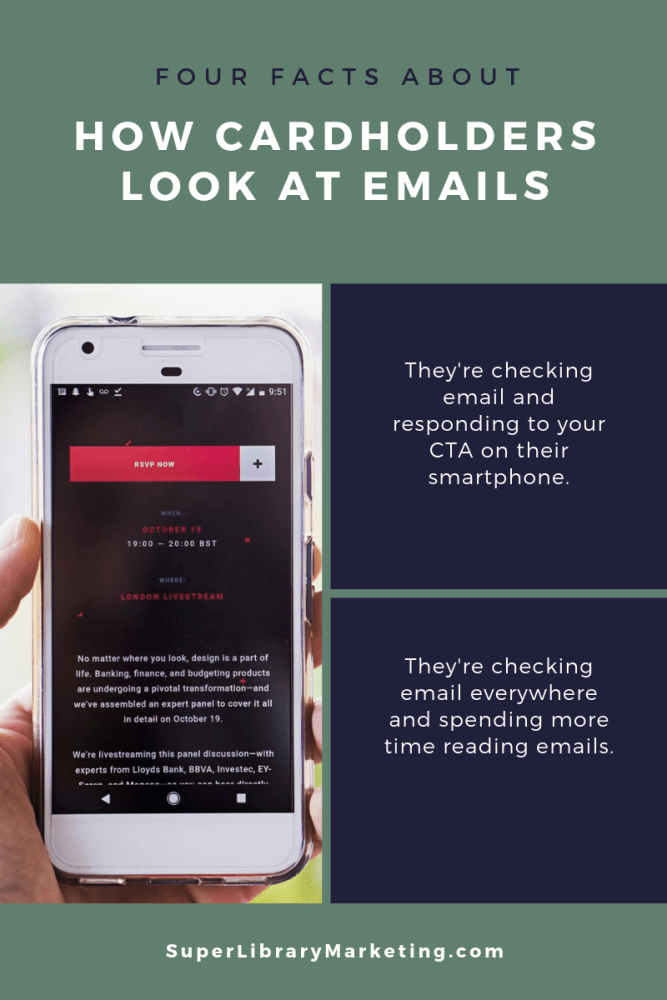
You’ve heard it before but I’ll say it again. You must make sure your emails are mobile-friendly and responsive. About 3 in 5 consumers check their email on the go. 75 percent of Americans say they use their smartphones most often to check email. (Blue Corona)

And you must assume your cardholders will use their phones to respond to your email call-to-action. 62 percent of email opens occur on mobile. Only 10 percent occur on desktop. That’s huge! (Adestra)

Your cardholders are checking their email literally everywhere. People admit to checking email while watching TV, in bed, on vacation, in the bathroom, while walking, during meals, during commuting, while talking, while working out, while driving, and while at a formal ceremony! (Adobe)

Your cardholders are spending more time reading emails. In the last decade, the amount of time people spent reading an email actually increased by 7 percent, to 11.1 seconds. (Litmus)

How to design the best library email

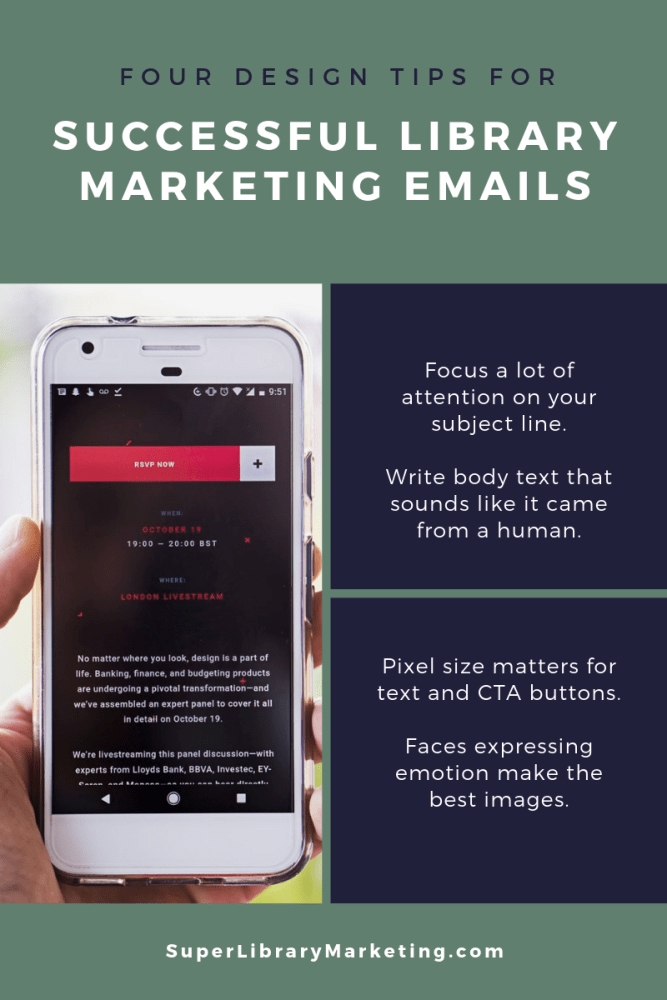
Your subject line is the most important part of your email. It gets your cardholders in the door, so to speak. Focus on sentiment by using emotional words. Use different words for different audiences. The subject line for a message you send to teens will be completely different from the message you send to parents. Make it simple and easy. However, length doesn’t matter anymore, so you can make your subject longer if you need too!

Write like a human and make sure everyone can read your text. For the text, speak conversationally. No industry-speak (words like periodicals are out!).You don’t have to convey all the information about your product or service or collection item in the body of the email. Get to the point and drive users to your website or another platform for more information. Avoid multi-colored fonts. Use fonts that are accessible, like Arial, Helvetica, Lucida Sans, Tahoma, and Verdana. (Bureau of Internet Accessibility).

Make your email design hard to ignore. Use a one-column layout so people can scroll easily. Make the text large! Headlines should be no smaller than 25 pixels, body text should be no smaller than 18 pixels.  Call to action buttons can be pretty huge– anywhere from 44 x 44 pixels to 72 x 72 pixels.

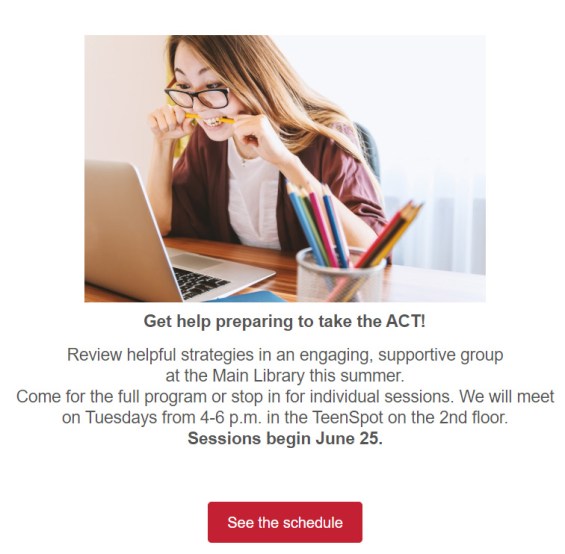
Images matter. Photos of real people, especially faces with emotional expressions, are best. But don’t be afraid to use gifs too!

Learn more about email marketing for libraries

The Step-by-Step Method for Figuring Out the Best Time to Send Library Marketing Emails and Why You Should Never Stop Experimenting!

The Tiny Little Mistakes That Ruin Your Library Marketing Emails AND How to Fix Them!

This Advice Will Boost Your Library Marketing Email Click-Thru Rates

Don’t forget to join us for the LIVE LIBRARY MARKETING TALK ON INSTAGRAM every Tuesday at noon ET. We’ll talk about library marketing topics for about 15 minutes each week. My handle is Webmastergirl. You can email questions and topic suggestions ahead of time. Just fill out this form.

And check out these upcoming events and webinars where we can connect and discuss library marketing. Registration links included.

Subscribe to this blog and you’ll receive an email every time I post. To do that, click on “Follow” button in the bottom left-hand corner of the page. Connect with me on Twitter, Instagram, and LinkedIn.  

The Step-by-Step Method for Figuring Out the Best Time to Send Library Marketing Emails and Why You Should Never Stop Experimenting!

I spend a good portion of my day as a library marketer trying to figure out how my cardholders live their lives. What do they do? When to they do it? What parts of their life are difficult? What parts are enjoyable? When do they have free time?

We do know a lot about the people who use the library, thanks to our own library surveys and great organizations like Pew Research Center. But you can also figure out what your cardholders are doing by email marketing experimentation. And your findings can increase the effectiveness of your marketing.

On the Library Marketing Live Instagram show, Dari from Cook Memorial Public Library District wanted to know how to figure out the best time to schedule marketing email to different audiences. The answer, in general terms, is between 6 p.m. and midnight. But I want to dive a little deeper into how I came to this conclusion and why this might NOT be the case for the people using your library!

If you’re just starting out with email marketing, check with the experts. There are a lot of companies (mostly email marketing software companies) which publish research on the best time of day and the best day of the week to send marketing emails, plus a bunch of other data points. So, start by gathering the latest research from these companies. Some of my favorites are Hubspot, AWeber, and Convertful.

Think about the daily life of your cardholder. If you are sending an email to a group of people who use a particular branch, or who are in a particular age group, try to imagine what they do all day. This generalization method will help you identify points in the day in which your target audience might have time to check their email.

Here’s an example: When I’m sending emails to parents of school-age children, I avoid 7 a.m. to 9 a.m., when parents are usually racing to get their kids ready to go to school. I also avoid 2:30 p.m. to dinner time, because many parents are picking up their kids, running them to extra-curriculars, and tackling homework.  I send marketing emails very early in the morning, like 5 a.m., so they are sitting in their inbox when they wake up but before their kids are up. I also send them after 8 p.m. when most school-age kids are in bed.

When I send emails to teenagers, I never, ever, ever send them in the morning. I exclusively email teenagers at night, and the later the better. That’s because most teens don’t have time to relax until 9:30 p.m. or later, after homework and after-school activities. They will likely check their email right before they fall to sleep at night, and they’re more likely to act on email in the late evenings.

Experiment. Send emails for a 3-6 months period of time. If you’re just starting out, try all hours of the day and night. Keep meticulous records of the results including open, click through, and conversion rates on all your emails.

After your allotted experimentation time, comb through the data and figure out which times of day resulted in the most click-throughs and conversions. Those are your optimum times to send emails! Focus most of your email scheduling on your proven best time of day.

And never stop experimenting. Start another experimentation period of 3-6 months, and then re-analyze data. If you notice a decline in click-through and conversion rates, go back to the drawing board.

My latest six-month analysis shows the best time to send email is between 6 p.m. and midnight, for all age categories and for all card types. This was not always the case. Two years ago, I could send my emails any time of the day EXCEPT between 7 a.m. and noon. But, at the end of 2018, that changed and the only emails that did well were the ones I sent at night.

Why did the effective time change? Because people’s lives change. Your cardholder base changes. The way that email gets delivered by various email providers changes. All of these factors mean that you’ll need to be in a constant state of experimentation. Don’t get married to any one time of day. Have an open mind and be ready to change your email scheduling strategy when the data tells you it’s time to change.

The most important thing is to have good content. If your emails contain stuff that your email audience wants to know about, they will engage with them, no matter what time of day it is. Try and keep your emails short. Focus on a few lines of really compelling text and one or two clear calls to action.

Bonus controversial opinion: I am not a fan of email newsletters. They usually contain too much information and too many calls to action. Their subject matter is usually too broad for their audience. I know a lot of us have to send them because senior leaders love them. But they aren’t an efficient use of email marketing. It would be better to take each section of your newsletter and send it separately to a targeted audience.

Don’t forget to join us for the LIVE LIBRARY MARKETING TALK ON INSTAGRAM every Tuesday at noon ET. We’ll talk about library marketing topics for about 20 minutes each week. My handle is Webmastergirl. You can email questions and topic suggestions ahead of time. Just fill out this form.

Subscribe to this blog and you’ll receive an email every time I post. To do that, click on “Follow” button in the bottom left-hand corner of the page. Connect with me on Twitter, Instagram, and LinkedIn.  

The Tiny Little Mistakes That Ruin Your Library Marketing Emails AND How to Fix Them!

NEW LIVE LIBRARY MARKETING SHOW ON INSTAGRAM! I’ve decided to try a new thing! I’ll be doing a live Instagram Q&A and discussion about Library Marketing. The sessions will be every Tuesday at noon ET (10 a.m. Central and 9 a.m. Pacific) beginning Tuesday, June 25. Join me to talk about library marketing topics for about 20 minutes each week. My handle is Webmastergirl. You can email questions and topic suggestions ahead of time. Just fill out this form below. See you there!

← Back

Thank you for your response. ✨

I get a lot of library marketing emails. I love to see what other systems are doing. So, I go to their websites and I see if I can get on their mailing lists! It’s fun and it helps me to find new things to promote and new ways to communicate with my audience.

I also get a first-hand look at some of the small boo-boos that other library marketers make in their emails. Email is hard. I’ve been doing email marketing for so long (feels like forever!) that I have made all of these mistakes myself! And I love email marketing, so I’m weirdly obsessed with learning about it. Some of the positive text and design choices that work for library marketing in other promotional pieces, like posters, flyers, websites, and blogs, do not work in email marketing.

The good news is that these little problems are easily fixed! Tiny adjustments in the text and design of your email can improve your click-through rates and effectiveness. Check this list against what you’re doing now and start reaping the benefits of improved email design!

Problem: too many images: A clean design is crucial to engagement. Too many images or too much text is off-putting to your email recipient.

The most common email programs like Yahoo and Outlook will NOT automatically download images. In fact, only Gmail downloads images automatically. With all other providers, the email recipient receiver must consciously click a prompt in order to download an image. That means if your image is conveying most of the key message in your email, your receiver likely won’t see it.  They will miss the information and the call to action, and your email is useless.

Solution: Create an email that is mainly text-based. I have found an 80-20 mix works best: 80 percent of my email is text, 20 percent is image-based. The image I use compliments the text. Its purpose is to create emotion or set the mood of the email. It’s there to inspire. It doesn’t convey key messages and it doesn’t contain the call to action.

Problem: too much text. An email that contains several long paragraphs of information is off-putting to recipients. It gives the impression that your email will take a long time to read.

The email scheduling platform Boomerang studied results of about 20 million emails sent using their software. They found that the optimal length of a marketing email is between 50 and 125 words. A study by Constant Contact of more than 2.1 million customers found emails with approximately 20 lines of text or 200 or so words had the highest click-through rates.

Excessive text can also send negative signals to spam filters. Too much text added to excessive punctuation or large images could keep your emails from ever arriving in an inbox.

Solution: Limit your email text to 200 words or less. The recipient should be able to read all the information in your email in about 15 seconds. If you have more information to share, use your call to action to indicate that there’s more to know about your subject. Then send your recipient to a landing page where they can get all the information they need.

Problem: Text that is too small. Keep in mind the growing number of people who will read your email on a mobile device. You want to make sure they can actually see your words. An 11 or 12 point font size is too small to be seen clearly on a screen.

Solution: Increase your text size.  Email font should never be below 18 point in size.  You should also use the bold option to make the most important information stand out.

Problem: Wishy-washy calls to action.  A compelling call to action is one of the best ways to increase the click-through rates of your library marketing. Some library marketing emails also contain too many CTAs.

Solution: Use positive, active language in your CTA. “Register” “Read This Book”, “Learn More”, “Join Us”, “Donate”, and “Get Started” are some of my favorites. I put my CTAs in a square red box that looks like a button to compel my recipients to click on them. I embed the CTA in my image as well and use the “alt text” to convey the CTA in case someone’s eye skims the email. I try to keep my CTAs to one per email.

One image, with the main text in bold at 18 point found. A few sentences and a clear call to action.

Problem: Ignoring mobile responsiveness.  Mobile opens accounted for 46 percent of all email opens according to the latest research from Litmus. If your emails aren’t optimized for mobile, you are missing a huge potential audience, particularly women and young people.

Solution: Optimize your emails for mobile to make them responsive. Most email marketing programs offer mobile responsive templates. My library uses Savannah by OrangeBoy. We switched to all responsive templates in January of this year. I’ve seen a nine percent increase in click-through rates. I count that as a win!

Problem: No system for proofing your emails in different kinds of email boxes. Your email design might look great in your creation software. But if you send it without testing it, you may find that your email becomes a kind of monster creature! It may show up a a jumbled mess of images and text. This happens because every email inbox will convert your email differently.

Solution: Test your email to make sure your message displays correctly for your recipients. Find people that you trust you have different providers… someone with Gmail, someone on Outlook, someone on Yahoo, and so on. Send them the message and ask them to check for warped images, font problems, and extra spaces.

Subscribe to this blog and you’ll receive an email every time I post. To do that, click on “Follow” button in the bottom left-hand corner of the page. Connect with me on Twitter, Instagram, and LinkedIn.  

How to Hook New Cardholders and Make Them Loyal with Email

We talk a lot about emailing our cardholders with information about new products, services, and collection items. But you can also use your email list in a powerful way to reach people who have just signed up for a library card.

Most libraries take a minimalist approach to “on-boarding” a new cardholder.  Once a person fills out a library card application, we hand them a card, a welcome brochure, and send them on their way. We’re friendly and we’re genuinely excited to welcome them to our system. But we make a mistake that’s common for a lot of businesses and organizations. We know our system inside and out and we often forget that our new cardholders know nothing about what we offer. We assume they can find their way to the things they need.

It’s important to help those cardholders learn to navigate the behemoth number of resources and items available at the library. A solid on-boarding campaign retains new cardholders and turns them into lifelong loyal users of the library. The first 90 days of a new library cardholder’s experience is crucial to determining their feelings of connection and loyalty to the library.

It also makes good business sense. Studies show it costs five times as much to gain a new customer than it does to retain them. A library marketer practicing good stewardship will want to do their best to keep new cardholders coming back to use the library.

The most effective way to on-board a new cardholder is through email marketing. Many libraries create a campaign with specific emails sent to new cardholders at a pre-determined pace. Those emails slowly introduce them to new features and inspire them to try out all the library has to offer. It’s easy to do this using some mail systems, like OrangeBoy and MailChimp.

My library has a 90 day on-boarding campaign set to run automatically through OrangeBoy. Creating it was a bit of process. But the effort was worth it. In addition to retaining customers, the on-boarding emails reduce unsubscribes for future targeted promotional emails. Here’s how we did it and what we learned about doing it well.

First, make a list of the services, events, and collection types that get the most use at your library. You’ll want to include information about the most popular features you offer in your emails to new cardholders.

Then, make a list of the services, events, and collection types that are interesting or unique to your library but don’t get a lot of use. These are the gold nuggets of your on-boarding campaign. You’ll have the attention of your new cardholder. The relationship is fresh. Why not use that to showcase the hidden treasures at your library.

Finally, create an outline of your campaign, mapping out each message, when it will be sent, and what it will say. Look at the two lists you’ve created and narrow your focus. Try to promote no more than four things per on-boarding message. You don’t want to overwhelm your new cardholder. Rather, you’ll want to introduce people to the library in small doses. Pick a theme for each message with a specific call to action. Keep the language simple, conversational, and free of industry jargon.

Create, test, and release the messages. This part took me nearly as long as creating the plan did! But you’re almost there.

Track results. Of course, you’ll want to use a Google URL tracker or Bitly link to see which services and items get the most interest from your new cardholders. You can also track unsubscribe rates, and if you have the ability to divide cardholders into clusters, you can see where your new cardholders land after they finish the on-boarding process.

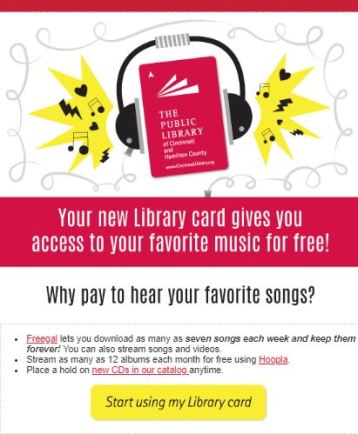
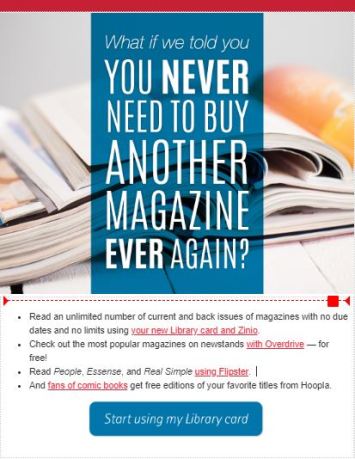
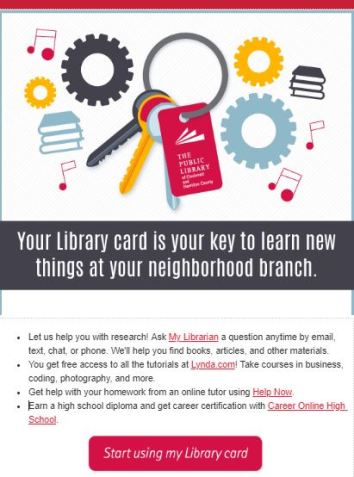
Here are a couple of examples of my library’s on-boarding emails so you can see what we do.

How do new cardholders react to these messages? They definitely don’t hate them. Our unsubscribe rate is 0%. We’re a large system and we’ve sent these for several years to thousands of new cardholders. Over the course of our campaign, we’ve had a couple of hundred people unsubscribe.

We send six emails over 90 days. The first email gets a lot of engagement, which is not a surprise.  The fifth email about using your neighborhood branch (see the image above) is the second most engaging email for us. Overall, about half of the new cardholders we sign up end up becoming loyal library customers. Most use our computers but the rest are checking out physical and digital items or using our MakerSpace.

If your library is doing something to on-board cardholders, I’d love to hear about it. Please take this poll and tell me about what you are doing in the comments.

Subscribe to this blog and you’ll receive an email every time I post. To do that, click on “Follow” button in the bottom left-hand corner of the page. Connect with me on Twitter, Snapchat, and LinkedIn. I talk about library marketing on all those platforms!


Teens Read Emails. Here’s How To Make Sure They Notice Yours!

I live with two teenagers. They love their mobile devices. They are avid users of social media. They also check their email often.

You might think that’s a fluke. For a long time, I did! I thought that my nagging insistence that was necessary to check their email accounts was paying off. I was a parenting genius! But over the course of the past year, I’ve discovered that most teens are reading their emails… even the teens who aren’t living in my house. So, I’m not a parenting genius. But I can see a huge opportunity for library marketing.

Research backs up my observation. The Pew Institute 2018 study of teens, social media, and technology found that 95 percent of teenagers have access to a smart phone. About 45 percent report they’re using that phone nearly all the time. Email marketing agency Adestra surveyed teens and found that 78 percent use email, while nearly 53 percent admit they buy things from marketing emails! Adestra’s survey also found that more than 67 percent of teens prefer communications from brands to come in email form, especially from a brand they love.

I’m not surprised by this statistic, because it bears out in my work. Every month for the past year, I’ve sent a librarian-recommended book title to teens in an email. Adults get one too. In 2018, the average click-thru rate for the adult email was five percent. But our teen cardholder email had a consistent click-thru rate average of 35 percent.  Even more exciting, the teen title increased in circulation between 300 and 400 percent during most months in 2018. In comparison, the adult title increased in circulation by 150 to 200 percent.

You can make emails work for your teen audience too. I understand it’s intimidating, particularly if you don’t live with teenagers. They can seem like otherworldly creatures. But they are just people, too. Here’s what I’ve learned about emails and teenage cardholders.

Send consistently good content to teens. Your teen cardholders are some of the most dedicated library users in your service population. They love you, and they want to hear from you. Use that to your advantage!

Teen cardholders typically are readers, so send them a monthly email to give them a heads-up about the newest items in your collection. Ask one of your teen librarians to pick out some titles, if you’re not comfortable doing it (I’m certainly not!).

You can also email teens to promote events but be picky. My experience is that teens respond to emails about events like coding classes, free summer camps, and anything involving food. They ignore emails about recurring programs, movie nights, crafting events, or homework or test prep sessions.

Don’t send too many emails. Resist the temptation to send email messages several times a week to your teen audience. I try to only send two or three emails a month to my teen cardholders, no more. So, when they see an email from my library, they know it’s important.

Watch formatting and check every email on a mobile device. Don’t include a bunch of links in your teen emails–to them, it looks like spam. Adestra’s survey of teens and email found that teenagers are more likely to unsubscribe when they see badly formatted text, broken links, or emails that just don’t look clean on their mobile devices. Include no more than three links in each email. Keep the text short. And check every message on your mobile device, because that’s where most teenagers will read their email.

Use emojis, texting language, and puns sparingly–or not at all. This advice feels counter-intuitive. Don’t we want to write in teen’s language? My answer is… no. Teens want to be treated like adults. Frankly, they find it “cringey” when an adult tries to sound like a teenager by using slang or texting language. Resist the urge.

You can appeal to teens by helping to relieve their pain points. For instance, I recently sent an email promoting a new book in our collection that was getting a lot of buzz on the YA reading lists. As I was constructing the email, I overheard one of my daughter’s friends complaining about assigned reading in her English class. So, in my email, I said, “When you’re done reading your assigned book, wouldn’t it be great to finally read something that you actually like?”  It was an effective message. It was clear. And it spoke to my teen cardholders by appealing to their emotional frustrations over assigned reading, without using emojis or hashtags or trying to be cool.

Send email later in the evening. In my three years of email marketing experience, I have noticed that messages sent to teens after 9 p.m. get the best engagement. I started sending my emails late in the evening after a conversation with one of my daughter’s friends. He was sharing his daily schedule with me. He told me about his after-school activities and job and mentioned that he doesn’t get to his homework until 9 p.m. or later. So, I started sending email late in the evening. And it worked!

Adestra’s study says teens will randomly check their email throughout the day and will save emails that seem interesting to them. You may want to test sending emails to teens at different times of the day. But in all my testing, late night emails work best… and I suspect they will for you too!

Subscribe to this blog and you’ll receive an email every time I post. To do that, click on “Follow” button in the bottom left-hand corner of the page. Connect with me on Twitter, Snapchat, and LinkedIn. I talk about library marketing on all those platforms!


Powerful Things You Can Do to Convert Cardholders

This is the second in a two-part series on how to improve the metrics that really matter for library marketing emails. To read the first part on how to improve your library email click-thru rate, click here.

The other important metric to measure for email library marketing is the conversion rate. Conversion rate refers to the percentage of people who received the email AND end up taking an action, such as checking out an item, registering for or attending a program, or using an online service.

Conversion rate really is the gold standard for the success of any email campaign. Your goal should always be to get people to act!  For every email you send, you should be able to state in one sentence what it is you want email receivers to do when they read your email. Then you need to follow-up and track the results to see if your email led to the desired action. If it doesn’t, you need to adjust your email strategy.

Here are the tips I’ve discovered, through years of email marketing success and failure, that work to drive up the conversion rate.

Do deep research to find the right target audience. Sometimes it’s hard to pinpoint the best audience for your email. It takes a lot of research. But this is an incredibly important step.

My library recently sent an email to promote a service we’ve had for many years called Career Online High School. COHS is a course that helps people who never finished high school to get their diploma and career certification. Finding the right target audience for this message is problematic. My library doesn’t ask cardholders if they also have a high school diploma, a job, or any kind of career skills. My library also doesn’t keep anything more than superficial demographic statistics on the people who already graduated from the COHS program. I don’t really know who my prime audience would be. I can’t say with accuracy what motivates a person to take this 18-month course. So, I had to do some deeper research.

I found some local studies that laid out the high school diploma concentration in geographic regions inside my library’s service area. This helped me narrow the email audience down to a few neighborhoods within my county. I also asked staff to help me create a subjective profile of past COHS students. I asked the staff to guess at the COHS program applicants ages. I asked if the applicants identified the part of the city they live in. I asked if the applicants typically have a library card when they sign up, or if they have to get one (the service requires you to be a cardholder). Finally, I asked staff if the applicants ever talked about how they first heard about COHS. The staff helped me craft a cluster that I thought *might* work.

We sent this message to about 18 percent of our cardholder base. That’s a wide net. But it worked in this instance. Five percent of the people who opened and clicked on the message are now in the process of filling out applications and completing paperwork to join the class. I consider that a huge success! The staff who run the COHS program told me they were incredibly pleased with the number of new applicants.

Sometimes, your targeted email audience will be obvious. And sometimes you’ll have to ask some questions and dig around to determine your audience. Try not to guess. Base your decisions on the information available and you’ll find success.

Experiment to determine your goal conversion rate. When I started sending emails to my cardholders, I had no idea what success looked like. Through experimentation, I set a goal. Each email must create a ten percent or higher bump in circulation, program attendance, or usage. If the email falls short of these goals, it’s not worth my time or my cardholders’ time.

This isn’t an arbitrary number. It’s a number I’ve landed on after many emails and lots of calculations. For my library system, a ten percent increase in any one of these numbers is significant enough to warrant the effort it takes to create and send an eblast.

You’ll set your own optimum conversion rate. Your optimum rate will depend on the size of your cardholder base, your staff’s capacity to handle increased circulation, program attendance, and library visits, and your overall library goals. But you must have a goal.

Make your call to action clear and persuasive. You’ll notice the call to action on the Career Online High School email is very direct. When you create a call to action (CTA), say the words “I want to…” before the CTA. In the COHS email above, that sentence ends up being, “I want to apply to Career Online High School.”  If that sentence is short, direct, and easy to follow through on, you’ve got a good call to action. Some other good CTA’s are:

Register for this program.

Put this event on my calendar.

Place a hold on this book.

Get reading recommendations.

I think you get the picture. In my emails, I put the CTA inside a button or box so it draws the eye and is intuitive for clicking.

Change focus of your email from the library to your cardholder. To persuade cardholders to act on your emails, stop talking about how great the library service is and to instead talk about how it will change or improve the life of your customer. You can do this even with a simple collection-based email.

We do this with our book recommendation service. We might be tempted to say, “Our Librarians are book experts. We give the best reading recommendations anywhere!” And we do! But by slightly pivoting our message, we show how this service helps our cardholders. Our re-focused sentence is: “You’ve got a lot to do. Let us help you pick out a good book to read.”

See how subtle it is? But it really works. You’re just changing all the “we’s” in your copy to “you’s.” By pivoting the focus of the message from how great your library is to how much you can help the cardholders, you increase the chances that cardholder will take an action.

Include humans in your emails. When you create your email, using a photo that includes a human face or faces expressing an emotion. Your cardholders will look at the faces and identify with one. That face will humanize your message. They’ll be more likely to take an action. We use one or two human faces in most of our email marketing campaigns.

Now, there is some science to suggest that human faces negatively affect conversion rates, particularly if the faces don’t align with the email’s target audience. So, you must choose the photos carefully. For instance, this email promoting our Memory Cafe accurately represents the audience and the activities at the cafe (there is often dancing!). And it worked to drive people to this recurring program. If you make a thoughtful photo choice, you’ll see good results.

Subscribe to this blog and you’ll receive an email every time I post. To do that, click on “Follow” button in the bottom left-hand corner of the page. Connect with me on Twitter, Snapchat, and LinkedIn. I talk about library marketing on all those platforms!

A WordPress.com Website.

Up ↑