If you have ever wondered what metrics to track for your library marketing… wonder no longer! There’s a new infographic out, and I think it’s the perfect cheat sheet to help you figure out the metrics to track for any promotion.
I’ll explain how it works in this episode of the Library Marketing Show.
And a library staffer also nominates her co-workers for kudos for their creativity and work to promote a fundraiser!
Do you have a suggestion for a topic for a future episode? Do you want to nominate someone for kudos? Let me know here. Thanks for watching!
Subscribe to this blog and you’ll receive an email whenever I post. To do that, enter your email address. Then click on the “Follow” button in the lower left-hand corner of the page. You can also follow me on the following social media platforms:
In a few weeks, kids in your community will head back to school. This time of year is a marketing opportunity for all libraries! Lucky for us, one of the major social media platforms just published a guide for marketing to back to school. I’ll share the top three takeaways for library marketing during back-to-school time in this episode.
Plus we’ll share kudos for a library that did something extraordinary by harnessing the power of their loyal library fans.
Do you have a suggestion for a topic for a future episode? Want to nominate someone for kudos? Let me know here. And thanks for watching!
Subscribe to this blog and you’ll receive an email whenever I post. To do that, enter your email address and click on the “Follow” button in the lower left-hand corner of the page. You can also follow me on the following social media platforms:
A war is being waged 10 feet from my office window.
I love watching birds feed and listening to them chirp, squawk, and sing. I have a feeder that I’ve positioned so I can see the birdies enjoying their meal as I work.
But something is ruining my relationship with my feathered friends.
Some mornings, I come outside to find my oversized bird feeder, which I always fill the night before, COMPLETELY EMPTY. The seed is scattered all over the ground. And a scurry of squirrels are gorging themselves on the spoils.
The first time this happened, I did what anyone does in this modern era. I turned to the internet for help.
I typed “how to keep squirrels off my bird feeder” into Google. Suddenly I found myself down a rabbit hole (pun intended) with all the squirrel battle content you could ever want.
Repellant. Special bird feeders. Tips for installing slinkies on the pole to prevent climbing. SPIKES. Videos, advice, and products galore.
Why is it so hard to find tips on fighting squirrels?
The internet is a giant swirling vortex of content. According to Master Blogging, there are 7.5 million blog posts published every single day. (Thanks for reading this one!)
When you factor in social media posts, videos, website content, emails, etc., it’s no wonder your library has a hard time breaking through the noise. A search by anyone for anything is likely to turn up hundreds of results.
So how do you make sure your library content reaches the people who need it most?
Keywords are the key
When a community member is online, trying to find the source that will help them write a research paper, add branches to their family tree, or make a decision about whether to purchase a car, they need us to speak their language.
That’s where keywords come into play.
Keywords help search engines and social media algorithms understand what your content is about. They use those keywords to categorize your content and then match your content to people who are searching for it.
The right keywords make it more likely that the content you write will end up on the computer or mobile phone screen of the person who needs it most.
But you don’t have to guess at what keywords to use! There are tools to help find keywords to weave into your content. Here are my five favorites. They’re reliable, efficient, and free. I’ve made a video tutorial for each to show you exactly how to use them.
The Google search bar allows you to see what content is rising to the top of Google’s algorithm. You can work keywords or phrases from those top-performing content pieces into your promotions.
Don’t forget to scroll to the bottom to see “people also search for,” which I find to be extremely valuable as a source of more keywords.
You can also use Google’s more robust Keyword Planner to search for keywords. The Keyword Planner is intended as a tool for buying Google ads but I find it to be an insightful way to find keywords for my website and social media.
Here’s a quick video to show you how both the regular Google search bar and the Google Keyword Planner work for sourcing keywords for library promotions.
This free tool gives you 25 keywords… more if you’re willing to provide them with your email. They’ll also show you the search volume for the phrase and the level at which you’ll compete with other content for attention. Type in your opening phrase and choose “All industries” for the best results.
This free keyword tool shows top suggestions, monthly volume, organic click-to-open rate, and difficulty ranking for any key phrase you search. You can get more robust suggestions if you hand over your email.
Whatever tool you use, the keywords you uncover should be placed in your blog headlines, in the text on your website, and in your social media posts.
But Angela, did you defeat the squirrels?
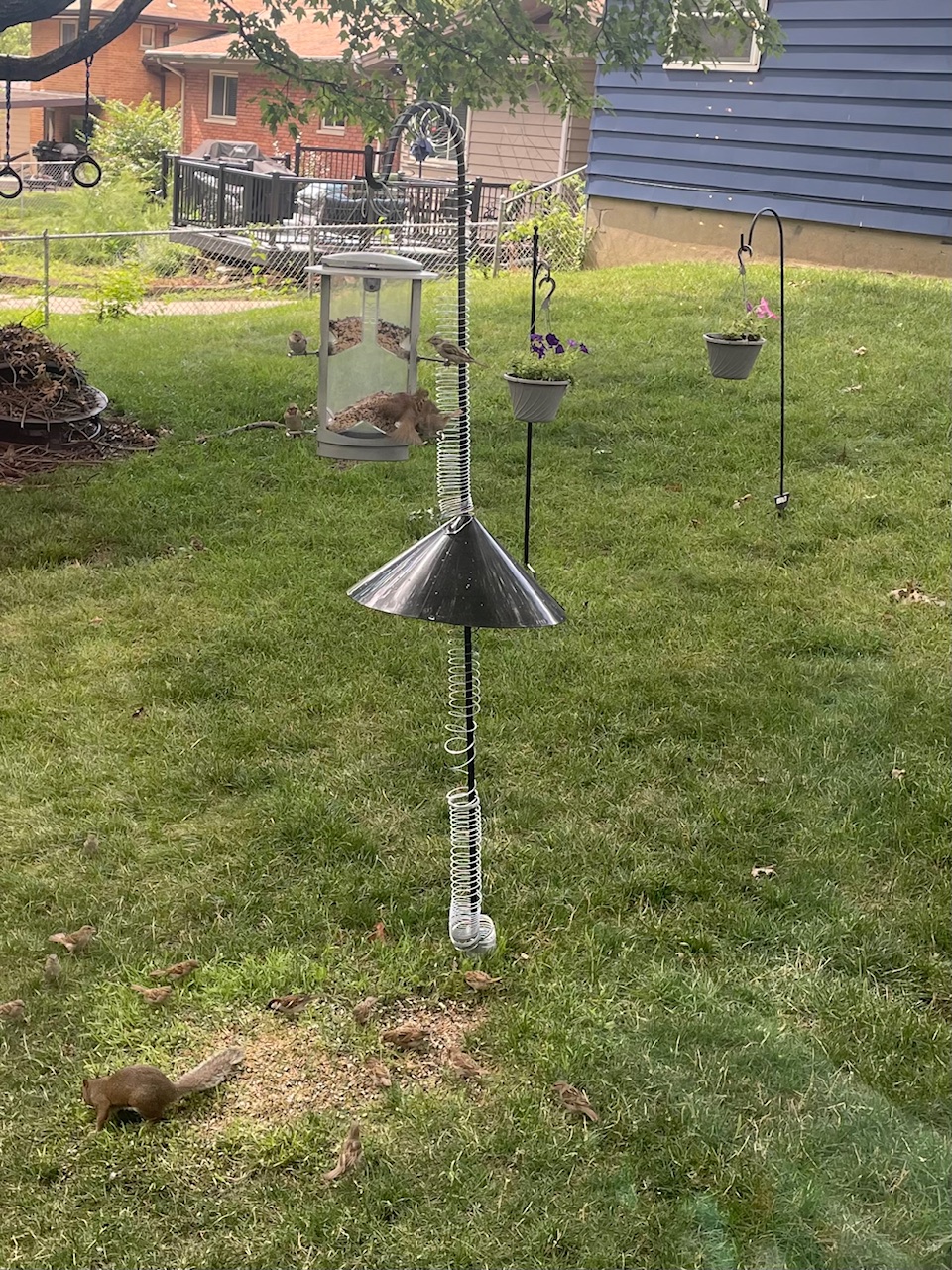
Yes, I did with the help of three slinkies, a 7-foot pole, and a baffle, which is a cone-shaped device that stops the squirrel from climbing up your pole to your feeder. I knew of the existence of baffles, but I had no idea that’s what it was called. But thanks to keyword research and placement by the vendor, I found it. Now my birds can eat in peace.
Note Mr. Squirrel, who is now relegated to picking up seeds from the ground.
Subscribe to this blog and you’ll receive an email whenever I post. To do that, enter your email address and click on the “Follow” button in the lower left-hand corner of the page. You can also follow me on the following social media platforms:
Photo courtesy Cincinnati and Hamilton County Public Library
One of the hardest tasks in library marketing is naming programs and events.
The name of a program can significantly impact attendance. The name must capture attention. It needs to be clear and memorable. And it needs to be discoverable for community members searching online.
In this post, I’ve created a checklist. Under each point on the checklist, I’ll give you an example of how to use AI tools like ChatGPT, CoPilot, Perplexity, and Gemini to check that your library program name meets the criteria.
If you’ve already come up with a name, you can check your choice against each of these considerations. If you’re beginning from nothing and have no clue what to name your program, use this checklist to find the best name and drive lots of attendance!
Checklist for Naming Your Library Program
✔️Relevance
The name of your library program should accurately reflect the program’s or event’s content and purpose. It should give attendees a clear idea of what to expect.
Example
I asked Google’s Gemini: “I am putting together an early literacy library program. In this program, babies and caregivers can read books together, but the babies are encouraged to move around during the reading time. I want to name the program “Young and Restless”. Is that a relevant program name?”
Gemini’s answer
“Young and Restless” might not be the best fit for an early literacy program.
“Young and Restless” is the title of a soap opera, and the connotation leans more towards drama and adult themes. It doesn’t immediately convey the idea of early literacy. While “restless” could be seen as a playful reference to a baby’s energy, it might also suggest a negative connotation of being unable to focus.
Here are some alternative program names that better capture the essence of your program:
“Wiggle While We Read”
“Rhyme Time & Playtime”
“Storytime on the Move”
“Littlest Learners & Lively Laps”
“Bookworms in Motion”
✔️Appeal
The name must attract your target audience. Consider that people often scroll online and when they read print. Your library program name must stand out from other programs or events in your community.
Example
I asked Perplexity: “I am putting together a library program where crocheters of all skill levels can come to work on their projects, give help to others, and get help building their skills. I want to call it Hooked on Crochet. Does that program name have enough appeal to capture attention?”
Perplexity’s answer
The name “Hooked on Crochet” for your library program has several appealing qualities that could help capture attention:
Pros:
The name plays on the double meaning of the word “hooked,” referring both to the crochet hook used in the craft and the idea of being enthusiastically engaged or “hooked” on crocheting.
The alliteration and rhyming nature of the name make it catchy and easy to remember, which is essential for a program name to stand out.
By not specifying skill levels in the name, it implies that the program is open to crocheters of all abilities, from beginners to experts.
The word “hooked” has a positive connotation, suggesting a passionate interest or enjoyment in crocheting, which could resonate with enthusiasts of the craft.
Potential Cons
While wordplay can be effective, some may find the “hooked” pun a bit overused or clichéd in the context of crocheting.
The name may be too specific to crochet and could potentially exclude other fiber arts or crafts that you might want to incorporate in the future.
✔️Clarity
The name should be easy to understand and remember. You’ll want to avoid complex, obscure, or cutesy names that might confuse people.
Example
I asked ChatGPT: “I am organizing a library program where people can bring a plant to swap and learn about composting, and sustainable gardening. There will also be crafts and games. This program is for all ages. Can you help me come up with a name that clearly states what will happen at my program?”
ChatGPT’s answer
That sounds like a fantastic and engaging program! For a name that captures the essence of your event while being concise and appealing, consider the following options:
“Sustainable Garden Swap & Fun Day”
“Green Thumb Plant Swap and Activities”
“Eco-Friendly Garden Day”
“Plant Swap and Garden Fun”
“Sustainable Gardening Fair”
✔️Length
The name should be short and concise. Long names can be difficult to remember and may be difficult to fit on your marketing materials.
Example
I asked ChatGPT: “I am putting together a library program at an academic library. The program will be interactive and will help students to better understand the databases and research resources available to them at the library. I want to call the program Interactive Workshop on the Integration of Research and Retrieval Skills, but my manager thinks that name is too long. Is it too long?”
ChatGPT’s answer
Yes, “Interactive Workshop on the Integration of Research and Retrieval Skills” is quite long for a program name. It might be better to shorten it to make it more concise and easier for students to remember. Here are a few shorter alternatives:
“Research Skills Workshop”
“Interactive Research and Retrieval Workshop”
“Library Research Skills Workshop”
“Research Resources Workshop”
“Effective Research Techniques Workshop”
✔️Accessibility
The name of your library program must not exclude any potential participants.
Example
I came up with a name for a technology program called “Advanced Technological Workshop for Digital Natives.” I asked ChatGPT to evaluate the accessibility of the name.
ChatGPT’s answer
“Advanced Technological Workshop for Digital Natives.” is an inaccessible library program name for several reasons.
Community members might interpret the term “Digital Natives” to mean only younger people who they assume are highly proficient with technology. This excludes older adults or those without regular access to technology. It’s also a very obscure term. Did these people live in the digital world??
The term “Advanced” might also deter people who do not consider themselves advanced in technology from attending, even if they are interested in learning more about it!
And the whole tone of the name is very formal, academic, and intimidating.
✔️Searchability
Many of your community members are looking for help online. You want your program name to come up in search! So be sure to include keywords that people might use in search.
Example
I asked Copilot: “I have a library program named “Opera Appreciation.” Are there any keywords or phrases that I need to add to the program name or description to make this more discoverable in search?”
Copilot’s answer
Certainly! To make your “Opera Appreciation” program more discoverable, consider incorporating relevant keywords and phrases in the program name or description. Here are some suggestions:
Opera: This will directly associate your program with the art form.
Music Appreciation: This can help convey the educational aspect and attract those interested in learning about this genre.
Classical Music: Opera is a subset of classical music, so including “classical music” in your program’s description can broaden its reach.
Arias: Highlight that your program explores opera arias—the beautiful solo pieces performed by singers. Mentioning “arias” can attract opera enthusiasts.
Composer Names: Incorporate the names of renowned opera composers.
Subscribe to this blog and you’ll receive an email whenever I post. To do that, enter your email address and click on the “Follow” button in the lower left-hand corner of the page. You can also follow me on the following social media platforms:
Photo courtesy Cincinnati and Hamilton County Public Library
In my freshman year of college, a woman came to my Intro to Communications class to talk about the future of the Internet.
She told us that someday, the internet would keep track of our previous searches and purchases. She predicted that we would see ads for products and be offered discounts based on our search and purchase history.
I remember being simultaneously awed, intrigued, and scared by this vision of the future. I’m having that same feeling lately as I read and learn more about ChatGPT.
It’s likely your news and social media feeds have been filled with chatter about Chat Generated Paragraph Techniques or ChatGPT. Launched six months ago, it’s become the center of every tech article and philosophical debate.
What is ChatGPT?
ChatGPT is an advanced natural language processing tool that provides text or information to a user based on prompts.
It’s different from a chatbot in that it can remember past conversations and provide more sophisticated answers as it “learns.” It allows users to provide follow-up corrections. It can reject inappropriate prompts and, allegedly, it can admit its mistakes.
ChatGPT is free for now. There is a Plus version that promises to be “available when demand is high,” “faster response speed”, and “priority access to new features.” It costs $20 a month.
Testing ChatGPT
I recently started playing with ChatGPT.
The very first prompt I gave it was What is library marketing? Here is the response.
Library marketing refers to the strategies and activities that libraries use to promote their services, collections, and programs to their target audience, which could be the local community or a specific group of users. The aim of library marketing is to increase the usage and visibility of library resources and services by building relationships with patrons, increasing awareness of library offerings, and creating engagement with library users.
Library marketing may involve a range of activities, such as creating promotional materials such as flyers, brochures, and newsletters, organizing events and programs, creating social media campaigns, developing partnerships with local organizations, and conducting outreach to underserved or marginalized communities. The goal is to reach potential users where they are, whether that be online or in person, and to communicate the value and relevance of the library’s offerings. By using effective marketing strategies, libraries can attract new users, retain existing patrons, and ultimately improve the overall impact of the library in the community.
ChatGPT
It’s a bit professorial but accurate.
Next, I asked ChatGPT to give me a social media post that would convince teenagers to participate in my library’s summer reading program.
Hang on to your hats, folks.
Attention all teenagers! 📢📚🌞
Are you ready for an exciting summer filled with adventure, knowledge, and prizes? Join our library’s summer reading program and discover the joy of reading! 📖🌟
Not only will you get access to a wide variety of books and resources, but you’ll also have the chance to win awesome prizes for reaching your reading goals! 🎁🏆
Plus, reading is the perfect way to unwind, escape into different worlds, and improve your vocabulary and critical thinking skills. 🧠💭
So, what are you waiting for? Sign up for our summer reading program today and let the fun begin! 🎉🌞📚 #SummerReading #LibraryLove #TeenReads
ChatGPT
It’s long. And why so many emojis??
I don’t think I’ve ever heard a teen use the word “access.”
And, in my experience, anytime you say, “Attention all teenagers”, teens immediately run for the exits. So, it’s not perfect. That’s because it’s not human. And there are other problems with ChatGPT.
Downsides of ChatGPT
There are limitations and concerns about ChatGPT. Some are disturbing, especially for libraries.
It may generate incorrect information.
It may occasionally produce harmful instructions or biased content.
It also has limited knowledge of the world and events after 2021. That’s because the original data feed provided by its creators happened that year.
One major concern for libraries
For libraries, there is also a privacy concern.
In its privacy policy, Open AI, the creators of ChatGPT, say the application may collect personal information from your messages, any files you upload, and any feedback you provide. Conversations may be reviewed by OpenAI to improve the chat. This article has more information on the potential privacy and security risks.
There is also a healthy debate happening now about whether Google will penalize online content creators, including library websites and blogs, for using machine-generated text.
Google can detect website copy and blog posts that may contain ChatGPT content. They use machine learning algorithms (ironic!) to detect text patterns that are indicative of AI content.
Under current guidelines, Google considers AI content to be “spammy”. Specifically, its guidelines say “…content that’s been generated programmatically without producing anything original or adding sufficient value: instead, that it’s been generated for the primary purpose of manipulating search rankings and not helping users.”
There does not appear to be a penalty at this time from Google for using ChatGPT to help with social media posts, emails, or ads.
So, should libraries use ChatGPT?
ChatGPT can’t replace people (at least, not yet). The tool can’t strategize or empathize. And it doesn’t know the human experience of your cardholders.
But it can save you time. It can jumpstart the creative process and help you move past writer’s block.
And many library marketers are beginning to experiment with ChatGPT.
Subscribe to this blog and you’ll receive an email whenever I post. To do that, enter your email address and click on the “Follow” button in the lower left-hand corner of the page. You can also follow me on the following social media platforms:
The Library Marketing Show, Episode 167: This episode is a must-see for any library that posts on Twitter.
Elon Musk’s takeover of the social media platform has put accounts at risk. I’ll explain the threat and the four steps your library can take right now to reduce the chances your library’s account will be cloned or hacked.
Do you have a suggestion for a topic for a future episode? Want to nominate someone for kudos? Let me know in the comments. And subscribe to this series to get a new weekly video tip for libraries.
Thanks for watching!
Subscribe to this blog and you’ll receive an email whenever I post. To do that, enter your email address and click on the “Follow” button in the lower left-hand corner of the page.
Now that you’ve created a library promotional strategy, it’s time to take the next step. And that is to create a calendar for all your library promotions.
Three main reasons a library promotional calendar is important
A promotional calendar is vital to success. This is especially true in an organization with many contributors and stakeholders, like a library.
Here’s why you’ll want to have a promotional calendar, even if your team of content creators or contributors is small.
It helps you stay organized and focused on the goals you set as part of your promotional strategy.
It helps you to keep track of holidays, seasonal library and literary events, and major annual promotions like summer reading.
It keeps everyone at your library up to date on your promotional plans.
How to set up your library’s promotional calendar
Scroll down to the bottom of this post for my recommendations of three free calendar templates that you can use to create your library’s promotional calendar.
No matter which template you choose, the calendar should be shareable. This will ensure the contributors at your library can see all future promotional plans. It will also make it easy for contributors to add comments and ideas.
Once you choose a template and a location where it will “live,” set up the columns to track the important pieces for library marketing. Your calendar should include spaces to track these things:
The name of the event or service you wish to promote
The date of the event or service launch if the service is new. If it’s an existing service, you can leave this space blank.
The start and end date of the promotion
The type of content. For example, blog post, video, etc.
The channel(s) in which the promotional content will be published. For example: email, social media platform, digital signs, etc.
The topic. For example: you may have two promotions for summer reading. One could be planned for two weeks before summer reading begins with the purpose of promoting registration. Later in the summer, you may launch a second promotion marking the halfway point and encouraging readers to log their reading hours. The “topics” for these two promotions could be “Registration Push” and “Halfway Check-in.”
Due dates
The date and time for publishing the content
The person in charge of each promotion
Follow-through. This column is where you will note if the content was published according to schedule or if there were delays. Tracking follow-through will help you spot hurdles in the process of creating and approving promotions, which will lead to more efficient planning of promotions in the future.
Links to promotions after they are published. This will be helpful for those times when you’ll need to find and analyze a promotion after it’s out in the world.
Success measurements. List the data you gather after the promotion is published to measure engagement and effectiveness. Tracking your promotional success will help you spot the topics, formats, and publishing platforms that yield the best results for your library.
How your promotional calendar will improve your library marketing
The Marketing Rule of 7 states that a prospect needs to hear or see the advertiser’s message at least seven times before they’ll buy that product or service.
For your library, the Marketing Rule of 7 means it’s important to publish content on various platforms and in multiple formats. This will allow your library to reach your entire target audience.
Your promotional calendar will help you make those decisions by having a list of your channels all in one spot. Your calendar will also help you to spot effective ways to re-purpose your content.
For example, let’s say you created an infographic demonstrating the value of summer reading in preventing the loss of literary skills. Initially, you planned to post the infographic to Instagram.
Using your promotional calendar, it may occur to you that the infographic would be a great starter for a blog post on the dangers of the “summer slide.” Then, you realize you can promote that blog post and infographic in your next library e-newsletter.
The library promotional calendar helps you to see all your promotions and create a holistic campaign. It can help you decide if you have enough resources to focus on the platforms where your target audience is most likely to see your content.
Use your calendar to prioritize your most important channels. Focus on creating high-quality content instead of aimlessly posting on all available platforms.
Your calendar can also help you set deadlines. You’ll quickly learn how often you can realistically create and release new promotions.
Finally, your library promotional calendar will help you spot the busiest times for your library before they sneak up on you. It will help you plan for those busy times. You’ll be able to ensure that the promotional creation process is finished well before the publishing date!
What to include in your library promotional calendar
Holidays, especially ones that affect your library’s service hours like Independence Day and Veterans Day.
Local holidays. For example, where I live in Cincinnati, Ohio, opening day for the Cincinnati Reds is a holiday.
Literary holidays such as Library Lovers Day or Audiobook Appreciation Month.
Seasons, like back to school or graduation.
Promotions tied to popular culture, like the Superbowl and the Olympics.
Building openings/renovations
New service releases
Summer Reading
Author events
Fundraising opportunities, like Giving Tuesday and National Library Week.
Patron stories
Interesting or funny details about your library.
Evergreen content, like collection promotion.
Three free promotional calendar templates
Some of these websites make you an offer to try their product, but you can still get these calendars without making a purchase.
Smartsheet: I recommend the Marketing Campaign Calendar Template.
Subscribe to this blog and you’ll receive an email every time I post. To do that, enter your email address and click on the “Follow” button in the lower left-hand corner of the page.
My mother believes the old-fashioned way is the best way to do most things.
She prefers mixing cookie dough with a spoon rather than using her KitchenAid mixer. She likes wrapping gifts with paper rather than using gift bags. She hangs her towels on the clothesline in the summer, rather than using the dryer.
I’m the complete opposite. If there is an easier way to do my household and cooking chores, I’m in. Give me all the gadgets. Hand me the tools. Machines are my friends.
For the past few months, I’ve been collecting a list of tools for those of us working in library promotion. They will help your library with video production, social media, writing, and content creation. Best of all, they are all free.
I’m listing the first 13 tools in alphabetical order. And I’ve included one bonus tool at the end of the list. It’s not related to marketing. However, it is the coolest thing since sliced bread.
Have a tool that you use to make your work easier? Let me know in the comments.
Animoto is an online video maker that makes it easy to create videos for your website or social media. The free account lets you edit on a desktop or a mobile device at 720p quality with 50 music tracks, three fonts, 30 color swatches, unlimited sharing on social platforms. There is a watermark on the videos.
For libraries that can afford it, the basic package, at $96 a year, removes the watermark, gives you unlimited downloads, and increased your video quality to 1080p.
This is my go-to URL shortener. I’ve had a free account for years. It helps me to track all the clicks on different platforms, including email and social media. That’s an important step to make sure you track the effectiveness of your marketing.
You can make 100 links a month with the free account, and you can customize the back half of your URL. For libraries that can afford it, the basic package is $348 a year and includes branded links and QR codes.
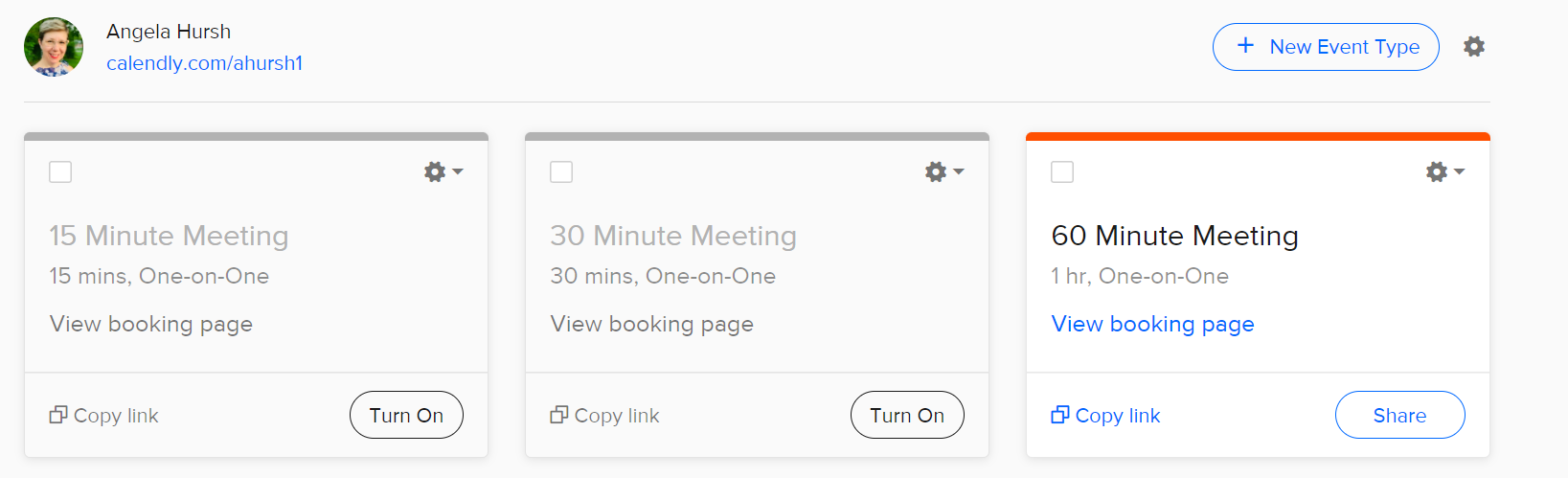
Whenever I need to schedule a meeting with someone who doesn’t work for my company, I use Calendly. It’s easy to integrate it with your calendar and a host of other apps, including Zoom. I cannot tell you the number of back and forth emails this tool has saved me!
Calendly also allows you to create rules for when someone can claim a block of your time. For instance, if you know you’ll be working the checkout desk every day from 12-1 p.m., you can block that off. You can also embed the link in your emails.
The free account only lets you share one length of meeting at a time (15, 30, or 60 minutes) but switching back and forth between the types is easy. You just flip a switch, share the link with the person you need to meet with, and you’re done!
I can switch between these three meeting lengths easily, depending on the circumstance.
Coolers is a color scheme generator that lets you explore and test thousands of color palettes for your print and digital graphic design projects. It’s saved me a ton of time. And it helps me, the girl with no artistic abilities, to make sure everything I create looks beautiful.
You can save palettes, create a collage, or find colors from photos. It also has settings for color blindness and a built-in contrast checker for accessibility.
This is my favorite place to find free emojis for any social media post and email. It’s easy to search. Once you find what you want, just copy, and paste and you’re done.
Emojis are a great way to catch the attention of your social media followers. They also work great in emails. 😉
If your library’s calendar is unreliable or if Facebook events aren’t generating registrations for you, Eventbrite is a great option.
You can use it for free when your event is free (as most library events are). Plus, there’s a mobile app to help you manage registrations. And you get listed on Eventbrite and its partner sites, which can increase the reach of your programs.
I cannot, for the life of me, match fonts when making graphics. This site is a lifesaver.
Once you find a base font that you love, use this site to identify matching fonts for sub-headers and smaller text. I used this site when I revamped Super Library Marketing to be more accessible.
Giphy lets you create animated video GIFs and GIF slideshows with captions. You can get your GIFs in a variety of formats or as stickers.
A new feature lets you create custom backgrounds for online video conferencing. How cool would it be to have a moving library background for your next program?
My life has been changed since I started using this tool. The free version is perfectly wonderful for checking your written work for common and complex grammatical mistakes, spanning everything from subject-verb agreement to article use to modifier placement.
If you use Chrome, download the extension. With that, Grammarly can check everything you type in real-time, from emails to blog posts to social media posts.
I don’t know why but finding an easy and free way to screen record is hard. I finally found this site when a vendor I work with used it to send me a screen recording explaining how to fix a technical issue.
You can record your whole screen or crop to just one area. You can even annotate with text, arrows, and shapes. There are mouse effects! And you can trim your recording.
SnapWidget allows you to display your Facebook, Twitter, YouTube, and Instagram photos in collage format on your website or blog. The free plan gives you unlimited widgets that refresh every 15 minutes.
Project management is a pain. When I worked at the Public Library of Cincinnati and Hamilton County, this was the tool we used to coordinate projects across teams.
It’s easy and intuitive to use. There are boards, lists, and cards that enable your organization to prioritize your most important projects. Everything is drag and drop and shareable.
The free account gives you 10 boards, unlimited storage, custom backgrounds and stickers, an activity log, and the ability to assign team members and set due dates. It was plenty for my team and we never had to upgrade to a paid plan.
This free resource lets you capture, organize, and share multi-media resources with anyone. Save lists, do research, bookmark websites, and curate content for your newsletters, social media posts, and more.
This tool will not make your life in marketing better (unless you are looking for a better job!) But it was made by a librarian at the Allen County Public Library, and it is remarkably helpful for your patrons.
Simply fill in all the appropriate information that you would put into a resume, press a button, and viola. It’s not fancy but it certainly makes a professional and polished resume. Seriously, how cool is this?
Subscribe to this blog and you’ll receive an email every time I post. To do that, enter your email address and click on the “Follow” button in the lower left-hand corner of the page.



 Super Library Marketing: Practical Tips and Ideas for Library Promotion