Shandi from the Illinios Heartland Library System sent me this question: I just read your blog article “How to Launch a Library Blog.” I would love to hear more about this! Specific question: Our new website won’t be ready for maybe 8 months (at our current rate). I want to add a blog with the introduction of our new site. When do you suggest beginning to curate articles? I’m thinking I could start now with evergreen pieces, right? Thanks!
So I talked through my answer to that question and gave some advice for creating evergreen content for a library marketing blog. I’m excited to see what Shandi’s blog looks like and to read the content she curates.
If you’ve got a library blog that you really love, please let me know in the comments. I’m curating a list of great library blogs to share in a future post so get your nominations in! Thanks for the question, Shandi.
Stay in Touch
Thanks to everyone who attended the webinar with Library Journal and Recorded Books on July 25. I am going to answer all the questions either on the live show, on my blog, or via email so be watching for that!
I’m speaking at two conferences this fall and you can register for both on the Upcoming Events page. The OLC released their full agenda this week and it looks like a great conference. Plus, you’ll be able to tour my library!
Have an idea for the next Library Marketing Live Show? Submit it now.
We’ll chat on Instagram on Tuesday at noon EST for about 15 minutes. My handle is @Webmastergirl so follow me to see the show live!
I don’t know about you, but I spend the majority of my day as a library marketer making decisions. I answer probably two dozen or more questions a day from co-workers, staff, and friends about everything from the title of our library’s next blog post to the photo used in an email campaign to the kind of swag we give out at library events. This may be why my poor husband often has to choose the restaurant when we go out to eat. By the end of the day, I’m tired of making decisions!
Library marketing often feels like air traffic control. So how can a library marketer work effectively without losing their ever-loving mind? Organization, my friends. And the best way to get organized is to live and die by a working editorial calendar.
An editorial calendar will define and control the process of creating content, from the creation of an idea through writing and publication. A good editorial calendar will help you decide which content ideas to publish, where to publish, and when to publish. After those decisions are made, the editorial calendar will help you assign tasks and keep up to date on deadlines.
The editorial calendar is literally the heart and soul of the library marketer. Mine is open all the time, as long as I’m at work at my desk. It’s a score card, to-do list, and road map all rolled into one. Without it, I’d be lost.
A number of readers have asked me how they can create an editorial calendar that will lead to effective marketing. I’ve broken it up into two parts. First, let’s go through the steps to setting yourself up for success by funneling your team and tasks into one tool. You need to pick the tool, define your process, and learn how to work your calendar in your role as the project manager.
The Library Marketer’s Definitive Guide to Creating an Editorial Calendar, Part One: How to Pick Your Tool and Use It
Step #1: You need a tool that will help you keep track of everything… and I mean everything! You should consolidate all of your team’s tasks into one place. That means anyone who has anything to do with creating content for your blog, social media, video, email, print, press release, digital signage, or newsletters is on the same tool.
The one tool approach will help everyone to know where each promotion is at any given time. It will also help to maintain a consistent voice and message throughout all of your marketing. Working off the same tool will also maximize the effective use of every piece of content. The one tool approach will also help you, as project manager, to minimize overlap and mistakes.
Set expectations with your team early. Tell them you’ll do your best to pick the right tool for your team. Then make it clear that there will come a point at which everyone will be expected to have transitioned to the new tool.
Step #2: Get your team involved in picking your tool. First, you’ll want to explore how the new system will make their jobs and their lives easier. You can do this by asking your team to list the problems they have right now with content creation. Then, ask them to prioritize them. Which problems cost your team the most time and energy?
Step #3: Enforce compliance. Once you pick the right tool for your team, you have to delete all your other calendars and tools. I’m not being harsh. Your team may need that extra push to use one tool. And it’s likely there may be someone on your team who doesn’t like whatever tool you end up choosing. You cannot allow them to go rogue. In order for this to work, everyone has to use the same base.
Step #4: Make checking your editorial calendar a part of your daily ritual. As the project manager, your job will be to keep everyone on track using your new tool. Some days, this task will take five minutes. Some days it will take longer.
I add promotions into my calendar as soon as I learn about them. I have some promotions planned six months in advance. Advance planning helps me to visualize the promotions I’m doing and make sure everything gets the proper attention it needs. I can still be flexible and change things around as needed. But if I know what my marketing will look like in October during the month of July, I’ll have a better chance of getting everything done in time. That also gives me time to think about what’s coming up and to work on creative and innovative ideas to make those promotions better.
Step #5: Leave plenty of room for data. Measure the results of your content so you can adjust the editorial calendar and improve the effectiveness of future promotions.
Analytics should drive most of the decisions in your editorial calendar. I say most because I believe analytics should be responsible for 75 percent of the decisions. The other 25 percent is experimentation, gut instinct, and a deep knowledge of your audience.
Measuring results has two benefits: It helps you to decide what to do and it helps you decide what to drop. If you find a particular content subject or format isn’t getting the results you want for your library, you have data to back up your decision to drop it. Likewise, when something is working well, you can use data to reinforce your decision to that thing more often!
Subscribe to this blog and you’ll receive an email every time I post. To do that, click on “Follow” button in the bottom left-hand corner of the page. Connect with me on Twitter,Instagram, and LinkedIn.
NEW LIVE LIBRARY MARKETING SHOW ON INSTAGRAM! I’ve decided to try a new thing! I’ll be doing a live Instagram Q&A and discussion about Library Marketing. The sessions will be every Tuesday at noon ET (10 a.m. Central and 9 a.m. Pacific) beginning Tuesday, June 25. Join me to talk about library marketing topics for about 20 minutes each week. My handle is Webmastergirl. You can email questions and topic suggestions ahead of time. Just fill out this form below. See you there!
I get a lot of library marketing emails. I love to see what other systems are doing. So, I go to their websites and I see if I can get on their mailing lists! It’s fun and it helps me to find new things to promote and new ways to communicate with my audience.
I also get a first-hand look at some of the small boo-boos that other library marketers make in their emails. Email is hard. I’ve been doing email marketing for so long (feels like forever!) that I have made all of these mistakes myself! And I love email marketing, so I’m weirdly obsessed with learning about it. Some of the positive text and design choices that work for library marketing in other promotional pieces, like posters, flyers, websites, and blogs, do not work in email marketing.
The good news is that these little problems are easily fixed! Tiny adjustments in the text and design of your email can improve your click-through rates and effectiveness. Check this list against what you’re doing now and start reaping the benefits of improved email design!
Problem: too many images: A clean design is crucial to engagement. Too many images or too much text is off-putting to your email recipient.
The most common email programs like Yahoo and Outlook will NOT automatically download images. In fact, only Gmail downloads images automatically. With all other providers, the email recipient receiver must consciously click a prompt in order to download an image. That means if your image is conveying most of the key message in your email, your receiver likely won’t see it. They will miss the information and the call to action, and your email is useless.
Solution: Create an email that is mainly text-based. I have found an 80-20 mix works best: 80 percent of my email is text, 20 percent is image-based. The image I use compliments the text. Its purpose is to create emotion or set the mood of the email. It’s there to inspire. It doesn’t convey key messages and it doesn’t contain the call to action.
Problem: too much text. An email that contains several long paragraphs of information is off-putting to recipients. It gives the impression that your email will take a long time to read.
The email scheduling platform Boomerang studied results of about 20 million emails sent using their software. They found that the optimal length of a marketing email is between 50 and 125 words. A study by Constant Contact of more than 2.1 million customers found emails with approximately 20 lines of text or 200 or so words had the highest click-through rates.
Excessive text can also send negative signals to spam filters. Too much text added to excessive punctuation or large images could keep your emails from ever arriving in an inbox.
Solution: Limit your email text to 200 words or less. The recipient should be able to read all the information in your email in about 15 seconds. If you have more information to share, use your call to action to indicate that there’s more to know about your subject. Then send your recipient to a landing page where they can get all the information they need.
Problem: Text that is too small. Keep in mind the growing number of people who will read your email on a mobile device. You want to make sure they can actually see your words. An 11 or 12 point font size is too small to be seen clearly on a screen.
Solution: Increase your text size. Email font should never be below 18 point in size. You should also use the bold option to make the most important information stand out.
Problem: Wishy-washy calls to action. A compelling call to action is one of the best ways to increase the click-through rates of your library marketing. Some library marketing emails also contain too many CTAs.
Solution: Use positive, active language in your CTA. “Register” “Read This Book”, “Learn More”, “Join Us”, “Donate”, and “Get Started” are some of my favorites. I put my CTAs in a square red box that looks like a button to compel my recipients to click on them. I embed the CTA in my image as well and use the “alt text” to convey the CTA in case someone’s eye skims the email. I try to keep my CTAs to one per email.
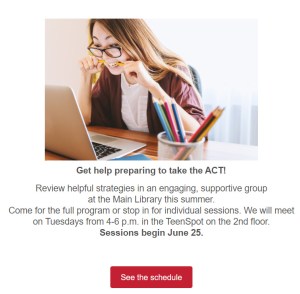
One image, with the main text in bold at 18 point found. A few sentences and a clear call to action.
Problem: Ignoring mobile responsiveness. Mobile opens accounted for 46 percent of all email opens according to the latest research from Litmus. If your emails aren’t optimized for mobile, you are missing a huge potential audience, particularly women and young people.
Solution: Optimize your emails for mobile to make them responsive. Most email marketing programs offer mobile responsive templates. My library uses Savannah by OrangeBoy. We switched to all responsive templates in January of this year. I’ve seen a nine percent increase in click-through rates. I count that as a win!
Problem: No system for proofing your emails in different kinds of email boxes. Your email design might look great in your creation software. But if you send it without testing it, you may find that your email becomes a kind of monster creature! It may show up a a jumbled mess of images and text. This happens because every email inbox will convert your email differently.
Solution: Test your email to make sure your message displays correctly for your recipients. Find people that you trust you have different providers… someone with Gmail, someone on Outlook, someone on Yahoo, and so on. Send them the message and ask them to check for warped images, font problems, and extra spaces.
Subscribe to this blog and you’ll receive an email every time I post. To do that, click on “Follow” button in the bottom left-hand corner of the page. Connect with me on Twitter,Instagram, and LinkedIn.
I need your help! In a few weeks, I’m giving a short online seminar to library directors about marketing! I have 15 minutes to convince them to throw their full support behind library marketing. I really want this talk to impact the way library directors think about your work. So… please let me know what you want library directors to know about library marketing. Fill out the form before you even read this post. It’s anonymous! Thank you!
Librarians are busy folks. You’re on the front lines, trying to work with cardholders and community members. You’re looking up information. You’re connecting people with social service resources. You’re filling out paperwork, creating curriculum for story time, and putting up displays. And you’re doing about 100 other things that I don’t know about because I’m not a librarian.
I worry about how much libraries lean on librarians to do their own marketing. Senior staff might believe spending money to hire staff for marketing is not a good use of their limited funds. But it’s not good for the librarians and it’s not good for the library.
I also can’t change the world in one blog post. What I can do is help the librarians in my readership to strategize to make marketing part of their regular duties. Here are four things that you can do that are already part of your job. These are marketing tactics, though you may not have thought of them that way before!
Merchandising. Merchandising is a form of marketing that focuses on presenting the items in your branch in the way that will compel people to interact with them. Every display, every sign, every decision on the arrangement space in your branch is a chance to market your library.
I know that the decision many libraries made to switch from using the Dewey Decimal system to a more categorized approach for arranging items pains library purists. But it pays off. Library visitors are accustomed to browsing in stores by categories. By mimicking that display effect, libraries make it easier for people to find the items they want and need. We want to be as easy to use (or easier) than our for-profit competitors.
It’s a time-consuming process but I’ve put merchandising first on this list because it is the most important and impactful way that librarians can market their branch. If you haven’t thought about re-arranging the materials in your branch, now is a great time to start. And to get some help, I recommend the slides from a presentation from Allison Fiscus of the Toledo Lucas County Public Library. She recently did an online seminar. Her presentation includes data that shows how merchandising positively effects the customer experience. She included a lot of visuals to help you understand her concepts. You can find them here.
Exceptional customer service. A lot of big brands have focused on improving customer service as a marketing tactic. If you are working on the front-line of your library, you have a unique opportunity to interact with cardholders.
The marketing buzz phrase for doing this is “surprise and delight.” We want to surprise our cardholders with service that exceeds their expectations. When we do that, they feel delighted with us! (Isn’t that just a sunny thought?) Delighted cardholders are more likely to spread the word to their friends and family about our system and the services we provide. They may be compelled to talk about us positively on social media, give us great reviews on Google Business, and support our work through donations or volunteerism. These are all marketing wins!
Good customer service is a competitive edge for libraries. If we can create an environment of inclusive and open access where people truly feel supported and cared for, we’ll have the clear advantage over for-profit competitors. One-on-one help is time-consuming, but it will pay off. We’ll build a reputation as a warm and inviting space. When’s the last time you heard Amazon or Best Buy described in those terms?
Library staff must make the commitment to provide good customer service. It’s not a skill that comes naturally to everyone. To help you, I love this free guide from Hubspot. It’s got templates and a ton of great information that you can use to improve your own customer service skills.
I also recommend you read this interview with Dan Gingiss, an expert at customer service. He’s written a great book with tips about customer service in social media and his interview has lots of ideas for improving library customer service to make our industry more competitive.
Word of mouth promotion. I get a lot of requests from librarians in my system who want our marketing department to promote their event or service. Posters and emails and fliers work, but the most effective method of marketing, in my experience, is word of mouth. You need to be telling your cardholders about your branch, events, and services. Talk to them!
Librarians are in a better position to sell people on their services and events than a for-profit business. That’s because you are a trusted member of the community. Librarians are admired and your opinions are valued more than the average person. Use that advantage to help “sell” the things that your branch offers!
I know word of mouth promotion seems time-consuming. But consider this. Data tells us that you have to get your message in front of your cardholder an average of SEVEN TIMES before they’ll be compelled to act on it. But when you have a direct conversation with a cardholder about your library, you are making a compelling and personal case. 75 percent of people don’t believe the advertisements they read but 92 percent believe brand recommendations they receive from trusted sources. Librarians are trusted! So just talk to people.
Sharing on your personal social media. Yes, you should be sharing posts from your library’s social media channels on your own personal channel. There’s no right or wrong way to do it. Just pick the promotions you feel most personally passionate about. Hit the “share” button and add a line about why this particular event or service is meaningful to you.
Your recommendations are trusted because of your position. It’s not unethical to share your employer’s promotional social posts. I know you feel passionate about the work your library is doing. Don’t be shy. Share your enthusiasm!
Subscribe to this blog and you’ll receive an email every time I post. To do that, click on “Follow” button in the bottom left-hand corner of the page. Connect with me on Twitter,Instagram, and LinkedIn.
I’m so excited to be the keynote speaker for the Illinois Library Association Marketing Forum Mini-Conference in Chicago in a few weeks. My brain is entirely engulfed in content marketing as I formulate the talk. There are also some big content changes afoot at my library. I’ll talk more about those when we have our campaigns up and running. But, let’s just say that most of my marketing focus in my professional life is on content–why we should do it, how to make it work better, and how to be efficient in our content creation.
The most important part of the speech I’ll give next month is the “why.” Why is content marketing important to libraries? This was actually the focus of one of my early posts here on blog. The argument for content marketing hasn’t changed. You can make all the posters and fliers you want. People don’t pay attention to those push promotional tactics. That’s why marketing seems frustrating.
You want desperately to break through the noise of life and become a subconscious part of your cardholders’ thought process. You want them to think of you every time they face a problem. You want them to remember they can come to you for pretty much anything they need. This is the common struggle for libraries everywhere, no matter their size, staffing, or service area. Honest to goodness, the only way to achieve that is through content marketing. I know this from experience.
There is now a lot of data to back up the assertion that content works. I want to share some of that with you. I’m hoping that, if you are hesitant or nervous about working content marketing into your overall library marketing strategy, these stats will convince you. I truly believe this is an opportunity for libraries that cannot be missed. If we are to survive and thrive as an industry, we need to do more content marketing.
Here are the facts for why content is key to library marketing.
Why Content is Key to Library Marketing
80 percent of people prefer to get information about your library from a series of articles versus an advertisement.
71 percent of people are turned off by content that seems like a sales pitch. Which means, if you are doing mostly traditional promotional marketing, it’s not working.
75 percent of people who find local, helpful information in search results are more likely to visit a physical building. We want to get more bodies inside our libraries. Content is the key.
Only 45 percent of marketers are using storytelling to create a relationship with their audience. Most big brands are still running ads and push promotion. This is our open door. It’s a huge opportunity for libraries. This is how we sneak in and take away audience share… by telling stories. And who doesn’t love a good positive story about a library?
95 percent of people only look at the first page of search results. Optimized content (that’s content that uses keywords that are likely to be picked up by Google and other search engines) is incredibly helpful. If your library’s content appears on the second page or later, people won’t see it.
Blog posts are the content that get the most shares. And if your post is helpful to others, it’s more likely to be shared. 94 percent of readers share a blog post because they think it can be useful to someone they know. And the more often you publish blog content, the more often your content will show up in search, which increases the likelihood that people will find your library while doing a search. Amazing, right?
90 percent of the most successful marketers prioritize educating their audience over promotion their company’s promotional messages. Education is our main industry. Libraries are perfectly aligned to make this work for us.
But here’s a stat that really surprised me. 78 percent of effective content marketers use press releases as part of their strategy. Yep, press releases can be content marketing too. Use your releases to be informative but to really pitch amazing story ideas to the media. If you have a great story and you can make all the elements available to the media, you can let them tell it and take advantage of their built-in audience to spread the word about your library.
Subscribe to this blog and you’ll receive an email every time I post. To do that, click on “Follow” button in the bottom left-hand corner of the page. Connect with me on Twitter,Snapchat, and LinkedIn. I talk about library marketing on all those platforms!
A well thought out social media strategy is only half the battle for library marketers looking to reach audiences without spending budget. Once you decide who you will talk to, and what you will say, it’s time to figure out how to physically get those posts scheduled.
I’ve scoured the web for scheduling tools and tried them out to see which ones will work for libraries. Some tools are better for people who must share accounts with lots of contributors. Others work best for single person teams. Some work well for libraries posting on only a few social media platforms. Some are meant for larger systems with wide strategies.
My list does not include schedulers that only allow you to schedule posts on one platform, like Tweetdeck. That is inefficient for any library system. I also recommend some paid plans, but only the ones that offer the most features for the least amount of money.
Before we get to the list, I want to address a myth about scheduling social media posts. I’ve heard lots of marketing “experts” say that it’s wrong for brands to pre-schedule social media posts. Their argument is that a pre-loaded social media platform is inauthentic. I call bullshit. Your cardholders don’t care if you are posting something live or using a scheduler. If the post comes across as inauthentic, it’s because it’s not written well!
There are good, data-driven reasons for scheduling social media posts. If you’re watching the data and engagement of past posts, you can use your scheduler to give your audience what they want, when they want it. You don’t have to worry that you’ll forget or get distracted. Pre-scheduling also gives you time to create honest and meaningful text and graphics. It’s not lazy. It’s incredibly smart.
Now, there in one warning I must share about scheduling posts in advance. You may run into a situation where you’ve pre-scheduled a post and something happens that makes the post irrelevant. For instance, if you schedule a post to promote an event at a branch and then something happens that causes that branch to close unexpectedly. That’s just something to keep in mind as emergencies arise in your system. Your checklist of things to do in an emergency should include checking your pre-scheduled social media posts.
Here are the tools I think are best for social media post scheduling.
The free plan lets you schedule on three platforms. You can pre-load 30 messages at a time. My favorite feature is the boost plan. If you have money for social media ads, you can boost posts through Hootsuite instead of going to each individual platform. That’s super convenient. There are also analytics and free social media courses.
This site’s free plan also lets you post on three platforms. You can pre-load 10 messages per platform. It includes a link shortener, an image creator, and the ability to upload videos or GIFs. If you want more capability, their most basic “Pro” plan is $10 a month and lets you post on eight platforms and schedule up to 100 posts in advance. One note: you must pay the Pro rate for the analytics capability on Buffer. Analytics are not included in the free plan.
Their standard plan is the most robust I found in my research. For a little more than $8 a month, two team members can post on eight different channels. The plan includes analytics, the ability to pause and resume posts, a link shortener, and other features. There is a free plan, which lets one person post on all the channels, but you can’t schedule posts ahead of time.
This site’s free option gives you the ability to schedule on two platforms, with up to five posts on each platform. That’s not super helpful unless you have time every day to schedule posts or are not active on social media. However, the site’s bottom tier paid plan is $7.50 a month and gives you a ton of features– you can pre-load as many as 500 posts to five platforms. 10 people can also use the platform on this plan. I think that’s a good deal.
Crowdfire’s free plan lets one person post on the big four social media platforms (Twitter, Facebook LinkedIn, and Instagram) with up to ten pre-loaded posts per platform. But I would actually recommend the first level paid plan, call Plus. For about $7.50 a month, you get access to Pinterest and 100 pre-loaded posts, plus a pretty robust analytics tracker, hashtag recommendations, and no ads on the mobile site.
Subscribe to this blog and you’ll receive an email every time I post. To do that, click on “Follow” button in the bottom left-hand corner of the page. Connect with me on Twitter,Snapchat, and LinkedIn. I talk about library marketing on all those platforms!
That phrase is the best description of our job. We are all planning and managing projects. We are scheduling and executing campaigns. We’re delegating. We manage multiple people who contribute to blog and social media posts. And unless you’re a super organized genius, all that coordination can cause you to lose your sanity.
I sometimes walk into my office in the morning feeling fantastic, and by the time I open my email and see a 30-message thread between departments about a piece of content I need for marketing, I can feel the steam rolling out of my ears.
Project management is like waiting tables. You have multiple customers who all want different things from you. They order at different times and their food comes out at unpredictable intervals. In the meantime, you must keep checking back and making sure they have everything they need for the moment. You must also keep them informed about how their meal is progressing.
It’s the same when for library marketing. We are working on multiple campaigns and we have lots of different customers, internally and externally. So how do you make sure you get all your work done without losing track of projects, content, and posts? It’s not easy.
Many of you have said that project management causes you grief and stress. Many of you don’t have a staff. You are doing this job solo. You’re doing branch work in addition to marketing. Your job is hard.
I have a system, developed over five years of trial and error. I thought I’d share it with you. I hope my tips relieve you of some stress.
Train other library staff to plan. I make it a point to stop by once every month or two to talk to all the departments that contribute to my marketing schedule. I ask them to tell me what is coming up in the next one to three months. At the end of each of those meetings, I make it a point to tell them to let me know if they start planning anything at any point. These “touch-base meetings” sometimes only last 15 minutes but they are incredibly valuable.
To be honest, it took me about a year of doing this to get my coworkers trained to let me in on their plans early. I realized later that most of them thought it best to wait to tell me about an event until they had all the details worked out. Now, they’ll give me a heads-up even if they only know the general subject of the event and the date. That way, I can work it into my schedule ahead of time and plan.
Share your schedule. I noticed that when I shared my promotional schedule with my coworkers, they got a good sense of the kind of work involved in creating a campaign. They started sharing more info with me because they could see the work involved. Don’t be precious with your schedule. Share it… and let everyone see how much work and planning goes into each piece.
Set deadlines and enforce them. I do this for lots of my content, but especially when it comes time for our summer reading program. It’s a massive marketing campaign, the biggest we do all year. I create a schedule by the first week of February. In it, I share the deadlines for each piece of the marketing with everyone involved. This sets clear expectations. I also do this for those who contribute to our quarterly content marketing magazine. I send reminders one month and one week before the submission deadline so it’s clear what I need and when I need it.
Use your calendar. I put appointment reminders in my Outlook calendar to check on the status of certain projects. I can look at my calendar each day and remember that I need to check up on certain things. I even put calendar reminders in for things like changing signs or updating content.
Don’t respond immediately to requests. This habit was hard to form but it’s the best discipline I’ve set for myself. When someone comes to be to tell me they need marketing for an event or service, I generally do not drop everything to plan out the marketing. I will put it on my to-do list for the next day, or even the next week. That gives me time to think about the best way to market each request.
Set aside time each week for planning. I have a designated planning day. I set aside a couple of hours on that day to purposefully think through my marketing. I make lists and set deadlines. It makes me more focused and helps me to know I have that time to think about what’s coming down the road.
Say no sometimes. Listen, I know it’s an uncomfortable conversation. I know you want to help everyone. You may feel pressured to do it all. I hate saying no. But sometimes, it is necessary. If the request doesn’t align with the library’s overall strategy, I say no.
Your time is limited. If you try to do everything for everyone, you won’t do anything well. Sometimes, you must say no. It may not make your friends, but it will make you better at your job. You were hired to do what’s best for the library.
Subscribe to this blog and you’ll receive an email every time I post. To do that, click on “Follow” button in the bottom left-hand corner of the page. Connect with me on Twitter,Snapchat, and LinkedIn. I talk about library marketing on all those platforms!
I don’t know about you, but I am feeling a bit stressed out.
There are many reasons for that. It’s been an incredibly busy year for my library. We’ve gone through a ton of changes. We endured a public outcry over a potential building sale. We hired a new director–our first new director in 20 years. We passed a levy. And we started a facilities master plan to renovate or rebuild ALL our 41 locations.
I’m tired. I need a break. So why do I feel an incredible sense of guilt walking away from it all, even for just a few days?
It may be because marketing industry thought-leaders are constantly preaching the notion that extreme hustle is the only way to get results. You must post consistently, no matter what. Your audience expects a steady stream of content, no matter what. You have to keep talking or they’ll forget about you.
To some extent, that is true. Audiences do expect consistent content. But they’re also forgiving. And if you are turning out amazing work, a little break in the action can be beneficial to you and to your audience.
A break gives you space to recharge your brain and reinvigorate your creative juices. That’s really important for those of us who do this library marketing job without the help of support staff. For your audience, a small break can build anticipation for your work. It can make your audience realize how special your content is, and how much they rely on it.
I listen to the “Lovett or Leave It” podcast. Jon Lovett, the host, recently took a two-week break over the Thanksgiving holiday. His first show back was the funniest it had been in a while. And he talked about how many messages he received from listeners, especially toward the end of his break, about how they were really missing the show. Those message re-invigorated him and made him excited to get back to the microphone. He did some of his best work.
Hustle is bullshit. We’re not robots. We all need self-care. I recently asked some of my readers to share their favorite ways to keep their sanity. Here are some suggestions!
Cara Luddy from the Onondaga County Public Library says, “When you’re frustrated, you are not going to do your best at work. Get up and take a walk around the library, eat something, or make some coffee/tea. If you don’t want to take a break, switch to working on a project that you’re excited about for a little bit. Use the momentum of working on something you really enjoy to build your confidence and help yourself tackle the less desirable parts of your job.”
Teresa Tidwell of the Carusthersville Public Library says, “Delegate! Delegate! Delegate!”
Erika Hill works at the Provo City Library, shared a really helpful story and example. “I think sometimes as marketers, we try to turn anecdotes into generalizations. DON’T DO IT! For example, we just sent out a satisfaction survey to our patrons. About 2,000 people responded. Of those 2,000 people, 20 people had some negative comments about our website (which are totally valid! Our mobile website is terrible!). I showed those comments to some colleagues, and they started talking about how much “everyone” hated our website. Nope, not “everyone.” 20 people. We have a tendency to do this kind of thing a lot; we take a few negative patron experiences and allow them to be a referendum on our jobs, and it takes a toll! Certainly, we need to listen to feedback. Certainly we need to try to help every patron have a good experience. But just because one person didn’t hear about an event doesn’t mean that I did my job badly.”
Amy Tollison works at the Weldon Public Library. She makes a great point, saying, “As I’m sure is true for many of us, marketing is not my only job at the library. If I get tired of working on this, or feel like I’m losing my creativity, I just switch hats and work on one of my other jobs such as programming or materials selection. Sometimes getting out of my chair and doing something physical like shelf reading is helpful. At home, I try to get enough sleep and to spend at least a little time each day doing my favorite thing–reading!”
And Elle Mott, who works with me at the Public Library of Cincinnati and Hamilton County, has a great suggestion. “Attend an ongoing library event–just for the fun of it–your engagement will likely elicit genuine passion which will show when later promoting the library plus it will have gotten you out of the business zone for a few minutes.”
The best thing sometimes for your mental health and the health of your organization is to take a short break. Reset your mind. Find your creative space. Reset your goals. Get inspired. Then, start again.
Subscribe to this blog and you’ll receive an email every time I post. To do that, click on “Follow” button in the bottom left-hand corner of the page. Connect with me on Twitter,Snapchat, and LinkedIn. I talk about library marketing on all those platforms!
A few months ago, I wrote a post about email vanity metrics. Those are the statistics like open rates that make us feel good. But if we’re being honest, they’re relatively meaningless.
The meaningful metrics like click-thru and conversion rates are harder to obtain and must be tied to your library’s overall strategy to provide any meaning. Humans naturally like doing the easy stuff! But it’s the hard metrics that make our work valuable and worthwhile.
So, I want to spend the next two posts sharing some of my strategies for improving your library email click-thru and conversion rates. I learned most of these tips through trial and error and a lot of failures. Remember that failure is okay! It teaches us lessons that lead to success.
This week we’ll focus on improving your click-thru rates. The click-thru rate is the percentage of people who, after opening your email, will click on a link. Here’s what I’ve learned about how to improve that rate.
Promote the best possible content. Don’t send an email to promote every program or service your library carries. Choose your promotions strategically. Put the best content into your emails to make it more likely that your cardholders will click on your links.
For collection-based marketing, make sure the books you choose to promote in your email are buzz-worthy, newer, have a great cover (you’d be surprised how much the cover art affects click-thru rates!). For program promotions, of course you’ll choose events that are fun and interesting. But the programs you promote through email should either in demand by your cardholders or unavailable at any other organization or community group in your area. If you are asked to promote new or existing services like databases, movie streaming platforms, or reading recommendation services, pick the best of parts of those services to promote. For example, I recently did a three-month series of emails promoting the Great Courses section of the Kanopy video platform. Instead of trying to promote the entire Great Courses section, I promoted three specific video series–yoga, family history research, and weight loss. Promoting parts of a service makes it easier to target your message. Speaking of which…
Target your message. Click-thru rates skyrocket when the message you send is targeted to the audience most likely to be interested in it. Sounds like common sense, yes? But I still hear from lots of libraries who are afraid to stop sending emails to all their cardholders. If you have the technology to segment your audience, you should do so. Try to target your email messages to about ten percent or less of your existing email list. Don’t worry if that number seems small. If that audience is getting an email about something they’re interested in. you’ll see results in big click thru rates and engagement.
Here’s my strongest example. A few months ago, my library started a short, monthly eNewsletter targeted specifically at young professionals. This newsletter goes to about 300 people once a month. For my library, an email sent to just 300 people is really tiny… that’s only about .10 percent of our total email list. But it pays off! This email gets huge engagement numbers because those 300 people are really, really interested in the contents of the email. In October, the click-thru rate was 37 percent. I wish all my emails were that successful.
Give yourself time to create and revise your emails. This is the maybe the most important step. Plan your email schedule as far in advance as possible. Set aside time to write the copy. Then, walk away. Come back later-preferably another day-and look over your work. Revise it. Walk away again. Repeat this process until the copy and structure of your email is as good as it possibly can be. Too many of us (myself included) rush through the creative process.
If you recognize that you are the kind of creative person who feels like he or she can never release anything into the word because it’s never perfect enough, set some boundaries. Give yourself a deadline for when you’ll send the email up the chain for approval and tell your supervisor when to expect it so he or she can hold you accountable. That will help you break the endless cycle of revision!
Write like a Buzzfeed blogger, not like a librarian. Write to entice. Make the text interesting. Use conversational language within your emails. Write short sentences. And don’t write too much! Less copy is better. Make your cardholders curious to find out more and then give them the means to do it by doing this next step, which is…
Embed clickable links in more than one location within the email. My personal rule of thumb is to include a link to the book, program, or service about three times in varying places within the email. This gives your cardholder the chance to act at various points as their eyes or mouse or thumbs roam your message. It also increases the chance that they’ll be able to act, if they so choose, by making it super easy for them.
Finally, would you be so kind as to answer a question for me?
Subscribe to this blog and you’ll receive an email every time I post. To do that, click on the “Follow” button in the bottom left-hand corner of the page.








 Super Library Marketing: Practical Tips and Ideas for Library Promotion