Have you ever stared at a piece of library marketing content and thought, should this be a quick update or a deep dive? Let’s settle that today! Here is how to know if you should use short-form content or when it’s time to go to long-form content in this episode of the Library Marketing Show.
Plus, we’ll give kudos to the subject of a past Super Library Marketing profile who just won a huge award.
Do you have a suggestion for a topic for a future episode? Do you want to nominate someone for kudos? Let me know here. Thanks for watching!
Subscribe to this blog, and you’ll receive an email whenever I post. To do that, enter your email address. Then, click the “Follow” button in the lower left-hand corner of the page. You can also follow me on the following social media platforms:
A war is being waged 10 feet from my office window.
I love watching birds feed and listening to them chirp, squawk, and sing. I have a feeder that I’ve positioned so I can see the birdies enjoying their meal as I work.
But something is ruining my relationship with my feathered friends.
Some mornings, I come outside to find my oversized bird feeder, which I always fill the night before, COMPLETELY EMPTY. The seed is scattered all over the ground. And a scurry of squirrels are gorging themselves on the spoils.
The first time this happened, I did what anyone does in this modern era. I turned to the internet for help.
I typed “how to keep squirrels off my bird feeder” into Google. Suddenly I found myself down a rabbit hole (pun intended) with all the squirrel battle content you could ever want.
Repellant. Special bird feeders. Tips for installing slinkies on the pole to prevent climbing. SPIKES. Videos, advice, and products galore.
Why is it so hard to find tips on fighting squirrels?
The internet is a giant swirling vortex of content. According to Master Blogging, there are 7.5 million blog posts published every single day. (Thanks for reading this one!)
When you factor in social media posts, videos, website content, emails, etc., it’s no wonder your library has a hard time breaking through the noise. A search by anyone for anything is likely to turn up hundreds of results.
So how do you make sure your library content reaches the people who need it most?
Keywords are the key
When a community member is online, trying to find the source that will help them write a research paper, add branches to their family tree, or make a decision about whether to purchase a car, they need us to speak their language.
That’s where keywords come into play.
Keywords help search engines and social media algorithms understand what your content is about. They use those keywords to categorize your content and then match your content to people who are searching for it.
The right keywords make it more likely that the content you write will end up on the computer or mobile phone screen of the person who needs it most.
But you don’t have to guess at what keywords to use! There are tools to help find keywords to weave into your content. Here are my five favorites. They’re reliable, efficient, and free. I’ve made a video tutorial for each to show you exactly how to use them.
The Google search bar allows you to see what content is rising to the top of Google’s algorithm. You can work keywords or phrases from those top-performing content pieces into your promotions.
Don’t forget to scroll to the bottom to see “people also search for,” which I find to be extremely valuable as a source of more keywords.
You can also use Google’s more robust Keyword Planner to search for keywords. The Keyword Planner is intended as a tool for buying Google ads but I find it to be an insightful way to find keywords for my website and social media.
Here’s a quick video to show you how both the regular Google search bar and the Google Keyword Planner work for sourcing keywords for library promotions.
This free tool gives you 25 keywords… more if you’re willing to provide them with your email. They’ll also show you the search volume for the phrase and the level at which you’ll compete with other content for attention. Type in your opening phrase and choose “All industries” for the best results.
This free keyword tool shows top suggestions, monthly volume, organic click-to-open rate, and difficulty ranking for any key phrase you search. You can get more robust suggestions if you hand over your email.
Whatever tool you use, the keywords you uncover should be placed in your blog headlines, in the text on your website, and in your social media posts.
But Angela, did you defeat the squirrels?
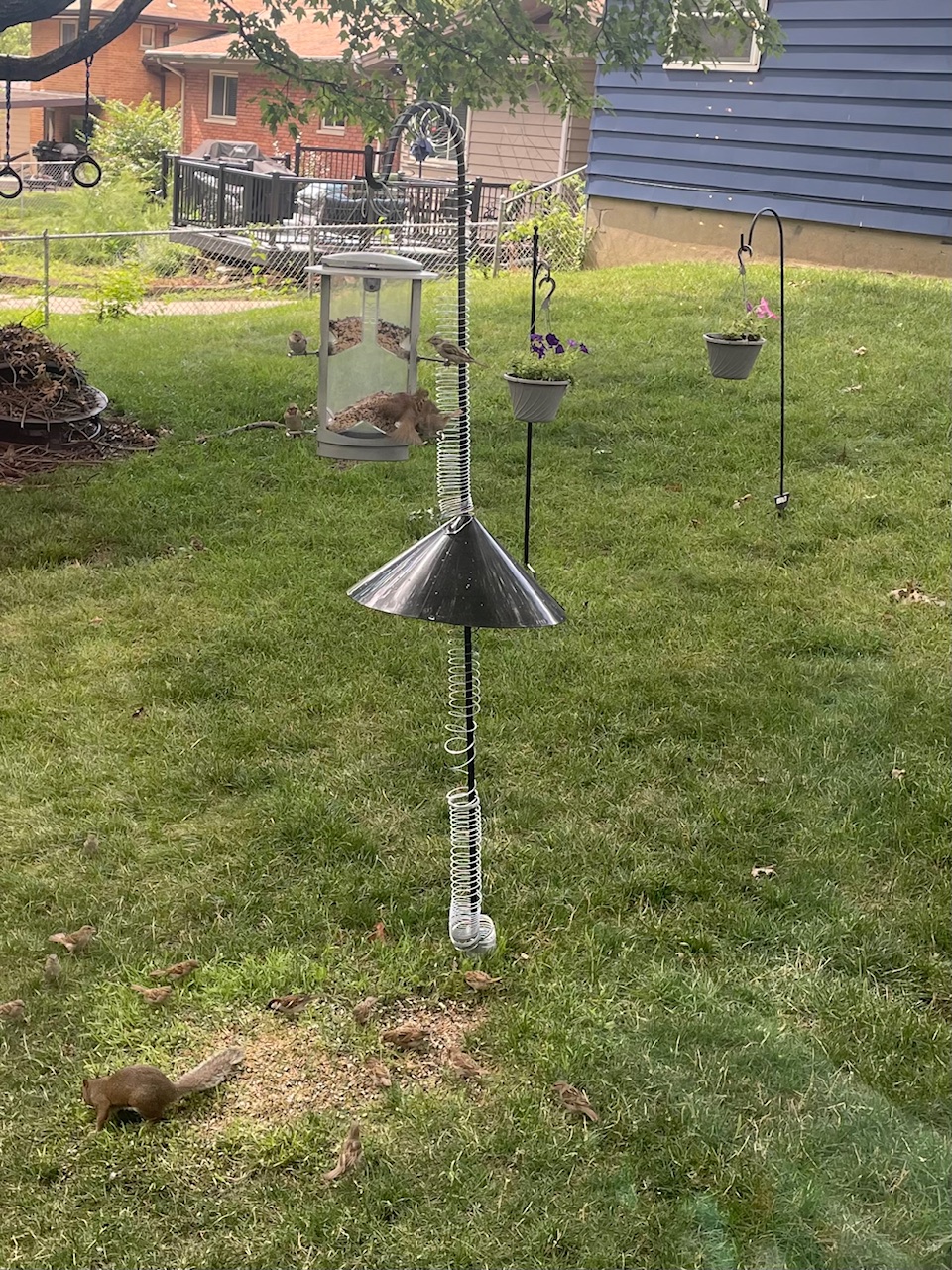
Yes, I did with the help of three slinkies, a 7-foot pole, and a baffle, which is a cone-shaped device that stops the squirrel from climbing up your pole to your feeder. I knew of the existence of baffles, but I had no idea that’s what it was called. But thanks to keyword research and placement by the vendor, I found it. Now my birds can eat in peace.
Note Mr. Squirrel, who is now relegated to picking up seeds from the ground.
Subscribe to this blog and you’ll receive an email whenever I post. To do that, enter your email address and click on the “Follow” button in the lower left-hand corner of the page. You can also follow me on the following social media platforms:
One of my viewers is struggling with consistent messaging. They are wondering how to promote something across multiple channels without rewriting the text every single time!
This is a great question. And there’s a little trick you can use to save time and effort. I’ll share it with you in this episode.
Plus kudos go to a library for press coverage they received for their new RFID checkout stands. I’ll explain.
Do you have a suggestion for a topic for a future episode? Want to nominate someone for kudos? Let me know here. And thanks for watching!
Special note for viewers: The next episode of The Library Marketing Show will be released on Wednesday, June 5.
Subscribe to this blog and you’ll receive an email whenever I post. To do that, enter your email address and click on the “Follow” button in the lower left-hand corner of the page. You can also follow me on the following social media platforms:
Photo courtesy Cincinnati and Hamilton County Public Library
Interviewing a stranger about their library experience is intimidating for many people. If the thought of having an intentional conversation to elicit a sound bite you can use in a blog, video, social media post, press release, or other content sounds daunting, the post is for you.
Why a powerful quote is important.
Your audience wants to hear directly from the people impacted by your library’s work. Whether that is your staff, director, board members, or patrons, a good quote can drive home your work’s value.
A quote can convey passion or a strong point of view. It can turn a story about statistics or complicated concepts into something understandable and relatable. A quote can also establish an emotional connection with the reader or viewer.
And, if your goal is to catch the attention of local media, a good quote can make your press release, blog post, or email stand out. Because…
The media knows when your quote is fake.
I worked in a local television newsroom for nearly 20 years before I became a library marketer. And I’m here to tell you… journalists can tell when you’ve made up a quote for a press release.
I understand why it happens. Your director or coworkers may tell you they trust you to put words in their mouths. It seems less time-consuming than doing an interview.
But the media can tell when you’re making it up. That’s why an interview, however short, is key to getting an authentic quote. So here are tips to make the interview process smooth and successful.
Prepare as much as possible.
If you are interviewing a co-worker, a board member, or the director of your library, take a few moments to see if there is any documentation that gives you clues about their background. Search their LinkedIn profile and board minutes. Do a Google search to see if they’ve ever done an interview. You may learn new facts about them and their speaking style.
Think about how you might structure your piece before you even write it.
That structure may lead you to questions to ask.
For example, readers may notice that I often start library profiles on this blog with some facts about my subject’s life before they worked in marketing. I ask people to tell me about their childhood library and their work before libraries, to build the scene and give a deep background on my subject. Use this technique for any interview leading to a blog post, social media post, or video.
If you are interviewing to get a quote for a press release, I suggest writing the press release before doing the interview. Leave spaces where a quote or two would grab the media’s attention and add context and emotion to the story you’re trying to pitch. Now you’re ready to write your questions.
Craft targeted questions that elicit insightful responses.
Use simple sentences and language.
Add intention to your questions. If you want someone to share a firsthand experience or observation, craft your sentence to gently lead your interviewee to that answer.
Ask open-ended questions. If you must ask a yes or no question, follow up with “Why?” to give your subject the nudge to elaborate.
Still stuck? Use your tools. ChatGPT can help you craft questions for your interview.
To show how this works, I typed into ChatGPT: “I am interviewing my library director about a new partnership that will help community members land a job or advance their careers. Can you give me some sample questions I might use to get a good quote?”
Here is the list of questions ChatGPT gave me.
Can you please provide an overview of the new partnership aimed at helping community members with job placement and career advancement?
What motivated the library to pursue this partnership?
How do you envision this partnership benefiting members of our community?
Could you elaborate on the specific resources or services that will be made available through this partnership?
In what ways will the library be collaborating with the partner organization to deliver these resources and services effectively?
How will the library measure the success of this partnership in terms of its impact on community members?
Are there any demographics or groups within the community that stand to benefit most from this initiative?
How does this partnership align with the library’s broader mission and goals?
Can you share any success stories or examples of how similar partnerships have been effective in other communities?
What steps will the library take to ensure that community members are aware of and can easily access the resources and services offered through this partnership?
That is a huge list! It’s a great start. All I would need to do is go through and tweak the questions to match the tone I want to set and to sound more like something I would say.
Now comes the fun part: the interview!
6 tips for conducting the interview
#1: Record the conversation.
#2: Talk a little about yourself to get the conversation started.
#3: Ask an easy first question to calm everyone’s nerves.
#4: Encourage elaboration on interesting points.
#5: Let the person talk. Don’t be afraid of silence.
#6: Paraphrase or summarize key points to nudge the interviewee towards a quotable response.
Subscribe to this blog and you’ll receive an email whenever I post. To do that, enter your email address and click on the “Follow” button in the lower left-hand corner of the page. You can also follow me on the following social media platforms:
A few weeks ago, we talked about eliminating the word “resource” from your library marketing. That video started a conversation that resulted in a whole list of words to eliminate from your library marketing vocabulary.
Get the list and the reason why this change is so important (I promise I’m not trying to be a pain… there is a good reason) in this episode!
Do you have a suggestion for a topic for a future episode? Want to nominate someone for kudos? Let me know here.
Subscribe to this blog to receive an email whenever I post. To do that, enter youremail address and click on the “Follow” button in the lower left-hand corner of the page. You can also follow me on the following social media platforms:
Subscribe to this blog and you’ll receive an email whenever I post. To do that, enter youremail address and click on the “Follow” button in the lower left-hand corner of the page. You can also follow me on the following social media platforms:
Subscribe to this blog and you’ll receive an email whenever I post. To do that, enter youremail address and click on the “Follow” button in the lower left-hand corner of the page. You can also follow me on the following social media platforms:
Photo courtesy Cincinnati and Hamilton County Public Library
I do my best writing in the darkness.
I wake up most workdays around 5:30 a.m. I pour coffee and add enough creamer to turn the liquid from black to beige. Then my coworker Scarlett and I stumble a few steps through the backyard to my office to begin the day.
I turn on the twinkle lights. I scratch my coworker behind the ears. She crawls into her office bed for another two hours of snoozing (lucky dog).
And then I begin.
The early morning, when my brain is empty and uncluttered by the tasks of the day, is when I do my best writing.
Library marketing often means cranking out text for a variety of promotional pieces. You’re likely writing blog posts, emails, speeches, press releases, talking points, and more.
Writing is difficult. But clear, concise text is essential as your library works to position itself in a world full of content.
Maybe you have been thinking about posting less on social media. You may consider turning to other, more content-rich and impactful tactics like blogs and print newsletters. If that’s the case, you’ll need to make sure your writing is readable, relatable, and memorable.
That’s where online writing tools come in handy. They can help your writing have more of an impact. They can help you craft sentences that are clear and concise, even when the subject matter is not. They can help you figure out a headline that will draw readers in. They can help you discover the right word to make your meaning clear.
And no matter what time of day you do your best writing, these tools will help you perfect your work. I use them every day on everything I write (including this blog post). Here are my favorites! They’re all free.
Sometimes the most difficult part of writing is coming up with an idea. This site has thousands of fill-in-the-blank prompts that can help you brainstorm your next topic. It’s a great place to visit when you’re suffering from writer’s block.
To demonstrate, I went to the site and typed in library marketing, then selected is an industry. Here are the suggestions it gave me.
You can save the suggestions and download them if you are willing to subscribe to their newsletter. And if you hit refresh, it will keep giving you ideas until you find one you like.
This is a very simple tool that shows you new keywords and performance data to use in your text.
I typed in reading recommendations and then chose Education & Instruction and the United States for my search parameters. Here are the results.
You’ll want to use this tool to see what phrasing to use when you are creating content. So if you were looking to promote your library’s reading recommendations, you may use phrases like “Best Books of All Time” in your email and in your blog posts to drive lots of traffic to your library’s website.
This fantastic tool measures searches from Google, the most popular search engine. You’ll get to see if your ideas play well in terms of topic, queries, and regions. It can help you to decide if a certain topic is something your audience in your community is searching for.
This text editor is helpful for creating copy that is clear, clever, bold, and easy to understand. You can either write inside the program or you can copy and paste your draft into the site.
The Hemingway App highlights complex phrases and errors. It grades your text and prompts you to break up sentences and replace words to clarify your meaning.
For example, originally, the eighth paragraph of this blog post went like this:
And if you’ve been thinking about the advantages of ramping down your library’s social media posts, and turning to other, more content-rich and impactful tactics like blogs, you’ll need to make sure your writing is readable, relatable, and memorable.
The Hemingway App led me to change the paragraph to this:
Maybe you have been thinking about posting less on social media. You may consider turning to other, more content-rich and impactful tactics like blogs,. If that’s the case, you’ll need to make sure your writing is readable, relatable, and memorable.
This tool is designed to help you write more conversations. It’s based on the premise that clear writing stays within the bounds of the ten-hundred most commonly used words in the English language. Use it to review the language you are using in any piece of text to make certain your writing makes sense.
Here’s how it works: You copy and paste a bit of text, or type directly into the tool, and then hit enter. The tool will point out all words you should change to be more conversational.
To demonstrate, I typed this sentence into the editor: Books help readers understand their place in the world. They can open new perspectives and new experiences for readers and enrich their lives.
Up-Goer suggested I replace these words: readers, perspectives, experiences, readers, enrich.
Obviously, you don’t have to change your text based on every suggestion. I changed several of the words in that paragraph for the final draft of this post and ignored the rest of the suggestions.
And even though I don’t always take all of its suggestions, this tool forces me to rethink the way I write. It makes me consider whether my words are truly the best way to express my thoughts and feelings to my library marketing audience.
I am not certain I would survive without this tool. It catches spelling and grammar errors, sentence structure problems, run-on sentences, and punctuation issues that are missed by the Microsoft Word editor.
Grammarly also lets you add words using the personal dictionary function, which is helpful for those quirky instances that may be part of your library style guide. For instance, I work for NoveList, and that capitalized L in the middle of the sentence always gets flagged as an error in other editors. But I’ve added it to my personal dictionary in Grammarly.
This browser extension is a mix between Grammarly and the Hemingway App. It gives you seemingly endless ways to rewrite sentences in a more creative fashion. It’s great for when you’re exhausted (hello Fridays!).
To demonstrate, I typed this sentence into the editor: Books help readers understand their place in the world. They can open new perspectives and new experiences for readers and enrich their lives.
The editor gave me more than six alternative ways to phrase that paragraph, including these:
WordTune integrates with Google Docs, Gmail, Slack, Facebook, Twitter, Web Outlook, Facebook, Twitter, LinkedIn, and WhatsApp.
There is a free version and a 30 percent discount for nonprofits and academia on paid plans. To take advantage of the discount, go here and scroll down to the point about discounts.
This tool highlights clichés in your text so you can avoid overused expressions. If clichés are your pet peeve (as they are mine), then this tool will be your new favorite!
This free tool trains you to write clear, catchy headlines with powerful, uncommon, and emotional words. It also shows you how your headline will look in a Google search and in an email on a desktop or mobile device.
Subscribe to this blog and you’ll receive an email every time I post. To do that, enter your email address and click on the “Follow” button in the lower left-hand corner of the page.
“Language is one of the most important parts of any culture. It is the way by which people communicate with one another, build relationships, and create a sense of community.”
Kelsey Holmes, Greenheart Club Program Assistant.
One of the ways we can best make all our community members feel welcome and safe is to use inclusive language in our library marketing and promotions.
What is inclusive language?
The University of Oregon has the best definition of inclusive language that I’ve found. In their editorial guidelines, they say “For communication to be effective, it needs to appropriately address all audiences for which it is intended. Inclusive language acknowledges diversity, conveys respect to all people, is sensitive to differences, and promotes equitable opportunities.”
Why inclusive language is important to your library
When your library uses inclusive language in print and digital marketing materials, on your website, and in conversation at the front desk, you are fulfilling the library’s core mission. You are giving people the signal that your library is a safe space.
A lack of inclusivity reflects negatively on your library and values. It affects library staff morale. Worst of all, it can hurt the community’s perception of your library, affecting donations and fundraising efforts.
You must make time to check all your promotions for inclusive language. Every email, social media post, blog post, digital sign, bookmark, and brochure must be examined. You must make sure you aren’t excluding someone in your patron base.
The latest on inclusive language
Inclusive language changes and evolves. Since this post was originally published, I’ve written an update on the NoveList blog which you can read here.
Subscribe to this blog and you’ll receive an email whenever I post. To do that, enter your email address and click on the “Follow” button in the lower left-hand corner of the page.


 Super Library Marketing: Practical Tips and Ideas for Library Promotion