A few weeks ago, I heard a tip for writing email subject lines that made me equal parts excited and annoyed. Excited because it works. Annoyed because it’s so obvious in hindsight.
In this episode of The Library Marketing Show, I’m sharing the simple shift that can make your library emails more compelling and more likely to get opened!
Plus, the first kudos of the new year go to an academic library that managed to poke fun at AI and highlight the staff’s human expertise.
Do you have a suggestion for a future episode’s topic? Do you want to nominate someone for kudos? Let me know here.
Fans of this show know I’m a big believer in email as one of the most powerful tools in your library’s marketing toolbox.
Now, a brand-new survey is packed with insights to help you boost opens and clicks — and make your emails even more effective. But here’s the real headline: there’s one SUPER secret trick that top marketers use to dramatically improve results.
It’s surprisingly simple, requires no extra tools or tech, and you can start using it right away. I’ll reveal exactly what it is in this episode of The Library Marketing Show.
Plus, we’re giving kudos to a library that introduced a brilliantly-named new mascot.
Do you have a suggestion for a future episode’s topic? Do you want to nominate someone for kudos? Let me know here.
Subscribe to this blog, and you’ll receive an email whenever I post. To do that, enter your email address. Then, click the “Follow” button in the lower left-hand corner of the page. You can also follow me on the following social media platforms:
There’s one teeny, tiny thing that you can do to make sure your library’s emails not only make it into the inbox of your recipients but also build a connection with the people who sign up for your emails. And it only takes you five seconds to take this step! I’m going to share that tip in this episode of the Library Marketing Show.
Plus we’ll give kudos to a library that gave us a master class in crisis communication.
Do you have a suggestion for a topic for a future episode? Want to nominate someone for kudos? Let me know here. And thanks for watching!
Subscribe to this blog and you’ll receive an email whenever I post. To do that, enter your email address. Then click on the “Follow” button in the lower left-hand corner of the page. You can also follow me on the following social media platforms:
We are going to put a common library marketing fear to rest, once and for all.
Here’s the concern: Are you inadvertently leaving people behind when you target people with your email marketing? Let’s get into it in this episode of The Library Marketing Show.
Plus kudos go to a library that was the focus of a blog post by a local country radio station DJ!
Do you have a suggestion for a topic for a future episode? Want to nominate someone for kudos? Let me know here. And thanks for watching!
Subscribe to this blog and you’ll receive an email whenever I post. To do that, enter your email address and click on the “Follow” button in the lower left-hand corner of the page. You can also follow me on the following social media platforms:
Sometimes in these videos, I give you a list of tips to help set you up for library marketing success.
But in today’s episode, I’m only going to share one task you’ll want to do once a year (yep, that’s it!) to ensure that your library’s email marketing continues to be successful.
Plus I’ll give kudos to 27 libraries who won a major award, and I’ll tell you where you can meet them in a few weeks!
Do you have a suggestion for a topic for a future episode? Want to nominate someone for kudos? Let me know here. And thanks for watching!
Subscribe to this blog and you’ll receive an email whenever I post. To do that, enter your email address and click on the “Follow” button in the lower left-hand corner of the page. You can also follow me on the following social media platforms:
Photo courtesy Cincinnati and Hamilton County Public Library
Last week, we discussed the pros and cons ofemail marketing automation. If your library chooses a program that requires a more hands-on approach to email marketing, this post is for you. These time-saving tips will let you create high-quality emails that resonate with your audience without spending all day on your emails. (Although, how fun would that be?!)
Time-saving Tip #1: Use templates.
This is the most effective way to save time when creating library marketing emails. If your email program doesn’t offer templates and you must make them yourself, here’s how to do it.
Decide on your buckets.
What kind of emails does your library need to send? Look at your library’s overall strategic goals and your marketing goals. Then, break your emails down into categories, like this:
Promote programs
Promote the collection
Promote services that bring people into our physical branches
Announcements like holiday closures, new services, renovations, service outages, etc.
Email to donors and legislators
Create one template for each category.
The ideal template will have sections with space for text, an image, and a call to action button. Here’s a great example of a library marketing email from Eisenhower Public Library made from a template.
Populate and send.
When it comes time to send the email, make a copy of your template. Insert the copy, images, and appropriate call to action, and hit send!
Time-saving Tip #2: Keep your emails short.
Emails that include no more than 4 topics perform best. If you have more to say, you can always send another email!
Keep the text in your email to a minimum. Think of your text as a tease. You want to write 1-3 enticing lines that compel your recipient to do something, like register for a program or put a book on hold.
Time-saving Tip #3: Target your messages to specific audiences.
It takes time to write copy that’s generic enough to appeal to everyone in your community. By comparison, it’s easier and faster to write text and find images when you know exactly what your audience is looking for in your library emails.
And, by targeting your message, you are more likely to say something that matters significantly to your cardholders, which makes them more likely to act, which makes your email more successful!
Targeted email marketing for libraries is effective because it serves the right message to the right group of people. And it works for all kinds of messages.
Also, your library should make your emails opt-in. This ensures your emails are going to community members who want your content.
Time-saving Tip #4: Let the robots help you with your subject line.
You should never rely on Artificial Intelligence tools like ChatGPT to do all the work for you when it comes to library email marketing. But they are a great starting point! Instead of staring at the wall trying to brainstorm ideas for the best subject line, ask the AI to get you started.
To show you, I ran this example using Microsoft’s Copilot.
Once you have a place to start, you can tweak the subject line to match the tone of your library. Move, change, or remove the suggested emoji. And then, run the subject line through one of the free analyzers below. Each has its own algorithm for predicting the success of a subject line. But all will help you get to a subject line that works for your target audience.
Time-saving Tip #5: Plan as much as humanly possible.
Plan your email campaigns in advance using an editorial calendar. This helps you stay organized and maintain consistency.
And, if you know ahead of time when you are sending emails, you can set aside time in advance to create them and get them approved. Have a few spare minutes at the beginning or end of your shift? Work on emails coming up in the next few months!
Time-saving Tip #6: Reuse and repurpose.
You don’t have to reinvent the wheel every time you create an email. If you wrote a social media post or a blog that did really well, steal the text you’ve already written and insert it into your email. Use the same image or graphics, sized correctly for your email of course, and hit send!
Time-saving Tip #7: Watch your metrics.
If you take an hour each month to analyze the performance of your library emails, you’ll soon start to get a clear picture of what works for your audiences. That will make you more efficient as you create your emails. You won’t waste time creating emails that your recipients won’t read.
Subscribe to this blog and you’ll receive an email whenever I post. To do that, enter your email address and click on the “Follow” button in the lower left-hand corner of the page. You can also follow me on the following social media platforms:
You may wonder, is it possible to over-communicate with my patrons?
Can you send too many emails, do too many social media posts, and put up too many posters and flyers in your library?
There are some telltale signs that you’re overdoing it! I have four tips to help you determine if you are flooding your community with too many messages in this Library Marketing Show episode.
Plus kudos go to a library that received press coverage for the return of a long overdue book with a funny note inside!
Do you have a suggestion for a topic for a future episode? Want to nominate someone for kudos? Let me know here. And thanks for watching!
Subscribe to this blog and you’ll receive an email whenever I post. To do that, enter your email address and click on the “Follow” button in the lower left-hand corner of the page. You can also follow me on the following social media platforms:
Photo courtesy Cincinnati and Hamilton County Public Library
My maternal grandfather was small (he stood about 5 feet 3 inches tall) but mighty.
He returned from World War Two to a wife and four children. He made ends meet by farming, driving a milk delivery truck, and working on a road construction crew. He taught me to build fences, crack walnuts with a vise, and drive a tractor and a car.
My grandfather
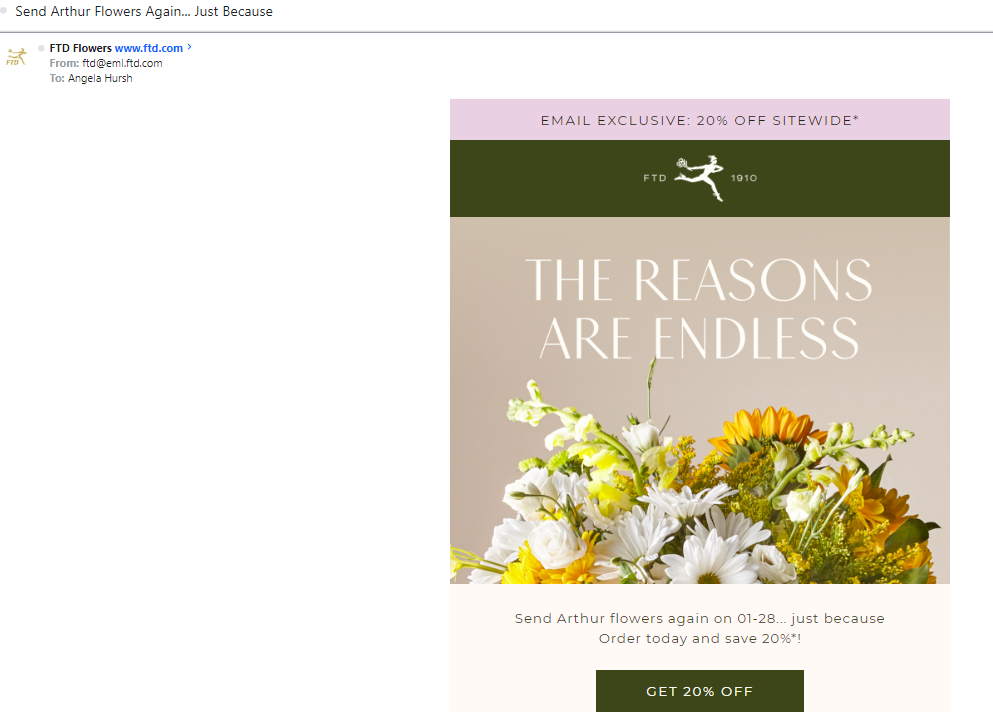
When he died in 2016, I decided I wanted a bouquet of flowers at the funeral as a symbol of all that he meant to me. I ordered an arrangement online.
Imagine my surprise when a few months ago, I received this email.
I admit, at first, I was shocked and baffled. But I work in marketing, so I understand this email was created using automation. And then, this email made me think about the pros and cons of automation for library email marketing.
The advantages of email automation
Automated email has one big advantage for library staff: It saves time.
Automated onboarding emails, reading suggestions, and program announcements will free up your time for other work. You can create a campaign, set it, and forget it.
Experts also say that open and click rates are higher for automated emails because they are more relevant to the recipient.
The disadvantage of email automation
There is one big problem with automated emails, in my opinion. The personalization isn’t personal. It’s inauthentic. And there’s a chance it can go very, very wrong.
The email from the flower company is a perfect example. It has negatively impacted my feelings toward the flower company. If they really cared about me, and not just my business, they would have looked to see that I’d sent flowers to a funeral home. And they wouldn’t have tried to sell me another bouquet to send to my dead grandfather.
Here’s how this snafu relates to library marketing: Most automated email programs created for libraries automatically segment your audience into groups based on factors like previous card use. Those programs use algorithms that look at past card usage or reading history to predict future behavior.
But, as happened with the flower company, those algorithms are not always correct. They don’t allow for changing tastes or lived experiences. And they won’t expand a cardholder’s use of the library by introducing them to new services.
The bottom line is that past library card usage does not always predict future library card use.
For example, in the last year, my library card use has changed drastically. I’ve switched from mainly print fiction books to audiobooks. I’m now a heavy user of downloadable magazines. I’ve also recently discovered the joy of using my library card to read newspapers online (goodbye paywall!). And I’ve used my library’s Makerspace several times this year.
My life and my habits have changed. But, my home library, which uses automated email, has not sent me any emails that show they’ve noticed my changing habits. They send emails based on my pre-pandemic use of the library.
What do libraries do best? Personalized service!
Libraries don’t focus on transactions. We don’t rush our visitors. We listen and work until we get them the answer or the service that best solves their problem.
This is particularly true when it comes to book recommendations.
A reader’s interests are never set for life. And the things that are interesting about a book—the tone, pace, setting, and characters, cannot be managed by an algorithm. Reading suggestions and collection marketing can’t be replicated by robots.
So, as library marketers, we must be cautious to balance our need to save time, with the need to create a connection with our readers. And that means, if you use automated email marketing, you must always be evaluating the emails your library sends.
Ask yourself: Is this email serving my recipient with the content they want and need?
Two more potential pitfalls of automated email marketing
Irrelevant automated emails may be marked as spam by your recipients, hurting your sender reputation. Read more about how that can impact whether your email gets delivered to your recipients here.
Many programs that offer automated emails don’t allow you to add design elements that are specific to libraries. And that can be detrimental to your library’s brand. You want your community to recognize the promotional materials you make, including emails.
The advantages of manual email marketing
Good patron experience means that you encourage your email recipients to choose the content they want to receive from the library.
Your library should make your emails opt-in. This ensures your emails go to community members who want your content, which protects your sender reputation.
The opt-in model allows you to add the content to your emails your audiences have indicated they are interested in, giving your recipients control over what they receive. It also allows for flexibility to account for changing use and taste.
Finally, opt-in emails allow you to send when it’s best for your users, not for your library. All email programs offer scheduling. When you schedule your own emails, you can look at reports to see when your target audience responds best to your emails. You can adjust accordingly.
The disadvantage of manual email marketing
Time is the number one disadvantage of programs that require you to create emails manually. It takes precious time to write copy, choose images, and schedule your emails.
So, next week on Super Library Marketing: Time-saving techniques for creating library marketing emails. These tips will work whether your library chooses automated or manual email marketing!
Subscribe to this blog and you’ll receive an email whenever I post. To do that, enter your email address and click on the “Follow” button in the lower left-hand corner of the page. You can also follow me on the following social media platforms:
Photo courtesy of Cincinnati and Hamilton County Public Library
If you send emails for library marketing, you may have been scared by recent articles on X, LinkedIn, and other marketing blogs that predict doom and disaster for email marketing in the coming months.
Last October, Gmail released this blog post, outlining changes coming to the algorithm they use to determine whether incoming emails make it into the regular inbox or go to the spam or promotions folder. Yahoo soon followed suit.
The response in the marketing world to these announcements took on a somewhat frantic tone.
“Are our emails going to be delivered?”
“What changes do we need to make to ensure we don’t end up in the junk folder?”
The short answer is that with a few small changes, your library emails will be delivered. Yahoo and Gmail want you to:
Authenticate your email
Enable easy unsubscribe
Reduce unwanted emails
Let’s go through each of these steps, beginning with authentication. Authentication means that your library’s email sender reputation is sound.
What is email sender reputation?
Email sender reputation is a score that an Internet Service Provider (ISP) assigns to any organization that sends an email. The higher the score, the more likely an ISP will deliver emails to the inboxes of recipients on their network.
Like any algorithm, Gmail, Outlook, Yahoo, and other email providers use ranking signals to determine the folder in which your email lands—or if it’s delivered at all.
Here is what we know about those ranking signals, according to my research. Sources I’ve used for this post include marketing expert Michael Barber, Mailmeteor, and my co-workers in product management at NoveList.
Sender Authentication and IP Address Reputation
Sender authentication involves verifying the authenticity of the sender’s domain. The email providers are looking at past sending behavior coming from your IP address.
The bad news is that your library has very little control over either the sender authentication or the IP address reputation of your emails.
For example, MailChimp’s website says their customer’s emails, including those from many libraries, are sent from an IP address that is shared by multiple customers. If one or more of those customers send emails that negatively impact MailChimp’s overall IP address reputation, your library’s emails could be affected. Your library can purchase a dedicated IP address from MailChimp for an additional monthly fee.
Domain Reputation
Email service providers also consider the reputation of the domain name in the email address. The domain is the part of your email address behind the @ symbol.
The email providers look at past sending behavior and the overall quality of emails from that domain. Specifically, they are looking at 3 factors.
Spam complaints
Email recipients click the spam (or junk) button for three reasons:
They don’t realize the email is coming from your library.
They can’t remember signing up for your library’s emails.
They can’t find the unsubscribe link.
Get ready for a shock, because I’m changing my position on a major part of my email marketing advice.
In the past, I was a proponent of opt-out emailing for libraries. But because of recent changes in the algorithms used by Gmail, Outlook, and Yahoo to sort messages…
Your library should make your emails opt-in. This ensures your emails are going to community members who want your content, which protects your sender reputation.
You can also reduce the likelihood that someone will mark your library emails as spam by making sure your “friendly from” line includes your library name. Add a first name to the friendly from (it doesn’t have to be a real person!) like “Angela from The Central Library.”
Make sure your reply address is a real email address as well. Let subscribers know how often you’ll be sending emails. And don’t send so few emails (yes, you read that right!) that subscribers don’t remember signing up!
Recipient inaction
When your email recipient either deletes your library’s email without opening it or leaves your library’s email sitting unopened in their inbox, that’s recipient inaction.
You can reduce recipient inaction by making sure your library emails are targeted to the audience that most want that information. Create interest groups and an opt-in page like this one from Delafield Public Library.
Letting your community members choose the information they wish to receive by email from your library will reduce recipient inaction and spam complaints against your library.
You can also reduce recipient inaction by spending time making sure your email subject lineis as good as it can be.
Engagement metrics
Open rates and click-through rates play a significant role in email reputation. Higher engagement indicates that recipients find your emails valuable and relevant, leading to better deliverability. Low engagement metrics tell the email algorithms that that your emails may be unwanted or irrelevant.
One-click unsubscribe
The biggest change is that Gmail and Yahoo are asking marketers to add one-click unsubscribe. Most email marketing providers are addressing this issue and have plans in place to include one-click unsubscribe this year.
To encourage your library email recipients to reply, ask for their feedback on a service within your email. Or ask recipients to reply with the name of a book they think should be included in your next booklist or book display. This is a chance for you to be creative!
You don’t have to respond to every email reply. But it is an opportunity to improve your sender reputation while gathering information that will help you to better serve your community.
Subscribe to this blog and you’ll receive an email whenever I post. To do that, enter your email address and click on the “Follow” button in the lower left-hand corner of the page. You can also follow me on the following social media platforms:




 Super Library Marketing: Practical Tips and Ideas for Library Promotion