Search

Super Library Marketing: Practical Tips and Ideas for Library Promotion

Tag

library customer emails

The Emoji Experiment: The Pros and Cons of Adding Emojis to Your Library Marketing Email Subject Lines

I notice it, groggy from sleep. I check my email, as one does, first thing in the morning before getting out of bed. 😉

The sight of it causes my heart to skip a beat. “It’s going to be a glorious day,” I think to myself as I jump out of bed. 🤩

What is the magical thing that makes getting up in the morning easier? 🌟

An emoji. To be specific, a set of headphones, situated in the subject line of an email. An email that comes from my library.⬇️⬇️

The headphones signal to my brain, before I can read the words that come after them, that my audiobook from Overdrive is ready for download.

After dozens of such emails, my body has an almost Pavlovian response to the tiny drawing of headphones.

I get giddy. I get excited. I am filled with anticipation to download and start the audiobook.

According to Salesforce, only two percent of emails sent by businesses to consumers in 2019 had an emoji in the subject line. That’s not a lot, really. And that means there is room for libraries to experiment.

I don’t think there is any doubt that emojis are here to stay. As of October 2019, there were 3,178 widely-recognized emojis, according to Emojipedia. And the major cell phone and digital marketing companies keep adding emojis to their libraries.

I want my cardholders to have the same reaction I have to the headphone emoji when I send them library marketing emails. The idea that an email from my library could energize someone or fill them with anticipation or cause them to do a mini-celebratory dance is one I can’t ignore.

Why might emojis work?

Emojis work because the brain processes visual information 60,000 times faster than text. More than 90 percent of the information that we process is visual.

The emoji drawing stands out in a line of letters. And if your recipient is using a device that adds color to the emoji, that also makes your subject line pop.

Your subject lines can also be shorter when you use an emoji because an emoji can do the work of some of the wording. And the shorter the subject line, the more effective the email. In 2018, 61 percent of emails were opened on mobile. Subject lines exceeding certain character counts can get cut off by mobile devices. And that impacts your open and conversion rates.

The experiment

I kept reading articles on the increased use of emojis in emails for brand marketing. There isn’t much data to suggest whether they are effective in converting customers to take any action on the email. And I thought, as I am apt to do, that someone should experiment with emojis in the library marketing space. Would my cardholders find them amusing? Would emojis help increase the effectiveness of my emails? Or would people think we had lost our mind and gone too far?

There was only one way to find out.

Over the course of six months, I sent 17 test emails to my cardholders with an emoji in the subject line. I used them in instances where I thought they added value to the subject line or helped me to make the subject line shorter. I also made sure I sent emojis to cardholders who tend to use digital services.

The results

After the six-month trial period, I crunched the numbers. And I discovered…

60 percent of the emails with an emoji in the subject line were effective. Ten of the 17 emails caused an increase in circulation, program attendance, or database usage for the item we promoted via email. That’s close to the average effective rate of my regular emails which do not include an emoji.

Emojis DID increase my open rate. The 17 messages I sent had an average open rate of 40 percent. Most of my regular emails have an open rate between 20 and 35 percent. So that was an improvement.

Emojis DID increase my click-through rate. The average click-through rate for the messages with emojis was eight percent. That is also slightly higher than normal. Most of my emails have a click-through rate of five percent.

Here are the subject lines from the four emails in the emoji test that had the highest open and click-through rates.

Ebook Publisher Policies
🚨New publisher policies will limit your access to eBooks.

This email had an 81 percent open rate and a 22 percent click-through rate.

Penguin Programs
🐧Make a date to visit the Library to see real live penguins this month!

This email had a 37 percent open rate and a 23 percent click-through rate.

Beach Reads 2019 Booklist
🏖️ Dreaming of sand, sun, surf, and great books? Here’s our 2019 vacation reading list!

This email had a 39 percent open rate and a 19 percent click-through rate.

Green Township Library Anniversary
🎈You’re invited to the Green Township 30th Anniversary celebration!

This email had a 54 percent open rate and a five percent click-through rate.

Now, there is something to consider and that is that the emoji may have had absolutely no effect on the overall effectiveness of these emails! Because my email marketing provider does not give me the ability to do true A/B testing, it may be that these emails had higher open, click-through, and conversion rates because of the wording of the subject line or the content of the email itself. The fact that there was an emoji in the subject line might be pure coincidence.🤷

Are there downsides to emojis?

There are some negative things to consider when you’re using emojis for email subject lines in library marketing.

Your emoji may not display correctly for your cardholder, depending on what kind of email platform they use.

Emojis can give the impression that your emails are not authentic. In some instances, users see an emoji and wonder if your library wrote it… or a robot.

Emojis can be overused. Finding the perfect emoji is fun. It makes you feel cool. But if you start putting an emoji in every subject line of every marketing email you send, you will likely find that they’ll soon have no impact or, worse, a negative impact.

That said, I think it’s worth it to experiment with emojis in your library’s email marketing. Your audience may love or hate them. There’s only one way to find out.

Remember to use them in the right context. Use emojis sparingly and make sure they add something to the message of your subject. And get your emojis from reliable sources like Emojipedia, GetEmoji, or your email platform.

Check the Upcoming Events page for a list of webinars and conferences where I’ll be next. Let’s connect! Plus, subscribe to this blog and you’ll receive an email every time I post. To do that, click on the “Follow” button in the bottom left-hand corner of the page. Connect with me on YouTube, Twitter, Instagram, and LinkedIn. 

The Tiny Little Mistakes That Ruin Your Library Marketing Emails AND How to Fix Them!

NEW LIVE LIBRARY MARKETING SHOW ON INSTAGRAM! I’ve decided to try a new thing! I’ll be doing a live Instagram Q&A and discussion about Library Marketing. The sessions will be every Tuesday at noon ET (10 a.m. Central and 9 a.m. Pacific) beginning Tuesday, June 25. Join me to talk about library marketing topics for about 20 minutes each week. My handle is Webmastergirl. You can email questions and topic suggestions ahead of time. Just fill out this form below. See you there!

Go back

Your message has been sent

Warning
Warning
Warning
Warning
Warning

Warning.

I get a lot of library marketing emails. I love to see what other systems are doing. So, I go to their websites and I see if I can get on their mailing lists! It’s fun and it helps me to find new things to promote and new ways to communicate with my audience.

I also get a first-hand look at some of the small boo-boos that other library marketers make in their emails. Email is hard. I’ve been doing email marketing for so long (feels like forever!) that I have made all of these mistakes myself! And I love email marketing, so I’m weirdly obsessed with learning about it. Some of the positive text and design choices that work for library marketing in other promotional pieces, like posters, flyers, websites, and blogs, do not work in email marketing.

The good news is that these little problems are easily fixed! Tiny adjustments in the text and design of your email can improve your click-through rates and effectiveness. Check this list against what you’re doing now and start reaping the benefits of improved email design!

Problem: too many images: A clean design is crucial to engagement. Too many images or too much text is off-putting to your email recipient.

The most common email programs like Yahoo and Outlook will NOT automatically download images. In fact, only Gmail downloads images automatically. With all other providers, the email recipient receiver must consciously click a prompt in order to download an image. That means if your image is conveying most of the key message in your email, your receiver likely won’t see it.  They will miss the information and the call to action, and your email is useless.

Solution: Create an email that is mainly text-based. I have found an 80-20 mix works best: 80 percent of my email is text, 20 percent is image-based. The image I use compliments the text. Its purpose is to create emotion or set the mood of the email. It’s there to inspire. It doesn’t convey key messages and it doesn’t contain the call to action.

Problem: too much text. An email that contains several long paragraphs of information is off-putting to recipients. It gives the impression that your email will take a long time to read.

The email scheduling platform Boomerang studied results of about 20 million emails sent using their software. They found that the optimal length of a marketing email is between 50 and 125 words. A study by Constant Contact of more than 2.1 million customers found emails with approximately 20 lines of text or 200 or so words had the highest click-through rates.

Excessive text can also send negative signals to spam filters. Too much text added to excessive punctuation or large images could keep your emails from ever arriving in an inbox.

Solution: Limit your email text to 200 words or less. The recipient should be able to read all the information in your email in about 15 seconds. If you have more information to share, use your call to action to indicate that there’s more to know about your subject. Then send your recipient to a landing page where they can get all the information they need.

Problem: Text that is too small. Keep in mind the growing number of people who will read your email on a mobile device. You want to make sure they can actually see your words. An 11 or 12 point font size is too small to be seen clearly on a screen.

Solution: Increase your text size.  Email font should never be below 18 point in size.  You should also use the bold option to make the most important information stand out.

Problem: Wishy-washy calls to action.  A compelling call to action is one of the best ways to increase the click-through rates of your library marketing. Some library marketing emails also contain too many CTAs.

Solution: Use positive, active language in your CTA. “Register” “Read This Book”, “Learn More”, “Join Us”, “Donate”, and “Get Started” are some of my favorites. I put my CTAs in a square red box that looks like a button to compel my recipients to click on them. I embed the CTA in my image as well and use the “alt text” to convey the CTA in case someone’s eye skims the email. I try to keep my CTAs to one per email.

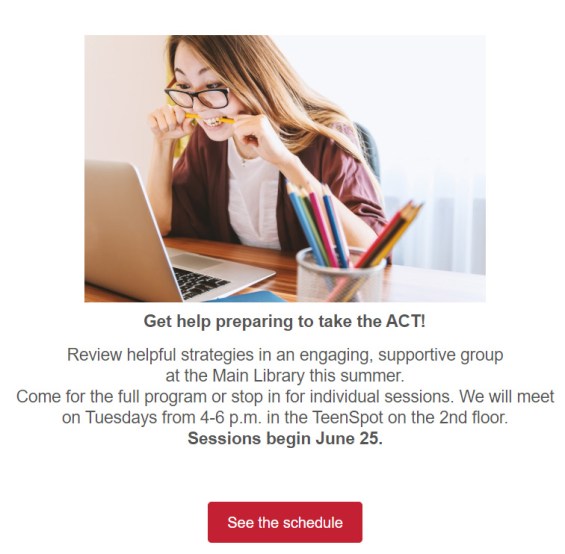
One image, with the main text in bold at 18 point found. A few sentences and a clear call to action.

Problem: Ignoring mobile responsiveness.  Mobile opens accounted for 46 percent of all email opens according to the latest research from Litmus. If your emails aren’t optimized for mobile, you are missing a huge potential audience, particularly women and young people.

Solution: Optimize your emails for mobile to make them responsive. Most email marketing programs offer mobile responsive templates. My library uses Savannah by OrangeBoy. We switched to all responsive templates in January of this year. I’ve seen a nine percent increase in click-through rates. I count that as a win!

Problem: No system for proofing your emails in different kinds of email boxes. Your email design might look great in your creation software. But if you send it without testing it, you may find that your email becomes a kind of monster creature! It may show up a a jumbled mess of images and text. This happens because every email inbox will convert your email differently.

Solution: Test your email to make sure your message displays correctly for your recipients. Find people that you trust you have different providers… someone with Gmail, someone on Outlook, someone on Yahoo, and so on. Send them the message and ask them to check for warped images, font problems, and extra spaces.

Subscribe to this blog and you’ll receive an email every time I post. To do that, click on “Follow” button in the bottom left-hand corner of the page. Connect with me on Twitter, Instagram, and LinkedIn.  
How to Hook New Cardholders and Make Them Loyal with Email

We talk a lot about emailing our cardholders with information about new products, services, and collection items. But you can also use your email list in a powerful way to reach people who have just signed up for a library card.

Most libraries take a minimalist approach to “on-boarding” a new cardholder.  Once a person fills out a library card application, we hand them a card, a welcome brochure, and send them on their way. We’re friendly and we’re genuinely excited to welcome them to our system. But we make a mistake that’s common for a lot of businesses and organizations. We know our system inside and out and we often forget that our new cardholders know nothing about what we offer. We assume they can find their way to the things they need.

It’s important to help those cardholders learn to navigate the behemoth number of resources and items available at the library. A solid on-boarding campaign retains new cardholders and turns them into lifelong loyal users of the library. The first 90 days of a new library cardholder’s experience is crucial to determining their feelings of connection and loyalty to the library.

It also makes good business sense. Studies show it costs five times as much to gain a new customer than it does to retain them. A library marketer practicing good stewardship will want to do their best to keep new cardholders coming back to use the library.

The most effective way to on-board a new cardholder is through email marketing. Many libraries create a campaign with specific emails sent to new cardholders at a pre-determined pace. Those emails slowly introduce them to new features and inspire them to try out all the library has to offer. It’s easy to do this using some mail systems, like OrangeBoy and MailChimp.

My library has a 90 day on-boarding campaign set to run automatically through OrangeBoy. Creating it was a bit of process. But the effort was worth it. In addition to retaining customers, the on-boarding emails reduce unsubscribes for future targeted promotional emails. Here’s how we did it and what we learned about doing it well.

First, make a list of the services, events, and collection types that get the most use at your library. You’ll want to include information about the most popular features you offer in your emails to new cardholders.

Then, make a list of the services, events, and collection types that are interesting or unique to your library but don’t get a lot of use. These are the gold nuggets of your on-boarding campaign. You’ll have the attention of your new cardholder. The relationship is fresh. Why not use that to showcase the hidden treasures at your library.

Finally, create an outline of your campaign, mapping out each message, when it will be sent, and what it will say. Look at the two lists you’ve created and narrow your focus. Try to promote no more than four things per on-boarding message. You don’t want to overwhelm your new cardholder. Rather, you’ll want to introduce people to the library in small doses. Pick a theme for each message with a specific call to action. Keep the language simple, conversational, and free of industry jargon.

Create, test, and release the messages. This part took me nearly as long as creating the plan did! But you’re almost there.

Track results. Of course, you’ll want to use a Google URL tracker or Bitly link to see which services and items get the most interest from your new cardholders. You can also track unsubscribe rates, and if you have the ability to divide cardholders into clusters, you can see where your new cardholders land after they finish the on-boarding process.

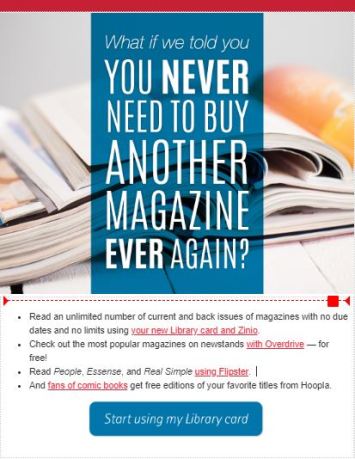
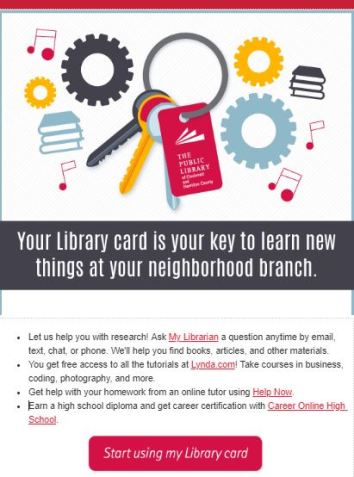
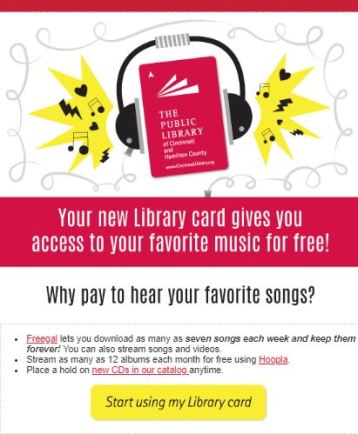
Here are a couple of examples of my library’s on-boarding emails so you can see what we do.

How do new cardholders react to these messages? They definitely don’t hate them. Our unsubscribe rate is 0%. We’re a large system and we’ve sent these for several years to thousands of new cardholders. Over the course of our campaign, we’ve had a couple of hundred people unsubscribe.

We send six emails over 90 days. The first email gets a lot of engagement, which is not a surprise.  The fifth email about using your neighborhood branch (see the image above) is the second most engaging email for us. Overall, about half of the new cardholders we sign up end up becoming loyal library customers. Most use our computers but the rest are checking out physical and digital items or using our MakerSpace.

If your library is doing something to on-board cardholders, I’d love to hear about it. Please take this poll and tell me about what you are doing in the comments.

Subscribe to this blog and you’ll receive an email every time I post. To do that, click on “Follow” button in the bottom left-hand corner of the page. Connect with me on Twitter, Snapchat, and LinkedIn. I talk about library marketing on all those platforms!


A WordPress.com Website.

Up ↑