In this episode, I’ll answer a viewer question from Hannah at the Johnson City Public Library. She asks, “What criteria would you use to justify retiring/making ‘private’ old blog posts?”
Kudos in this episode go to the Mary Wood Weldon Memorial Public Library. Watch the video to find out why they’re being recognized.
Do you have a suggestion for a topic for a future episode? Want to nominate someone for kudos? Let me know in the comments. And subscribe to this series to get a new video tip for libraries each week.
Thanks for watching!
Subscribe to this blog and you’ll receive an email every time I post. To do that, enter your email address and click on the “Follow” button in the lower left-hand corner of the page.
Last week, I wrote about the new email marketing data that changed the way I think about email and libraries. This week, I wanted to share more new tips to help you improve the chances your email subscribers will act.
Some of these come from Nancy Harhut, Founder and Chief Creative Officer of HMT Marketing. Nancy is an expert on behavioral science and consumer behavior. She studies how and why humans behave the way they do when they interact with marketing.
Nancy spoke at Content Marketing World. Her talk included a list of tricks to improve the effectiveness of your library promotional emails. I’ve combined her advice with new best practices I recently discovered while doing some deep research on email marketing.
And there’s a bonus in this post! Scroll down for a special free tool you can use to check the “spamminess” of your emails and get suggestions for improvement.
Tip #1: Make your community the focus of your email.
There’s a common mistake we make in library marketing. We often tell our community what we want them to hear.
But your email recipients are interested in how the library can help them. They have needs and wants that are specific to them.
@nharhut says your email recipients are not interested in everything you want to tell them. They want to know about the one thing they are looking for that will improve their lives.
Here’s a quick exercise you can do every time you create an email. Instead of making a list of items your library wants to promote, ask yourself these four questions about the person who receives your email.
What are their needs?
What’s driving their decision-making?
What are their goals?
What are they feeling?
This exercise will help you to focus on the way your library can help your community member. Once you’ve done that, you’ll want to include text in your email that makes it clear your library puts your community member first. It’s easiest to explain this using an example.
Library-focused readers’ advisory message: “We can recommend great books for you to read.”
Customer-focused readers’ advisory message: “You love to read. You’re busy. Leave the searching to us and get your reading recommendations fast.”
A few simple tweaks in wording put the patron first.
Finally, the images you choose for your email play a big part in making your community members feel that your library is focused on them. Be sure to choose images that reflect your community.
Here’s a real-life example: A library was creating an email to promote a yoga program. They chose a photo of a young, physically fit white woman in a yoga pose as their accompanying image.
But when they talked a bit about who actually comes to their yoga programs, they realized it’s attended by older, more diverse members of their population. Some of those attendees have physical challenges.
So, they found a new image that more accurately reflected their community. The image change helped drive more attendance to their yoga program!
Tip #2: Use first and second-person pronouns in your call-to- action button.
In all your library marketing text, you must connect with your community and make them feel seen, welcome, and invited. Using first and second-person pronouns like “me” and “my” or “you” and “yours” will help your email recipients to imagine themselves using your library.
In fact, using a first- or second-person pronoun for your CTA can result in as much as a 90 percent increase in clicks, according to market research conducted by two content marketing companies, Unbounce and ContentVerve.
Again, this is a simple tweak in wording that can lead to big results. Some pronoun-centered CTAs are:
Download my book
Claim your seat
Reserve your spot
Get my library card
Make your donation
Tip #3: Pair your calls-to-action.
Library emails tend to include many offers. But, according to Harhut, we should put our calls-to-action together, in pairs!
Why? Giving your email recipients a choice between two options will increase the likelihood that your subscriber will take an action, according to Harhut. In fact, she told us that researchers at Tulane University found pairing calls to action will quadruple the chance that someone will make a choice between the two options at the moment.
Here’s an easy example. Let’s say you are sending an email to promote new books in your collection. Simply pair them together, like this:
Pair book covers together to improve the chances that someone will click on a jacket and place a hold.
If you are promoting databases or events, use the same pairing trick. Put two options side-by-side. Doing this will create a “this or that” decision for your email recipient and increase the chances that they will choose one of the two options.
Tip #4: Try a tiny dose of negativity.
Our library promotional emails almost always emphasize the benefits or advantages of using the library. But Harhut says people are twice as motivated to avoid the pain of loss as they are to reap the benefits of gains.
This happens because of the Loss Aversion Theory. It was formulated by Nobel Prize-winning psychologists Daniel Kahneman and Amos Tversky.
Their research found that people value a loss more than an equivalent gain. Losses are unpleasant and evoke emotions like fear, guilt, regret, and anger. People will do pretty much anything to avoid those negative emotions.
We can take that fear of losing and use it to strengthen our library. How exactly does this work?
Let’s say your library is creating an email to promote your graduate school test preparation resources. You might try some text that says, “More than 50 percent of the students who don’t study for the LSAT can’t get into law school.” (A fact I looked up for this example… feel free to steal!)
Or, for your next ticketed event, emphasize the need to register before all the seats are taken.
These are just two examples of the way you can work a subtle hint of negative emotion into your marketing. For more ideas, I recommend this well-written research article from the Open Journal of Social Science: When and Why Negative Emotional Appeals Work in Advertising.
Tip #5: Include a good testimonial.
Your library emails shouldn’t just include promotions for products and services. Testimonials can help people to make decisions about whether to use your library. They help people to imagine themselves using your services.
Harhut says we should always be collecting and sorting testimonials so that we can use the best of them in our emails. It’s another great way to show that your library is focused on your community.
Use this list to help you pick your best testimonials.
Include a few lines from the testimonial in your email. Try putting it at the top of the email, before your promotions. This is especially effective if the testimonial is from someone who benefited from the program, service, or collection item you are promoting in your email.
Tip #6: Proofread. Then do it again. And again.
Spelling, punctuation, and grammar errors will damage the trust your community puts into your library.
Copy and paste your email text into Word, then run the editorial review.
Ask your co-workers to read through your email.
Read your email out loud. You’ll be surprised how many mistakes your brain will gloss over when you read silently.
Bonus: Free email testing tool.
There’s a new free tool I just learned about that can help your email. It’s called Mail Tester.
It was designed by software engineers who wanted a way to test the quality of their own email newsletters. So, they built their own tool and made it free to anyone who wanted to use it.
Here’s how it works.
Take an email that you plan on sending to your community and send it to Mail Tester first. They generate a random email address every time you go to their website.
Next, you click on the “check your score” button and wait for your results. You can see your results for up to 7 days.
I tried it using an example email I created for a presentation. Here are my results:
Subscribe to this blog and you’ll receive an email every time I post. To do that, enter your email address and click on the “Follow” button in the lower left-hand corner of the page.
The most powerful tool you have to reach your community is email.
I know there are some readers who don’t believe me. But here’s a fact that cannot be denied: 90 percent of Americans over the age of 15 use email. In the United Kingdom and Canada, 85 percentof people use email.
That’s a big portion of your community.
The digital divide is real but not as wide as most of us thought. The latest Pew Research Center study released in August 2021 shows:
Rural residents have seen a nine percentage point rise in home broadband adoption in the last five years.
72 percent of rural Americans have high-speed internet access.
Smartphone ownership also rose nine percentage points among rural residents in the past three years.
For most of my library friends, the percentage of people in your community who can (and should) be receiving email marketing from your library far outpaces the percentage of people who don’t have an email address.
Social media platforms do not care about your library. The press does not care about your library. Google does not care about your library.
It doesn’t matter how big or small your library is. You have the power in email marketing.
Now, I’ve learned some brand-new information about email marketing. I am not exaggerating when I say this new data has made me re-think the advice I give to my library marketing friends.
This information comes from Michael Barber, who is a brand consultant and marketing strategist. He was the featured speaker of a recent Marketing Profs webinar that frankly blew my mind.
Here are the four big things I learned from his presentation.
Your open rate does not mean what you think it means.
Remember when I said that open rates are a sign of customer loyalty?
My view has changed.
With most email services, the open rate is tracked with the help of a hidden one-pixel image placed in the body of the email message. It used to be that the email counted as being “opened” when the recipient opened the email up.
But now, the email counts as opened when it loads in a recipient’s inbox because that’s when the pixel is now being triggered. Apps like Gmail, Hotmail, Yahoo, and any Apple device with iOS 15 will preload images.
That means a human didn’t necessarily open your email.
What does this mean for your library?
Email marketing expert Jay Schwedelson says your email open rate provides direction for your strategy. It can still serve as a benchmark for testing factors like subject lines and send times.
If you work on your library’s email marketing, you’ll need to really focus on the action created by your email.
Use trackable links inside the body to see what people click on. And then measure what they do after they click.
Do they register for a program? Do they put a book on hold? Do they log into a database? Those are human-triggered actions. Those are the true measure of the effectiveness of your email.
The new iOS update isn’t as bad as it seems… for now.
In September 2021, Apple released the iOS 15 update, which includes more user protection from third-party trackers, including mail privacy protection that stops email senders from collecting data on how a person interacts with email.
The new privacy settings keep marketers from seeing who opened their emails, what time they opened them, where they opened them, and what device they used to open the email.
Michael says it’s not as bad as it seems. First, the privacy protections only apply to people who have actually downloaded the update, and who use Apple Mail.
About 72 percent of Apple users have upgraded to iOS 15. Statistics on the number of people who use Apple Mail vary according to industry and location. But most email providers say they see around 35% of their recipients use Apple Mail.
And so far, according to Michael, not everyone is opting into the privacy protections offered by iOS 15. Only about 48 percent of Apple Mail users are turning on the new privacy settings.
What does this mean for your library?
As always, be watchful of your metrics so you can spot any downward trends in engagement. But don’t panic. Focus on sending great content to your email list.
Your sender reputation is incredibly important
Email sender reputation is a score that an Internet Service Provider (ISP) assigns to an organization that sends email. The higher the score, the more likely an ISP will deliver emails to the inboxes of recipients on their network.
There are three positive signals of engagement that can raise your library’s sender reputation, according to Michael. They are:
Replying to your message.
Clicking on links inside the email.
Adding you to their contacts.
Conversely, there are three negative signals of engagement that can hurt your library’s sender reputation, according to Michael. You want to prevent your library email recipients from:
Moving your library’s email to their junk or spam folders.
Deleting your email without opening it.
Leaving your email unopened and sitting in their inbox. Michael says this is a stronger negative signal than unsubscribing! (WOW, right?)
What does this mean for your library?
Michael says replies are a “super strong signal of engagement.” He encourages email marketers to stop using the “no-reply” return email address in their emails. Use a real email address for replies.
And you’ll want to go a step further by directly asking recipients to reply to your emails. You could ask for their feedback on a service. Or ask recipients to reply with the name of a book they think should be included in your next booklist or book display. This is a chance for you to be creative! You don’t have to respond to every email reply. But this is an opportunity to improve your sender reputation while gathering information that will help you to better serve your community.
You’ll also want to focus on raising your email click rate. Here are five ideas.
Finally, include great content in your email so your recipients will never let it sit in their inbox unopened.
We need to start thinking about how “dark mode” affects design.
Dark Mode inverts the colors on your device to decrease the amount of light on your screen. Dark mode turns the default white background with black text to a black background with white text.
Dark Mode eases the strain on your eyes, especially at night or in dark conditions. It also helps preserve battery power.
What does this mean for your library?
The way our emails are designed will need to change. Michael recommends that, if your email provider has this data, you may want to start tracking how many of your email recipients look at your emails in dark mode.
You’ll also want to test your emails using dark mode to determine if your library’s brand colors work with the darker background.
Finally, make sure your email provider is mobile responsive. This will ensure your emails will be converted properly.
Next week: 6 super-easy tricks to make your library emails stand out in the inbox and get results!
Subscribe to this blog and you’ll receive an email every time I post. To do that, enter your email address and click on the “Follow” button in the lower left-hand corner of the page.
In this episode, I’ll answer a question from Dianne at the Pottsboro Area Public Library. She has been trying to drive attendance to her library events using Facebook events. It’s not working. So she wondered what else she can do?
Kudos in this episode go to the Nashua Public Library. Watch the video to find out why they’re being recognized.
Do you have a suggestion for a topic for a future episode? Want to nominate someone for kudos? Let me know in the comments. And subscribe to this series to get a new video tip for libraries each week.
Thanks for watching!
Subscribe to this blog and you’ll receive an email every time I post. To do that, enter your email address and click on the “Follow” button in the lower left-hand corner of the page.
“Language is one of the most important parts of any culture. It is the way by which people communicate with one another, build relationships, and create a sense of community.”
Kelsey Holmes, Greenheart Club Program Assistant.
One of the ways we can best make all our community members feel welcome and safe is to use inclusive language in our library marketing and promotions.
What is inclusive language?
The University of Oregon has the best definition of inclusive language that I’ve found. In their editorial guidelines, they say “For communication to be effective, it needs to appropriately address all audiences for which it is intended. Inclusive language acknowledges diversity, conveys respect to all people, is sensitive to differences, and promotes equitable opportunities.”
Why inclusive language is important to your library
When your library uses inclusive language in print and digital marketing materials, on your website, and in conversation at the front desk, you are fulfilling the library’s core mission. You are giving people the signal that your library is a safe space.
A lack of inclusivity reflects negatively on your library and values. It affects library staff morale. Worst of all, it can hurt the community’s perception of your library, affecting donations and fundraising efforts.
You must make time to check all your promotions for inclusive language. Every email, social media post, blog post, digital sign, bookmark, and brochure must be examined. You must make sure you aren’t excluding someone in your patron base.
The latest on inclusive language
Inclusive language changes and evolves. Since this post was originally published, I’ve written an update on the NoveList blog which you can read here.
Subscribe to this blog and you’ll receive an email whenever I post. To do that, enter your email address and click on the “Follow” button in the lower left-hand corner of the page.
In this episode, I’ll share the latest social media updates for January 2022, including a new way to filter analytics on YouTube and a new way to share video clips from Facebook to your stories. We’ll talk about what all of this means for libraries. Plus a study that may make you rethink the way you spent ad $$ for Summer Reading and other big library programs.
Kudos in this episode go to the ten winners of a huge award given by the American Library Association! Watch the video to see why they’re being recognized.
Do you have a suggestion for a topic for a future episode? Want to nominate someone for kudos? Let me know in the comments. And subscribe to this series to get a new video tip for libraries each week.
Thanks for watching!
Subscribe to this blog and you’ll receive an email every time I post. To do that, enter your email address and click on the “Follow” button in the lower left-hand corner of the page.
My mother believes the old-fashioned way is the best way to do most things.
She prefers mixing cookie dough with a spoon rather than using her KitchenAid mixer. She likes wrapping gifts with paper rather than using gift bags. She hangs her towels on the clothesline in the summer, rather than using the dryer.
I’m the complete opposite. If there is an easier way to do my household and cooking chores, I’m in. Give me all the gadgets. Hand me the tools. Machines are my friends.
For the past few months, I’ve been collecting a list of tools for those of us working in library promotion. They will help your library with video production, social media, writing, and content creation. Best of all, they are all free.
I’m listing the first 13 tools in alphabetical order. And I’ve included one bonus tool at the end of the list. It’s not related to marketing. However, it is the coolest thing since sliced bread.
Have a tool that you use to make your work easier? Let me know in the comments.
Animoto is an online video maker that makes it easy to create videos for your website or social media. The free account lets you edit on a desktop or a mobile device at 720p quality with 50 music tracks, three fonts, 30 color swatches, unlimited sharing on social platforms. There is a watermark on the videos.
For libraries that can afford it, the basic package, at $96 a year, removes the watermark, gives you unlimited downloads, and increased your video quality to 1080p.
This is my go-to URL shortener. I’ve had a free account for years. It helps me to track all the clicks on different platforms, including email and social media. That’s an important step to make sure you track the effectiveness of your marketing.
You can make 100 links a month with the free account, and you can customize the back half of your URL. For libraries that can afford it, the basic package is $348 a year and includes branded links and QR codes.
Whenever I need to schedule a meeting with someone who doesn’t work for my company, I use Calendly. It’s easy to integrate it with your calendar and a host of other apps, including Zoom. I cannot tell you the number of back and forth emails this tool has saved me!
Calendly also allows you to create rules for when someone can claim a block of your time. For instance, if you know you’ll be working the checkout desk every day from 12-1 p.m., you can block that off. You can also embed the link in your emails.
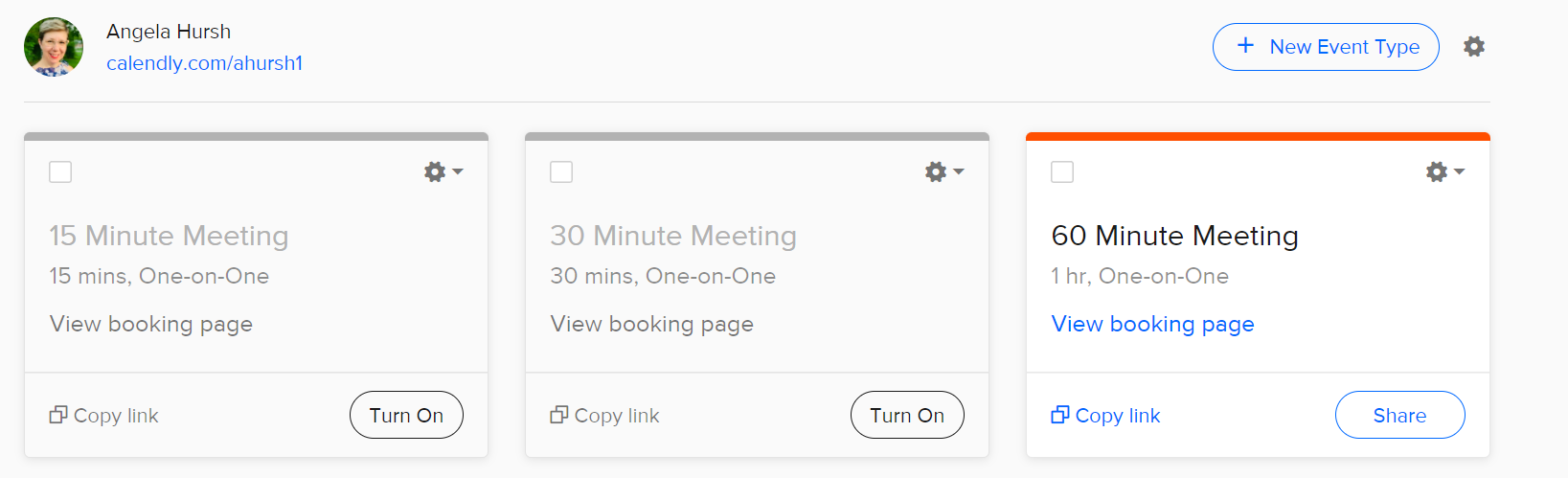
The free account only lets you share one length of meeting at a time (15, 30, or 60 minutes) but switching back and forth between the types is easy. You just flip a switch, share the link with the person you need to meet with, and you’re done!
I can switch between these three meeting lengths easily, depending on the circumstance.
Coolers is a color scheme generator that lets you explore and test thousands of color palettes for your print and digital graphic design projects. It’s saved me a ton of time. And it helps me, the girl with no artistic abilities, to make sure everything I create looks beautiful.
You can save palettes, create a collage, or find colors from photos. It also has settings for color blindness and a built-in contrast checker for accessibility.
This is my favorite place to find free emojis for any social media post and email. It’s easy to search. Once you find what you want, just copy, and paste and you’re done.
Emojis are a great way to catch the attention of your social media followers. They also work great in emails. 😉
If your library’s calendar is unreliable or if Facebook events aren’t generating registrations for you, Eventbrite is a great option.
You can use it for free when your event is free (as most library events are). Plus, there’s a mobile app to help you manage registrations. And you get listed on Eventbrite and its partner sites, which can increase the reach of your programs.
I cannot, for the life of me, match fonts when making graphics. This site is a lifesaver.
Once you find a base font that you love, use this site to identify matching fonts for sub-headers and smaller text. I used this site when I revamped Super Library Marketing to be more accessible.
Giphy lets you create animated video GIFs and GIF slideshows with captions. You can get your GIFs in a variety of formats or as stickers.
A new feature lets you create custom backgrounds for online video conferencing. How cool would it be to have a moving library background for your next program?
My life has been changed since I started using this tool. The free version is perfectly wonderful for checking your written work for common and complex grammatical mistakes, spanning everything from subject-verb agreement to article use to modifier placement.
If you use Chrome, download the extension. With that, Grammarly can check everything you type in real-time, from emails to blog posts to social media posts.
I don’t know why but finding an easy and free way to screen record is hard. I finally found this site when a vendor I work with used it to send me a screen recording explaining how to fix a technical issue.
You can record your whole screen or crop to just one area. You can even annotate with text, arrows, and shapes. There are mouse effects! And you can trim your recording.
SnapWidget allows you to display your Facebook, Twitter, YouTube, and Instagram photos in collage format on your website or blog. The free plan gives you unlimited widgets that refresh every 15 minutes.
Project management is a pain. When I worked at the Public Library of Cincinnati and Hamilton County, this was the tool we used to coordinate projects across teams.
It’s easy and intuitive to use. There are boards, lists, and cards that enable your organization to prioritize your most important projects. Everything is drag and drop and shareable.
The free account gives you 10 boards, unlimited storage, custom backgrounds and stickers, an activity log, and the ability to assign team members and set due dates. It was plenty for my team and we never had to upgrade to a paid plan.
This free resource lets you capture, organize, and share multi-media resources with anyone. Save lists, do research, bookmark websites, and curate content for your newsletters, social media posts, and more.
This tool will not make your life in marketing better (unless you are looking for a better job!) But it was made by a librarian at the Allen County Public Library, and it is remarkably helpful for your patrons.
Simply fill in all the appropriate information that you would put into a resume, press a button, and viola. It’s not fancy but it certainly makes a professional and polished resume. Seriously, how cool is this?
Subscribe to this blog and you’ll receive an email every time I post. To do that, enter your email address and click on the “Follow” button in the lower left-hand corner of the page.
Do you have a suggestion for a topic for a future episode? Want to nominate someone for kudos? Let me know in the comments.
And subscribe to this series to get a new video tip for libraries each week.
Thanks for watching!
Subscribe to this blog and you’ll receive an email every time I post. To do that, enter your email address and click on the “Follow” button in the lower left-hand corner of the page.
I’m 100 percent certain that everyone who reads this blog has heard of the book, “The 7 Habits of Highly Effective People” by Stephen Covey. Written in 1989, this self-help book has sold more than 25 million copies worldwide.
Covey’s approach to attaining goals is to follow what he calls “true north” principles. Those principles are based on seven character ethics that he says are universal and timeless.
It’s a great book. But, because I’m a weirdo, I read it and thought, “There needs to be a list like this specifically for people who work in library promotion.” No joke. My internal monologue is strange.
We need some true north principles for library marketing now more than ever. We face uncertainty in every corner. Algorithms and budget shortfalls and virus variants can make our job seem impossible.
It may feel like the whole world is working against you and your library. So here are my true north principles for doing your best and most effective work.
Be good to yourself.
This is first on my list because it’s the most important and frankly, most library staffers could use a little morale boost. This year, I want you to celebrate the work you do. Every. Single. Week.
By the way, my boss gets full credit for this idea.
It’s pretty simple: At the end of the week, write down all the things you did. Then, pick a “gold star moment“: one thing that you did that stands out for some extra recognition.
Send your list to your boss or keep it for yourself. It doesn’t matter. What matters is that you take the time to acknowledge all the work you’ve done in the last week.
And, rather than focusing on what you didn’t get done from your to-do list, recognize all the work you did do.
You’ll be surprised at how much better you’ll feel at the end of a workweek. And you’ll be motivated or excited about the work coming in the following week.
Be constantly learning.
I know that most library staffers are incredibly overworked. You’re promoting your library in addition to 100 other tasks, including cleaning the restrooms and acting as security. The idea of spending any time learning more about marketing feels overwhelming.
How does someone fit personal professional development into their schedule?
Set a learning appointment for yourself every single day. All you need is five minutes. Spend that very short but important block of time reading a blog, a book on marketing, or an email newsletter on marketing. If you’re a visual learner, watch a YouTube tutorial on marketing or work on a self-paced marketing course online.
For the typical, full-time library staffer working five days a week with two weeks of vacation, that will add up to 1,150 minutes or 19 hours of learning in a year! That’s plenty of time to stay on top of marketing and social media trends and learn new ways to engage your audience more effectively on all channels.
Best of all, at the end of that year of learning, you’ll feel more confident in your work and of course, your library’s promotional efforts will improve.
Need help finding places to learn about marketing in a short amount of time? Here’s a great list.
Be hyper-focused on your library’s overall goals.
What is your library trying to accomplish right now? Are you hoping to increase your circulation to pre-pandemic numbers? Are you helping to bridge the pandemic educational gap for elementary school students? Are you implementing a step-by-step plan to ensure your library is truly accessible to everyone? Are you undergoing a facilities improvement project?
Your promotions should be centered on whatever your library is trying to accomplish this year.
When you focus your marketing with precision on your library’s strategy, your marketing will be more effective. You will avoid spreading your message thin. You’ll be using your precious time and energy more efficiently.
Every piece of marketing you do needs to be in service of reaching your library’s strategic goals. They are the reason you come to work every morning. Make certain there is a solid connection between your promotional efforts and your library’s overall strategy.
Be a fan of data.
Block off five minutes in every workday to gather or analyze the metrics of your marketing and promotions. Just like with the professional development appointment you’re making each day, schedule this into your calendar.
This simple step will give you a very clear sense of what is working and what isn’t. You’ll have the numbers to back yourself up when you make decisions about which promotions to do and which ones to drop.
Be constantly experimenting.
One of my favorite parts of working in marketing is experimentation. There are so many ways we can test promotions to find the most effective means of communicating with our audiences.
I want you to think of yourself as a kind of scientist. Your experiments don’t have to be complicated.
For example, when you send emails, try sending on different days of the week and different times of the day.
When you want to promote an item in your collection or a service provided by your library, post on all your library’s social media channels. Then look at the insights to see where you get the highest engagement.
When you write blog posts, try experimenting with the length of the post, the length of the title, or the number of images you insert in the piece. Then look at views to see if your metrics are impacted by changing any of those factors.
Experimenting is fun. And it can lead you to create more effective promotions. Need some ideas about where to experiment with your promotions? Here’s a list of things to try.
Be open to change.
How many times have you heard someone say, “But we’ve always done it that way” in your library? Reject this phrase.
I think many times we get stuck promoting our library the same way we always have. Don’t be afraid to look at the data and say to your boss or co-workers, “This isn’t working. Let’s try this instead.”
In library marketing, change isn’t a bad thing. It means you are being responsive to your community’s needs and meeting them where they are as their lives are changing.
Sometimes it takes a while for fellow co-workers, senior staff, and your community members to respond to your ideas.
Effective library marketers set a timeline for how long they think it will take to increase engagement or reach a certain target audience with a message across multiple channels. A good rule of thumb is to give any new promotion about three months to catch on. If it’s not working by then, experiment with something else.
Subscribe to this blog and you’ll receive an email every time I post. To do that, enter your email address and click on the “Follow” button in the lower left-hand corner of the page.






 Super Library Marketing: Practical Tips and Ideas for Library Promotion