Search

Super Library Marketing: Practical Tips and Ideas for Library Promotion

Tag

marketing library

The Nine Things You Need to Look for to Hire the Best Graphic Artist for Your Library Marketing

Confession: When I took this job in library marketing, I knew nothing about graphic design. And I mean LITERALLY NOTHING.

I came from the world of TV news. There is no print element to that. All the graphics are done by a mysterious department located on the second floor of our station, where artists work in a dimly lit room surrounded by monitors. And their ability to get creative is limited by the fast pace of the workplace.

My first week in the library was a lesson in paper weight (text vs. cover?? What??), labels, printing terms, and equipment that I had never seen before, like a Baum Cutter that look a small tank with a blade like a guillotine. I was scared.

And I bet a lot of library marketers can relate. We have degrees in library science and communications, not design. Most of us do not have any training or background in graphic art. I don’t know about you, but I find it difficult and intimidating to manage an employee when I have no idea what their job is, how they do it, or how I could help them to improve.

I’m lucky to have two graphic artists at my library, serving a system of 41 locations and 600,000 cardholders. I can count on my artists to be a touchstone for all projects. They keep my library branches on brand. They help me turn ideas that seem stuck in my head into something clear and understandable to our cardholders.

Visuals are a key part of marketing. Your graphic designer is an invaluable member of your library marketing team. So it’s an important hire to make.

A great artist can create a consistent look and feel to everything surrounding your library’s brand. You want your customers to be able to recognize your visuals as being part of your brand, even before they spot your name or logo on the material.

A good artist can convey the message of your library without actually using your library’s name. They can listen to you explain a vague idea and create something visually stunning which helps enhance the customer experience.

When you’re in the market to add a graphic artist to your team, you may be dazzled by stunning portfolios and creative resumes (graphic artists create some of the best resumes I’ve ever seen!) But there are nine important qualities your candidates must have.

Someone with good customer service. Your artists will be working with multiple departments, branches, customers, and outside partner agencies. You need someone who can listen to whoever they are working with, understand their needs, and translate their vision.

Someone who can communicate with your customers. Ask your candidates how they will create pieces for different age groups, ethnic backgrounds, and interests. Make sure your artist can switch viewpoints and create visuals that speak to many different library audience segments.

Someone who can translate your library strategy and goals into visuals. These are complex concepts. A good artist will take big ideas and turn them into a visual the audience can understand. Ask for examples of infographics and annual reports from previous employers or internships. Can you understand what the message is? Are the statistics presented in a clear and interesting way?

Someone who can work with multiple formats. You’ll be asking your artist to create print and digital graphics, so they should be comfortable working with both. Ideally, you should also look with experience in web design, video production, and animation.

Someone with a vision. You’ll want to make sure your graphic designer will stay on top of the latest trends in design so your marketing material doesn’t look dated.

Someone with whom you can collaborate. Your work with design will be a back and forth, give and take, and you will need someone who can walk through that messy process with you. A good designer will be able to defend their design as well as adapt to ideas that aren’t expressly theirs.

Someone who seeks inspiration. My two designers have a common belief that their work gets better as they learn more. They both have a desire to attend creative sessions and try new mediums. They both work on creative endeavors outside of the library.

You don’t want a designer who simple comes into the office, does what you tell them, and then goes home for the day. Ask potential hires if they do anything artistic outside of the workplace to fuel their own creativity.

Someone who can think on their feet. Ask your candidates to critique a design piece and explain what they would have done differently. Their answer will tell you a lot about their creative process, their ability to articulate their vision, and how they think when they’re asked to do a project on the fly.

Someone who can handle criticism. This is true of every hire you make, but graphic artists are creatives and in my experience, creatives take their work seriously. They may feel precious about their designs and may be resistant to your opinions about them. Make sure you can give positive and constructive feedback to your potential hire without worrying that they’ll refuse to take your suggestions.

Subscribe to this blog and you’ll receive an email every time I post. To do that, click on “Follow” button in the bottom left-hand corner of the page. Connect with me on YouTube, Twitter, Instagram, and LinkedIn.  And check my list of upcoming events so we can connect.

The Tiny Little Mistakes That Ruin Your Library Marketing Emails AND How to Fix Them!

NEW LIVE LIBRARY MARKETING SHOW ON INSTAGRAM! I’ve decided to try a new thing! I’ll be doing a live Instagram Q&A and discussion about Library Marketing. The sessions will be every Tuesday at noon ET (10 a.m. Central and 9 a.m. Pacific) beginning Tuesday, June 25. Join me to talk about library marketing topics for about 20 minutes each week. My handle is Webmastergirl. You can email questions and topic suggestions ahead of time. Just fill out this form below. See you there!

Go back

Your message has been sent

Warning
Warning
Warning
Warning
Warning

Warning.

I get a lot of library marketing emails. I love to see what other systems are doing. So, I go to their websites and I see if I can get on their mailing lists! It’s fun and it helps me to find new things to promote and new ways to communicate with my audience.

I also get a first-hand look at some of the small boo-boos that other library marketers make in their emails. Email is hard. I’ve been doing email marketing for so long (feels like forever!) that I have made all of these mistakes myself! And I love email marketing, so I’m weirdly obsessed with learning about it. Some of the positive text and design choices that work for library marketing in other promotional pieces, like posters, flyers, websites, and blogs, do not work in email marketing.

The good news is that these little problems are easily fixed! Tiny adjustments in the text and design of your email can improve your click-through rates and effectiveness. Check this list against what you’re doing now and start reaping the benefits of improved email design!

Problem: too many images: A clean design is crucial to engagement. Too many images or too much text is off-putting to your email recipient.

The most common email programs like Yahoo and Outlook will NOT automatically download images. In fact, only Gmail downloads images automatically. With all other providers, the email recipient receiver must consciously click a prompt in order to download an image. That means if your image is conveying most of the key message in your email, your receiver likely won’t see it.  They will miss the information and the call to action, and your email is useless.

Solution: Create an email that is mainly text-based. I have found an 80-20 mix works best: 80 percent of my email is text, 20 percent is image-based. The image I use compliments the text. Its purpose is to create emotion or set the mood of the email. It’s there to inspire. It doesn’t convey key messages and it doesn’t contain the call to action.

Problem: too much text. An email that contains several long paragraphs of information is off-putting to recipients. It gives the impression that your email will take a long time to read.

The email scheduling platform Boomerang studied results of about 20 million emails sent using their software. They found that the optimal length of a marketing email is between 50 and 125 words. A study by Constant Contact of more than 2.1 million customers found emails with approximately 20 lines of text or 200 or so words had the highest click-through rates.

Excessive text can also send negative signals to spam filters. Too much text added to excessive punctuation or large images could keep your emails from ever arriving in an inbox.

Solution: Limit your email text to 200 words or less. The recipient should be able to read all the information in your email in about 15 seconds. If you have more information to share, use your call to action to indicate that there’s more to know about your subject. Then send your recipient to a landing page where they can get all the information they need.

Problem: Text that is too small. Keep in mind the growing number of people who will read your email on a mobile device. You want to make sure they can actually see your words. An 11 or 12 point font size is too small to be seen clearly on a screen.

Solution: Increase your text size.  Email font should never be below 18 point in size.  You should also use the bold option to make the most important information stand out.

Problem: Wishy-washy calls to action.  A compelling call to action is one of the best ways to increase the click-through rates of your library marketing. Some library marketing emails also contain too many CTAs.

Solution: Use positive, active language in your CTA. “Register” “Read This Book”, “Learn More”, “Join Us”, “Donate”, and “Get Started” are some of my favorites. I put my CTAs in a square red box that looks like a button to compel my recipients to click on them. I embed the CTA in my image as well and use the “alt text” to convey the CTA in case someone’s eye skims the email. I try to keep my CTAs to one per email.

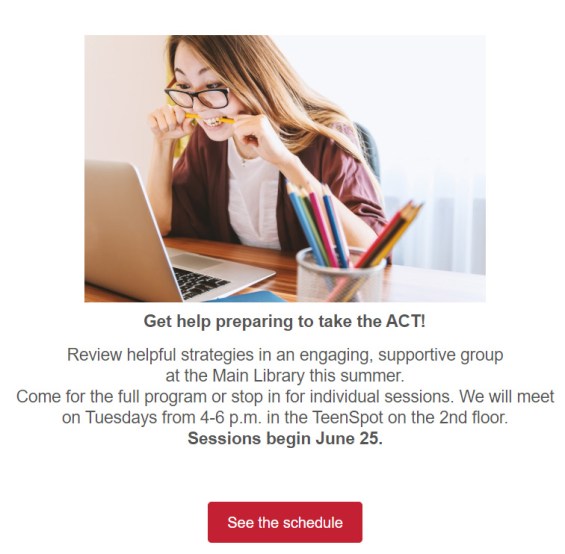
One image, with the main text in bold at 18 point found. A few sentences and a clear call to action.

Problem: Ignoring mobile responsiveness.  Mobile opens accounted for 46 percent of all email opens according to the latest research from Litmus. If your emails aren’t optimized for mobile, you are missing a huge potential audience, particularly women and young people.

Solution: Optimize your emails for mobile to make them responsive. Most email marketing programs offer mobile responsive templates. My library uses Savannah by OrangeBoy. We switched to all responsive templates in January of this year. I’ve seen a nine percent increase in click-through rates. I count that as a win!

Problem: No system for proofing your emails in different kinds of email boxes. Your email design might look great in your creation software. But if you send it without testing it, you may find that your email becomes a kind of monster creature! It may show up a a jumbled mess of images and text. This happens because every email inbox will convert your email differently.

Solution: Test your email to make sure your message displays correctly for your recipients. Find people that you trust you have different providers… someone with Gmail, someone on Outlook, someone on Yahoo, and so on. Send them the message and ask them to check for warped images, font problems, and extra spaces.

Subscribe to this blog and you’ll receive an email every time I post. To do that, click on “Follow” button in the bottom left-hand corner of the page. Connect with me on Twitter, Instagram, and LinkedIn.  

A WordPress.com Website.

Up ↑