Search

Super Library Marketing: Practical Tips and Ideas for Library Promotion

Tag

social media libraries

The 2026 Guide to Facebook for Libraries: New Tips to Boost Reach and Visibility

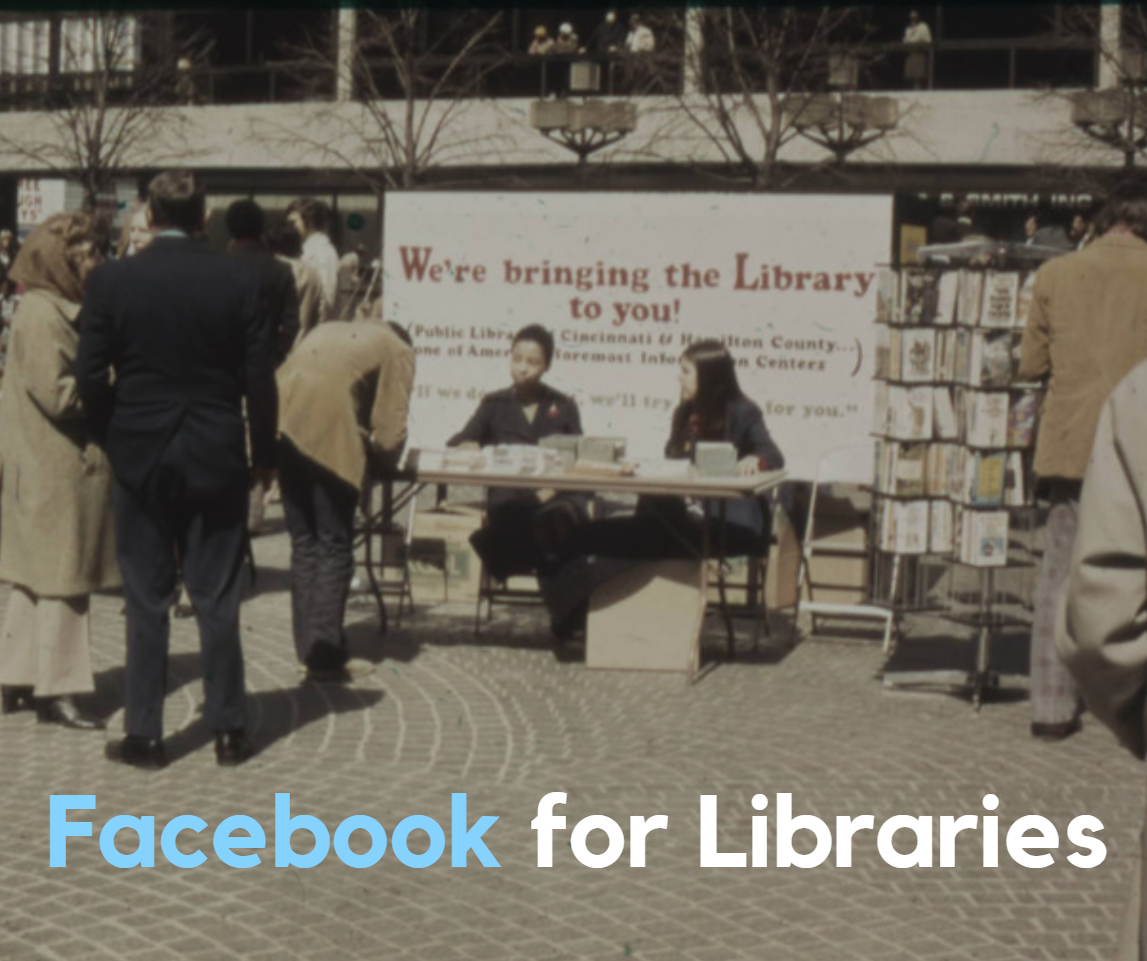
Two women in pantsuits sitting at a table outdoors on Fountain Square in Cincinnati in the 1970s, selling books.
Photo courtesy of the Cincinnati and Hamilton County Public Library

This is the final portion of the 2026 series of library social media guides. In addition to this post, be sure to bookmark these updated guides:

Facebook for libraries

Once again, Facebook remains the single most popular social media platform for libraries, but only by a fraction! According to the 2025 Super Library Marketing Survey, 95 percent of libraries use Facebook for promotions. Libraries use Instagram at nearly the same rate.

Statistically, this makes sense. Facebook is the largest social media platform in the world by number of users. And every day, about 69 percent of those users check their Facebook feed.

How are people using Facebook right now?

Here are some statistics from Demandsage.

  • The average Facebook session length is approximately 10 minutes and 12 seconds.
  • Most Facebook users are male.
  • Most Facebook users in the U.S. (nearly 99 percent) use the mobile version of the platform. That statistic rose by 16 percentage points this year! So, as you create Facebook content, assume everyone who sees your libraryโ€™s Facebook posts is doing so on a mobile device.
  • The largest segment of Facebook users is aged 25 to 34 years. Facebook has a reputation as a social media platform for older generations, which makes this stat somewhat surprising. However…
  • Facebook users aged 55 to 64 years spend the most time on Facebook, an average of 45 minutes a day. I think younger generations are looking at content, but not engaging with it. (This opinion is based on the use of Facebook by my own Gen Z daughters.)

How much success can libraries expect to see on Facebook?

Facebook has, by far, the lowest engagement rate of any of the social media platforms we’ve covered in the series. In fact, these rates are shockingly low.

I want you to look at this list of engagement statistics from Demandsage and really consider whether your time is well-spent when you post on Facebook.

  • Facebook Reels have an average fan engagement rate of 0.26 percent.
  • Images or photos get an average engagement rate of 0.24 percent.
  • A plain status update with text, no video, or no photo gets an average engagement rate of 0.12 percent.
  • And posts that include a link get an average engagement rate of 0.06 percent. OUCH.

Why is the engagement so low? Among the reasons is the motivation of the users: Nearly 75 percent of Facebook users say they use the platform primarily to message their friends and family.

The Facebook Algorithm for 2026

Here are the ranking signals Facebook uses to decide who sees your posts, according to Followeran. These are quite different from other platforms.

  • Facebook AI: As much as half of a user’s feed now features โ€œrecommendedโ€ content from creators or Pages they donโ€™t follow, chosen by Facebookโ€™s AI based on their interests and engagement behavior.
  • Deep conversations: The algorithm heavily favors content that sparks exchanges between users. It also looks to boost posts with longer, more considered reactions. Simple likes and short comments no longer drive reach.
  • Time spent: The algorithm will show your content to more people if the post requires users to spend time reading comments, scrolling through a carousel, or finishing a video. Longer sessions boost its distribution.
  • Video: Facebook still prioritizes short-form video formats (Reels, Facebook Live, Stories), followed by carousels and native videos. Posting consistently also helps, as newer content tends to perform better.
  • Original content: Reposts, duplicate content, or AI-generated content will be penalized with suppressed reach.

Here are 4 ways to get the best organic reach for your libraryโ€™s Facebook account in 2026

#1: Optimize for AI recommendations.

Half of all Facebook feed content now contains posts from pages that the user does not follow. Those recommendations are sourced by Facebook’s AI. The good news is that your library can reach new audiences without paid ads if you play by the algorithm’s rules.

Make sure you create original posts with strong potential for engagement. For example, ask your audience a question. You can also put book covers in a carousel of photos and encourage people to swipe through to the end.

Avoid duplicating or reposting content from other people or organizations. That’s a bummer, because many libraries repost their partner organizations’ content or content from publishers to save time. It’s okay to share that content on your Stories. But for your feed and Reels, make sure your posts are original works from your library account.

#2: Design your posts to maximize dwell time

I know many libraries post a graphic of their event calendar or a graphic promoting an upcoming program to Facebook. And if you’ve been wondering why those posts aren’t getting engagement, this is why. Facebook wants to keep people on the platform as long as possible. And those posts don’t help them achieve that goal.

Every time you post to Facebook, ask yourself, “How can I keep my users engaged longer?” You’ll want to use formats that encourage people to scroll, read, or watch to the end.

What do you do about promoting your programs? Share the graphic and program details on Stories or make a Reel about the program.

To share your calendar and get better results, ask people to sign up for a monthly email to receive a downloadable version. That’s a win for your library’s Facebook account and for your patrons, who will have a copy they can refer to all month long.

#3: Work on building early momentum for posts.

Posts that gain traction in the first 24 to 48 hours are rewarded by the Facebook algorithm. Look at your insights and post when your audience is most active. If your post starts to get comments, make sure you reply as quickly as possible (within 24 hours) to keep engagement flowing.

You can also try to drive traffic to your Facebook feed from your monthly email newsletter. Here’s how:

  • Post something fun and engaging on the day before your newsletter goes out. This “something” should be a piece of content that is NOT in your email newsletter. For example, you can post a carousel of photos of new books that just arrived at your library. Ask people to vote in the comments for the book they’re most excited to read.
  • In your email newsletter, write a tease that suggests people will be missing something if they don’t head over to your Facebook page to check out the post! For the example above, you could say, “Want to see which new arrival everyone is excited to read? Head to our Facebook page to cast your vote before the big reveal!”
  • Wait 1-2 days after your email newsletter goes out to post anything new on your Facebook page so your email users can find your teaser content easily. Or, if you must post more content, pin the teaser post to your profile for 1-2 days.

#4: Lean on authenticity and hyperlocality.

Meta rewards pages that post content that is clearly not generated by AI. This is where libraries can shine! Share patron stories, staff picks, book recommendations, and other highlights that show your library is a vital part of your community. Be sure to use your town or city’s name in the post and write the copy to show that your library is integrated into the community.

When to post on Facebook

Hootsuite says the best time to post is early morning,ย between 5 a.m. and 8 a.m., local time.

How often should you post to Facebook?

  • Post to the Facebook Feed 3-5 times each week.
  • Post at least one slide to Facebook Stories every day.
  • Post a Facebook Reel once a week.

P.S. Want more help?

Can Facebook Events Increase Your Program Attendance? How To Decide if Itโ€™s Worth the Effort

Subscribe to this blog, and youโ€™ll receive an email whenever I post. You can also follow me on the following social media platforms:

The 2026 Guide to Instagram for Libraries: New, Creative Ways to Grow Engagement

Photo courtesy Cincinnati and Hamilton County Public Library

This is part of the 2026 series of library social media guides. In addition to this post, be sure to bookmark these new guides:

Next week, I’ll wrap up the series with tips for Facebook.

Instagram for libraries

According to the 2025 Super Library Marketing survey, 93 percent of libraries say they post to Instagram, making it the second-most-popular social media platform for library marketing. However, the number of libraries using Instagram dropped by 5 percentage points in 2025.

I have a few guesses as to why this happened:

  • Some libraries faced privacy concerns about using Meta-owned platforms.
  • Instagram’s increasing emphasis on paid ads makes it difficult for libraries to reach their community organically.
  • Budget cuts mean fewer staff, which may have led some libraries to scale back their Instagram use.
  • The inability to insert links into posts remains a major downside for Instagram users.

How are people using Instagram right now?

Here are some statistics from Backlinko, Teleprompter, and Digiexe.

  • Instagram is the most popular app for 18-24-year-olds, a key demographic for libraries.
  • The average Instagram user now spends 33 minutes a day on the platform. But, for 18-24 year olds, the average time spent on Instagram per day is much higher, atย 53 minutes per day.
  • 90 percent of Instagram users watch Reels.
  • Instagram users remain evenly split by gender.

How much success can libraries expect to see on Instagram?

  • Reels: The average engagement rate is 2.46 percent, according to Sprout Social.
  • Carousel posts: According to Social Media Today, the average engagement rate is 2.4 percent.
  • Stories: Stories are shown to existing followers, so they’re not a tool for discovery. It’s difficult to get Instagram to give up engagement rates for Stories. However, Sprout Social says the average engagement rate is generally lower than for other types of content, at 0.8 to 1.2 percent.

The Instagram algorithm for 2026

Here are the updated Instagram ranking signals according to Sprout Social. Note: Nearly ALL the Reels ranking signals have changed in the last year. Also, Instagram now uses the same ranking signals for the Feed and Stories. That’s a huge change. (Gotta love social media!)

Instagram Reels Ranking Signals

  • Engagement velocity: The more likes, comments, and shares you can get on your video within the first hour of posting, the more reach you’ll get.
  • Completion rate: The more people watch your Reel all the way through, the more reach you’ll get.
  • Audio trends: Using trending audio will increase your reach.
  • Content quality: Edit your Reels in an app like Edits to post without a watermark. Never repost your TikTok videos directly from TikTok to Reels. Doing so will suppress your reach.
  • Consistency: The algorithm rewards accounts that post regularly.

Instagram Feed and Instagram Stories Ranking Signals

  • Content popularity: Instagram will reward you for getting engagement quickly, for tagging other people or organizations, for tagging the location, and for the timeliness of the post. However, here’s something to consider: Instagram tries to avoid showing too many people from one account to users in a row. So, that means you don’t want to post too often on Instagram!
  • Relationship: The algorithm will show you feed posts and stories to people who normally engage with your content first. The more your followers interact with the post, the more often they’ll see your content and the more reach you’ll get outside your library followers.
  • Behavior: Instagram tries to predict how likely someone is to spend time reading your post, commenting, liking, resharing, or tapping on your library’s profile picture for more information.

4 ways to get the best organic reach for your library’s Instagram account in 2026

#1: Lean into searchability.

Instagram is increasingly functioning like a search engine. Users, especially younger users, will use the search bar to find what they need, like “cozy books for winter reading” or “family activities near me.” Here’s how to make sure your library’s content gets seen:

  • Write captions using natural language. Think about how you would say what you want to say if the person were standing in front of you at the desk. For example, “Looking for cozy books for winter reading? Here are our five favorites!” Try to avoid stuffing your captions with keywords.
  • Use alt text for accessibility and to optimize search results. For feed posts and Reels, you’ll find the alt text box under “Advanced Settings”. You cannot add alt text to Stories unless you add it straight to the screen using captions or a text overlay.
  • Add the location tag to every post.
  • Be super strategic with hashtags. Use 3-5 relevant ones, such as #WinterReading #CozyBooks #PinetreeLibrary

#2: Prioritize video, but be strategic about it.

Reels are a priority for Instagram, so they need to be one for you, too! However, the algorithm doesn’t care as much about how many videos you post. It favors watch time and completion rates.

To boost your videos, you should:

  • Keep your Reels under 30 seconds to boost completion rates.
  • Add captions and on-screen text for accessibility and silent viewing.
  • Use trending audio when appropriate.
  • End with a call to action asking viewers to “Save this Reel for your next visit to the library!

#3: Post when your audience is active.

This year, timing will be critical because the algorithm prioritizes newer content. You’ll want to:

  • Use your insights and check often to find the peak engagement time for your account. Then, schedule your posts during those windows.
  • Post to Stories right before your scheduled feed or Reels posts to keep your account active and visible.
  • Share your feed or Reels post to your Stories once it’s live to ensure your followers see it and engage with it, which will boost your reach.

#4: Have fun with interactive micro-content.

The Instagram algorithm favors interaction signals because they indicate that people are interested in your content. To help boost this signal, you can:

  • Add polls, quizzes, and emoji sliders in Stories.
  • Use carousel posts with prompts to swipe through all the pictures to get to something exciting at the end of the carousel.
  • Ask questions to encourage commenting.

When to post on Instagram

According to Sprout Social, the average best time to post to Instagram is between 9 a.m. and 1 p.m. local time. But as always, check the insights on your libraryโ€™s account. Post when you notice your followers are engaging most often with your content.

And remember that being consistent is key. Pick a schedule that your library staff can stick to.


P.S. Want more help?

The Secret to Library Instagram Success? Start With the Story, Not the Promo

Subscribe to this blog, and youโ€™ll receive an email whenever I post. You can also follow me on the following social media platforms:

8 Key Pieces of Social Media Marketing Advice From a Library Marketer Who Works at One of Scotlandโ€™s Oldest Public Libraries!

Photo courtesy Cincinnati and Hamilton County Public Library

About 10 miles north of the northernmost coast of Scotland lay an archipelago or chain of islands called Orkney. The islands surround Neolithic sites dating back 5,000 years with tall sandstone cliffs and colonies of seals. Archeological evidence shows that humans have lived on the island for nearly 9,000 years.

Thatโ€™s where John Peterson lives and works. He has managed social media for Orkney Library & Archive since 2017.

The library is one of the oldest public libraries in Scotland, dating back to 1683. These days, the Orkney library has two physical locations, a mobile library, and serves a population of about 22,000 people.

โ€œOrkney is a very rural community with a lot of farming and agriculture,โ€ explains John. โ€œAnd of course, weโ€™re an island so weโ€™re surrounded by the sea and have a lot of maritime history, particularly from the 20th Century and the World Wars.โ€

The Orkney library may be remote, but it has fans worldwide. In fact, one of my readers nominated this library for a profile, saying โ€œI love their use of social media and how they got such a small library on the world map.โ€  

โ€œWeโ€™re a very small organization and so we donโ€™t have a marketing team or anything like that,โ€ says John. โ€œWe just try to share what weโ€™re doing with our followers on social media and have a bit of fun as we go along.โ€

โ€œWe use social media as a way of sharing whatโ€™s happening in the library and the archive and what we do every day. Itโ€™s a good way of showing off Orkney and what it is to be a library and archive service in the 21st century.โ€

Orkney Library posts on Facebook, Instagram, and X (formerly known as Twitter). Of the three, John says X is the most effective way to reach his audience.

โ€œIt has its challenges sometimes but itโ€™s probably still our favourite as a way of telling stories and making fun posts or threads,โ€ explains John. โ€œFor us, it has been a great way of communicating an idea with a few words and pictures. Our Twitter following is approximately 4 times the entire population we serve.โ€

โ€œInstagram is our newest platform, but it has a growing audience, and we get a lot of nice feedback.”

“The platforms work differently, so we often have to tweak the posts slightly to suit each. Often, we post on Twitter first and then on to the other two platforms.โ€

When John sees a particularly effective post, he builds on that success by sharing the same kind of content his audience is responding to. But he admits that, like most of you, heโ€™s sometimes baffled by what does and doesnโ€™t work!

โ€œWe post different kinds of content,โ€ explains John. โ€œBut they usually involve books, archives, or old photographs.โ€

 โ€œSometimes a post takes off far better than you expected and other times a post that you thought was interesting or funny doesnโ€™t get much engagement. There is a whole load of reasons for that and itโ€™s important not to get too disheartened if something doesnโ€™t work.โ€

โ€œOf course when a post doesnโ€™t work it could be that the idea wasnโ€™t good or wasnโ€™t communicated well enough. But often it is just a case of timing โ€“ wrong time, wrong day, it didnโ€™t get the retweets to send it further across the platform, etc. You could post the same post at two different times and get totally different responses.โ€

John’s Advice for Social Media Marketing

  1. Try to post good content and try to post regularly โ€“ but not too much. Not every post can be funny or interesting. But try to make sure that some of them are so people have a reason to follow you.
  2. Try to make it interesting. Donโ€™t just do what everyone else is doing, and donโ€™t rely on sharing content from other accounts.
  3. Try to write your own stuff and find your own voice.
  4. Pay attention to what works for you and then do more of it. Listen to feedback, good and bad โ€“ itโ€™ll help you to do more of what people like and less of what they donโ€™t.
  5. Donโ€™t be controversial and try to avoid politics.
  6. Concentrate on what makes your library or organization different from everyone else and try to use those things to build your own presence and identity.
  7. Look around you. Spot opportunities for good content. The more you do it the easier it gets.
  8. Find some libraries on social media and follow them, no matter where they are in the world. They donโ€™t have to be the famous places youโ€™re always hearing about to be worth following. Anybody can be worth following if they post good, interesting content – even small local libraries on remote islands. Find some libraries and archives, museums and galleries, and give them a follow. Youโ€™ll be glad you did.

Johnโ€™s final piece of advice: donโ€™t take your libraryโ€™s social media work too seriously.

โ€œThatโ€™s what itโ€™s all about โ€“ having fun, having a passion for what youโ€™re doing, and sharing it with the world.โ€  


P.S. You might also find this helpful

A Reader Asked for My Ultimate Top Ten Tips for the Most Effective Library Marketing Possible: Hereโ€™s the List

Subscribe to this blog and youโ€™ll receive an email whenever I post. To do that, enter your email address and click on the โ€œFollowโ€ button in the lower left-hand corner of the page. You can also follow me on the following social media platforms:

Thereโ€™s New Advice for Libraries About Posting to Social Media butโ€ฆ Should You Actually Take It?๐Ÿค”

Watch Now

The Library Marketing Show, Episode 176: A marketing agency has done the research and is unveiling the best days and times to post on social media. But is this the advice your library has been searching for? Or will you end up being less successful on social media if you take it?

We’ll unpack the results and how to interpret them in this episode.

Kudos in this episode go to the Milton Public Library.

Do you have a suggestion for a topic for a future episode? Want to nominate someone for kudos? Let me know in the comments.

And subscribe to this series to get a new weekly video tip for libraries.

Thanks for watching!


Subscribe to this blog and youโ€™ll receive an email whenever I post. To do that, enter your email address and click on the โ€œFollowโ€ button in the lower left-hand corner of the page.

Conquering Social Media for Your Library: The Seven Decisions You Need To Make Before You Create Your Next Post!

Photo courtesy Public Library of Cincinnati and Hamilton County

I love libraries. I work with libraries. I talk to library staff every single day. I like, share, and comment on library social media posts.

But every time I open my app for any of the platforms, I NEVER see content from libraries.

Why?

The odds are never in our favor, thanks to algorithms.

Itโ€™s a daily battle that libraries face. Social media is free and easy.

But itโ€™s also not free and easy.

Itโ€™s incredibly, insanely difficult to figure out what works on social media when the rules are constantly changing. If you donโ€™t have time or staff to keep up, it can be exhausting and demoralizing.

But like it or not, libraries must use social media to promote their services, collection, and events. We must do our best to work with the algorithms, for better or worse.

Starting next week, Iโ€™ll begin my annual six-part series laying out best practices for the top platforms used for promotion by libraries.

I chose these platforms because of a survey you, dear readers, so graciously answered. Nearly 300 library staffers let me know which social media platforms your library uses for promotion.

Before the platform best practice series begins, itโ€™s important to set your library up for success by creating a social media style guide.

This is different than a social media policy, which lays out guidelines for how your staff will use social media to communicate with the public and sets rules for how the community interacts with you and others on your libraryโ€™s social media accounts.

A social media style guide will ensure your posts are clear and consistent, no matter what platform you post on. It will take the guesswork out of many aspects of posting and make your work more efficient.

A social media style guide has seven parts. Here are the key decisions you should make now to ensure future success on social.

Make a list of all your social media accounts

Include your libraryโ€™s handle on each platform. This will give you get a clear picture of the naming conventions youโ€™ve used for your accounts.

Are the names consistent across channels? If not, choose a style and note it in your style guide.

Then, the next time a new social media platform is launched, you can claim and name your new account in a way that will make it easily discoverable for your existing fans.

Identify your libraryโ€™s demographics for each platform.

Look at the insights for each of the platforms. Who is interacting with your posts? Your audience will be different for every platform. Make a list of the different audiences.

Because of the algorithms, you have very little control over who sees your post on any given platform. But you can get to know your available audiences and create content that will engage them.

If you are struggling with time management and you want to cut down on the number of social media posts you do, you can look at your lists of demographics. Identify the platforms with the audiences that will help you achieve your overall library and marketing goals. Post to those platforms and put the rest on hold.

Create a mission statement for each platform.

Look at your libraryโ€™s goals for the year and what you know about each platform. Then write a one or two sentence mission statement for each of the social media platforms, lining up your libraryโ€™s goals with the currently available audience for that platform.

For example:

  • LinkedIn: Discover career advice, business tips, and free resources that will help you succeed at work.
  • Twitter: Get regular updates on our collection, library events, and the literary and entertainment world.
  • Instagram: Photos tell the libraryโ€™s story, one snapshot at a time.

These platform-specific mission statements, combined with the demographics you identified in the previous step, will help you visualize your audience every time you post. Youโ€™ll be able to connect with them because youโ€™ll know who they are, and what they expect from you.

Decide the voice and tone youโ€™ll use for each platform.

You want to use the same language and tone across platforms for consistency. The goal is to make sure your audience recognizes your posts no matter which platform they are on. Some things to consider include:

  • Whether your library will use formal or conversational text.
  • The words, phrases, and names that are specific to your library and can be used in posts. For instance, does your Maker Space or your Bookmobile have a specific branded name? Include that in your list.
  • Make a list of the acronyms your library commonly uses internally, along with the full spelled-out versions of what they stand for. Decide whether itโ€™s appropriate to use the acronyms on each social channel, or if the full terms should be used.
  • Include parameters for inclusive language that will be standard for your library. For example, will your library remove the use of pronouns to be inclusive to all genders? How will you refer to people living with disabilities?

Choose an expert to make grammar and punctuation choices for you.

You can define whether youโ€™ll use an existing style guide, like the Associated Press Stylebook or the Chicago Manual of Style. Or you may decide to rely on add-ons like Grammarly.

This decision will take the guesswork out of your libraryโ€™s use of serial commas, headline capitalization, dash style, dates and times, and more.

Define the aesthetics.

This section will lay the groundwork for the visual portion of your posts. Decisions to be made here include:

  • Will you use your library’s defined brand colors?
  • Which fonts will your library use in images, cover photos, and for short-form social media posts like Instagram Stories and Reels?
  • How will your libraryโ€™s logo be used on social media? Will it be used as the profile photo for your platforms? Can it be added to images? If so, where will it be placed and how large should it be?
  • Will youย use emojis, GIFs, and memes? Which ones? How many? On what channels? How often?
  • Will you include a call to action in every post? What kinds of action words will you use in your call to action?
  • How often will you include links in your posts? Will you use a URL shortener?
  • Which hashtags will you use? How many hashtags are acceptable on each platform?
  • Will your library use filters and effects in your posts?

Formalize curation

Your library can share the blog posts, infographics, case studies, and interesting posts created by other organizations on your platforms. This is a great way to add value for your available social media audiences without creating new content of your own. Some key decisions to make around curated content include:

  • Which sources will your library share from?
  • Which sources will you not share from?
  • How will you cite third-party content?

You May Also Want to Read These Articles

Three Design Tips For Creating Beautiful Social Media Graphics for Your Library

Why Itโ€™s OKAY for Your Library To Pull Back on Posting on a Social Media Platform!

Subscribe to this blog and youโ€™ll receive an email every time I post. To do that, enter your email address and click on the โ€œFollowโ€ button in the lower left-hand corner of the page.

Two Brilliant and Easy Ways to Get More Reach for Your Library’s Instagram Account

Library employee examining newspapers, circa 1926. Photo courtesy 	
Cincinnati & Hamilton County Public Library.

I may be addicted to Instagram.

The social media platform is my favorite place to scroll and post.

It’s fun. It’s heartwarming. It’s filled with great content. It’s inspiring and beautiful.

I follow a lot of libraries on Instagram. They are doing a great job, sharing user-generated content, promoting their collection, highlighting their patrons and volunteers, and using humor and cute stuffed puppies to drive engagement.

Instagram is super popular right now, especially with people under the age of 34. That’s a key demographic for library marketers.

According to Web Hosting Rating, 60 percent of users log in daily, and more than half of those people log in more than once a day. Best of all, the average U.S.-based Instagram user spends a whopping 53 minutes a day on the app. (That’s me! ๐Ÿ™‹)

If your library posts to Instagram, it’s time to take it up a notch. To drive your engagement stats, there are two things you can do.

Instagram takeovers and Instagram highlights are an easy way to get more reach on your Instagram account.

Instagram takeover

An Instagram takeover is when you arrange for a partner organization, library department, senior leader, or fan to take over your account for a day or during a special event.

A takeover will expose your library to a new audience of potential followers. It will also give your library external credibility.

A takeover can be done without giving your takeover partner the password to your account.

  • Ask your takeover partner to save each individual story slide to their camera roll.
  • Next, they’ll email the slides to your library.
  • Then, youโ€™ll upload them, one by one, to your Instagram story.

Before you agree to a takeover, be sure to establish some guidelines.

  • Be specific about what you want in terms of content and number of slides.
  • Set a deadline.
  • Put all of that in writing. 

Here’s a template you can use to set up the guidelines for your own library’s Instagram takeover.

My former library did an Instagram takeover with a nearby library system, with whom we had a reciprocal lending agreement. It gave each participating library access to a new audience. And people loved it! Each story got an average of 605 views.

Patrick Kinsella, Library Communications Coordinator for the library at the University of Salford in Manchester had even more success with his Instagram takeover success story.

He said, “As our Library is in the final stage of a ยฃ6.2 million redevelopment, we decided to run a campaign to promote our study spaces outside our main library. We have five main study spaces outside of Clifford Whitworth, our main library, that could give students a place to study and help make up for the reduction in space in Clifford Whitworth.”

“We also decided to take over our universityโ€™s main Instagram account to give their followers a tour of what lies beyond Clifford Whitworth. Followers were also invited to send pictures of themselves studying outside Clifford Whitworth in exchange for ยฃ5 worth of printer credits.”

“The Instagram story was viewed over 1,200 times and 14 students sent us pictures of themselves studying outside Clifford Whitworth. The cross-promotion of our Instagram account @salfordunilibrary through the story also gained us more than 20 new followers. The user-generated content that we received also allowed us to build a Twitter campaign displaying their images.”

Instagram highlights

Highlights are custom containers for similarly themed Instagram stories. After you add content to your story, you can choose to highlight that content by saving it to one of these containers.

Unlike regular Instagram stories, which disappear after 24 hours, highlights live on your Instagram profile forever, or until you delete them.

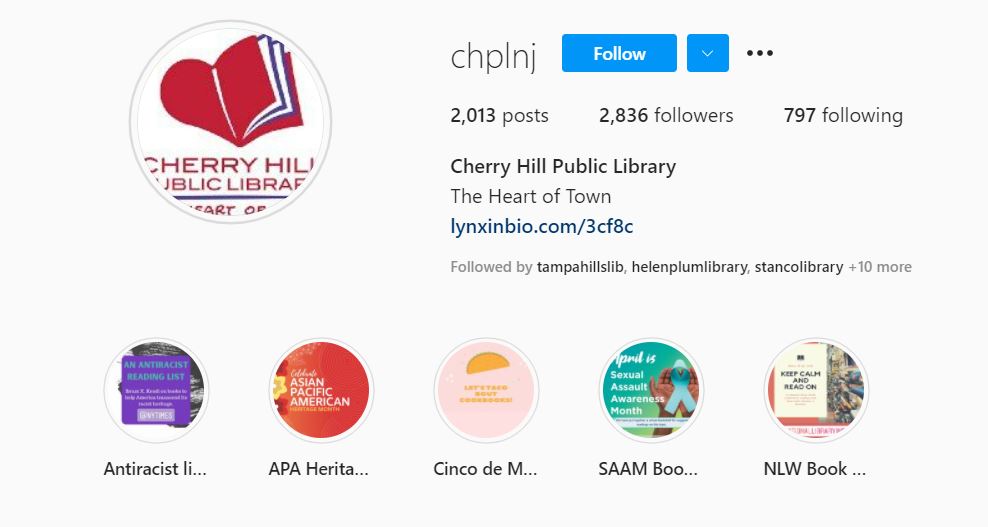
Cherry Hill Public Library uses highlights to save important Instagram stories.

Highlights showcase the best of your previous Instagram content to new followers. And they create an archive of content, especially those stories that contain “evergreen” content that never expires and is always relevant. Instagram highlights are a great place to save library FAQs, book reviews, tutorials, and other wide-ranging topics.

To create a highlight from an active Instagram story:

  • View the story.
  • Click on “Highlight” in the bottom tool bar.
  • Click on the plus icon to create a new highlight container or add to a highlight container you have already created.
  • Click on “Add”. You’re done!

You can add photos or videos to each of your highlight containers any time you want. There is no limit to how many photos and videos each highlight container can hold.

Screen capture showing the Instagram highlights for Springville Library.
Springville Library uses highlights, and they’ve created icon-based covers for each container.

You can change the title of your highlights containers at any time. Just open the highlight, and then tap on the name of the highlight container in the upper left-hand corner. You’ll be given the option to edit.

Share your tips for library Instagram success! Click on the Feedback button to tell me about what you’re doing on Instagram. I’ll share your tips with others on Twitter, Instagram, and YouTube!


Subscribe to this blog and youโ€™ll receive an email every time I post. To do that, click on the โ€œFollowโ€ button in the bottom left-hand corner of the page.

You May Also Want to Read These Posts

Social Media News About Twitter, Instagram, and Facebook That Your Library Needs To Know!

The 2021 Guide to Social Media for Libraries: Instagram

Angela’s Latest Book Review

Four Hundred Souls edited by Ibram X. Kendi and Keisha N. Blain

How #COVID-19 is Impacting Social Media Marketing and What That Means for Libraries

Watch Now

In this episode,ย  I’ll share the latest research on how the #COVID-19 or #Coronavirus pandemic is affecting social media marketing. This research comes from Rival IQ.

I mentioned I’m doing three live webinars this Thursday, March 26 on social media marketing for libraries for EBSCO. The content is all the same for each so register for the time that’s best for you here.

Also Kudos to the Peters Township Public Library in McMurray, Pennsylvania. Like many libraries in the US, they are closed to the public but they created a Hogwarts Digital Escape Room that is pretty fantastic.ย ย 

More Help

Library Marketing During a Pandemic: Tips for Working from Home or the Office and Dealing with the Stress of a Crisis

Self-Care for Library Social Media Staff in the Midst of a Crisis like #COVID-19

If you have a topic for the show, kudos to share, or want to talk to me about library marketing, contact me using this short form.

Go back

Your message has been sent

Warning
Warning
Warning

Warning.

Want more Library Marketing Show? Watch previous episodes!

Check the Upcoming Events page to see where I’ll be soon. Let’s connect!

This blog consistsย of my own personal opinions and may not represent those of my employer. Subscribe to this blog and youโ€™ll receive an email every time I post. To do that, click on โ€œFollowโ€ button in the bottom left-hand corner of the page. Connect with me on Twitter,ย Instagram, andย LinkedIn.ย  ย 

A WordPress.com Website.

Up ↑