In this episode, I answer a question from Jenny of Burlington Public Library: “Can you share some ideas for Library Card Sign-up Month in September? I’m especially looking for video ideas and outreach for youth, but I’ll take any ideas!”
Kudos in this episode go to the Saint Louis County Library for offering enrollment in Headspace with a library card.
Do you have a suggestion for a topic for a future episode? Want to nominate someone for kudos? Let me know in the comments.
And subscribe to this series to get a new video tip for libraries each week.
Thanks for watching!
Subscribe to this blog and you’ll receive an email every time I post. To do that, click on the “Follow” button in the bottom left-hand corner of the page.
In this episode, I answer a question from Tovah Anderson about how to decide how much time and money should be spent on the three buckets of library marketing: programs, services, and the collection.
Kudos in this episode go to the Monroe County Public Library for their new testing kitchen.
Do you have a suggestion for a topic for a future episode? Want to nominate someone for kudos? Let me know in the comments. And subscribe to this series to get a new video tip for libraries each week.
Before I worked in library marketing, I spent nearly 20 years as a broadcast television journalist.
I was a newscast producer for a local TV station. I created a nightly newscast from scratch. I decided which stories would be told, who would tell them, how long they would be, and more.
Every day, I was part of the newsroom decision-making process. I know why certain stories get airtime and others don’t (ratings). I know why important facts end up “on the cutting room floor” (time constraints). I know why online media outlets and newspapers write sensational headlines (clicks).
For the last eight years, I’ve been on the other side of that world. I’ve been the one sending press releases and asking, sometimes begging, for coverage of my library or for the libraries I work with in my current job.
A library blog and a video marketing strategy are the best ways to control the narrative and tell your own library story on your terms.
But let’s be honest… media coverage can be great for your library.
So here are my top six tips to help get more positive press for your library.
Did your library get amazing press coverage? How did you do it? Share your story by clicking on the feedback button in the lower left-hand corner of your screen.
Send news releases early.
For events like author visits, grand openings, and other programs, send press releases four to six weeks before the event. Then, send a reminder to the media again about a week before the event.
If your library is unveiling a new service, send your press release one to two weeks before the new service launches.
For big announcements, like awards, send the press release one week before the official announcement and include a line that embargos the release. That means the news outlet can’t cover the story in print or on air until the day the embargo ends. Put the embargo right in the sub-headline of the press release, to be sure the journalists see it.
Write a news story instead of writing a press release.
If you send the newsroom a publishable piece of content with photos or video, you win on two levels.
First, you’ll increase the chances that your library will get coverage. Second, the narrative is exactly as you want it! You make the important points. You have control.
So, write a story which the media outlet can copy and paste into a script or column. Use Associated Press style and these four basic journalistic principles:
A catchy lead sentence;
The who-what-where-when-why sequence, interspersed with a quote or two;
Clear writing without library jargon or technical terms. If you must use a technical term, explain it clearly. And,
A concise ending.
Make your quotes sound like they come from a real person.
Reporters and editors can spot a manufactured quote a mile away.
I know a manufactured quote is often a necessity in libraries. So, if you must make up a quote from your director, don’t write: “Our dynamic approach to customer service is central to our strategic initiatives. We are scheduled to implement more of these forward-thinking tactics.”
This is so much better: “We are adding an online, real-time reading recommendations service because we wanted to do a better job of answering our patrons’ questions and help them find the books they want. We’re hoping to really shake up the service experience. But mostly, we want to make it easy for people to get personal attention and a great book.”
Don’t send your press release in a mass email.
A reporter is much less likely to follow up with you for a story if they are part of a large group of journalists who’ve all received the same story. Journalists want the “exclusive,” even on small things. So don’t let on that you are also sending your release to other outlets.
When you create your list of media contacts, include information about that outlet’s target audience, the kind of stories they usually cover, and the reporters with whom you have a personal connection.
Then, match your potential story with the right reporter rather than sending your release to every reporter you know. It’s a better use of your time and energy, and you’re more likely to get media coverage.
Find good interview subjects ahead of time.
Reporters are looking for compelling quotes that add depth to a story.
They’ll love a quote or a soundbite from a child who finally catches up in reading because of extra tutoring from a children’s librarian. They’ll jump at the chance for a quote or soundbite from an immigrant who got help at his library filling out a naturalization form.
Arrange diverse interviews, including people from all different backgrounds and walks of life. Most newspapers, TV, and radio stations will tell you their target audience is women, ages 25-54. Your interview subjects should be relatable to people in that demographic.
Pick interview subjects who are comfortable on camera and can “talk in soundbites”. That means they can make a point in three to four sentences.
Respect the reporters’ deadline.
When I was a journalist, it was frustrating to call an organization hoping for an interview or answers to questions only to be told that the person was out of the office or wouldn’t be able to call me back until late in the day.
If a reporter is calling you, chances are that they’re working on the story for today’s edition or newscast, which means they’d really like to have all the elements by early afternoon at the latest, to give themselves time to craft the story. Tomorrow is too late.
Move heaven and earth to accommodate the reporter as much as possible. When you do that, you’re more likely to get coverage every time you ask for it.
Newsrooms often have crews available at odd hours, like 10 a.m. or 8 p.m. Sometimes reporters will squeeze in a story during a very limited window in their day. They may call you and say they can come to the library in 10 minutes. Make sure you and your interview subjects can accommodate those last-minute requests.
I have a special request.
I’m putting together a conference presentation and I’m looking for some examples.
Libraries that have reopened and have had some success drawing people back into the physical branch.
Libraries who believe they’ve figured out the hybrid program model.
Libraries who are trying to turn their pandemic digital users on to other services now that the library has reopened.
I know you are doing amazing work. I want to highlight you on a national stage! Thank you in advance.
Subscribe to this blog and you’ll receive an email every time I post. To do that, click on the “Follow” button in the bottom left-hand corner of the page.
In this episode, I share some tips for how to use your library’s FAQ’s into marketing opportunities. This idea can be a great way to establish your library as a place of answers.. And it can help you fill holes in your promotional schedule with valuable content.
Kudos in this episode go to Eileen Button of Genesee Public Library who wrote an open love letter to libraries that made me a little teary-eyed!
Do you have a suggestion for a topic for a future episode? Want to nominate someone for kudos? Let me know by clicking on the feedback tab.
And subscribe to this series to get a new video tip for libraries each week. Thanks for watching!
If you want your community members to do something, you must tell them what you want them to do. Explicitly.
That means you must add an amazing call to action for every promotional piece you create.
What Is a Call to Action?
A Call to Action, or a CTA, is a phrase that is used to tell the someone exactly what action to take and how to take it. It also implicitly provides the motivation for the recipient to take the action.
A CTA can be as simple as two words “Read Now.” It may be longer: “Want to take the next step in your career? Take a free career assessment test on our library’s website.”
It may be a link to your website, catalog, chat service, or email box. It may tell community members to call a special phone number to speak with a librarian or visit a certain desk at the library to talk with staff.
The call to action gives the person consuming the promotional material the instructions for taking the next step to use library resources. It must be strong, clear, and commanding.
For most of us, the CTA is the last thing we think about when creating a promotional piece. Staff put their time and energy into creating the layout, adding the right image, making sure all the text details are correct, and timing the promotion for the perfect release.
But I encourage you to spend some time thinking through your CTAs early in the process of creating any marketing piece. Here are seven tips to remember when you create a CTA for any piece. Practice going through this list every time you do a promotion.
Use positive, active language in your call to action.
Think of your CTA like a commandment. If you could order your community member to do something, what would you say?
Some examples of positive, active language which apply to libraries are:
Read
Watch
Download
Create
Join
Learn
Donate
Explore
Discover
Enter
You can also add a sense of urgency to your CTAs by adding the word “Now” as in “Read Now” or “Watch Now”.
Make your call to action as concise as possible.
For emails and digital signage try to keep your CTA between one and three words.
For flyers, bookmarks, posters, and videos, you can add a few more words like:
Register for this program
Place a hold on this book
Reserve your spot
Get the details
Sign up now
Read our step-by-step guide
For social media posts, a full sentence is good. But, on social media, put your sentence-long CTA into the text of your post, not as text inside the graphic or image you are attaching. If your CTA is in the image, use the one-to-three-word rule.
For blog posts, your CTA can be a longform sentence. Consider using bold text to draw the eye to that sentence. Or you can use a button (see the section on buttons below).
Try using the first person.
The marketing agency Unbounce did a fascinating study on CTAs and found that changing the text from the second person (“Register your child today”) to the first person (“Register my child today”) resulted in a 90 percent increase in clicks.
Your library can experiment using CTAs that say, “Reserve my spot” or “Get my personalized reading recommendations.” You may find that the change makes a difference in the number of people who take an action after seeing your promotional message.
Putyour call to action in a brightly colored box or circle.
There is something psychological about the look of a button that will compel your recipients to click on it.
The color of the button matters. You want something that’s eye-catching. You may be limited in your color choices depending on your library’s brand standards.
But, if you have room to experiment, read this fascinating post from marketing expert Neil Patel on color psychology. Then decide what kind of emotion or energy you want your CTA button to convey and choose the corresponding color.
CTA buttons work best in emails and newsletters. But try them also in promotions where you can’t click on a button, like bookmarks, flyers, posters, and digital sign promotions. The button will still serve the purpose of setting your CTA apart from the rest of the piece.
Put your call to action in the top one-third of whatever piece you are creating.
Moving your CTA “above the fold” as it’s called in the newspaper and magazine business, calls attention to the action you wish for your recipient to take.
Add white space to the area around your call to action.
The extra white space helps create a visual break and draws the reader’s attention right where you want it. Extra white space is also good for anyone reading your digital library promotional piece on a mobile device. It creates a clear area for fingers to click.
Try to use as few calls to action as possible.
You’ll want to focus the energy of your reader on the next action you wish for them to take. If you offer them too many potential actions, they’ll be overwhelmed and less likely to do anything!
For most promotional pieces, you’ll want only one CTA. This rule includes CTAs for email, digital signage, flyers, posters, bookmarks, social media posts, and videos.
The exceptions are blog posts and newsletters. For blog posts, my personal experience is that two or three CTAs work best. For newsletters, try to offer no more than five CTAs.
Did you notice where I took my own advice in this blog post?
Subscribe to this blog and you’ll receive an email every time I post. To do that, click on the “Follow” button in the bottom left-hand corner of the page.
Use the feedback button to share your most pressing email marketing question. I’ll answer these in a future blog post!
I love opening the “reports” tab on an email platform. There is a second or two of anticipation as the page loads that brings me a thrill.
What will the numbers say? Will they be better or worse than last month? Will they reveal a new trend that I can use to better serve my target audience?
I realize I sound a little nuts. But honestly, I love metrics.
They are clear and concise. They show you what’s working and what’s not working. They give you permission to stop doing promotions that don’t help your library at all. If you try something new, they’ll tell you whether your idea worked or not.
Tracked over time, email metrics will help you to take the 30,000-foot view of your library marketing. You can see if your emails are doing what they are supposed to do… moving your library toward its overall strategic goals.
There is a lot we could measure in terms of email marketing. It would be easy to get lost in the quagmire of numbers and analysis.
So, I want you to focus on four data points that really matter to library email marketing. Use these metrics to determine whether your messages are connecting with your audience and promoting your library’s overall strategic goals. And don’t miss the bonus tip at the end of this list!
“Email is the only place where people, not algorithms, are in control.”
Ann Handley, writer, digital marketing pioneer, and Wall Street Journal best-selling author
1. Increase of raw circulation numbers.
Record the number of checkouts and holds before you send the message and then again after the message is sent. You can generally wait about three days to check those numbers. Cardholders who want to act on an email will do so within a three-day period of receiving it.
What this metric will tell you: Raw circulation numbers will likely be of interest to anyone in collection development at your library. They are also the basis for the next two metrics, which will help you compare the effectiveness of your emails.
2. Percentage increase in circulation.
Once you start collecting data on raw holds and checkout increases, you will want to calculate the percentage increase in circulation.
Let’s say on Monday, you send an email promoting one specific eBook. Before you send the email, you note that there are currently three holds or checkouts of this eBook. When you check on Tuesday, there are four new holds or checkouts placed on the eBook. In total, there are now seven holds or checkouts on this item.
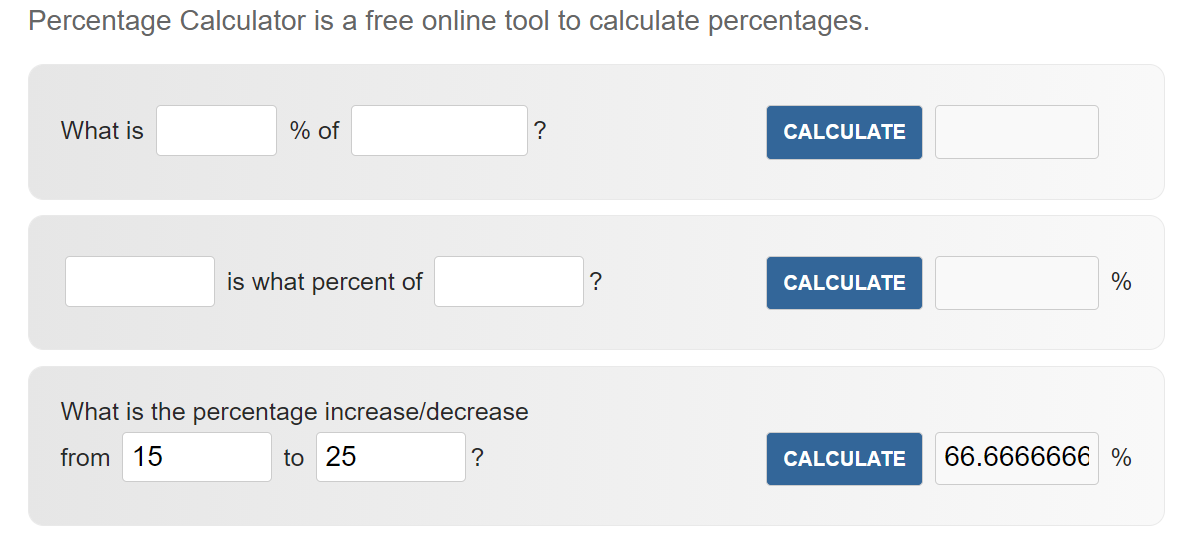
Use percentagecalculator.net to calculate the percentage increase in circulation. For this example, we use the third calculation tool on the page:
That’s a 133 percent increase in circulation.
Now, the next week, you decide to send another email promoting a different eBook. But this time, the eBook you choose to promote has 15 holds or copies before the email is sent. When you check 24 hours after sending the email, there are 10 new holds or checkouts. In total, there are now 25 holds or checkouts on the eBook.
The raw numbers for the second email are bigger (an increase of 4 holds/checkouts vs. an increase of 10 holds/checkouts). But the percentage increase for the second email is actually smaller, at 66%! That means email #1 was more effective.
What this metric will tell you: Percentage increase in circulation lets you compare your promotions more accurately. If you are short on time, this kind of comparison will help you determine which promotions will give you the most success with your limited resources.
3. Conversion rate.
This is the percentage of people who took an action after receiving your email.
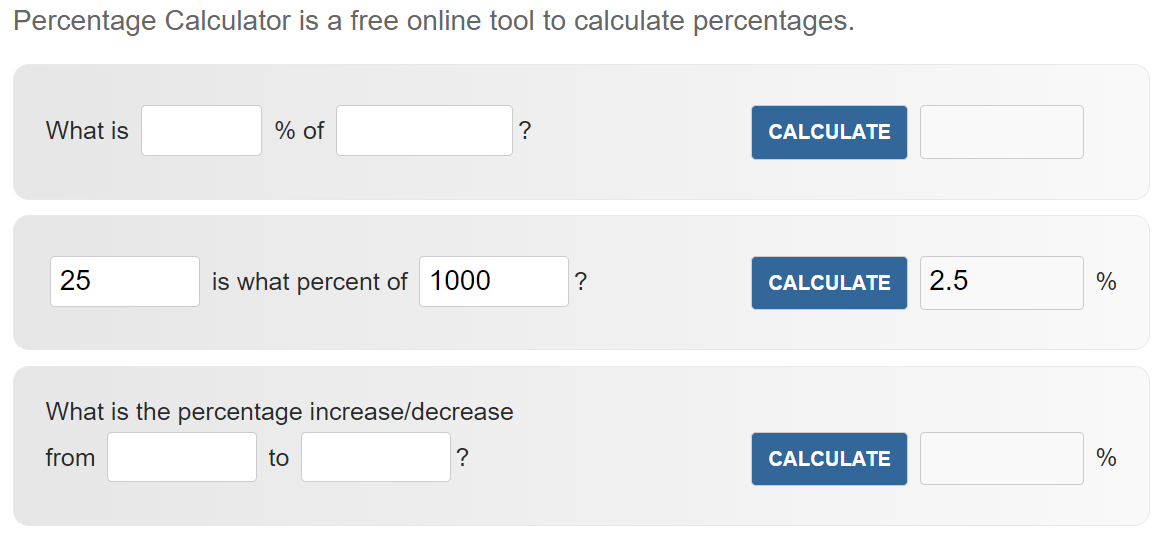
Let’s pretend that you’ve sent an email to 1000 people. The email promotes a streaming video on your library website that hasn’t had any views in the past couple of weeks.
When you check the streaming statistics for that video, you see that 25 people watched the video in the days immediately after you sent the email.
Using the second tool on our percentage calculator website, you can calculate the percentage of people who “converted” or took an action after your email.
What this metric will tell you: If you start tracking conversion rates on your emails, over time you’ll have a clear picture of the types of emails your audience responds to. You’ll be able to establish a good base percentage for your audience. This number will be different for every library.
If you are short on time, this metric will help you determine which promotions will give you the most success with your limited resources. When you find a certain type of email promotion works based on conversion rate, you should do it more often.
4. Amount of traffic driven to your website.
Track how much traffic is funneled to your public website by your emails. You can use Google Analytics to analyze how efforts on those platform translates into action by your cardholders. If you’ve never worked with Google Analytics, here is an easy guide to get you started.
What this metric will tell you: This is an important metric to share with administration, because it clearly demonstrates the value of the time and energy you have invested in email marketing.
Special bonus tip!
If you promote the same collection item or booklist on social media, email, and your website, put some space between those three promotions. A week is a good amount of time. That allows you to really pinpoint whether your increase in circulation is coming from email, your placement of the item on your website, or social media.
In fact, that’s a fun experiment to run. Can you drive higher circulation numbers by promoting your collection on your website, email, or social media?
You can even get more granular: which social media platform is best for collection promotion? Which page on your website is best for placing collection promotions? Which email list responds best? See, this is fun!
Subscribe to this blog and you’ll receive an email every time I post. To do that, click on the “Follow” button in the bottom left-hand corner of the page.
In this episode, I want to inspire you to experiment with your library marketing and promotions this summer. I’ll give you some ideas to help you do this, and I’ll explain why right now is the perfect time to try things you’ve never tried before.
Kudos go to the Iowa Library for the Blind and Print Disabled. They were honored by the Library of Congress for their work during the pandemic.
Do you have a suggestion for a topic for a future episode? Want to nominate someone for kudos? Let me know in the comments. And subscribe to this series to get a new video tip for libraries each week.
In 2016, the Public Library of Cincinnati and Hamilton County caught wind of a fantastic promotional opportunity.
I don’t remember the exact quote, but this is a paraphrase of a Tweet our library saw that revealed a local man’s big plan.
“My son and I are planning a big adventure. We’re going to try to visit all 41 Cincinnati library branches in one day. We’ll take a picture at each branch. Wish us luck!”
The father didn’t tag our library. Still, our social media manager found out about the plan by practicing social listening.
What is social listening?
Your library already tracks mentions, shares, comments, and hashtags related to your library. They record and analyze those engagement metrics to figure out the effectiveness of your library’s promotions on social media.
Social listening is a step beyond that.
Social listening is the purposeful search for conversations about your library on social media platforms, both the ones you are using to promote your library and the ones you are not using.
It’s not looking to see how your library’s marketing is landing. Rather, it’s looking to see the conversations that happen about your library between people who may or may not use your library or who may or may not see any marketing from your library.
Imagine if you could eavesdrop on the conversations people are having about your library when you’re not around. What do you think your community would say?
“That children’s librarian is a hoot. His storytimes are fun, even for the adults.”
“I cannot believe I have to create a separate login and password to use some of the library’s free stuff. It’s so frustrating and time-consuming.”
“Big interview on Monday. I could really use some help figuring out what kinds of questions they’ll ask and practicing my answers. There ought to be a service like that at the library.”
These three made-up examples illustrate the valuable information your library can uncover when it practices social listening.
Social listening will give you a clearer picture of how people feel about your library. You may be able to spot problems before they happen. And you will certainly spot promotional opportunities which you can amplify to connect to more users.
In the case of the father and son Cincinnati Library branch adventure, our marketing staff reached out to the dad. We told him we loved his plan and wanted to follow along. We ended up turning their marathon day-long quest to visit all our branches into a memorable cover story for our quarterly content marketing magazine, Library Links.
Read the story about the Grand Library Adventure
Free social media listening tools
If your library uses a social media scheduling platform, it will have the ability to integrate social listening into your dashboard in some form. Check the help section of the platform for instructions.
There are also free tools to help you with social listening.
Boardreader: This site searches forums, websites, blogs, and messaging boards. Type the name of your library into the search bar to find all the posts mentioning your library.
TweetDeck.com: This tool is run by Twitter and lets you monitor live feeds across the platform.
Also, read this post to see how to use Google alerts for social listening as well as catch media mentions of your library. If your library gets media coverage, you may find conversations about your library in the comment section of the story and on the social media pages of the media outlet.
What to monitor with social listening
You’ll want to set up your social listening tools to monitor:
Your library’s name and social media handle
Common misspellings of your library’s name and social media handle
Names of your services, especially branded names, like the name of your bookmobile, your Library of Things, your summer reading program, your storytimes, etc.
Common terms associated with libraries like reading, librarian, book drop, etc.
The names of senior leaders like your director and board members
The names of your branches and locations
Opportunities to gain from social listening
Social listening means you can interact more with your community. Cardholders (and non-cardholders) may talk about your library but not directly tag you. If you are doing social listening, you will still spot those interactions.
You can also spot problems and trends. If you notice that a lot of community members are posting negative comments about a service, you can elevate that to senior leadership.
Social listening also means you’ll know more about your competitors. If you are “competing” with other organizations in your community or with for-profit companies that provide services similar to your library, you can use social listening to look for opportunities to position your library as a free and better alternative to those competitors.
Finally, social listening can also help you identify library advocates. They might be vocal about their support of the library. You want to connect with these people who already love your library and ask them to speak out for you.
Subscribe to this blog and you’ll receive an email every time I post. To do that, click on the “Follow” button in the bottom left-hand corner of the page. Connect with me on YouTube, Twitter, Instagram, Goodreads, andLinkedIn.
This week, I heard a truism about email marketing.
Marketing expert Ann Handley said, “Email is the only place where people, not algorithms, are in control.”
When the pandemic struck, email became the only reliable way libraries had to communicate with their patrons. More libraries are sending email newsletters. And they’ve gotten good at the basics.
So, it’s time to take the power of email newsletters to the next level.
Focus less on the news, more on the letter
Handley has one of the best newsletters I’ve ever seen. It stands out because she focuses less on the news part… and more on the letter. Sign up, and you’ll see what I mean.
What I’ve learned from Handley is that your newsletter is your opportunity to directly connect with cardholders in their inbox. What does your community need? What can you provide for them? And most importantly, how can your library demonstrate the way it is different than any other organization?
Ann recommends you lose the marketing voice for your newsletter. Instead, write as you would if you were trying to convince a friend or family member to use the library. Be personable and relatable. Your authentic voice will connect to your readers.
New topic ideas for your library email newsletter
Your library newsletter can and should contain more than book recommendations and announcements about programs and services. Here is a list of ideas that go beyond the typical library information.
Send simple how-to instructions for using your library.
There are all kinds of opportunities to share instructions. Write simple steps for using one of your services. Or share instructions on how to complete a task outside of your library, like fill out an absentee ballot form or make a COVID-19 vaccination appointment.
Step-by-by-step instructions shared in your newsletter will help you build a relationship and form trust with your community. It demonstrates your library’s ability to find solutions to your community’s most pressing problems.
Answer frequently asked questions.
Ask your front line staff, your chat service operator, or the person who handles your library’s main email inbox to share the questions they get most frequently from the public. Then, answer them in your newsletter!
Your email audience will learn new things about your library. You’ll make your library more accessible. And you’ll build trust with your community by proving your library is a place where answers are found.
Promote blog posts.
Use your newsletter to promote your blog and get more views.
Take the first few lines of your post and use them to tease your newsletter audience. Include a photo or graphic from the post to tie your newsletter into your blog. If you send one newsletter a month but post several blogs, tease each post and include a link.
Your newsletter audience will be introduced to a new way to interact with and get news from your library. It will also give you valuable information about which blog posts your newsletter audience is interested in.
For instance, if you see that your newsletter audience always click on links for blog posts about genealogy and history, then you’ll know to write more posts on that topic and include them your next newsletter.
Promote your videos.
If your library is creating and posting videos on YouTube, Facebook, Vimeo, or another platform, your newsletter is the perfect place to give those videos an extra boost. As with the blog posts, share a sentence or two to entice your audience to click on a link to the video.
One note: Include a link to the video on the original platform to which you published. Don’t embed the video in your newsletter. Many email services view embedded video code as suspicious, and will mark your email as spam.
Create lists.
There’s a reason Buzzfeed articles are so popular… they contain listicles, which are articles that feature a numbered list (Hey, this post is a listicle of sorts!) A list is easy for your audience to digest and remember.
Create a top ten list of anything: your staff’s book picks, the ten things a patron can create in your Makerspace, the best albums to download from the library… the possibilities are endless. Your email readers will love it. You can even ask your readers to suggest a topic for a list in your next email newsletter!
Share social media content in your newsletter.
If you library had a popular social media post, you can replicate it by adding it to your newsletter.
For instance, if your library posted a book review that got a lot of comments, likes, and shares, put that post into your newsletter, along with a link so your patrons can visit the social media platform, see the original post, and interact with it.
Likewise, when your library gets a great piece of user-generated content, share it in your newsletter as well as on your social media audience.
Share testimonials and reviews.
We know that trust is built between your community and your library through social proof: namely, other community members talking about how they’ve used and loved your library. So, when you get those reviews and testimonials, insert them into your newsletter.
You should also ask your email readers to share reviews and testimonials of your library. Include an easy way for them to send you feedback on what they love about your library. Then share those in your next newsletter and on social media.
Advocate your library.
As a library staffer, you likely know about all the good work your library is doing. But your community has a very limited understanding of the value of your work.
Your newsletter is a great way to begin to share examples and stories of how your library works to make your community a better place. Share short tidbits or an infographic to explain your library’s value.
Subscribe to this blog and you’ll receive an email every time I post. To do that, click on the “Follow” button in the bottom left-hand corner of the page. Connect with me on YouTube, Twitter, Instagram, Goodreads, andLinkedIn.





 Super Library Marketing: Practical Tips and Ideas for Library Promotion