Search

Super Library Marketing: Practical Tips and Ideas for Library Promotion

Category

library marketing ideas

Your Library is Reopening: How to Communicate New Rules to Your Staff and the Public During a Pandemic

Photo courtesy Public Library of Cincinnati and Hamilton County

What is your #1 library marketing worry or concern right now?

← Back

Thank you for your response. ✨

In many parts of the United States, library boards and senior staff have decided to reopen in the next few weeks. My social media feeds are filled with posts from library staff airing concerns over a return to “normal” library duties.

The plans vary. But it appears that most institutions are slowly phasing in services. Some libraries are doing curbside only. Some are opening drive-thrus. And some are fully allowing patrons back inside their physical buildings. 

When your library settles on what to do, it will be your job to let your staff and community know what’s happening. This week, I spent a lot of time compiling the best advice I could offer to help you communicate a library reopening during a pandemic.

As you know, communicating is SO important. Your staff, your regular customers, and your community need to know what you are doing and what changes you are making to keep them safe. They will need you to say it more than once. And they will need time to digest all this information.  

A guide to communicating your library’s new policies

It starts with the staff. So many libraries think about customer communications first and forget that staff need to know what is happening. If your library is contemplating reopening, be open and honest with your staff about all aspects of what that will entail. Ask for feedback and listen respectfully to staff concerns and ideas. Adjust your plan where you can.

And expect pushback. It’s uncomfortable. People are scared. And there are members of your staff who will be vocal about their disapproval. If you are a library leader, find ways to address the concerns of staff. The Library Management Group on Facebook is a helpful resource for advice from other managers.

When sharing news with your community, use all your tactics. Create a page on your website where you put all your re-opening information. Link to it from your homepage and, for the time being, in the bio of all your social media accounts.

Make a video, or several videos, to explain the changes. If your library has accounts on multiple social media platforms, use all of them to tell people about your plans. And make your re-opening plans the exclusive focus of a social media live event. You can really build excitement and interest by publicizing the livestream where you’ll unveil the plans and take direct questions from the audience in the comments or chat.

Send emails to your community and patrons. Ask community partners to help share information about your reopening. Finally, pitch your reopening as a story to your local media. 

Create one core message and repeat it. You are going to have to say the same things and repeat the same information before the changes sink in.

Remember the Marketing Rule of 7? People need to hear a message seven times before they are compelled to take an action. It applies in this instance. And, with the vast amount of information coming at them from various sources, your community may need MORE than seven messages to fully grasp your library’s new service requirements. 

For maximum effect, settle on a few sentences as your core message or talking points. Repeat those on all your channels.

For social media, post your message at varying times of the day to make sure that it’s seen by as many followers as possible. Add your message to all your email marketing campaigns. Ask staff to practice your message as talking points so they can deliver a consistent answer when they receive questions from people at the desk, at the door, or by phone. Add the message to your holds slips and receipts. Add your message to videos. If you do live virtual events, ask staff to repeat the message before they go into their main program. 

It’s going to seem redundant to you. But a consistently repeated messaging campaign works.

But don’t overwhelm people. I received a reopening email from a library this past week with no less than 18 calls to action! It was overwhelming. And I didn’t click on any of them.

Don’t make that mistake. The services you provide are going to be different for different people. If you can break your messages up by audience, do so. And instead of sending one message with EVERYTHING in it, send two or three messages containing your core talking points, plus two to three details that pertain to a targeted audience. Your readers will be better able to digest and retain the information.

Use your signage wisely. I know many libraries are putting a good deal of information on their signage to keep interactions with the public to a minimum. But remember that too much signage will look crowded, cluttered, and overwhelming to your patrons. Take some time to plan where you’re place signage, and what they will say, for maximum effect.

Don’t forget to keep stakeholders and legislators in the loop. It’s important to send regular updates about what your library has been doing during the shutdown and what it is doing now as it plans to resume physical service. Highlight the many ways your collection was used even when your building was closed.

Legislators love numbers… so check your library statistics for use of digital resources. Point out trends. Show how your library helped the community cope with the stresses of the shutdown. 

Why is this so important? Right now, we must send the message that the library is always valuable. A time is coming when the economic crisis caused by this pandemic will lead to budget cuts. We need to do everything we can on the front side of this crisis to save as much of our funding as possible. And that starts now, with communication. 

Resources to help you deal with reopening

Self-Care for Library Social Media Staff in the Midst of a Crisis like #COVID-19

Don’t Stop Communicating! Tips for Handling Library Promotion Overload During a Crisis

Libraries and Social Media Facebook Group

Libraries Step Up in a Time of Crisis Facebook Group

Subscribe to this blog and you’ll receive an email every time I post. To do that, click on the “Follow” button in the bottom left-hand corner of the page. Connect with me on YouTube, Twitter, Instagram, and LinkedIn.  
Marketing is Not a Dirty Word! Why Libraries Need to Promote Themselves Now, More Than Ever

Photo courtesy Public Library of Cincinnati and Hamilton County

Back in February, I had the great pleasure of attending and speaking at the Edge 2020 conference in Edinburgh, Scotland. While there, I heard from librarians across the United Kingdom as they shared stories about the fantastic work happening in their libraries. You can now see video of all the sessions on their web page.

Scott Simpson, Head of Library & Information Services, and Paul Martin, Systems Development & Support Officer, East Renfrewshire, discussed their library’s program, “Do Your Bucket List at Your Library.” Attendees can visit places they’ve always wanted to see, pretty much anywhere in the world, using a VR headset and guidance from a library staffer. Simpson and Martin told us that many older people use VR to revisit places they haven’t seen in years or to show their families where they grew up.

I think this is brilliant. And marketable. And I said so on Twitter.

That’s when this back and forth happened.

The discussion has been on my mind ever since. I thought about it last week, when I recorded an episode of The Library Marketing Show about the need for libraries to keep communicating their value. I want to expand on that point.

The debate surrounding the word “marketing” in libraries is not new. When I worked for a large metropolitan public library system, my department was often met with skepticism or wary looks from librarians.

Most staffers wanted me to promote their programs and events. But many told me they felt weird or icky about promoting the non-program library work, like the collection or summer reading or homework help or online resources.

Library staff was more than happy to talk one-on-one about how great their library was. But there was something off-putting about loudly proclaiming the value of the library in mass library promotions.

Frankly, we must get over it. We must stop being humble. We must talk more about the work we do in our libraries, as loudly as we can, to as many people as will listen. Our very existence depends on it.

I don’t mean to be overly dramatic. But I am deeply worried about the future of libraries.

Marketing is not a dirty word. The importance of library marketing is the reason I started this blog five years ago. It is my mission to help library staff communicate their value to the public.

I love the library industry. I truly believe that libraries are the key to building a fair, educated, and empathetic society.

We’re not very good at marketing libraries, to be honest. In 2018, OCLC released this report on the marketing approach of public libraries in the United States. According to the data, 96 percent of US libraries said they use social media. I bet that number is much higher now. 70 percent send emails (also probably higher now, due the pandemic).

Here is the bad news. At the time of this report, only 40 percent of public libraries had a communications strategy. Only 17 percent said their strategy was current.

Why?  75 percent of libraries say they don’t have the necessary staff resources to do marketing. They don’t even have a marketing professional on their staff. That’s a big red flag, my friends.

I’ve been frustrated by the lack of focus on library marketing for years. But now, amid a pandemic, when library buildings are closed and when libraries face imminent budget cuts, it’s become a serious problem.

Many library staffers make an assumption that the community knows what they do in the library. But I am certain your community does not know the full extent of your impact.

They don’t know how you help craft the resume of the single parent looking to get a better job so he or she can provide a better future for their family. They don’t see how you help a terrified cancer patient research the latest treatment option. They don’t have any idea that you provide after-school homework help or teach young children to love reading. They don’t have a clue that your building is the only safe space a teenager has to hang out. They don’t know that the library is sometimes the only place where a child in their community gets a meal. Heck, half the time, they don’t realize you have eBooks.

It’s important to talk about all your work–loudly, openly, and all the time. It’s more than pride. It’s survival.

If you educate your community about the work of your library, it’s going to be painful for leaders to make budget and staff cuts. Your community will come to defense if they understand the loss that those cuts will mean for their community.

This is a change in mindset for libraries. This is not something that you’ll talk about once at a staff meeting and forget it. This is something we need to do every day, without fail.

Now is the time to make marketing one of the main focal points of your library’s outreach. It’s our duty to advocate for our own professional services and expertise.

Your patrons don’t want you to remain neutral. They want you to take a stand.

If your library isn’t centered on marketing, you might well face more problems than just getting people to your programs.

The very survival of your library depends on marketing.

Subscribe to this blog and you’ll receive an email every time I post. To do that, click on the “Follow” button in the bottom left-hand corner of the page. Connect with me on YouTube, Twitter, Instagram, and LinkedIn.  


Butts in Seats: Which Video Metrics Count as Attendance in the New World of Virtual Library Programming?

Photo Courtesy the Public Library of Cincinnati and Hamilton County

This week’s post is inspired by a question on the Libraries and Social Media Facebook page. A library staff member asked this: “We’re being asked to track the virtual ‘butts in seats’ numbers for each of our programs and also how many views each get in the first hour. I can’t for the life of me find that in insights.”

Analytics on views for videos, both live and pre-recorded, are measured differently by each platform. So, tracking actual attendance can be confusing and time intensive. But it is valuable data.

I have done some research this week to find updated information about how to track video views on the platforms where most libraries are posting video and doing live stream programming: Facebook, Twitter, and YouTube.

Special note: Libraries are also using Instagram for live streaming and video views. However, analytics for videos on Instagram are nearly impossible to track. My advice is limited by that fact.

What counts as attendance?

Before you begin analyzing video views on any platform, you’ll want to establish what will count as attendance to a virtual programming. It may be easiest to align your library’s definition of what counts as video attendance with the way each platform measures a video view.

Most platforms based their metrics on someone viewing a very short portion of your video, not the whole thing. That sounds like good news. But, like an email open rate or a social media follower count, the simple video view is vanity metrics. We want our videos to impact our community. We need to push our definition of video program attendance into deeper territory.

You’ll also want to consider whether your library will use a different metric to measure the number of people who attend a live stream virtual program versus a pre-recorded video. My recommendation is to track both numbers separately. This will give you a sense of whether your followers prefer live streaming over pre-recorded video.

When you live stream, you can see right away how many people are “attending” your event. When you finish your live stream on Facebook and Instagram, you’ll have the option of saving your video to your device. Always do that.

Then, you’ll be asked if you want to upload your live stream recording to the platform for on-demand views. You should do that too!

As soon as you end your live stream, Facebook and Instagram both tell you right away the number of people who viewed your live stream. Then you’ll need to decide how often you check the on-demand views of your live stream. You’ll also need to decide how long will you track the on-demand views on each live stream recording.

Make these decisions now so you can consistently report the attendance and compare metrics on videos to see which ones perform best. If you have one type of video program that does well, you should offer more of that!

Once you decide what will count as attendance by one person on each platform, you’re ready to start recording your views. If you are using a social media scheduling platform, this will be easy. Most scheduling platforms have a video performance section that will help you analyze your views. If you can’t find it, go to the “Help” section of your platform. You should also check your scheduling platforms help section to get more information about how they gather those metrics.

If you don’t have a social media scheduling platform, you’ll check the video views on each platform. Here’s how to do that.

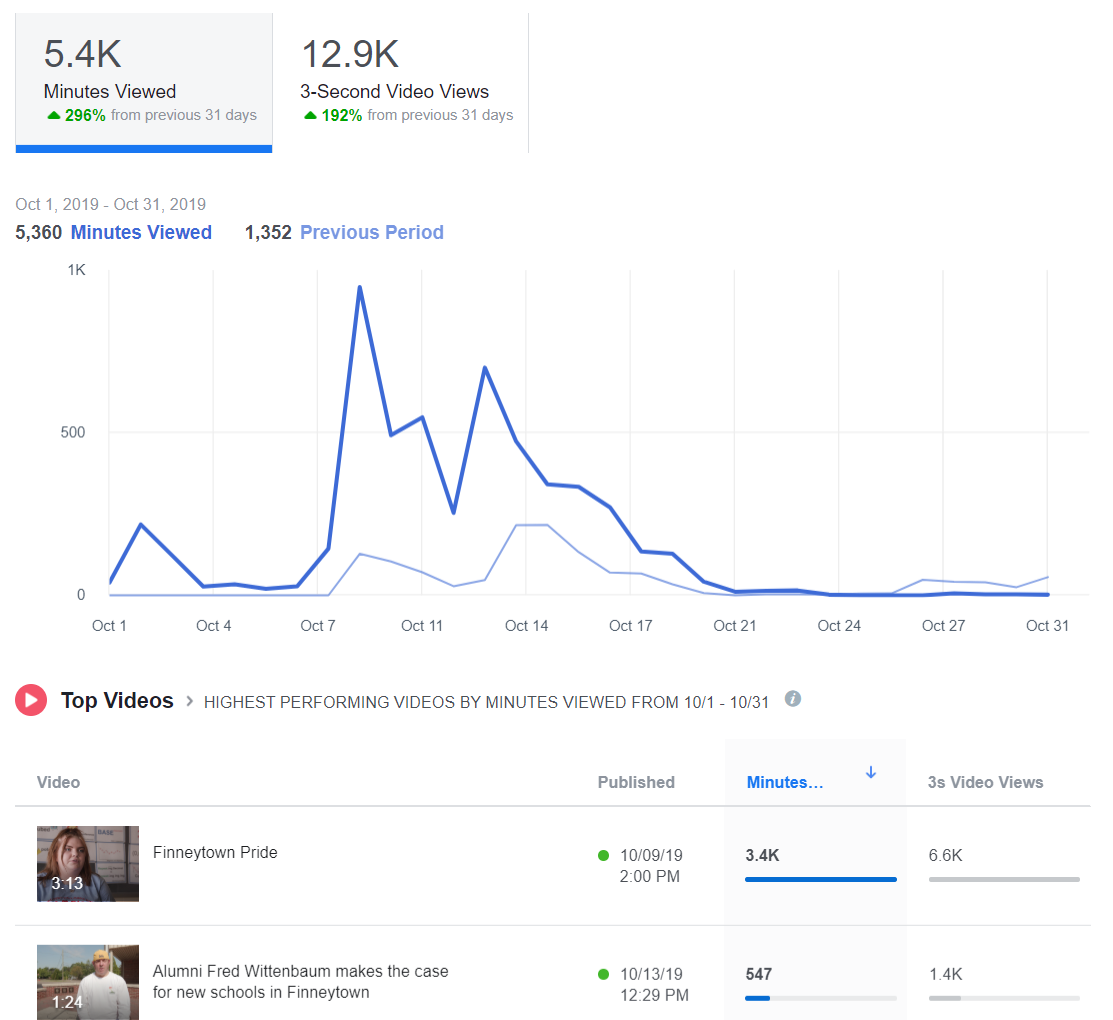
Facebook: Go to your library’s page. At the top, under the general Facebook search bar, you’ll see “Insights.” Click on that. Then scroll down the menu on the left side of the page until you see “Videos.” Click on that.

Instagram: You can see how many people viewed your live stream after it’s finished. If you post your live stream to your stories, you can see how many people viewed it. Be sure to check it before the end of your 24 hour period, because it will disappear! If you upload a video to IGTV, you can see how many people viewed the video, but there are no further analytics. You cannot track video views for videos posted to your normal Instagram feed.

Twitter: Go to Google and type “Twitter Analytics.” If you are logged into your library’s Twitter account, the URL will automatically populate with your library’s analytics. At the top of the page, to the right of the Twitter logo, you’ll see the word “More” and a drop-down menu. Click on the arrow to find “Videos.”

YouTube: Go to your channel. Click on YouTube Studio, then Video Analytics.

Side note: You can see my latest book review did not do very well on YouTube. I am comforted by the fact that it was gangbusters on Facebook. And that’s a lesson too. Different videos will work better on different platforms. You’ll learn how to pair a video to a platform by tracking video analytics.

The top three video metrics to track

#1-Video Views

Facebook and Instagram: a view is counted anytime someone watches your video for at least three seconds.

Twitter: a view counts if someone watches at least two seconds. Additionally, at least 50 percent of the tweeted video must be visible on screen to be registered as viewed. This rule is to account for the auto-play function.

YouTube: a view is counted anytime someone watches your video for at least 30 seconds.

#2-Watch Time

Facebook reports this metric in insights and calls it “minutes viewed.”

Instagram, as far as I can tell at this writing, does not report watch time. (BOO!)

Twitter reports minutes watched under the “video details” of every video you publish on the site. In addition, they have a cool graph that tells you how long the average viewer watches your video. This is reported in quarter percentages. You’ll also get the completion rate, or the percentage of viewers who watched your video from start to finish.

YouTube will tell you the average total watch time for every video you create.

Let’s say you post a 10-minute video on YouTube. You might have 500 views, which means 500 people watched at least the first 30 seconds. Then you’ll have an average watch time of say, 5:33, which means most people watched at least five minutes and 33 seconds of your video.

YouTube prioritizes videos with high watch times in its viewing suggestion algorithm.

I can tell you from my own experience posting The Library Marketing Show to YouTube each week that it’s rare for someone to watch an entire video from start to finish. I challenge myself every week to improve my watch time.

#3-Engagement

As always, you want to record likes, comments, and shares of your videos, as you would with other social media posts. These metrics can tell you how many people were compelled to act based on your video. You can help boost these numbers by actively asking your viewers to like, comment, and share.

Shares are the most important engagement metric, because that means someone liked your online program so much, they wanted their friends and family to enjoy it too.

You might also want to read these⬇️

Videos Can Reach Library Users at Home Now and in the Future. Here’s Your Starter Kit.

The New Guide to Library Marketing Social Media for 2020! Part Four: Maximizing YouTube for Video Plus What About Tumblr, Snapchat, and TikTok?

Subscribe to this blog and you’ll receive an email every time I post. To do that, click on the “Follow” button in the bottom left-hand corner of the page. Connect with me on YouTube, Twitter, Instagram, and LinkedIn.  

The Complete List of Free Online Tools to Help You Do Your Job as a Library Marketer

Your work as a library marketer is no walk in the park in the best of circumstances. But it’s especially difficult right now.

I started compiling a list of tools for library marketers before COVID-19 turned our world upside down. Now I want to share them.

Each tool is free. And I hope they make it easier to do your job, wherever you are.

But first, I have a question.

Tools for Writing

Grammarly. Grammerly is a plug-in. It scans what you are writing as you write it. It points out common grammatical mistakes, like subject-verb agreement, article use, and modifier placement. You can also upload documents for scanning. For remote workers or library marketers handling all the work alone, it’s a lifesaver.

Hemingway Editor.  The Hemingway Editor grades your writing for readability and points out the excessive use of adverbs, passive voice, and complex sentences. Use it to improve your social media posts, web content, blog posts, and press releases.

I have a love/hate relationship with this website. I love it because it forces me to become a better writer. I hate it because every time I use it, it’s clear what an awful writer I am without it!

BrainyQuote. A directory of inspirational quotes for web, email, and social media content. This is a great site to visit when you’re feeling creatively drained. They verify all quotes. There are plenty of quotes about literature, books, reading, and learning.

The Secret Language of Books by NoveList. This little guide helps you create engaging emails and social media posts about books. It can help you craft language for genres, mood, and styles. It expanded the vocabulary I used to entice readers to check out our collection.

Disclaimer: I work for NoveList. But, I got my first copy of this handbook last year, before I worked for them, and it changed my life.

Tools for Graphics, Videos, and Photos

Emojim. This website is my go-to source for finding emojis. I search what I need and then hit copy. Then I insert the emoji in my platform of choice. The selection on this site is better than Emojipedia.

Use of emojis on social media platforms like Instagram increases engagement by 48 percent. My own data from my time at my former public library job showed that the use of an emoji in an email subject line increased open rates by as much as 60 percent.

HTML Color Codes. Use it to find the exact HTML color of any section on an existing graphic or photo. Upload a photo or graphic, then hold your mouse over the section you want to match and click. The HTML code will appear in the box.

When I worked at the Public Library of Cincinnati and Hamilton County, I would use this to create a call to action button for my emails that matched the accompanying graphic or photo.

Iconfinder. Iconfinder is a database of almost one million icons. Don’t be fooled by the priced sets at the top of the page. Scroll down to find their selection of free downloadable icon sets. Right now, they have lots of free choices for hand washing, social distancing, and public health.

Trace by Sticker Mule. This tool will let your library remove a background from a picture.

Giphy GIF Maker. This site allows you to easily create animated video GIFs and GIF slideshows with captions.

Lumen5. Lumen5 is a video content creator. There is a free version that lets you create five videos each month. You can choose clips from a standard video library and get access to free music.

RecordScreen.io. This site lets you record your screen and your webcam at the same time. There are no bells and whistles and no other features. It’s great for demos and tutorials you might want to create to help patrons learn how to navigate your digital resources.

Tools for Organization

Otter. This cool app is a transcription service. It lets you record meetings or conversations on your phone or browser and then turn those conversations into notes that can be shared. The free plan lets you record 600 minutes of conversations per month.

Andrew and Pete’s Content Editorial Calendar. Andrew and Pete run a marketing agency in the UK. I had the pleasure of meeting them in person at Content Marketing World in 2018. They are sweet, funny, and smart. They created this free template for download. I know many library marketers who can put it to use to organize and manage their editorial calendar.

URL List. This website is a revelation. It creates one URL for a list of pages. For instance, I entered all the articles I’ve written on Super Library Marketing about COVID-19 before today and created this URL: https://www.theurlist.com/covid19. It also generates a QR code for use on print materials. To keep your URL lists, just create an account. Use this to promote multiple blog articles or programs happening at multiple branches in your library system.

Subscribe to this blog and you’ll receive an email every time I post. To do that, click on the “Follow” button in the bottom left-hand corner of the page. Connect with me on YouTube, Twitter, Instagram, and LinkedIn.  

Library Marketing During a Pandemic: Tips for Working from Home or the Office and Dealing with the Stress of a Crisis

This week has been super crazy.

Many libraries have closed their doors to help quell the spread of COVID-19. Some have chosen to remain open.

I’m not here to judge one way or another. I’m here to help you work efficiently during this crisis, whether you’ve been allowed to work from home or whether you are compelled to report to the office.

Even before the pandemic struck, remote work was growing in popularity in the library world. At the Public Library of Cincinnati and Hamilton County, administrative staff could work from home up to two days a week.

That’s a trend in workplaces across the nation. The amount of people working from home has tripled in the past 15 years, according to the Federal Reserve.

But if you’ve never worked from home, the transition can be a little tricky. And there are things you can do to set yourself up for success and weather this strange time in library land.

Working from Home

Treat your morning routine the same as you would if you were heading into an office. Have breakfast, shower, and get dressed, even if it’s not in fancy clothing.

Keeping a consistent schedule will help you get in the right head space for work. It will also make the transition back to the office easier (once this is all over).

Make yourself a designated workspace. It is super tempting to set up shop on your couch or bed. Resist the urge. In fact, never do work in your bed. Your sleeping space is sacred. If you are working in your bed, you mind will start to associate that space with work and its stresses. It can mess with your sanity.

Set up at your desk, kitchen table, the kitchen counter, or some other non-sleeping space. Have all the supplies you normally have at hand. Set up your photos, your plants, and your trinkets. Make it feel as much like your normal workspace as possible.

Be careful what you download. Ask your library’s IT team which platform they prefer you use to work remotely. Google, Slack, Facetime, and Teams are the most popular tools. If you do need to download a new tool or app, stick to well-known companies or ones that have been vetted and approved by your library.

Ask your library about a VPN. A virtual private network can give you access to shared drives at your home library and protect your privacy.

Watch out for scammers. Already, there are reports of coronavirus scammers calling employees. They claim they’re with the help desk, They try to get you to download software or go to a certain webpage. Don’t fall for it.

If you get an email or a phone call from someone claiming to be from IT, especially if the email contains links or documents, send a new email to your IT deparmtnet (so you’re not using the address the possible scam came from). Or call your IT department to make sure it’s legitimate.

Scammers also sometimes claim you library has set up special new call centers and the regular corporate IT phone numbers won’t work. Don’t buy it. Hang up and call your IT department.

Leave healthy food within easy reach. It’s hard to avoid the chips when you can just open the cupboard door. To help combat the constant urge to munch on junk food, I usually wash fruit and veggies in the morning and place them in bowls on my kitchen counter. That way they’re within easy reach when I get hungry.

Don’t fall into a Netflix/YouTube/Twitter/whatever hole. It’s hard for some work-at-home employees to avoid distractions. The best way to keep from binge-watching shows when you should be working is not to start.

I try to have the same mindset in my home office that I had at the library: if my boss walked in right now and saw what I was doing, would she approve?

Over-communicate. The distance created by working from home sometimes can hamper communications. Ask co-workers to tell you the best way to reach them… by text, or chat, or email, or video. Then try your best to respect their preferences.

Ask for clarity on projects from your boss. Get instructions and deadlines in writing.

And don’t be afraid to ask questions. Clarity will help get the work done faster and without mistakes.

Mute yourself if you’re on a conference call. As many of us move to virtual meetings and working from home during this strange time, we need to remember to respect meeting time as we would in the office. That means protecting your fellow workers from the sound of your dishwasher/barking dog/loud neighbor during a conference call.

Create a wrap-up routine for the end of your day. This will signal to your brain that your work has ended.

It sounds silly, but it works. Put away your laptop, pack up your pens, straighten your desk, and maybe talk a walk or lite a scented candle to signal to yourself that it’s time to relax and readjust to non-work life in your home.

If You Must Still Report to the Library

Talk to your boss about what to do if you get sick. Make sure you know who to call if you fall ill and what your rights are in terms of medical leave. Having a plan in place will help ease some of the anxiety of working in a public building.

Clean your workspace before you touch anything. This is particularly true for workers sharing desks. Clean the phone, the desk, the keyboard and the monitor buttons, the copy machine keypad, and any other shared surface with an antibacterial wipe.

Wash your hands or sanitize frequently. No need to be specific here. You’ve seen the recommendations from experts. Sing your 20-second song of choice and do it frequently.

Advice for Everyone

Remember it’s a global crisis. If you feel less productive, it’s natural and you’re not alone.

Managers: please remember that your staff are dealing with issues. They may not be sharing everything with you. Concerns about the health of loved ones, daycare situations, and generalized anxiety may lead to less productivity. Please be patient and generous with your employees.

Our cardholders and community may also be working through anxieties and taking out their stresses on staff. Please support your employees. Make sure they know it’s okay to talk about the additional stresses this situation creates for them.

And if you are feeling anxious, seek professional help. There is no shame in talking with a licensed medical professional about these extraordinary circumstances and the fears they may cause.

Try to get enough sleep. Exercise. Limit your exposure to the news. Talk with friends and family about how you feel. Read a good book.

We will all get through this. Let’s be kind and patient with ourselves and others as we navigate these uncharted waters.

Read More: How Libraries Are Responding to the Coronavirus Threat and How Your Library Can Prep for Any Crisis

Subscribe to this blog and you’ll receive an email every time I post. To do that, click on the “Follow” button in the bottom left-hand corner of the page. Connect with me on YouTube, Twitter, Instagram, and LinkedIn.  

Practical Tips for U.S. Libraries to Promote the 2020 Census

The Library Marketing Show Episode 36

Watch Now

On March 12, people in the U.S. will start to receive an invitation to participate in the census. This is the first time respondents will be urged to respond online. In this episode, we talk about why it’s so important for libraries to promote the census and make sure everyone in our communities get counted. Plus practical tips!

How is your library helping with the census? Let me know in the comments.

More help

American Library Association Census Guide for Libraries

Public Libraries Online Podcast About the Census

Also KUDOS this week to the New York Public Library. They are celebrating their 125th anniversary and they put out a fantastic list of their favorite 125 books. The hosts of their podcast, The Librarian is In, will be reading and reviewing books from this list this year. How many have you already read? (I’ve read 20. Pretty sad!)

If you have a topic for the show, kudos to share, or want to talk to me about library marketing, contact me using this short form.

← Back

Thank you for your response. ✨

Want more Library Marketing Show? Watch previous episodes!

Check the Upcoming Events page to see where I’ll be soon. Let’s connect!

This blog consists of my own personal opinions and may not represent those of my employer. Subscribe to this blog and you’ll receive an email every time I post. To do that, click on “Follow” button in the bottom left-hand corner of the page. Connect with me on Twitter, Instagram, and LinkedIn.   

The Secret to Forge Library Loyalty: Stop Holding Programs and Start Creating Experiences

Photo courtesy Public Library of Cincinnati and Hamilton County

Anytime I hear anyone talk a new marketing trend, I must consciously remind myself not to roll my eyes. Marketing trends tend to be nonsense created by agencies hoping to generate buzz.

So, when I first learned about a trend called experiential marketing a few years ago at a conference, I listened politely, and filed it away in the back of my mind, along with my skepticism about whether this truly existed.

It’s clear to me now that experiential marketing isn’t just a buzzword. It’s a legit marketing option for libraries everywhere. And it could be the trend that permanently cements the bond between your library and the community it serves.

What is experiential marketing?

Experiential marketing is sometimes also called event marketing. It can be a pop-up library or program. It can take the form of a special day long library event, an immersion experience, a conference, a workshop—there are limitless possibilities.

But this isn’t just an ordinary event. An experiential marketing event is a program that includes a way to create an experience, to engage the attendee’s senses, and to create a personal and memorable interaction with your library.

It’s about sparking positive emotions in the people who attend. Those emotions become imprinted in the minds of the attendees. They associate that positive emotion with your library.

See why it sounded a little hokey to me the first time I heard it?

But here’s the thing. While most marketing interrupts and forces itself on the community, the experiential experience is voluntary. Your community or cardholders are choosing to interact with your library. Those experiences create beautiful memories. Those beautiful memories become a part of the overall library experience for your community. A loyalty is formed.

Libraries tend to think about their programs and events in simple terms. The program is a way to offer something to the community that is in line with the library’s overall strategic plan. It may also help to fill a community need like literacy or workforce development. These reasons are all valid and valuable.

But there is a clear marketing value in expanding our understanding of what a program or experience can be for our community–and what it can do for our libraries.

And we need to do so because our younger cardholders are at stake. Experiential marketing appeals to younger people. A study by Harris Group found that 72 percent of millennials would rather pay for an experience than for material objects.

This can be a differentiating factor for libraries. We should jump at the chance.

Why experiential marketing is so appealing

It all comes down to the fear of missing out, or FOMO. We see our friends and family posting on social media as they engage in exciting events. We feel anxious because we are missing out on these amazing experiences. And we feel compelled to resolve that anxiety by attending.

Think FOMO isn’t real? Check out the Twitter feed anytime the ALA or PLA conference is in full swing. The number of librarians who lament about missing the conference is pretty astounding.

What are the benefits of creating library experiences?

Experiential marketing forges a personal connection with your library. As younger generations increasingly value experience over tangible items, they’ll patronize and visit libraries that have taken the time to get to know them and offer them experiences that they can learn and grow from in a deep and meaningful way.

  • 85% of consumers say they were likely to purchase after participating in events or experiences.
  • 91% of consumers say they had more positive feelings about brands after attending events or experiences.

Examples of experiential library marketing programs

Challenge yourself to go beyond the normal crafting groups, story times, and passive programs. Instead, push your library to nurture the relationship between the library brand and your community.

You can create all kinds of innovative programs that foster a love and joy of reading. Try a TED talk style book talk. Invite readers to give a compelling talk under a time limit,  say 60 seconds, to convince people to read one of their favorite books. Or schedule book dates, where readers talk one-on-one with under a limited time deadline about their favorite books.

At the Edge 2020 conference in Edinburgh last week, the head of Library and Information Services at East Renfrewshire Libraries in Scotland talked about programs they hold called “Come Complete Your Bucket List at the Library.” Visitors use virtual reality sets to visit places and have experiences they’ve only dreamed about. That is an amazing example of experiential library marketing.

Other great experiences for library customers include:

  • Escape rooms
  • Interactive STEM programs for adults and kids
  • Interactive activities between patrons and in-residence programs featuring authors, entrepreneurs, makers, and artists
  • Interactive programs in your MakerSpace
  • A conference connecting readers and authors interacting in sessions, workshops, and one-on-one experiences
  • Interactive and immersive library exhibits
  • Interactive activities at outreach events
  • Library sleepovers

Experiential experiences are any kind of program that creates a lasting, emotional experience that will bond your community to your library. This is not a one-off kind of event. This is something memorable.

You’ll notice the word “interactive” is used frequently to describe these events. Experiential marketing events require that attendees to do more than sit, listen, and absorb. If they are playing a part in the activities, they’ll remember them.

Experiential marketing is not a quiet kind of marketing. It’s often noisy, literally and figuratively. It might be messy. It might take more planning. These events are not what people think of when they think about what libraries look like.

And that’s the whole point, isn’t it?

Subscribe to this blog and you’ll receive an email every time I post. To do that, click on the “Follow” button in the bottom left-hand corner of the page. Connect with me on YouTube, Twitter, Instagram, and LinkedIn.  

What Metrics Demonstrate Your Library’s Social Media Marketing is Working?

The Library Marketing Show: Episode 32

WATCH NOW

In this episode, we answer a question from Tiffani from the St. Charles City-County Library. She asked, “What analytics are the most helpful to determine if social media is working?”

Angela shares the three big measures of success and ONE metric that doesn’t mean much anymore!

Also kudos go out to libraries taking part in the Dolly Parton meme. Find out why this fun project is so important to library marketing.

If you have a topic for the show, kudos to share, or want to talk to me more about library marketing, email me at ahursh@ebsco.com.

Want more Library Marketing Show? Watch previous episodes!

Check the Upcoming Events page to see where I’ll be soon. Let’s connect!

Subscribe to this blog and you’ll receive an email every time I post. To do that, click on “Follow” button in the bottom left-hand corner of the page. Connect with me on Twitter, Instagram, and LinkedIn.  

Show, Don’t Tell: Why Infographics are an Essential Component in Your Library Marketing

Infographics are visual marketing pieces that help explain facts and figures or lay out a complex set of information in a way that is easy to understand. They’re an incredibly effective marketing tactic.

Until recently, I thought infographics were a relatively new marketing tactic. I remember deciding in 2013 to create an infographic, the first for my library, to promote a readalikes list. I thought I was so innovative!

Turns out, infographics have been around for hundreds of years. Fun fact: The first known instance of infographics as we know them today dates to the late 1700s with a chart of wheat process and labor wages.

Frankly, I love infographics. They appeal to my visual and creative nature. They work well on social media. But they take a lot of time and planning. So, for libraries with a limited marketing staff, it can seem daunting to create one. But it’s worth it.

Why use infographics in library marketing?

Infographics grab attention. Our brains are hard wired for visuals. The human eye can process 36,000 visual messages per hour. That’s 60,000 times faster than the brain can process text. 60,000 times. Whoa.

A good infographic will trigger a reaction in the human brain, sometimes even before the person consciously realizes and processes that reaction.

Think about what happens to you when you see a photograph of a beloved family member or friend. The photo instantly makes you cry, laugh, or long for that person to return to your life. An infographic can trigger the same kind of emotional response. And emotional responses are the best kind of marketing, because they are memorable.

Infographics can explain complex ideas and convey a lot of information in a simple way that is accessible to many audiences. Libraries deal with a lot of data. Our products and services are sometimes difficult to break down into steps. A good infographic will take facts and figures, difficult instructions, or confusing concepts and present them in a way that everyone can understand.

Infographics will position your library as an expert in a way that words can’t. A good visual will demonstrate your library’s subject-matter expertise. It can boost your credibility. It shows that you care about effective communication with your community. And that builds trust with your visitors, community members, and stakeholders in a way that feels more genuine that fancy words.

Three ways to use infographics in your library marketing

Promote your collection. Use infographics to promote a themed collection series, such as new dystopian fiction, the best book club reads, or mystery authors.

You can recruit your collection development department to come up with a list or, if your library is a NoveList client, you can use the NoveList database to find books within a theme. Use the infographic to drive traffic to those titles in your catalog. This works really well on social media.

Explain difficult information. Create an infographic to help you explain something to your cardholders, like how to download an eBook, how to pay a fine, how your library uses taxpayer funding, or why summer reading is vital to childhood literacy.

Infographic template from LibraryAware

Show that your library is fun! Have your content team come up with a great idea for a fun promotion, like 20 signs that you might be a bookworm or how to make a bookmark out of an old book.

How to design a library marketing infographic

Create an outline. An outline can help you to lay out the pieces of the infographic and cut your ideas down to the essential elements.

Decide which points are essential for getting your message across. Is there a story to be told in the data or concept you are trying to convey? Is there a beginning, a middle, and an end to that story?

Once your outline is set, your other design elements will become clear to you. What is your theme? Will you use charts or graphics, lists or numbered elements, photos, shapes, or icons? Write those decisions down next to each section in the outline to help you organize your thoughts.

Plan your layout. You’ll want to make sure all the elements of your infographic are balanced. But that doesn’t mean everything has to be symmetrical!

For instance, if your infographic is explaining something that has a lot of considerations at the beginning of the process and works toward one end result, you could consider a funnel-design: making the number of visuals heavy at the top and lighter as the eye moves down.

If you are explaining something on a timeline, you can arrange your elements evenly from top to bottom but not directly across from one another.

It’s good to sketch your layout out before you go into a design program. This saves time in the actual process of creation and gives you space to make changes at a stage where it’s easy to fix.

You will also want to plan out any places in your infographic where you might need a visual break, like a solid block of color or a line or shape. Finally, be sure to leave white space. You want your infographic to look uncluttered.

Decide your color scheme. A good rule of thumb is to design your infographic with two or three main colors. Then choose a few minor color accents.

The subject of your infographic will have a bearing on your color decision. Some colors work better for explaining data, and some work better for explaining processes.

Infographic template in LibraryAware

Take your branding into consideration when you decide on your color scheme, to avoid clashing with your logo.

Pick your fonts. You’ll want to make sure your type is accessible to all audiences. Avoid script-type fonts. Keep in mind that an infographic is visual, and the amount of text will be minimal, so the font you choose must compliment the design elements of the infographics.

Limit your use of fonts to just two or three types. It’s good design to pick a font for the header, one for the main body text, and a third for the complimentary or subtext.

Write a headline that hooks your target audience. As you would with emails or blog articles, the headline or title of your infographic will need to convey the general theme of your visual and catch the attention of your potential audience. Be descriptive and catchy. The title should be shorter than a headline you may use for other content—only a few words long.

Subscribe to this blog and you’ll receive an email every time I post. To do that, click on the “Follow” button in the bottom left-hand corner of the page. Connect with me on YouTube, Twitter, Instagram, and LinkedIn.  
A WordPress.com Website.

Up ↑