Search

Super Library Marketing: Practical Tips and Ideas for Library Promotion

Category

Video Marketing

The Absolute MOST Important Step in Library Marketing…Revealed!

Watch Now

The Library Marketing Show, Episode 79

In this episode, I’ll share the MOST IMPORTANT thing you need to do in library marketing and why you must make time for this step!

Kudos in this episode go to the Madison Library District for their commitment to marketing on Pinterest.

Do you have a suggestion for a topic for a future episode? Want to nominate someone for kudos? Let me know in the comments. And subscribe to this series to get a new video tip for libraries each week.

Thanks for watching!

Behind the Scenes of The Library Marketing Show: Anyone Can Create Library Videos!

Watch Now

The Library Marketing Show, Episode 70

In this episode, Angela answers a viewer question from Lori Hagen, who wanted to see how these videos come together. She’ll take you behind the scenes. It’s a lot easier than you think… in fact, anyone can create videos!

Kudos in this episode go to the Tacoma Public Library for their innovative virtual programming for adults, including tutorials for how to use their digital resources.

Do you have a suggestion for a topic for a future episode? Want to nominate someone for kudos? Let me know in the comments. And subscribe to this series to get a new video tip for libraries each week!

Thanks for watching.

Going Live on Facebook? Here are Three Tips to Maximize the Reach of Your Library’s Virtual Programs

I don’t ever want to hear anyone tell me ever again that libraries can’t adapt and be flexible. My friends in the library world have proven their adaptability this year in dozens of ways.

The biggest sea change is around how libraries deliver programs to their community. Librarians shifted on a dime when buildings closed and limited service due to the pandemic.

One of the major changes came in the way libraries deliver programs. Almost every library I’ve worked with is now delivering programs live on Facebook. And they’re doing a fantastic job.

But many librarians say they have a hard time getting people to attend these live programs. They want more people to be a part of the livestreams.

It takes a lot of work to put a livestream virtual program together. And the more people who attend, the more likely they are to recognize the value of your library.

I’ve got some tips that will help you promote your Facebook livestreams to get more viewers.

Plan it out

Before you go live on Facebook, you ask yourself these questions:

What are my goals? Your main goal should be more than “I want to get 20 people to watch the livestream.” Think holistically about what you want your audience to get from your livestream. Be as specific as possible.

Some good goals are “To teach our audience how to search for articles, marriage and death notices, and other information about their families in our newspaper archive” or “To show viewers how to use the new feature updates on the Libby app from Overdrive to better manage their holds.”

A goal or goals for your live video will help you when it comes time to decide how you’ll structure your live and what you’ll say. It also gives you a measurable outcome that you can use to assess the use of live virtual programs.

What will my main message be? The main message is how you translate your overall video goal into a line that you can repeat in your promotion of the video and while you are live.

For example, if your goal is to explain those new features on the Libby app, your main message might be, “You now have more control over the e-books and audiobooks you check out from your library.” Repeating your main message in your video pre-promotion, during the video, and when you post the video on-demand will help drive that message home and make it stick in your viewer’s mind.

Who is my target audience? Readers of this blog know that the best way to have success in marketing is to pick an audience and market to them, rather than marketing to the whole of your cardholder base.

Picking a target audience is important when you’re working in Facebook, because the platform will pick up on any keywords you use in your program description. They’ll help you find those specific viewers by showing your organic post to people who may actually be interested in it.

Once you’ve answered these three questions, you’ll have a good foundation as you head into the stage where you promote your livestream.

Promote before you go live

Facebook suggests that you schedule an announcement post in Live Producer. That feature will automatically create a Facebook preview post. Your library followers can then set up a reminder to join the live broadcast.

You can also set up a Facebook event as a preview to your livestream. If you choose to go this route, be sure to explain that you’ll be going live on your main Facebook page, not within the event.

You can also create organic preview posts. Use an eye-catching graphic or photo and link to your virtual event calendar, where people can register to attend.

Registration for your virtual programs is a great option because it gives your library control over communication. Ask for your potential viewer’s email. Then, send them a reminder to watch from your own email marketing system.

In your reminder email, include other virtual program choices and collection items that compliment your livestream. You should also ask recipients to sign up for other email or newsletter marketing from your library.

Whichever option you go with, be sure to promote your livestream at least two weeks before it happens.

And don’t forget to promote your live program on your other channels, like in your email marketing, on your website’s homepage, or even with fliers or bookmarks that you slip into holds or curbside pickups.

Focus on the conversation

Your promotional efforts don’t end when you hit the “live” button.

Facebook will serve a notification of your live virtual program to people who may be scrolling the news feed while you are live. And the best way to get those notifications to happen is to make sure your audience is having a lively conversation.

To help facilitate the conversation, come up with a list of questions for viewers of your livestream before you go live. If the conversation with viewers lags during your livestream, refer to your list and ask the next question to spark comments again.

Now, that’s hard to do when you’re also the person who is hosting or talking during the livestream! So, ask one of your library co-workers with admin access to your library’s Facebook page to post a comment as the library.

You may also find these posts helpful

Virtual Library Programmers–Heads Up! Here’s a Super Easy, Step-by-Step Plan to Establish a Style Guide for Your Library Videos

Butts in Seats: Which Video Metrics Count as Attendance in the New World of Virtual Library Programming?

Latest Book Reviews

Outsider by Linda Castillo

Our Time is Now: Power, Purpose, and a Fight for a Fair America by Stacey Abrams

Find more 60-second Book Reviews here.

Subscribe to this blog and you’ll receive an email every time I post. To do that, click on the “Follow” button in the bottom left-hand corner of the page. Connect with me on YouTube, Twitter, Instagram, and LinkedIn.

Virtual Library Programmers–Heads Up! Here’s a Super Easy, Step-by-Step Plan to Establish a Style Guide for Your Library Videos

Photo Courtesy Public Library of Cincinnati and Hamilton County

There’s a trend in library marketing now. It’s born out of necessity and determination.

More libraries are producing videos. They’re using the format to deliver programs to their community. They’re using video to explain the value of their library, as they brace for the economic impact of the pandemic.

I’ve long been a fan of video library marketing. And, even before COVID-19, there was mounting evidence that video is an effective and engaging way to communicate.

Video is easy to produce, really. Anyone with a smartphone and some editing software can make cool videos that look professional. My 19-year-old taught herself to edit this week in about two days’ time. I imagine many of you are doing the same thing.

But there’s one step in the process you may have missed. And for this, I must thank Mary from Evergreen Park Library. She asked me to talk about creating a video style guide. 

Why you need a video style guide

Any content coming out of your library will need to look like it’s coming from your library!

It’s the same philosophy you may have for any print material you create. You likely have rules and specifications about the look of the text, the placement of the logo, the use of colors, and more. Even if your guidelines are just a few sentences, someone along the line has likely laid out the rules.

Your videos need a similar set of guidelines. We want people to be able to recognize your work on all platforms.

And once you create a video style guide, it’s important to make sure everyone who creates content adheres to it. It’s incredibly important that we reinforce your library’s brand to your community. We want them to immediately know the video was produced by your library. Later, when we need support for funding, they’ll remember your work and the value you provide.

Creating your video style guide

In your style guide, answer these questions.  

  1. Logo: How often will your logo be used in the video? Where does it need to appear on the screen? How big should it be? What color should it be? If you have several versions of your logo, which one will be used in videos?
  2. Fonts: What font should be used for onscreen text? What color does it need to be? How large should it be? When should it appear?
  3. Graphics: If your video creators are adding additional graphics, what colors are allowed? What style of graphic should they use? What program should they use to create them? 
  4. Video: How should shots be framed? What resolution do you want recorded? What aspect ratio will be allowed? Do shots need to be focused? Does video need to be stable or will you allow shaky shots?    
  5. Audio: How loud should audio be in your videos? Should on camera talent use a microphone, headsets, or camera audio? If they edit music into the final product, how loud should the music be versus spoken words?  
  6. Talent: Which library staff members are permitted to record, edit, and upload videos? Should on-camera library staff wear something specific, like your library’s uniform shirt or a library branded t-shirt?
  7. Process: Is there a senior staff member who must give final approval for your video? How will the video be transferred between staff members at various stages of editing, approval, and posting?  
  8. Patron privacy: How do you go about getting permission from everyone who appears on camera, even in the background? This is especially important when library buildings reopen, and we start capturing video of patrons. It’s likely part of your library’s overall privacy policy. So, check to see what kind of permission you need to get from participants and set guidelines to make sure your video creators know that’s part of their responsibility.
  9. Liability and copyright issues: What music can your video creators legally use? What still photos can they legally use?  What extra footage can they legally use? Be explicit about fair use standards. 

Examples of video style guides

Pepperdine University

Oxford Brooks University

Washington University School of Medicine

You might also want to read these

Butts in Seats: Which Video Metrics Count as Attendance in the New World of Virtual Library Programming?

Videos Can Reach Library Users at Home Now and in the Future. Here’s Your Starter Kit.

Subscribe to this blog and you’ll receive an email every time I post. To do that, click on the “Follow” button in the bottom left-hand corner of the page. Connect with me on YouTube, Twitter, Instagram, and LinkedIn.  

Butts in Seats: Which Video Metrics Count as Attendance in the New World of Virtual Library Programming?

Photo Courtesy the Public Library of Cincinnati and Hamilton County

This week’s post is inspired by a question on the Libraries and Social Media Facebook page. A library staff member asked this: “We’re being asked to track the virtual ‘butts in seats’ numbers for each of our programs and also how many views each get in the first hour. I can’t for the life of me find that in insights.”

Analytics on views for videos, both live and pre-recorded, are measured differently by each platform. So, tracking actual attendance can be confusing and time intensive. But it is valuable data.

I have done some research this week to find updated information about how to track video views on the platforms where most libraries are posting video and doing live stream programming: Facebook, Twitter, and YouTube.

Special note: Libraries are also using Instagram for live streaming and video views. However, analytics for videos on Instagram are nearly impossible to track. My advice is limited by that fact.

What counts as attendance?

Before you begin analyzing video views on any platform, you’ll want to establish what will count as attendance to a virtual programming. It may be easiest to align your library’s definition of what counts as video attendance with the way each platform measures a video view.

Most platforms based their metrics on someone viewing a very short portion of your video, not the whole thing. That sounds like good news. But, like an email open rate or a social media follower count, the simple video view is vanity metrics. We want our videos to impact our community. We need to push our definition of video program attendance into deeper territory.

You’ll also want to consider whether your library will use a different metric to measure the number of people who attend a live stream virtual program versus a pre-recorded video. My recommendation is to track both numbers separately. This will give you a sense of whether your followers prefer live streaming over pre-recorded video.

When you live stream, you can see right away how many people are “attending” your event. When you finish your live stream on Facebook and Instagram, you’ll have the option of saving your video to your device. Always do that.

Then, you’ll be asked if you want to upload your live stream recording to the platform for on-demand views. You should do that too!

As soon as you end your live stream, Facebook and Instagram both tell you right away the number of people who viewed your live stream. Then you’ll need to decide how often you check the on-demand views of your live stream. You’ll also need to decide how long will you track the on-demand views on each live stream recording.

Make these decisions now so you can consistently report the attendance and compare metrics on videos to see which ones perform best. If you have one type of video program that does well, you should offer more of that!

Once you decide what will count as attendance by one person on each platform, you’re ready to start recording your views. If you are using a social media scheduling platform, this will be easy. Most scheduling platforms have a video performance section that will help you analyze your views. If you can’t find it, go to the “Help” section of your platform. You should also check your scheduling platforms help section to get more information about how they gather those metrics.

If you don’t have a social media scheduling platform, you’ll check the video views on each platform. Here’s how to do that.

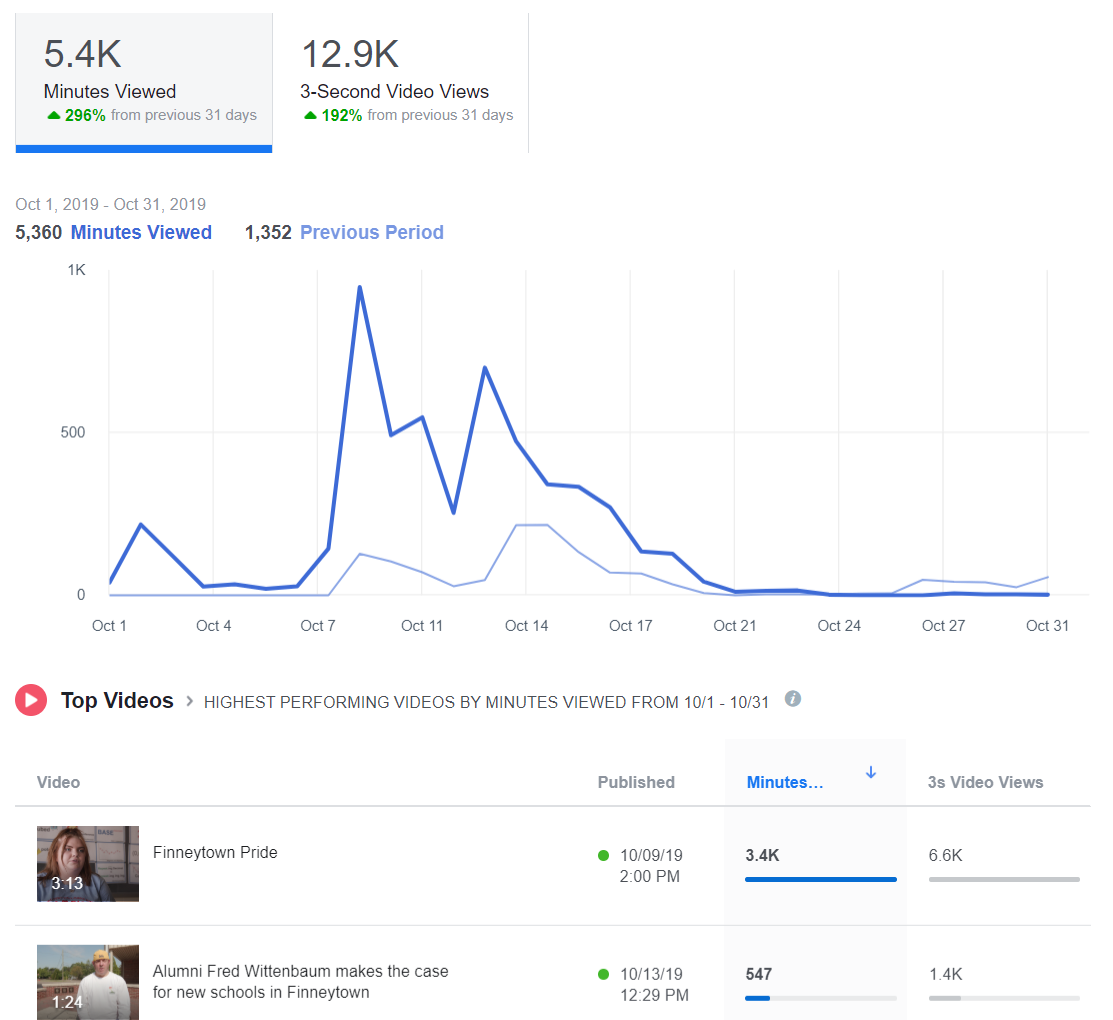
Facebook: Go to your library’s page. At the top, under the general Facebook search bar, you’ll see “Insights.” Click on that. Then scroll down the menu on the left side of the page until you see “Videos.” Click on that.

Instagram: You can see how many people viewed your live stream after it’s finished. If you post your live stream to your stories, you can see how many people viewed it. Be sure to check it before the end of your 24 hour period, because it will disappear! If you upload a video to IGTV, you can see how many people viewed the video, but there are no further analytics. You cannot track video views for videos posted to your normal Instagram feed.

Twitter: Go to Google and type “Twitter Analytics.” If you are logged into your library’s Twitter account, the URL will automatically populate with your library’s analytics. At the top of the page, to the right of the Twitter logo, you’ll see the word “More” and a drop-down menu. Click on the arrow to find “Videos.”

YouTube: Go to your channel. Click on YouTube Studio, then Video Analytics.

Side note: You can see my latest book review did not do very well on YouTube. I am comforted by the fact that it was gangbusters on Facebook. And that’s a lesson too. Different videos will work better on different platforms. You’ll learn how to pair a video to a platform by tracking video analytics.

The top three video metrics to track

#1-Video Views

Facebook and Instagram: a view is counted anytime someone watches your video for at least three seconds.

Twitter: a view counts if someone watches at least two seconds. Additionally, at least 50 percent of the tweeted video must be visible on screen to be registered as viewed. This rule is to account for the auto-play function.

YouTube: a view is counted anytime someone watches your video for at least 30 seconds.

#2-Watch Time

Facebook reports this metric in insights and calls it “minutes viewed.”

Instagram, as far as I can tell at this writing, does not report watch time. (BOO!)

Twitter reports minutes watched under the “video details” of every video you publish on the site. In addition, they have a cool graph that tells you how long the average viewer watches your video. This is reported in quarter percentages. You’ll also get the completion rate, or the percentage of viewers who watched your video from start to finish.

YouTube will tell you the average total watch time for every video you create.

Let’s say you post a 10-minute video on YouTube. You might have 500 views, which means 500 people watched at least the first 30 seconds. Then you’ll have an average watch time of say, 5:33, which means most people watched at least five minutes and 33 seconds of your video.

YouTube prioritizes videos with high watch times in its viewing suggestion algorithm.

I can tell you from my own experience posting The Library Marketing Show to YouTube each week that it’s rare for someone to watch an entire video from start to finish. I challenge myself every week to improve my watch time.

#3-Engagement

As always, you want to record likes, comments, and shares of your videos, as you would with other social media posts. These metrics can tell you how many people were compelled to act based on your video. You can help boost these numbers by actively asking your viewers to like, comment, and share.

Shares are the most important engagement metric, because that means someone liked your online program so much, they wanted their friends and family to enjoy it too.

You might also want to read these⬇️

Videos Can Reach Library Users at Home Now and in the Future. Here’s Your Starter Kit.

The New Guide to Library Marketing Social Media for 2020! Part Four: Maximizing YouTube for Video Plus What About Tumblr, Snapchat, and TikTok?

Subscribe to this blog and you’ll receive an email every time I post. To do that, click on the “Follow” button in the bottom left-hand corner of the page. Connect with me on YouTube, Twitter, Instagram, and LinkedIn.  
Videos Can Reach Library Users at Home Now and in the Future. Here’s Your Starter Kit.

In a time of social isolation, video is a great way to communicate with patrons. A video can help you provide service to the community without having an open physical building.

If you are nervous about using video for marketing, I’ve got a secret for you. Video, whether live or recorded and edited, is easy and relatively inexpensive. During the COVID-19 crisis, it’s now necessary for you to produce videos. And, when things return to normal (and they will) you will have the skills to extend the reach of your library to home-bound customers through video.

Using video for library outreach

This list will help you brainstorm specific videos to fill your library marketing content editorial calendar.

Demos: You can show library users how to navigate your digital resources. You can show them how to use specific platforms, like Overdrive, LearningExpress Library, or Lynda.com. Demonstrate how to search a database, like NoveList or Consumer Reports. Make a video to show how patrons can talk to a librarian through chat or email while buildings are closed.

Programs: Many libraries are moving their planned program presents online right now. And this is a great video opportunity. You can record a teaser video, then the actual event, and a highlight reel for further promotion of more presenters. You can also move your story times to video format.

If you do these videos live on Facebook, Instagram, or YouTube, your viewers can still ask questions by commenting. In fact, live videos are a great option for library reach.  Viewers spend up to eight times longer with live video than with video-on-demand.

Book reviews: Turn the camera on yourself or a fellow book lover and record a review! I have started doing this on my YouTube channel. It took me about five minutes, once I figured out what I was going to say. Writing a Goodreads review of the book first helped me to organize my thoughts.

What equipment do you need?

In the past, producing video was expensive and difficult. But that is no longer the case. If you have a smartphone, you’re set. You can also record video on most DSLR cameras.

If you have an Adobe Creative Suite license already, you can use that to edit. You can also use iMovie or a host of other online editing software pieces, many of which are free. Here’s a great list. I edit the Library Marketing Show videos on my iPhone or using YouTube studio. And that’s really all you need!

Before you begin

Before you record anything, it’s important to identify who your target audience will be, and what the goal of the video will be. What do you want your audience to do after watching the video? This will help you plan the script, the call to action, the setting, and the goals by which you’ll measure the video’s success.

You should also decide where the video will live… on Facebook, on Instagram’s IGTV, on your library’s webpage, on YouTube, etc. Decide on one target location for your video.

Writing a script or outline

Most library videos will need a script or, at the very least, an outline. If you skip this step, you’ll may spend more time than you want editing. You may even discover you have to re-record certain sections. Your video might end up being longer than necessary. It might not be as engaging as you hope.

When I do the Library Marketing Show, I write a script. Sometimes it’s just an outline with key points. And sometimes it’s a word-for-word account of what I want to say. The script or outline helps me to formulate my thoughts. It also helps me time the video so I’m sure I’m not babbling on for longer than I need to be. But I don’t memorize my script. You know those cards with key points that I hold up during the video? Those are like slides in a conference presentation–they are visual cues to me so I can remember what I need to say.

As with any kind of library marketing, the language of your video should be relaxed, clear, and conversational. Avoid complex sentences and industry jargon or buzzwords. Speak to your video audience as you would to a customer at the front desk.

Also remember that the written word will sound different when you read it out loud. I rediscover this every time I do a webinar or a video! Be sure to read your script out loud before you record.

If your video features an outside presenter, write an introduction, as you would if you were doing the program in person. Be sure to tell your viewers how they can contact you with questions or comments during the video, if it’s live, or later if they are watching on-demand.

Time to record

Before you start recording, be sure your device has enough storage. If you’re using your smartphone, turn on the “Do Not Disturb” feature to avoid distracting notifications. When I shoot my videos, I also do a few test recordings to make sure the lighting, the background, and the sound are the best they can be.

Record horizontally. This gives your video the best viewing experience on most platforms. If you are recording yourself speaking, be sure your camera is on a level surface and won’t fall over! And don’t forget to focus on the object that’s most important, like your face.

If you are shooting a video of yourself, be sure to look at your phone’s camera… not at yourself on the screen. This may feel like the weirdest thing ever. But it looks more normal because it mimics looking someone in the eye.

It may take a couple of takes to get a video right. Don’t despair… and don’t erase any bad takes until you publish your finished video officially. You never know what footage you may need in editing.

If your video needs music

The right music can set the mood and tone for your video. Do you need background music or something that will manipulate the mood of your viewers? Will someone be speaking in the video? What kind of pace should your music have–fast, steady, ethereal, dramatic? These are all factors to consider when choosing your music.

Most music isn’t free. If you use an artist’s music without permission or proper licensing, you risk legal action against your library and your video may be removed from social media channels. Look for royalty free tunes to fill your music needs.

Royalty free songs aren’t free to use; they’re quality songs available for a single flat fee. This means you don’t have to worry about paying additional licensing fees or royalties in the future. YouTube, Shutterstock, and Epidemic Sound are all great sites to find royalty free music.

Posting your video

You’ve got a couple of good options for housing your finished video. YouTube is the largest video hosting platform It’s free to upload your videos to YouTube and optimize them for search. I created this guide for optimizing your videos on YouTube.

Vimeo is another choice. There is a free option, with limited storage space. During the COVID-19 crisis, videos on Vimeo might be higher quality because YouTube has reduced its streaming quality to deal with bandwidth issues.

You can also post videos on Facebook, IGTV (this is Instagram’s version of YouTube), and of course, your library’s own website.

Pick one spot to house the full-length video. Then use your other marketing channels to drive traffic to your video on that one, main location.

It doesn’t have to be perfect

We all have this idea that the video must be narrated by the perfect person with the perfect hair in front of the perfect background. That’s old school TV thinking and it’s no longer necessary. In fact, the best videos are the ones that show your library’s authentic self. Don’t worry about getting every little hair to lie in place, having the right clothes, or always saying the right thing. You’re talking to real people, even if they are on the other end of a video screen. And they’ll forgive you–and love you–if you aren’t robotic. You will find fans will love you just for being you!

More Library Marketing Help During the COVID-19 Crisis

Recording of live session on promoting your online resources through social media.

Self-Care for Library Social Media Staff in the Midst of a Crisis like #COVID-19

Library Marketing During a Pandemic: Tips for Working from Home or the Office and Dealing with the Stress of a Crisis

How #COVID-19 is Impacting Social Media Marketing and What That Means for Libraries

Subscribe to this blog and you’ll receive an email every time I post. To do that, click on the “Follow” button in the bottom left-hand corner of the page. Connect with me on YouTube, Twitter, Instagram, and LinkedIn.  

 

The Best Posts and Videos to Get Started in #LibraryMarketing! The Library Marketing Show: Episode 28

WATCH NOW

The #LibraryMarketing Show, Episode 28: Brenna Jaco at the Lubbock Public Library in Lubbock, Texas submitted this question: “I just discovered your blog and I wish I had the time to go back and read all your posts from the beginning. In your opinion, what are the most important/useful/favorite blog posts and YouTube videos you’ve done over the years?”

Thanks for the question, Brenna! I give the top three blog posts and videos, ranked by views. That means other library marketing pros found them helpful. I hope you will too!

The Top video was Fighting Back Against the Endless Poster-Flyer-Bookmark Cycle! #LibraryMarketing Show: Episode 8.

A close second was Best Free Ways To Reach Non-Cardholders! #LibraryMarketing Show: Episode 13.

And finally, people love Advice for Digital Signage in Libraries! The #LibraryMarketing Show: Episode 21.

Now for the top three blog posts. The top post is The Best Library Customer Service Advice from an Expert! I interviewed Dan Gingiss, author of Winning at Social Customer Care: How Top Brands Create Engaging Experiences on Social Media.

People also love my early list of the best conference for library marketers. There’s no link because it’s outdated now, but a new list for 2020 is coming out on February 3rd!!

Finally, one of the most popular posts is about how my library increased participation in our summer reading program by 97% one year!

And KUDOS go out to the East Baton Rouge Parish Library System because they have a Library Road show! It’s a whole 30-minute show on YouTube.  It’s well-produced and informative. Great job!

Want more Library Marketing Show? Watch previous episodes!

Check the Upcoming Events page to see where I’ll be soon. Let’s connect!

Subscribe to this blog and you’ll receive an email every time I post. To do that, click on “Follow” button in the bottom left-hand corner of the page. Connect with me on Twitter, Instagram, and LinkedIn.  

What a Firecracker and a Watermelon Have to Do with Library Video Marketing

I am so excited that the focus of marketing in the current era is video. I’m positively giddy at the prospect of how this medium will help us transform the popular view of libraries. The power of video is mind-blowing. It’s easier than ever to create a video. The hard part is compelling your viewers to watch it and to keep coming back for more.

I want to encourage you by sharing tips I learned from an extraordinary marketing expert.  Andrew Davis is CEO of Monumental Shift and author of the book Brandscaping. He is a former journalist and producer for The Muppets and Charles Kuralt. He’s a brilliant storyteller and a gifted speaker. He spoke at Content Marketing World this year about the power of video marketing and how to make sure your videos are working at their fullest potential–engaging viewers, building compelling stories, and getting your whole message through to your target audience. His talk was energizing and I want to spread some of his enthusiasm around!

Davis says we need to change the way we think about engagement. Most libraries declare engagement victory when we get a certain amount of views, impressions, shares, or likes. But the social media landscape is so saturated that those numbers really have no meaning anymore. We need to shift our definition of engagement to audience retention.

Audience retention is, simply put, the amount of time our cardholders spend viewing our content. This translates to watch time on YouTube and Facebook and page time on Google Analytics. A compelling video will persuade people returning to those platforms to view your content over and over. Davis says we must stop blaming our viewers for having the attention span of a goldfish. It isn’t that our viewers can’t pay attention to what we are saying. The problem is that what we are saying is boring.

Create videos that your cardholders really want to watch. To do this, you’ll need to get inside the mind of your viewer. Start by creating a series of “how to” videos, which have high audience retention. How-to videos are low-hanging fruit for a library. Your librarians can be your guide–ask them to name the questions they are asked most often by cardholders and then help you create a simple video to explain the answers. To prove the power of the how-to video, Davis played this video, which is one of the most watched how-to videos on YouTube.

Davis says your next video marketing challenge is to create suspense by raising the stakes. The best way to explain this concept is with this video from the Slo-Mo guys.They inserted a firecracker into a watermelon. It takes 18 seconds from start to finish for it to blow up. I admit it’s kind of exciting.  But it’s over in less than half a minute–not the greatest way to create audience retention!

Davis says there is a better way to do that video–and the example comes from Buzzfeed. They did a Facebook live where they burst a watermelon with rubber bands. It took forever to make the watermelon explode but tons of people were watching when it finally blew up. At the 20 minute mark, they had 375,000 viewers. By 40 minutes, they had 800,000 viewers. In all, more than 11 million watched it on demand after the fact. So the lesson is… DON’T INSERT A FIRECRACKER INTO A WATERMELON.

Next, Davis says, teach your audience to chase answers. The pursuit of the answers builds momentum. Your videos need to occupy your audience’s desire to know more over time. Davis says you need to stop worrying about how long a video is. Rather, ask yourself if your entire video worth watching. When someone says your video is too long, what they’re really saying is “I have no more questions.” Make sure there are questions that need answering and keep the audience constantly asking what’s next.

Remember that building suspense isn’t just part of the story line of your video. The title and the thumbnail you choose is part of the equation–don’t give it all away in those two elements. To demonstrate, Davis shared this video from the ancestry research company 23 and Me. Honestly, if you just read the title and look at the thumbnail, you will already know what’s going to happen. There’s no suspense and that translates into no real reason to watch.

A more compelling example of building suspense through the title and use of video is this Dove Choose Beautiful spot.

Finally, Davis says when you are creating drama with your videos, it is important to remember to pay it off. Make sure you deliver a catharsis or an emotional release our audience craves. If you don’t, you risk alienating your viewers. For example, Billy Gene The Wolf of Advertising made the following video. Watch it and see if you can guess why it was widely criticized.

There is no resolution! You must resolve every question you raise by the end of the video. Be sure to provide answers to all the questions in your video, so you avoid frustrating your audience. A frustrated audience will not come back to watch more of your content.

Subscribe to this blog and you’ll receive an email every time I post. To do that, click on “Follow” button on the bottom left-hand corner of the page. Connect with me on Twitter and Snapchat–it’s where I talk about library marketing! I’m @Webmastergirl. I’m also on LinkedInInstagram and Pinterest. Views in this post are my own and do not represent those of my employer.

A WordPress.com Website.

Up ↑