The Library Marketing Show, Episode 166: This episode is all about click-thru rates for digital promotions!
This topic was suggested by a viewer named Lily who says, “We have a super high open rate and super low click-through rate. Could you talk CTRs?” I sure can!
Do you have a suggestion for a topic for a future episode? Want to nominate someone for kudos? Let me know in the comments. And subscribe to this series to get a new weekly video tip for libraries.
Subscribe to this blog and you’ll receive an email whenever I post. To do that, enter your email address and click on the “Follow” button in the lower left-hand corner of the page.
The #LibraryMarketing Show, Episode 162: This episode is my response to a recent comment by a library staffer. They believe that marketing emails aren’t worth their time because people receive too many emails from brands.
That’s a common misconception. I’ll explain why it’s not true and share some tips for making sure your library marketing emails get opened and clicked on!
Kudos in this episode go to Kathy Zappitello. Watch to find out why she’s being recognized.
Do you have a suggestion for a topic for a future episode? Want to nominate someone for kudos? Let me know in the comments.
And subscribe to this series to get a new weekly video tip for libraries.
Thanks for watching!
Subscribe to this blog and you’ll receive an email whenever I post. To do that, enter your email address and click on the “Follow” button in the lower left-hand corner of the page.
The Library Marketing Show, Episode 138: In this episode, I’ll answer a viewer’s question. Michelle from Atlantic Public Library writes, “I am the director of a small library serving about 7,000 people in rural southwest Iowa. You have inspired me (and my board) to make marketing a higher priority and include it in our new strategic plan. I have just over 1,000 folks signed up for my e-mail newsletters. Does it make sense to invest our very limited publicity funds into a product that allows segmented lists for such a (relatively) small community?”
Kudos in this episode go to the Grosse Pointe Public Library. Watch the video to find out why they’re being recognized.
Do you have a suggestion for a topic for a future episode? Want to nominate someone for kudos? Let me know in the comments. And subscribe to this series to get a new video tip for libraries each week.
Thanks for watching!
Subscribe to this blog and you’ll receive an email every time I post. To do that, enter your email address and click on the “Follow” button in the lower left-hand corner of the page.
Last week, I wrote about the new email marketing data that changed the way I think about email and libraries. This week, I wanted to share more new tips to help you improve the chances your email subscribers will act.
Some of these come from Nancy Harhut, Founder and Chief Creative Officer of HMT Marketing. Nancy is an expert on behavioral science and consumer behavior. She studies how and why humans behave the way they do when they interact with marketing.
Nancy spoke at Content Marketing World. Her talk included a list of tricks to improve the effectiveness of your library promotional emails. I’ve combined her advice with new best practices I recently discovered while doing some deep research on email marketing.
And there’s a bonus in this post! Scroll down for a special free tool you can use to check the “spamminess” of your emails and get suggestions for improvement.
Tip #1: Make your community the focus of your email.
There’s a common mistake we make in library marketing. We often tell our community what we want them to hear.
But your email recipients are interested in how the library can help them. They have needs and wants that are specific to them.
@nharhut says your email recipients are not interested in everything you want to tell them. They want to know about the one thing they are looking for that will improve their lives.
Here’s a quick exercise you can do every time you create an email. Instead of making a list of items your library wants to promote, ask yourself these four questions about the person who receives your email.
What are their needs?
What’s driving their decision-making?
What are their goals?
What are they feeling?
This exercise will help you to focus on the way your library can help your community member. Once you’ve done that, you’ll want to include text in your email that makes it clear your library puts your community member first. It’s easiest to explain this using an example.
Library-focused readers’ advisory message: “We can recommend great books for you to read.”
Customer-focused readers’ advisory message: “You love to read. You’re busy. Leave the searching to us and get your reading recommendations fast.”
A few simple tweaks in wording put the patron first.
Finally, the images you choose for your email play a big part in making your community members feel that your library is focused on them. Be sure to choose images that reflect your community.
Here’s a real-life example: A library was creating an email to promote a yoga program. They chose a photo of a young, physically fit white woman in a yoga pose as their accompanying image.
But when they talked a bit about who actually comes to their yoga programs, they realized it’s attended by older, more diverse members of their population. Some of those attendees have physical challenges.
So, they found a new image that more accurately reflected their community. The image change helped drive more attendance to their yoga program!
Tip #2: Use first and second-person pronouns in your call-to- action button.
In all your library marketing text, you must connect with your community and make them feel seen, welcome, and invited. Using first and second-person pronouns like “me” and “my” or “you” and “yours” will help your email recipients to imagine themselves using your library.
In fact, using a first- or second-person pronoun for your CTA can result in as much as a 90 percent increase in clicks, according to market research conducted by two content marketing companies, Unbounce and ContentVerve.
Again, this is a simple tweak in wording that can lead to big results. Some pronoun-centered CTAs are:
Download my book
Claim your seat
Reserve your spot
Get my library card
Make your donation
Tip #3: Pair your calls-to-action.
Library emails tend to include many offers. But, according to Harhut, we should put our calls-to-action together, in pairs!
Why? Giving your email recipients a choice between two options will increase the likelihood that your subscriber will take an action, according to Harhut. In fact, she told us that researchers at Tulane University found pairing calls to action will quadruple the chance that someone will make a choice between the two options at the moment.
Here’s an easy example. Let’s say you are sending an email to promote new books in your collection. Simply pair them together, like this:
Pair book covers together to improve the chances that someone will click on a jacket and place a hold.
If you are promoting databases or events, use the same pairing trick. Put two options side-by-side. Doing this will create a “this or that” decision for your email recipient and increase the chances that they will choose one of the two options.
Tip #4: Try a tiny dose of negativity.
Our library promotional emails almost always emphasize the benefits or advantages of using the library. But Harhut says people are twice as motivated to avoid the pain of loss as they are to reap the benefits of gains.
This happens because of the Loss Aversion Theory. It was formulated by Nobel Prize-winning psychologists Daniel Kahneman and Amos Tversky.
Their research found that people value a loss more than an equivalent gain. Losses are unpleasant and evoke emotions like fear, guilt, regret, and anger. People will do pretty much anything to avoid those negative emotions.
We can take that fear of losing and use it to strengthen our library. How exactly does this work?
Let’s say your library is creating an email to promote your graduate school test preparation resources. You might try some text that says, “More than 50 percent of the students who don’t study for the LSAT can’t get into law school.” (A fact I looked up for this example… feel free to steal!)
Or, for your next ticketed event, emphasize the need to register before all the seats are taken.
These are just two examples of the way you can work a subtle hint of negative emotion into your marketing. For more ideas, I recommend this well-written research article from the Open Journal of Social Science: When and Why Negative Emotional Appeals Work in Advertising.
Tip #5: Include a good testimonial.
Your library emails shouldn’t just include promotions for products and services. Testimonials can help people to make decisions about whether to use your library. They help people to imagine themselves using your services.
Harhut says we should always be collecting and sorting testimonials so that we can use the best of them in our emails. It’s another great way to show that your library is focused on your community.
Use this list to help you pick your best testimonials.
Include a few lines from the testimonial in your email. Try putting it at the top of the email, before your promotions. This is especially effective if the testimonial is from someone who benefited from the program, service, or collection item you are promoting in your email.
Tip #6: Proofread. Then do it again. And again.
Spelling, punctuation, and grammar errors will damage the trust your community puts into your library.
Copy and paste your email text into Word, then run the editorial review.
Ask your co-workers to read through your email.
Read your email out loud. You’ll be surprised how many mistakes your brain will gloss over when you read silently.
Bonus: Free email testing tool.
There’s a new free tool I just learned about that can help your email. It’s called Mail Tester.
It was designed by software engineers who wanted a way to test the quality of their own email newsletters. So, they built their own tool and made it free to anyone who wanted to use it.
Here’s how it works.
Take an email that you plan on sending to your community and send it to Mail Tester first. They generate a random email address every time you go to their website.
Next, you click on the “check your score” button and wait for your results. You can see your results for up to 7 days.
I tried it using an example email I created for a presentation. Here are my results:
Subscribe to this blog and you’ll receive an email every time I post. To do that, enter your email address and click on the “Follow” button in the lower left-hand corner of the page.
The most powerful tool you have to reach your community is email.
I know there are some readers who don’t believe me. But here’s a fact that cannot be denied: 90 percent of Americans over the age of 15 use email. In the United Kingdom and Canada, 85 percentof people use email.
That’s a big portion of your community.
The digital divide is real but not as wide as most of us thought. The latest Pew Research Center study released in August 2021 shows:
Rural residents have seen a nine percentage point rise in home broadband adoption in the last five years.
72 percent of rural Americans have high-speed internet access.
Smartphone ownership also rose nine percentage points among rural residents in the past three years.
For most of my library friends, the percentage of people in your community who can (and should) be receiving email marketing from your library far outpaces the percentage of people who don’t have an email address.
Social media platforms do not care about your library. The press does not care about your library. Google does not care about your library.
It doesn’t matter how big or small your library is. You have the power in email marketing.
Now, I’ve learned some brand-new information about email marketing. I am not exaggerating when I say this new data has made me re-think the advice I give to my library marketing friends.
This information comes from Michael Barber, who is a brand consultant and marketing strategist. He was the featured speaker of a recent Marketing Profs webinar that frankly blew my mind.
Here are the four big things I learned from his presentation.
Your open rate does not mean what you think it means.
Remember when I said that open rates are a sign of customer loyalty?
My view has changed.
With most email services, the open rate is tracked with the help of a hidden one-pixel image placed in the body of the email message. It used to be that the email counted as being “opened” when the recipient opened the email up.
But now, the email counts as opened when it loads in a recipient’s inbox because that’s when the pixel is now being triggered. Apps like Gmail, Hotmail, Yahoo, and any Apple device with iOS 15 will preload images.
That means a human didn’t necessarily open your email.
What does this mean for your library?
Email marketing expert Jay Schwedelson says your email open rate provides direction for your strategy. It can still serve as a benchmark for testing factors like subject lines and send times.
If you work on your library’s email marketing, you’ll need to really focus on the action created by your email.
Use trackable links inside the body to see what people click on. And then measure what they do after they click.
Do they register for a program? Do they put a book on hold? Do they log into a database? Those are human-triggered actions. Those are the true measure of the effectiveness of your email.
The new iOS update isn’t as bad as it seems… for now.
In September 2021, Apple released the iOS 15 update, which includes more user protection from third-party trackers, including mail privacy protection that stops email senders from collecting data on how a person interacts with email.
The new privacy settings keep marketers from seeing who opened their emails, what time they opened them, where they opened them, and what device they used to open the email.
Michael says it’s not as bad as it seems. First, the privacy protections only apply to people who have actually downloaded the update, and who use Apple Mail.
About 72 percent of Apple users have upgraded to iOS 15. Statistics on the number of people who use Apple Mail vary according to industry and location. But most email providers say they see around 35% of their recipients use Apple Mail.
And so far, according to Michael, not everyone is opting into the privacy protections offered by iOS 15. Only about 48 percent of Apple Mail users are turning on the new privacy settings.
What does this mean for your library?
As always, be watchful of your metrics so you can spot any downward trends in engagement. But don’t panic. Focus on sending great content to your email list.
Your sender reputation is incredibly important
Email sender reputation is a score that an Internet Service Provider (ISP) assigns to an organization that sends email. The higher the score, the more likely an ISP will deliver emails to the inboxes of recipients on their network.
There are three positive signals of engagement that can raise your library’s sender reputation, according to Michael. They are:
Replying to your message.
Clicking on links inside the email.
Adding you to their contacts.
Conversely, there are three negative signals of engagement that can hurt your library’s sender reputation, according to Michael. You want to prevent your library email recipients from:
Moving your library’s email to their junk or spam folders.
Deleting your email without opening it.
Leaving your email unopened and sitting in their inbox. Michael says this is a stronger negative signal than unsubscribing! (WOW, right?)
What does this mean for your library?
Michael says replies are a “super strong signal of engagement.” He encourages email marketers to stop using the “no-reply” return email address in their emails. Use a real email address for replies.
And you’ll want to go a step further by directly asking recipients to reply to your emails. You could ask for their feedback on a service. Or ask recipients to reply with the name of a book they think should be included in your next booklist or book display. This is a chance for you to be creative! You don’t have to respond to every email reply. But this is an opportunity to improve your sender reputation while gathering information that will help you to better serve your community.
You’ll also want to focus on raising your email click rate. Here are five ideas.
Finally, include great content in your email so your recipients will never let it sit in their inbox unopened.
We need to start thinking about how “dark mode” affects design.
Dark Mode inverts the colors on your device to decrease the amount of light on your screen. Dark mode turns the default white background with black text to a black background with white text.
Dark Mode eases the strain on your eyes, especially at night or in dark conditions. It also helps preserve battery power.
What does this mean for your library?
The way our emails are designed will need to change. Michael recommends that, if your email provider has this data, you may want to start tracking how many of your email recipients look at your emails in dark mode.
You’ll also want to test your emails using dark mode to determine if your library’s brand colors work with the darker background.
Finally, make sure your email provider is mobile responsive. This will ensure your emails will be converted properly.
Next week: 6 super-easy tricks to make your library emails stand out in the inbox and get results!
Subscribe to this blog and you’ll receive an email every time I post. To do that, enter your email address and click on the “Follow” button in the lower left-hand corner of the page.
For libraries large and small, public, private, and academic, there is but one powerful promotional tool that you can use to reach as many people as possible.
It’s an email.
When you have limited staff, limited time, and an audience that is scattered across a large geographic area or is not comfortable coming into the building, email is the most effective method of communication.
And while the digital divide is still a very real and present problem for many communities, access to the internet is improving.
The latest Pew Research Center study released in August of this year shows that rural residents have seen a nine-percentage point rise in home broadband adoption in the last five years. 72 percent of rural Americans have high-speed internet access. Smartphone ownership also rose nine percentage points among rural residents in the past three years.
That’s a significant portion of your audience that’s reachable by email.
And the beautiful part is when you build a subscriber list, it’s all yours. No algorithm can touch it!
Segmenting your audience by their self-identified interests is the most effective way to market your library by email. Once you’ve created your segments, the next step is to build your subscriber lists. That’s your golden ticket to promotional success.
Here are 12 super easy ways to do that.
Sign up people whenever you interact with them.
I’ve got a thing for candles that smell like baked goods.
Every single time I stock up at Bath and Body Works or Yankee Candle, I am asked for my email at checkout. And I always give it to the cashier.
Why? Because I know I’ll be sent coupons. This means I’ll be able to enjoy the scent of sugar cookies or freshly baked apples wafting through my house without having to turn on my oven.
Every time your library staff talks with a patron, whether it’s by phone, chat, at the desk, or at outreach events, they should be asking for their email. Train staff to ask for email at every opportunity.
Create a form sign up for holds and self-service checkouts.
Some of our patrons prefer not to interact with staff. They love self-service. They may dart in and out of your building to get their holds. (That’s me!)
For these low-interaction patrons, create a form as a bookmark. Ask for the person’s name and email. If you have segmented email lists, you can ask them to check off the ones they’d like to subscribe to. They can return the form when they return their items. Or, even easier…
Add an opt-in page to your website.
Your bookmark can simply include the URL to a landing page on your library website where people can opt-in to your segmented lists. You might also include a QR code that takes people directly to your opt-in page.
An opt-in page is also handy for the next four suggestions.
Ask staff to include a link to your opt-in page in their email signatures.
Library staff send a lot of emails to patrons, community members, presenters, and stakeholders. They can help build your subscriber lists by including a line with an embedded link to your opt-in page in their email signature.
Start an opt-in campaign.
Send an email to your current subscribers and ask them to opt-in to other segmented lists. You can also give them the option to opt-out of any lists they may not be interested in any longer.
It may seem counterintuitive to remove people from your email list to grow your email list. But your current email subscribers are more likely to engage with other lists.
Also, their interests may have changed since they signed up. Give them the chance to update their subscriptions. They’ll be more likely to engage with the emails you send to them.
Cross-promote your least popular list to subscribers of your most popular lists.
Experiment with cross-promotion to give your least popular lists improved visibility. Include a few teaser lines in your email or e-newsletter and a link to sign up.
Promote your lists on your social media cover photos or headers.
Pick a list to promote by looking at the demographics for each of the social media platforms your library uses. You’ll be able to pinpoint which of your segmented lists will resonate the most with the followers of that platform.
Or you can highlight your opt-in page, where people can choose from all your lists. Then create a high-quality graphic and include instructions for signing up in the caption, and watch your list grow.
Share email previews on your library’s social media accounts.
Sharing a portion of your emails or e-newsletters is a great way to attract your audiences and entice them to join your email list.
Doing this demonstrates the value of your library and your email messages. Community members will be more likely to sign up if you give them a preview of what you’ll be sending them.
Promote your emails in your YouTube video descriptions.
Include a plug for your email lists every time you upload a video. One line at the beginning or end of your video description is all you need.
This is especially effective if you create a how-to video. Tell your viewers that they can sign up for more informative content and instruction by clicking the link in your description.
Promote your emails on your blog
For every blog post you publish, include a line that asks readers to sign up for one of your subscriber lists.
This works well when you match the content of the list with the content of your blog post.
Put the “ask line” somewhere in the first two-thirds of the blog post to catch readers who might not read your post all the way to the end.
Encourage subscribers to forward your emails.
Include social sharing buttons and an “Email to a Friend” button in your emails. Also, at the bottom of your emails, include a “Subscribe” call to action with a link so that the people receiving the forwarded emails can easily opt-in too!
Send great content.
If your emails are informative and interesting, your library will get a reputation… a good one.
Your communications will be viewed as valuable. People will always look forward to receiving your emails. They’ll be more likely to forward them to their friends, family, and co-workers. And this will help you to gather additional subscribers.
Subscribe to this blog and you’ll receive an email every time I post. To do that, enter your email address and click on the “Follow” button in the lower left-hand corner of the page.
This week, I heard a truism about email marketing.
Marketing expert Ann Handley said, “Email is the only place where people, not algorithms, are in control.”
When the pandemic struck, email became the only reliable way libraries had to communicate with their patrons. More libraries are sending email newsletters. And they’ve gotten good at the basics.
So, it’s time to take the power of email newsletters to the next level.
Focus less on the news, more on the letter
Handley has one of the best newsletters I’ve ever seen. It stands out because she focuses less on the news part… and more on the letter. Sign up, and you’ll see what I mean.
What I’ve learned from Handley is that your newsletter is your opportunity to directly connect with cardholders in their inbox. What does your community need? What can you provide for them? And most importantly, how can your library demonstrate the way it is different than any other organization?
Ann recommends you lose the marketing voice for your newsletter. Instead, write as you would if you were trying to convince a friend or family member to use the library. Be personable and relatable. Your authentic voice will connect to your readers.
New topic ideas for your library email newsletter
Your library newsletter can and should contain more than book recommendations and announcements about programs and services. Here is a list of ideas that go beyond the typical library information.
Send simple how-to instructions for using your library.
There are all kinds of opportunities to share instructions. Write simple steps for using one of your services. Or share instructions on how to complete a task outside of your library, like fill out an absentee ballot form or make a COVID-19 vaccination appointment.
Step-by-by-step instructions shared in your newsletter will help you build a relationship and form trust with your community. It demonstrates your library’s ability to find solutions to your community’s most pressing problems.
Answer frequently asked questions.
Ask your front line staff, your chat service operator, or the person who handles your library’s main email inbox to share the questions they get most frequently from the public. Then, answer them in your newsletter!
Your email audience will learn new things about your library. You’ll make your library more accessible. And you’ll build trust with your community by proving your library is a place where answers are found.
Promote blog posts.
Use your newsletter to promote your blog and get more views.
Take the first few lines of your post and use them to tease your newsletter audience. Include a photo or graphic from the post to tie your newsletter into your blog. If you send one newsletter a month but post several blogs, tease each post and include a link.
Your newsletter audience will be introduced to a new way to interact with and get news from your library. It will also give you valuable information about which blog posts your newsletter audience is interested in.
For instance, if you see that your newsletter audience always click on links for blog posts about genealogy and history, then you’ll know to write more posts on that topic and include them your next newsletter.
Promote your videos.
If your library is creating and posting videos on YouTube, Facebook, Vimeo, or another platform, your newsletter is the perfect place to give those videos an extra boost. As with the blog posts, share a sentence or two to entice your audience to click on a link to the video.
One note: Include a link to the video on the original platform to which you published. Don’t embed the video in your newsletter. Many email services view embedded video code as suspicious, and will mark your email as spam.
Create lists.
There’s a reason Buzzfeed articles are so popular… they contain listicles, which are articles that feature a numbered list (Hey, this post is a listicle of sorts!) A list is easy for your audience to digest and remember.
Create a top ten list of anything: your staff’s book picks, the ten things a patron can create in your Makerspace, the best albums to download from the library… the possibilities are endless. Your email readers will love it. You can even ask your readers to suggest a topic for a list in your next email newsletter!
Share social media content in your newsletter.
If you library had a popular social media post, you can replicate it by adding it to your newsletter.
For instance, if your library posted a book review that got a lot of comments, likes, and shares, put that post into your newsletter, along with a link so your patrons can visit the social media platform, see the original post, and interact with it.
Likewise, when your library gets a great piece of user-generated content, share it in your newsletter as well as on your social media audience.
Share testimonials and reviews.
We know that trust is built between your community and your library through social proof: namely, other community members talking about how they’ve used and loved your library. So, when you get those reviews and testimonials, insert them into your newsletter.
You should also ask your email readers to share reviews and testimonials of your library. Include an easy way for them to send you feedback on what they love about your library. Then share those in your next newsletter and on social media.
Advocate your library.
As a library staffer, you likely know about all the good work your library is doing. But your community has a very limited understanding of the value of your work.
Your newsletter is a great way to begin to share examples and stories of how your library works to make your community a better place. Share short tidbits or an infographic to explain your library’s value.
Subscribe to this blog and you’ll receive an email every time I post. To do that, click on the “Follow” button in the bottom left-hand corner of the page. Connect with me on YouTube, Twitter, Instagram, Goodreads, andLinkedIn.
This is the second in a two-part series on email marketing for libraries. Read part one here.
At the Library Advocacy and Funding Conference in September, a new buzzword seemed to be on the lips of many of the presenters. They were all talking about psychographic segmentation of library audiences for email marketing.
I thought I knew most of the marketing buzzwords, but I confess this was the first time I’d ever heard the term. So, it was time to do some research.
What is psychographics?
Psychographics is the study and classification of people according to their attitudes, aspirations, and other psychological criteria, especially in market research (Oxford Dictionary).
Psychographics go beyond basic demographics: location, age, gender identity, and library card usage. To segment by psychographics is to divide your library audience into groups according to their beliefs, values, and reasons for being. It delves deeper into your cardholder’s values, dreams, desires, and outlook on life.
Psychographics identify motivation. Why does your library community take certain actions? Why do they feel the way they do about the library? How do they see the role of the library in their life? And what activities do they participate in, both inside and outside of the library?
Psychographics lead to compelling email marketing messages because they focus on your community’s unarticulated needs and motivations.
Understanding psychographics
The term is new to me but it’s not new to marketing. In 1964, Harvard graduate and social scientist Daniel Yankelovich wrote that traditional demographic traits—sex, age, and education level—lacked the insights marketers needed to target their audiences.
Around the same time, market researcher Emanuel Demby began using the term ‘psychographics’ to reference variations in attitudes, values, and behaviors within a specific demographic segment.
In the 1980s, the Stanford Research Institute developed the Values Attitudes and Lifestyles (VALS) psychographic methodology. It was hailed as a breakthrough in marketing.
One way to understand this concept is to find your own VALS type by taking this survey. My results show that I like to have historical context, that I buy proven products, and that I’m not influenced by what’s “hot.” I also like to experiment. Share your results in the comments.
The travel industry uses psychographics. Email marketing by hotels, cruise lines, and cities, states, and countries often focuses on why a person wants to travel: adventure, romance, curiosity, and relaxation.
Libraries can do the same thing.
Imagine if we started focusing our library email marketing messages not on what are cardholders want to do… but WHY they want to do it.
Uncover the psychographics of your library audience
How do you figure out what makes your library audience do the things they do? You must ask them! A survey is the best way to drill down on the psychographics of your library audience.
Most library surveys focus solely on demographics like age, location, and income. They generally ask people how they use the library now. They may ask people to predict how they’ll use the library in the future.
By adding psychographic questions, you’ll get a look at your audience’s true motivations. That may include questions like, “The last time you checked out a book, what was the reason?” “How do you feel about the library’s work with people experiencing homelessness?”
You can also use matrix-rated questions to gauge psychographics. For instance, you could include a statement like “The library helps people find a new job” and ask respondents to select an answer from a range of “not important” to “extremely important.”
You can also use outside data sources to get at the psychographics of your library audience. Take a closer look at the comments on your social media posts. Can you uncover any reasons why your followers are interacting with your library on social media? Do they share or comment on a particular type of post?
Check Google analytics on your library’s website. Are visitors taking the same steps to move from one landing page to another on your site? Do they spend a longer amount of time on one type of page?
Your circulation stats are a source of psychographics. Are you seeing a surge in the checkouts or interest of one genre of book, or one format? What language do your cardholders use when they ask for recommendations using your form-based readers’ advisory service?
If your library answers reference questions, what type of problems and language are your cardholders using when they ask for help?
Try to look at any interaction your library has with your cardholders, in any arena, as an opportunity to unlock their motivations and psychology. Then use those new insights to craft compelling email marketing messages.
Using psychographics in library email segmentation
Libraries can segment their email audience without violating CAN-SPAM laws. If your cardholders gave you permission to send them email, you can segment them into psychographic segments. As long as your email includes opt-out language (i.e. “If you no longer wish to receive emails about job services at the library, click here”), you are complying with the law.
Combine your demographic knowledge of your cardholders with the research you’ve done on the psychographics of your cardholders. Then divide your email recipients into new segments and try sending them psychographic messages.
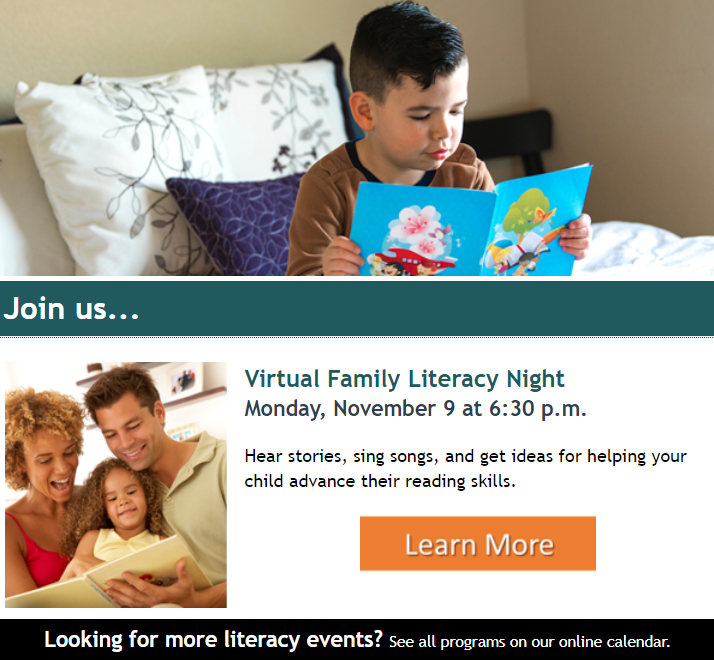
For example, let’s say you are already sending a monthly email to parents about storytime at the library. Now let’s say your library decides to offer a new program, like a virtual family literacy night, to help families whose children are not attending in-person classes during the pandemic.
Without psychographics, your email message may have looked like this:
But, thanks to your survey results, you know that many parents are worried about the effect that virtual learning is having on their child’s education. They believe their child will need extra tutoring and classroom attention to succeed in life because of the impact of virtual learning.
Now you can combine your audience’s motivations for attending with your message about the new program.
This marketing message pivoted from a simple invitation to a message that strikes at the heart of the caregiver’s concern for their child.
Psychographics activate the motivations and aspirations of your cardholders. When you get to know your community better, you’ll do a better job of getting your community to know your library!
Subscribe to this blog and you’ll receive an email every time I post. To do that, click on the “Follow” button in the bottom left-hand corner of the page. Connect with me on YouTube, Twitter, Instagram, and LinkedIn.
I notice it, groggy from sleep. I check my email, as one does, first thing in the morning before getting out of bed. 😉
The sight of it causes my heart to skip a beat. “It’s going to be a glorious day,” I think to myself as I jump out of bed. 🤩
What is the magical thing that makes getting up in the morning easier? 🌟
An emoji. To be specific, a set of headphones, situated in the subject line of an email. An email that comes from my library.⬇️⬇️
The headphones signal to my brain, before I can read the words that come after them, that my audiobook from Overdrive is ready for download.
After dozens of such emails, my body has an almost Pavlovian response to the tiny drawing of headphones.
I get giddy. I get excited. I am filled with anticipation to download and start the audiobook.
According to Salesforce, only two percent of emails sent by businesses to consumers in 2019 had an emoji in the subject line. That’s not a lot, really. And that means there is room for libraries to experiment.
I don’t think there is any doubt that emojis are here to stay. As of October 2019, there were 3,178 widely-recognized emojis, according to Emojipedia. And the major cell phone and digital marketing companies keep adding emojis to their libraries.
I want my cardholders to have the same reaction I have to the headphone emoji when I send them library marketing emails. The idea that an email from my library could energize someone or fill them with anticipation or cause them to do a mini-celebratory dance is one I can’t ignore.
Why might emojis work?
Emojis work because the brain processes visual information 60,000 times faster than text. More than 90 percent of the information that we process is visual.
The emoji drawing stands out in a line of letters. And if your recipient is using a device that adds color to the emoji, that also makes your subject line pop.
Your subject lines can also be shorter when you use an emoji because an emoji can do the work of some of the wording. And the shorter the subject line, the more effective the email. In 2018, 61 percent of emails were opened on mobile. Subject lines exceeding certain character counts can get cut off by mobile devices. And that impacts your open and conversion rates.
The experiment
I kept reading articles on the increased use of emojis in emails for brand marketing. There isn’t much data to suggest whether they are effective in converting customers to take any action on the email. And I thought, as I am apt to do, that someone should experiment with emojis in the library marketing space. Would my cardholders find them amusing? Would emojis help increase the effectiveness of my emails? Or would people think we had lost our mind and gone too far?
There was only one way to find out.
Over the course of six months, I sent 17 test emails to my cardholders with an emoji in the subject line. I used them in instances where I thought they added value to the subject line or helped me to make the subject line shorter. I also made sure I sent emojis to cardholders who tend to use digital services.
The results
After the six-month trial period, I crunched the numbers. And I discovered…
60 percent of the emails with an emoji in the subject line were effective. Ten of the 17 emails caused an increase in circulation, program attendance, or database usage for the item we promoted via email. That’s close to the average effective rate of my regular emails which do not include an emoji.
Emojis DID increase my open rate. The 17 messages I sent had an average open rate of 40 percent. Most of my regular emails have an open rate between 20 and 35 percent. So that was an improvement.
Emojis DID increase my click-through rate. The average click-through rate for the messages with emojis was eight percent. That is also slightly higher than normal. Most of my emails have a click-through rate of five percent.
Here are the subject lines from the four emails in the emoji test that had the highest open and click-through rates.
Ebook Publisher Policies
🚨New publisher policies will limit your access to eBooks.
This email had an 81 percent open rate and a 22 percent click-through rate.
Penguin Programs
🐧Make a date to visit the Library to see real live penguins this month!
This email had a 37 percent open rate and a 23 percent click-through rate.
Beach Reads 2019 Booklist
🏖️ Dreaming of sand, sun, surf, and great books? Here’s our 2019 vacation reading list!
This email had a 39 percent open rate and a 19 percent click-through rate.
Green Township Library Anniversary
🎈You’re invited to the Green Township 30th Anniversary celebration!
This email had a 54 percent open rate and a five percent click-through rate.
Now, there is something to consider and that is that the emoji may have had absolutely no effect on the overall effectiveness of these emails! Because my email marketing provider does not give me the ability to do true A/B testing, it may be that these emails had higher open, click-through, and conversion rates because of the wording of the subject line or the content of the email itself. The fact that there was an emoji in the subject line might be pure coincidence.🤷
Are there downsides to emojis?
There are some negative things to consider when you’re using emojis for email subject lines in library marketing.
Your emoji may not display correctly for your cardholder, depending on what kind of email platform they use.
Emojis can give the impression that your emails are not authentic. In some instances, users see an emoji and wonder if your library wrote it… or a robot.
Emojis can be overused. Finding the perfect emoji is fun. It makes you feel cool. But if you start putting an emoji in every subject line of every marketing email you send, you will likely find that they’ll soon have no impact or, worse, a negative impact.
That said, I think it’s worth it to experiment with emojis in your library’s email marketing. Your audience may love or hate them. There’s only one way to find out.
Remember to use them in the right context. Use emojis sparingly and make sure they add something to the message of your subject. And get your emojis from reliable sources like Emojipedia, GetEmoji, or your email platform.
Check the Upcoming Events page for a list of webinars and conferences where I’ll be next. Let’s connect! Plus, subscribe to this blog and you’ll receive an email every time I post. To do that, click on the “Follow” button in the bottom left-hand corner of the page. Connect with me on YouTube, Twitter,Instagram, and LinkedIn.




 Super Library Marketing: Practical Tips and Ideas for Library Promotion