Search

Super Library Marketing: Practical Tips and Ideas for Library Promotion

Tag

library marketing video

How Storytelling Is Revolutionizing One Libraryโ€™s Video Strategy

Photo courtesy of Cincinnati and Hamilton County Public Library

Itโ€™s not surprising that Tina Walker Davis and her communications team at Deschutes Public Library in Bend, Oregon, have a robust and interesting video strategy for YouTube. Tina, who grew up in the San Francisco Bay area and graduated from Washington State University, has a previous career as a television anchor and reporter.

โ€œI left journalism to go into marketing and communications and owned my own marketing business for 10 years until I made the financially disastrous decision to open an independent bookstore,โ€ explains Tina. โ€œWhile the bookstore didnโ€™t pan out, it did enmesh me in the literary community here, including the library system.โ€

Tina took a job at the library in 2012 in event planning and coordination. Now sheโ€™s Communications Manager for the library. She manages four people, including a Graphic Design Coordinator and Dana Oโ€™Connell, Keifer McCool, and Michael Rivera, who are all Digital Communications Coordinators.

โ€œMichael almost exclusively does video work, and Dana and Kiefer both manage social media,โ€ says Tina. โ€œDana also does all of our Spanish-language communications. Iโ€™ve told the team many times that Iโ€™ve never worked with such a collaborative group.โ€

โ€œWe have bi-weekly brainstorming sessions that are so fun. Thereโ€™s no agenda. Itโ€™s just a time for us to come together and talk about what weโ€™re seeing, what weโ€™re excited about, and generally throw some spaghetti at the wall. A lot of our best content was conceptualized in those brainstorming meetings.โ€

Deschutes Public Libraryโ€™s YouTube channel was already up and running when Tina began her job. At first, Tinaโ€™s team used it to share story time videos and videos of their marquee events, as well as a Why We Love the Library series in 2016 and 2017. At the end of 2019, they had 265 subscribers.

Then COVID hit. Like most libraries, Deschutes Public Library pivoted to online programs and saw its subscriber count grow to 14,500 at the time of this writing.

When Tina hired Michael in 2022, he โ€œbrought a wealth of professional video production experienceโ€”just phenomenal skills in shooting and editing, but also a fantastic eye and ear for storytelling,โ€ exclaims Tina.

โ€œThe first video he did for us was promoting our Summer with the Library program, and I knew immediately that we were going places with our videos. He started another Why We Love the Library series, with this video being one of my absolute favorites.โ€

โ€œI donโ€™t know if itโ€™s my background in journalism, but Iโ€™ve always believed in the power of stories to do the work that we can sometimes struggle to do in marketing.โ€

โ€œWe can run ads telling people how great the library is, but itโ€™s so much more impactful when it comes from real people who truly believe in the power of libraries to change lives.โ€

-Tina Walker Davis

Dana says the libraryโ€™s strategy, when it comes to producing videos for YouTube, is to strike a balance between the information the community needs to know about the library and fun or trending content.

โ€œEveryone who comes into the library has a story,โ€ explains Dana. โ€œSome of our human-interest pieces come from referrals by our public services staff, in the form of kudos from our online web form, or a chance meeting while in one of our branches.โ€

โ€œStaff, volunteers, and customers offer the chance to talk about the library in a unique voice where we arenโ€™t necessarily promoting a product or service. For me, itโ€™s about having a touch point with a customer and listening to what excites them about the library; no two answers are the same.โ€

โ€œOne thing we do every time someone is interviewed for a video, regardless of the topic, is to ask, โ€˜Why are libraries important?โ€™โ€ adds Tina. โ€œThe answer to that question is evergreen. We can pull the answer and use it along for a series of shorts, turn it into a graphic quote for social, or string together several answers for a stand-alone piece.โ€

Dana and Kiefer shoot and edit the short-form, vertical format for Instagram, Facebook, TikTok, and YouTube shorts. Michael uses videography equipment to do the longer-form and documentary-style videos.

โ€œBut rarely do they work alone,โ€ explains Tina. โ€œTheyโ€™re writing together, and often Dana or Kiefer will act as Michaelโ€™s grip during shoots and take care of the interview portions. Michael is definitely a dedicated videographer, but itโ€™s truly a team effort between the three of themโ€”and itโ€™s magical.โ€

All videos from Deschutes Public Library have captions for accessibility and clarity. They also have video thumbnails featuring a branded, consistent look. That helps to capture the attention of scrollers while making sure viewers know this content comes from the library.

โ€œWhen I choose the image(s), Iโ€™m looking for a visually pleasing frame that tells the viewer just enough to pique their interest without giving away too much of the story,โ€ reveals Michael. โ€œThe best images will also have some clean space in the frame that the title will naturally fall into.โ€

โ€œThe title in the thumbnail usually doesnโ€™t match the video title, and thatโ€™s on purpose.ย The main title is always clear and matter-of-fact, while the thumbnail title often uses one of the most impactful quotes in the story.ย The key here is to be concise to maximize the size of the text in the frame, so the titles are usually no more than six words.โ€

Deschutes Public Library doesnโ€™t rely on pure chance to get views on its videos. They promote them!

โ€œOur flagship eNewsletter has 55,000 subscribers, and weโ€™ll sometimes link to videos from the newsletter,โ€ says Tina. “We embed some videos on our website. In particular, weโ€™ve used our videos on our website to help inform the public about our bond projects.โ€

โ€œI also do some paid promotion of videos on YouTube, Facebook, and Instagram if I can see that a monetary ad boost is needed and will help us really target our Deschutes County residents.โ€

โ€œSo, with all that said, our investment in YouTube as a platform was very organic. It started slowly, but we saw real growth. But nothing happens on YouTube alone in terms of storytelling. Anything that is shared there is also pushed out on Instagram and Facebook, and some also make their way to TikTok if theyโ€™re humorous or have that viral potential.โ€

Tina and her team say the videos help boost awareness of the library and its services, and theyโ€™ve received a wealth of positive community feedback.

โ€œOur recent viral video โ€” where our director, Todd Dunkelberg, is giving a Gen Z-inspired tour of the new Redmond Library โ€” was a great community experience. Between Facebook, Instagram, TikTok, and YouTube, we are now close to 5 million views on that video. But what I loved seeing was locals commenting amongst folks from across the country and the world โ€” the locals took so much pride in claiming the library as their own (โ€˜Thatโ€™s MY library!โ€™).โ€

โ€œAnd Todd became a little local celebrity after it, with folks coming up to him in the community and telling him how much they loved the video. We immediately jumped on the โ€˜Slayโ€™ and โ€˜So Juliaโ€™ lines and created stickers with the characters Todd points to in the video, and those were really popular with our customers.โ€

For inspiration, Tina and her team often look inside and outside the library world.

โ€œIโ€™m guilty of being an Instagram reels scroller,โ€ confesses Tina. โ€œMy brain often goes to, โ€˜Could we put a spin on that?’ Often in our brainstorming sessions, weโ€™ll bring forward videos that weโ€™ve seen over the past two weeks, share them with the team, and see if thereโ€™s something we can do along those lines.โ€

โ€œLibrary systems are really growing into their own niche on social. Theyโ€™re funny, sometimes irreverent. People really enjoy watching library folks, who are perhaps historically thought of as buttoned up, be funny.โ€

– Tina Walker Davis

Tina says the key factors in the success of the libraryโ€™s video marketing strategy are her talented team and library leadership that believes in the power of communication.

โ€œI know that for a lot of libraries across the county, being able to spend this kind of time on video work is an absolute luxury,โ€ says. Tina. โ€œI feel very fortunate to not only have the trust from our leadership to do that work, but also lucky to work with a team of communications professionals who are passionate about the work and the message.โ€

โ€œThe goal is to remind our customers, the taxpayers who make the libraryโ€™s work possible, that the library is here for them, in whatever way they may need, from checking out a book to finding a job. Weโ€™re here to meet people where they are and make their lives better.โ€


Need more inspiration?

From Shelves to Screens: How an Academic Librarian Captures Student Narratives for Libraryย Marketing

Subscribe to this blog, and youโ€™ll receive an email whenever I post. To do that, enter your email address and click on the โ€œFollowโ€ button in the lower left-hand corner of the page. You can also follow me on the following social media platforms:


Push Play and Record: The Libraryโ€™s Guide to Video Production (including a list of equipment to fit your budget!)

Photo courtesy Cincinnati and Hamilton County Public Library

There is nothing like putting a face on a story.

In my television news days, we worked hard to get on-camera interviews for every story. We knew that there was no better way to express emotion and build empathy for the subjects of our stories than to show their faces and hear their voices.

Your library can and should be producing videos for library marketing to build empathy and connection with your organization.

To be clear, I am not talking about TikTok or Instagram Reels videos. TikTok or Reels are fun and give you a chance to engage new audiences. And those videos do build brand awareness for your library.

But that should not be the only video your library is creating. Your library should produce some longer-form videos, lasting a minute or more, that tell a specific story or have a specific library marketing goal. These are videos you will embed on your website, and post natively to Facebook, LinkedIn, YouTube, or Vimeo (or all the above if youโ€™re smart!)

Why?

Videos help you rank higher in searches.

According to Oberlo, more than 82 percent of global internet traffic comes from videos. That means video can be a powerful tool for driving community members to your website to check out your services.

Demand for video is increasing.

According to a survey conducted among consumers worldwide by Statista, people watched an average of 19 hours of online video content per week in 2022. That hourly total has been steadily rising since the survey was first conducted in 2018.

Every major social media platform will reward you for producing longer-form videos.

They boost video posts organically. And the more video your library posts to those platforms, the more organic reach your other posts will get.

Video makes your marketing memorable.

Video is the closest you can get to experiencing something without being physically present. Itโ€™s relatable. As I mentioned earlier, seeing faces and hearing voices builds empathy and allows people to really feel the emotions your videos convey.

And if you use staff in videos, community members will end up recognizing those staff members as they come into the library. They’ll feel more comfortable because they will “know” the person behind the desk.

Your libraryโ€™s long-form video strategy doesnโ€™t have to be complicated. And you donโ€™t have to break the bank to buy equipment. So, letโ€™s lay out a plan in three parts.

Set goals and brainstorm video ideas to meet those goals.

The easiest way to decide which videos to create is to refer to your libraryโ€™s strategic goals. What does your library wish to accomplish? Your videos should serve to make those strategic goals a reality. For this section, let’s pretend your library has a strategic goal to increase visits to the Makerspace by 10 percent in the next year.

Once you decide which of your libraryโ€™s overall goals to focus on, the next step is to set your own marketing goal for your videos. For example:

Your video marketing goals:

  • 1000 views on YouTube
  • 200 views on the library website
  • 50 Makerspace sessions booked by people who watched the videos.

Setting your video marketing goals before you decide what videos you want to create might feel backward. But youโ€™ll have more success if you set your marketing goals first. Thatโ€™s because youโ€™ll be asking yourself: What kind of videos will help me achieve these goals?

If you have trouble coming up with video ideas, try searching your website analytics to see what your cardholders are looking for when they visit your site. Do they have specific questions or use specific keywords or terms to search for information related to the strategic goal youโ€™re focusing on?

You can also check keywords used in Google searches in connection with your libraryโ€™s strategic goal. This keyword research will uncover the questions your community has related to the goal youโ€™re trying to accomplish. You can use video to answer those questions!

For our MakerSpace example, letโ€™s say you look at Google Analytics for your library website and you do Google keyword research. And you discover that people in your community are searching, for โ€œ3D printers near me.โ€  If your Makerspace includes a 3D printer, youโ€™ll want to make sure some of your videos are about that piece of equipment.

Letโ€™s say you also discover many searches of the phrase โ€œcost of 3D printingโ€.  Now you know that cost may be a barrier to use for some community members. You can address that with a video.

Plan and produce.

With your goals and keyword research in hand, itโ€™s time to make more concrete plans. Start brainstorming and make a list of ideas. Depending on your goal, you may want to produce more than one video.

Letโ€™s go back to our previous example of increasing visits to your Makerspace. Your library may decide to make a series of videos to reach your goal of 50 Makerspace sessions booked.

  • Interview a patron who made something unusual on the 3D printer.
  • Interview a patron who used your 3D printer for their small business.
  • Showcase Makerspace staff using the 3D printer to make common items, like repair parts, for a fraction of the cost of buying those parts.
  • Show how to book the Makerspace.
  • Show how a typical Makerspace session runs, from greeting to finished product.

It took me about five minutes to come up with that list! If you are having trouble coming up with ideas on your own, ask your co-workers. For our Makerspace example, it would make total sense to ask the staff working in the Makerspace to help you come up with ideas.

Plan your production.

Itโ€™s time to create a production schedule. Youโ€™ll want to add your videos to your regular editorial calendar, giving yourself plenty of time to produce them. In general, it will take you about a month to produce a video lasting one minute or longer. Hereโ€™s a sample schedule:

  • A week to write an outline or a script if necessary.
  • A week to get your outline or script approved.
  • A day to shoot the video.
  • A week to edit a draft.
  • A week for approvals and edits.

With this schedule, you could release one longer form video each month.

Refer to your video style guide as you begin the work of bringing each video to reality.

Now youโ€™re ready to shoot and edit your videos. Then, itโ€™s time to make some important decisions.

Choose the thumbnail picture for your video carefully.

The thumbnail picture is the billboard advertisement for your video. Research shows that faces are more likely to draw viewers. If you can, choose a face showing an emotion.

If you are creating a series of videos, be consistent with the look of your thumbnails. Youโ€™ll want your audience to recognize the video as being from your library and part of a series.

Use keyword research to come up with video titles. 

Video titles should be 100 characters or less, so youโ€™ll need to use that limited space to your best advantage. Do a few test searches to see what keywords lead viewers to popular videos. Then try to work those keywords into your video title.

Include a Call to Action and track results with special codes.

When you create and promote your videos, include a Bitly link to drive viewers to your website, catalog, or other owned property.

Promote your videos.

Itโ€™s not enough to post your video and forget it. Youโ€™ll make sure people see your video once itโ€™s released.

Within the first 24 hours of uploading and releasing a video, send an email to promote your video. Youโ€™ll want to match the content of your video to the segmented email list that will be most likely to want to view it. 

The exception to this rule would be system-wide video announcements, like the opening of a new branch or a change in service for your entire library system. You can send an email to your entire list, letting them know thereโ€™s a video available with exciting information! 

Email notifications about your video will alert your audience that the video exists. More people will watch the video. And the more views you get in the first 24 hours after youโ€™ve uploaded a video, the higher your video will appear in search rankings. 

Bonus: Affordable equipment list for library marketing videos

  • Camera: Canon EOS 2000D is great for beginners. It also has a Wi-Fi connection, so you can easily share your videos. And it gets great ratings. This package from Walmart is fairly priced and includes extras like memory cards, a backpack, and a tripod.
  • Ring light: The Sensyne Ring Light is an affordable option for libraries and it comes with its own tripod.
  • Wireless Lavalier microphones: Youโ€™ll want to buy at least two. This model from ZMOTG can be used with phones and a DSLR camera and gets great reviews.    
  • Editing software: Here’s a great list of free editing software.

More Advice

5 Easy and Surefire Ways To Decide What Videos You Should Create for Your Libraryโ€™s YouTube Channel

Subscribe to this blog and youโ€™ll receive an email whenever I post. To do that, enter your email address and click on the โ€œFollowโ€ button in the lower left-hand corner of the page. You can also follow me on the following social media platforms:

Virtual Library Programmers–Heads Up! Here’s a Super Easy, Step-by-Step Plan to Establish a Style Guide for Your Library Videos

Photo Courtesy Public Library of Cincinnati and Hamilton County

There’s a trend in library marketing now. It’s born out of necessity and determination.

More libraries are producing videos. They’re using the format to deliver programs to their community. They’re using video to explain the value of their library, as they brace for the economic impact of the pandemic.

I’ve long been a fan of video library marketing. And, even before COVID-19, there was mounting evidence that video is an effective and engaging way to communicate.

Video is easy to produce, really. Anyone with a smartphone and some editing software can make cool videos that look professional. My 19-year-old taught herself to edit this week in about two days’ time. I imagine many of you are doing the same thing.

But there’s one step in the process you may have missed. And for this, I must thank Mary from Evergreen Park Library. She asked me to talk about creating a video style guide.ย 

Why you need a video style guide

Any content coming out of your library will need to look like it’s coming from your library!

It’s the same philosophy you may have for any print material you create. You likely have rules and specifications about the look of the text, the placement of the logo, the use of colors, and more. Even if your guidelines are just a few sentences, someone along the line has likely laid out the rules.

Your videos need a similar set of guidelines. We want people to be able to recognize your work on all platforms.

And once you create a video style guide, it’s important to make sure everyone who creates content adheres to it. It’s incredibly important that we reinforce your library’s brand to your community. We want them to immediately know the video was produced by your library. Later, when we need support for funding, they’ll remember your work and the value you provide.

Creating your video style guide

In your style guide, answer these questions.ย ย 

  1. Logo: How often will your logo be used in the video? Where does it need to appear on the screen? How big should it be? What color should it be? If you have several versions of your logo, which one will be used in videos?
  2. Fonts:ย What font should be used for onscreen text? What color does it need to be? How large should it be? When should it appear?
  3. Graphics: If your video creators are adding additional graphics, what colors are allowed? What style of graphic should they use? What program should they use to create them?ย 
  4. Video: How should shots be framed? What resolution do you want recorded? What aspect ratio will be allowed? Do shots need to be focused? Does video need to be stable or will you allow shaky shots?ย  ย ย 
  5. Audio: How loud should audio be in your videos? Should on camera talent use a microphone, headsets, or camera audio? If they edit music into the final product, how loud should the music be versus spoken words?ย ย 
  6. Talent: Which library staff members are permitted to record, edit, and upload videos? Should on-camera library staff wear something specific, like your library’s uniform shirt or a library branded t-shirt?
  7. Process: Is there a senior staff member who must give final approval for your video? How will the video be transferred between staff members at various stages of editing, approval, and posting?ย ย 
  8. Patron privacy: How do you go about getting permission from everyone who appears on camera, even in the background? This is especially important when library buildings reopen, and we start capturing video of patrons. Itโ€™s likely part of your library’s overall privacy policy. So, check to see what kind of permission you need to get from participants and set guidelines to make sure your video creators know that’s part of their responsibility.
  9. Liability and copyright issues: What music can your video creators legally use? What still photos can they legally use?ย  What extra footage can they legally use? Be explicit about fair use standards.ย 

Examples of video style guides

Pepperdine University

Oxford Brooks University

Washington University School of Medicine

You might also want to read these

Butts in Seats: Which Video Metrics Count as Attendance in the New World of Virtual Library Programming?

Videos Can Reach Library Users at Home Now and in the Future. Hereโ€™s Your Starter Kit.

Subscribe to this blog and youโ€™ll receive an email every time I post. To do that, click on the โ€œFollowโ€ button in the bottom left-hand corner of the page. Connect with me on YouTube, Twitter,ย Instagram, and LinkedIn. ย 

Butts in Seats: Which Video Metrics Count as Attendance in the New World of Virtual Library Programming?

Photo Courtesy the Public Library of Cincinnati and Hamilton County

This week’s post is inspired by a question on the Libraries and Social Media Facebook page. A library staff member asked this: “We’re being asked to track the virtual ‘butts in seats’ numbers for each of our programs and also how many views each get in the first hour. I can’t for the life of me find that in insights.”

Analytics on views for videos, both live and pre-recorded, are measured differently by each platform. So, tracking actual attendance can be confusing and time intensive. But it is valuable data.

I have done some research this week to find updated information about how to track video views on the platforms where most libraries are posting video and doing live stream programming: Facebook, Twitter, and YouTube.

Special note: Libraries are also using Instagram for live streaming and video views. However, analytics for videos on Instagram are nearly impossible to track. My advice is limited by that fact.

What counts as attendance?

Before you begin analyzing video views on any platform, you’ll want to establish what will count as attendance to a virtual programming. It may be easiest to align your library’s definition of what counts as video attendance with the way each platform measures a video view.

Most platforms based their metrics on someone viewing a very short portion of your video, not the whole thing. That sounds like good news. But, like an email open rate or a social media follower count, the simple video view is vanity metrics. We want our videos to impact our community. We need to push our definition of video program attendance into deeper territory.

You’ll also want to consider whether your library will use a different metric to measure the number of people who attend a live stream virtual program versus a pre-recorded video. My recommendation is to track both numbers separately. This will give you a sense of whether your followers prefer live streaming over pre-recorded video.

When you live stream, you can see right away how many people are “attending” your event. When you finish your live stream on Facebook and Instagram, you’ll have the option of saving your video to your device. Always do that.

Then, you’ll be asked if you want to upload your live stream recording to the platform for on-demand views. You should do that too!

As soon as you end your live stream, Facebook and Instagram both tell you right away the number of people who viewed your live stream. Then you’ll need to decide how often you check the on-demand views of your live stream. You’ll also need to decide how long will you track the on-demand views on each live stream recording.

Make these decisions now so you can consistently report the attendance and compare metrics on videos to see which ones perform best. If you have one type of video program that does well, you should offer more of that!

Once you decide what will count as attendance by one person on each platform, you’re ready to start recording your views. If you are using a social media scheduling platform, this will be easy. Most scheduling platforms have a video performance section that will help you analyze your views. If you can’t find it, go to the “Help” section of your platform. You should also check your scheduling platforms help section to get more information about how they gather those metrics.

If you don’t have a social media scheduling platform, you’ll check the video views on each platform. Here’s how to do that.

Facebook: Go to your library’s page. At the top, under the general Facebook search bar, you’ll see “Insights.” Click on that. Then scroll down the menu on the left side of the page until you see “Videos.” Click on that.

Instagram: You can see how many people viewed your live stream after it’s finished. If you post your live stream to your stories, you can see how many people viewed it. Be sure to check it before the end of your 24 hour period, because it will disappear! If you upload a video to IGTV, you can see how many people viewed the video, but there are no further analytics. You cannot track video views for videos posted to your normal Instagram feed.

Twitter: Go to Google and type “Twitter Analytics.” If you are logged into your library’s Twitter account, the URL will automatically populate with your library’s analytics. At the top of the page, to the right of the Twitter logo, you’ll see the word “More” and a drop-down menu. Click on the arrow to find “Videos.”

YouTube: Go to your channel. Click on YouTube Studio, then Video Analytics.

Side note: You can see my latest book review did not do very well on YouTube. I am comforted by the fact that it was gangbusters on Facebook. And that’s a lesson too. Different videos will work better on different platforms. You’ll learn how to pair a video to a platform by tracking video analytics.

The top three video metrics to track

#1-Video Views

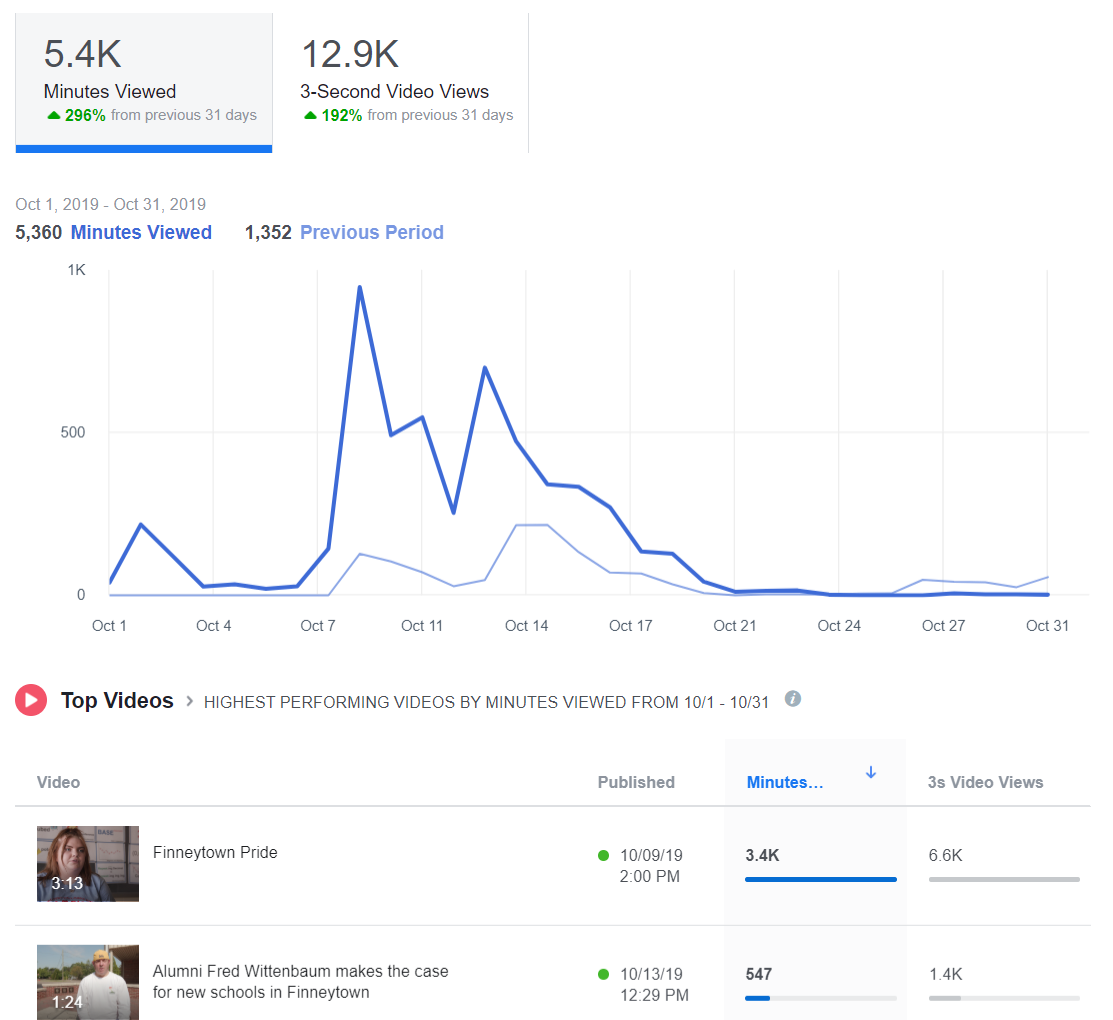
Facebook and Instagram: a view is counted anytime someone watches your video for at least three seconds.

Twitter: a view counts if someone watches at least two seconds. Additionally, at least 50 percent of the tweeted video must be visible on screen to be registered as viewed. This rule is to account for the auto-play function.

YouTube: a view is counted anytime someone watches your video for at least 30 seconds.

#2-Watch Time

Facebook reports this metric in insights and calls it “minutes viewed.”

Instagram, as far as I can tell at this writing, does not report watch time. (BOO!)

Twitter reports minutes watched under the “video details” of every video you publish on the site. In addition, they have a cool graph that tells you how long the average viewer watches your video. This is reported in quarter percentages. You’ll also get the completion rate, or the percentage of viewers who watched your video from start to finish.

YouTube will tell you the average total watch time for every video you create.

Let’s say you post a 10-minute video on YouTube. You might have 500 views, which means 500 people watched at least the first 30 seconds. Then you’ll have an average watch time of say, 5:33, which means most people watched at least five minutes and 33 seconds of your video.

YouTube prioritizes videos with high watch times in its viewing suggestion algorithm.

I can tell you from my own experience posting The Library Marketing Show to YouTube each week that it’s rare for someone to watch an entire video from start to finish. I challenge myself every week to improve my watch time.

#3-Engagement

As always, you want to record likes, comments, and shares of your videos, as you would with other social media posts. These metrics can tell you how many people were compelled to act based on your video. You can help boost these numbers by actively asking your viewers to like, comment, and share.

Shares are the most important engagement metric, because that means someone liked your online program so much, they wanted their friends and family to enjoy it too.

You might also want to read theseโฌ‡๏ธ

Videos Can Reach Library Users at Home Now and in the Future. Hereโ€™s Your Starter Kit.

The New Guide to Library Marketing Social Media for 2020! Part Four: Maximizing YouTube for Video Plus What About Tumblr, Snapchat, and TikTok?

Subscribe to this blog and youโ€™ll receive an email every time I post. To do that, click on the โ€œFollowโ€ button in the bottom left-hand corner of the page. Connect with me on YouTube, Twitter,ย Instagram, and LinkedIn. ย 

The Best Posts and Videos to Get Started in #LibraryMarketing! The Library Marketing Show: Episode 28

WATCH NOW

The #LibraryMarketing Show, Episode 28: Brenna Jaco at the Lubbock Public Library in Lubbock, Texas submitted this question: โ€œI just discovered your blog and I wish I had the time to go back and read all your posts from the beginning. In your opinion, what are the most important/useful/favorite blog posts and YouTube videos you’ve done over the years?โ€

Thanks for the question, Brenna! I give the top three blog posts and videos, ranked by views. That means other library marketing pros found them helpful. I hope you will too!

The Top video was Fighting Back Against the Endless Poster-Flyer-Bookmark Cycle! #LibraryMarketing Show: Episode 8.

A close second was Best Free Ways To Reach Non-Cardholders! #LibraryMarketing Show: Episode 13.

And finally, people love Advice for Digital Signage in Libraries! The #LibraryMarketing Show: Episode 21.

Now for the top three blog posts. The top post is The Best Library Customer Service Advice from an Expert! I interviewed Dan Gingiss, author of Winning at Social Customer Care: How Top Brands Create Engaging Experiences on Social Media.

People also love my early list of the best conference for library marketers. There’s no link because it’s outdated now, but a new list for 2020 is coming out on February 3rd!!

Finally, one of the most popular posts is about how my library increased participation in our summer reading program by 97% one year!

And KUDOS go out to the East Baton Rouge Parish Library System because they have a Library Road show! Itโ€™s a whole 30-minute show on YouTube.ย  It’s well-produced and informative. Great job!

Want more Library Marketing Show? Watch previous episodes!

Check the Upcoming Events page to see where I’ll be soon. Let’s connect!

Subscribe to this blog and youโ€™llย receiveย an emailย every time I post. To do that, click on โ€œFollowโ€ button in the bottom left-hand corner of the page. Connect with me onย Twitter,ย Instagram, andย LinkedIn.ย ย 

What a Firecracker and a Watermelon Have to Do with Library Video Marketing

I am so excited that the focus of marketing in the current era is video. I’m positively giddy at the prospect of how this medium will help us transform the popular view of libraries. The power of video is mind-blowing. It’s easier than ever to create a video. The hard part is compelling your viewers to watch it and to keep coming back for more.

I want to encourage you by sharing tips I learned from an extraordinary marketing expert.ย ย Andrew Davis is CEO of Monumental Shift and author of the book Brandscaping.ย He is a former journalist and producer for The Muppets and Charles Kuralt. He’s a brilliant storyteller and a gifted speaker. He spoke at Content Marketing World this year about the power of video marketing and how to make sure your videos are working at their fullest potential–engaging viewers, building compelling stories, and getting your whole message through to your target audience. His talk was energizing and I want to spread some of his enthusiasm around!

Davis says we need to change the way we think about engagement. Most libraries declare engagement victory when we get a certainย amount of views, impressions, shares, or likes. But the social media landscape is so saturated that those numbers really have no meaning anymore. We need to shift our definition of engagement to audience retention.

Audience retention is, simply put, the amount of time our cardholders spend viewing our content. This translates to watch time on YouTube and Facebook and page time on Google Analytics. A compelling video will persuade people returning to those platforms to view your content over and over. Davis says we must stop blaming our viewers for having the attention span of a goldfish. It isn’t that our viewers can’t pay attention to what we are saying. The problem is that what we are saying is boring.

Create videos that your cardholders really want to watch.ย To do this, you’ll need to get inside the mind of your viewer. Start by creating a series of โ€œhow toโ€ videos, which have high audience retention. How-to videos are low-hanging fruit for a library. Your librarians can be your guide–ask them to name the questions they are asked most often by cardholders and then help you create a simple video to explain the answers. To prove the power of the how-to video, Davis played this video, which is one of the most watched how-to videos on YouTube.

Davis says your next video marketing challenge is to create suspense by raising the stakes. The best way to explain this concept is with this video from the Slo-Mo guys.They inserted a firecracker into a watermelon. It takes 18 seconds from start to finish for it to blow up. I admitย it’s kind of exciting.ย  But it’s over in less than half a minute–not the greatest way to create audience retention!

Davis says there is a better way to do that video–and the example comes from Buzzfeed. They did a Facebook live where theyย burst a watermelon with rubber bands.ย It took forever to make the watermelon explode but tons of people were watching when it finally blew up. At the 20 minute mark, they had 375,000 viewers. By 40 minutes, they had 800,000 viewers. In all, more than 11 million watched it on demand after the fact. So the lesson is… DONโ€™T INSERT A FIRECRACKER INTO A WATERMELON.

Next, Davis says, teach your audience to chase answers. The pursuit of the answers builds momentum. Your videos need to occupy your audience’s desire to know more over time. Davis says you need to stop worrying about how long a video is. Rather, ask yourself if your entire video worth watching. When someone says your video is too long, what theyโ€™re really saying is โ€œI have no more questions.โ€ Make sure there are questions that need answering and keep the audience constantly asking whatโ€™s next.

Remember that building suspense isn’t just part of the story line of your video. The title and the thumbnail you choose is part of the equation–don’t give it all away in those two elements. To demonstrate, Davis shared this video from the ancestry research company 23 and Me. Honestly, if you just read the title and look at the thumbnail, you will already know whatโ€™s going to happen. There’s no suspense and that translates into no real reason to watch.

A more compelling example of building suspense through the title and use of video is this Dove Choose Beautiful spot.

Finally, Davis says when you are creating drama with your videos, it is important to remember to pay it off. Make sure you deliver a catharsis or an emotional release our audience craves. If you don’t, you risk alienating your viewers. For example, Billy Gene The Wolf of Advertising made the following video. Watch it and see if you can guess why it was widely criticized.

There is no resolution! You must resolve every question you raise by the end of the video. Be sure to provide answers to all the questions in your video, so you avoid frustrating your audience. A frustrated audience will not come back to watch more of your content.

Subscribe to this blog and youโ€™llย receiveย an emailย every time I post. To do that, click on โ€œFollowโ€ button on the bottom left-hand corner of the page. Connect with me on Twitter and Snapchatโ€“itโ€™s where I talk about library marketing! Iโ€™mย @Webmastergirl.ย Iโ€™m also onย LinkedIn,ย Instagramย andย Pinterest.ย Views in this post are my own and do not represent those of my employer.

A WordPress.com Website.

Up ↑