Search

Super Library Marketing: Practical Tips and Ideas for Library Promotion

Category

Video Marketing

Listening Is the Key: How One Woman Turned Her Superpower Into a Video Marketing Series That Changed Public Perception of Her Library

Photo of children reading courtesy the Public Library of Cincinnati and Hamilton County's Digital Collection

As you well know, libraries have changed, evolved, and adapted in some remarkable ways, particularly in the past 19 months.

But past perception continues to be a real hurdle for libraries. Plenty of people who would call themselves a fan of the library donโ€™t know all the things the modern library does.

We must make sure our community understands who we are right now. And there is a movement to do that through storytelling.

One of those storytellers is Evelyn Shapiro, Promotions Manager at Champaign Public Library in Illinois. As I was preparing to speak at Content Marketing World, I reached out to Evelyn to ask for details about her content marketing campaign, A Library for Life.

Evelyn graciously shared the story of how she compiled this amazing YouTube playlist of patrons who shared the relevance and importance of the Champaign Library’s work. And sheโ€™s permitted me to share what she wrote with you.

I hope you will find inspiration in her words. But also, I hope you will see how practical and, frankly, easy it is to gather and tell stories about the ways your library is changing lives.

โ€œLibraries are one of the best ideas humans have ever had.โ€

Danielle Borasky, Vice-President, NoveList


“Friends and colleagues have told me that connecting with amazing people is one of my superpowers. It’s funny because I can’t help thinkingโ€”doesn’t everyone feel like they know truly remarkable people?”

“So, part of the genesis of the project came through the #LibraryLove shared by Karin Markovitch, the parent I interviewed. She had been sharing the most fantastic comments and stories with us in social media posts, tagging the library, also in person with the desk staff. She is just a natural library ambassador, brimming with appreciation.”

“I kept thinking about how I wanted to share her enthusiasm and appreciation of what we offer with the world, but especially with local community members who might not know about or use the library, and with staff because we never tire of hearing that our efforts and expertise result in a positive experience and impact for customers.”

“Our Teen Librarian Kathie Kading was keen on introducing me to Mallory Morris, the educator I interviewed. Mallory’s energy is pure magic, and she can speak with authority about the impact the library has on teachersโ€™ and students’ lives. Interviewing her would mean other people would get to hear her stories, in her words. She was able to put together our group of teen interviewees, drawing from students at her school (across the street from the library) which turned out to be powerful testimony as well.”

“Also, a colleague in the children’s department introduced me to an area artist, Stacey Robinson, who was using the study room next to the children’s desk as his studio, coming in regularly and drawing illustrations for a graphic novel he was creating. She had gotten to know him over time and wanted to be sure I knew his story. (He ended up surprising her by thanking her by name in the acknowledgments of his book!)”

“I connected with him, and it turns out we know people in common in town in the art/design/theatre/dance/music worlds. Again, he was passionate about the library and spoke so well about what a treasure this place is. I wanted to be able to share his story. He also teaches on the University of Illinois campus in the Art + Design department and is a lot of fun to follow on social media.” 

“So, momentum had started building and because it was our tenth anniversary in this building, I realized I could propose the project as interviews with ten community members. It was our first video project and not part of my original budget that year, but it was the right timing to ask.”

“Once approved, I needed to build my list of who I would bring on camera. I knew about some of the range I wanted and topics I wanted to highlight including a parent and teen, a Board member, and someone who could speak about the Branch. Our director was able to recommend three of those featuredโ€”Candace, Thom, and Rajiv.”

“While working on developing our strategic plan, we invited a group of community members (around 50) to a retreat here to talk about the library and community needs. In one session I attended, Charlisa spoke up about the Douglass Branch, what libraries meant to her as a child, and how children access literacy in our community. I was so compelled by what she had to say. Charlisa has become a very active participant on our social streams as well.”

“Around this time, I’d met a new-to-the-community social media manager named Huan who worked remotely with an international org in communications and marketing. It turned out she spent a lot of time in our new walk-in co-working space for area entrepreneurs. She used it as her office and was getting involved with supporting the library in a few different waysโ€”through a United Way young professionals project and through serving on the Library Friends Board. We met by chance in the FriendShop Bookstore. At the time, she was volunteering in the shop, and we had a chance to chat. She had an international perspective, having lived, and worked in co-working spaces in London. She could compare what we offered here with co-working amenities in a Big City.”

“I already knew Amanda personally and at this time she was heading up the local Project READ initiative and both our locations were public sites where their group offered tutoring. I love talking with her about making good things happen in our community. She had held the role of liaison for families as part of a school program our daughter participated in. I had seen how fluidly she moved in different worlds and languages and what an effective advocate she is. She turned out to be an ideal example of how the library partners with community groups and how our services help immigrants.”

“I learned to bring a stash of tissues with me each time because someone always started crying. The stories were so heartful. I’ve also thought about additional ways we could share these stories, including in print somehow. I haven’t even transcribed them yet or pulled quotes from them. There may be obvious ways to expand and reuse their stories. The key seems to be selecting people who could talk glowingly about the library, without a lot of prompting from me.”

“As communicators, we focus a lot on our messages, as we need to. However, I see our role as much as a listenerโ€”how else can we share great comments and stories?”

Evelyn Shapiro is Promotions Manager at Champaign Public Library in Illinois. Before that, she worked in graphic design and has more than 75 published books and CDs to her credit, along with numerous awards from Parents’โ€‹ Choice, University College and Designers Association, and the Chicago Book Clinic.

Is your library telling stories about your work and your patrons? I’d love to see and share those stories! Send me an email with more information.


You Might Also Want to Read These Articles

The Top Four Reasons To Use Content Marketing To Promote Your Library on Every Platform

The Dreaded Library Annual Report: How to Create a Masterpiece that Showcases Your Libraryโ€™s Value and Inspires Your Readers

Latest Book Review

Subscribe to this blog and youโ€™ll receive an email every time I post. To do that, enter your email address and click on the โ€œFollowโ€ button in the lower left-hand corner of the page.

Which is the Best Platform for My Library’s Virtual Storytime Videos? Viewer Question Answered!

Watch Now

The Library Marketingโ€‹ Show, Episode 87

In this episode, I’ll answer a question from Jennifer from Lexington County Public Libraries. She writes, “Keeping in mind fair use guidelines, would it be better to post our virtual pre-recorded story times to our Facebook story rather than to our timeline. My understanding is that stories only appear for 24 hours and can be tailored somehow to only reach certain audiences. Do you have any suggestions?”

Kudos in this episode go to Pottsboro Area Library for hosting telehealth appointments at their library.

Do you have a suggestion for a topic for a future episode? Want to nominate someone for kudos? Let me know in the comments. And subscribe to this series to get a new video tip for libraries each week.

Thanks for watching!

How to Reboot AND Optimize Your Library’s YouTube Channel for Marketing Success!

Watch Now

The Library Marketing Show, Episode 84

In this episode, I’ll answer a question from Jennifer of the Park Ridge Public Library. She asked, “What advice would you give to a library needing to reboot the way they use YouTube? We have a YouTube account but only used it sporadically in the past. How can we effectively use it to promote programs, host book talks, share big library news?”

Kudos in this episode go to the Sierra Madre Public Library for their amazing work on TikTok!

Do you have a suggestion for a topic for a future episode? Want to nominate someone for kudos? Let me know in the comments. And subscribe to this series to get a new video tip for libraries each week. Thanks for watching!

The Absolute MOST Important Step in Library Marketing…Revealed!

Watch Now

The Library Marketing Show, Episode 79

In this episode, I’ll share the MOST IMPORTANT thing you need to do in library marketing and why you must make time for this step!

Kudos in this episode go to the Madison Library District for their commitment to marketing on Pinterest.

Do you have a suggestion for a topic for a future episode? Want to nominate someone for kudos? Let me know in the comments. And subscribe to this series to get a new video tip for libraries each week.

Thanks for watching!

Behind the Scenes of The Library Marketing Show: Anyone Can Create Library Videos!

Watch Now

The Library Marketing Show, Episode 70

In this episode, Angela answers a viewer question from Lori Hagen, who wanted to see how these videos come together. She’ll take you behind the scenes. It’s a lot easier than you think… in fact, anyone can create videos!

Kudos in this episode go to the Tacoma Public Library for their innovative virtual programming for adults, including tutorials for how to use their digital resources.

Do you have a suggestion for a topic for a future episode? Want to nominate someone for kudos? Let me know in the comments. And subscribe to this series to get a new video tip for libraries each week!

Thanks for watching.

Going Live on Facebook? Here are Three Tips to Maximize the Reach of Your Library’s Virtual Programs

I don’t ever want to hear anyone tell me ever again that libraries can’t adapt and be flexible. My friends in the library world have proven their adaptability this year in dozens of ways.

The biggest sea change is around how libraries deliver programs to their community. Librarians shifted on a dime when buildings closed and limited service due to the pandemic.

One of the major changes came in the way libraries deliver programs. Almost every library I’ve worked with is now delivering programs live on Facebook. And they’re doing a fantastic job.

But many librarians say they have a hard time getting people to attend these live programs. They want more people to be a part of the livestreams.

It takes a lot of work to put a livestream virtual program together. And the more people who attend, the more likely they are to recognize the value of your library.

I’ve got some tips that will help you promote your Facebook livestreams to get more viewers.

Plan it out

Before you go live on Facebook, you ask yourself these questions:

What are my goals? Your main goal should be more than “I want to get 20 people to watch the livestream.” Think holistically about what you want your audience to get from your livestream. Be as specific as possible.

Some good goals are “To teach our audience how to search for articles, marriage and death notices, and other information about their families in our newspaper archive” or “To show viewers how to use the new feature updates on the Libby app from Overdrive to better manage their holds.”

A goal or goals for your live video will help you when it comes time to decide how you’ll structure your live and what you’ll say. It also gives you a measurable outcome that you can use to assess the use of live virtual programs.

What will my main message be? The main message is how you translate your overall video goal into a line that you can repeat in your promotion of the video and while you are live.

For example, if your goal is to explain those new features on the Libby app, your main message might be, “You now have more control over the e-books and audiobooks you check out from your library.” Repeating your main message in your video pre-promotion, during the video, and when you post the video on-demand will help drive that message home and make it stick in your viewer’s mind.

Who is my target audience? Readers of this blog know that the best way to have success in marketing is to pick an audience and market to them, rather than marketing to the whole of your cardholder base.

Picking a target audience is important when you’re working in Facebook, because the platform will pick up on any keywords you use in your program description. They’ll help you find those specific viewers by showing your organic post to people who may actually be interested in it.

Once you’ve answered these three questions, you’ll have a good foundation as you head into the stage where you promote your livestream.

Promote before you go live

Facebook suggests that you schedule an announcement post in Live Producer. That feature will automatically create a Facebook preview post. Your library followers can then set up a reminder to join the live broadcast.

You can also set up a Facebook event as a preview to your livestream. If you choose to go this route, be sure to explain that you’ll be going live on your main Facebook page, not within the event.

You can also create organic preview posts. Use an eye-catching graphic or photo and link to your virtual event calendar, where people can register to attend.

Registration for your virtual programs is a great option because it gives your library control over communication. Ask for your potential viewer’s email. Then, send them a reminder to watch from your own email marketing system.

In your reminder email, include other virtual program choices and collection items that compliment your livestream. You should also ask recipients to sign up for other email or newsletter marketing from your library.

Whichever option you go with, be sure to promote your livestream at least two weeks before it happens.

And don’t forget to promote your live program on your other channels, like in your email marketing, on your website’s homepage, or even with fliers or bookmarks that you slip into holds or curbside pickups.

Focus on the conversation

Your promotional efforts don’t end when you hit the “live” button.

Facebook will serve a notification of your live virtual program to people who may be scrolling the news feed while you are live. And the best way to get those notifications to happen is to make sure your audience is having a lively conversation.

To help facilitate the conversation, come up with a list of questions for viewers of your livestream before you go live. If the conversation with viewers lags during your livestream, refer to your list and ask the next question to spark comments again.

Now, that’s hard to do when you’re also the person who is hosting or talking during the livestream! So, ask one of your library co-workers with admin access to your library’s Facebook page to post a comment as the library.

You may also find these posts helpful

Virtual Library Programmersโ€“Heads Up! Hereโ€™s a Super Easy, Step-by-Step Plan to Establish a Style Guide for Your Library Videos

Butts in Seats: Which Video Metrics Count as Attendance in the New World of Virtual Library Programming?

Latest Book Reviews

Outsider by Linda Castillo

Our Time is Now: Power, Purpose, and a Fight for a Fair America by Stacey Abrams

Find more 60-second Book Reviews here.

Subscribe to this blog and youโ€™ll receive an email every time I post. To do that, click on the โ€œFollowโ€ button in the bottom left-hand corner of the page. Connect with me on YouTube, Twitter, Instagram, and LinkedIn.

Virtual Library Programmers–Heads Up! Here’s a Super Easy, Step-by-Step Plan to Establish a Style Guide for Your Library Videos

Photo Courtesy Public Library of Cincinnati and Hamilton County

There’s a trend in library marketing now. It’s born out of necessity and determination.

More libraries are producing videos. They’re using the format to deliver programs to their community. They’re using video to explain the value of their library, as they brace for the economic impact of the pandemic.

I’ve long been a fan of video library marketing. And, even before COVID-19, there was mounting evidence that video is an effective and engaging way to communicate.

Video is easy to produce, really. Anyone with a smartphone and some editing software can make cool videos that look professional. My 19-year-old taught herself to edit this week in about two days’ time. I imagine many of you are doing the same thing.

But there’s one step in the process you may have missed. And for this, I must thank Mary from Evergreen Park Library. She asked me to talk about creating a video style guide.ย 

Why you need a video style guide

Any content coming out of your library will need to look like it’s coming from your library!

It’s the same philosophy you may have for any print material you create. You likely have rules and specifications about the look of the text, the placement of the logo, the use of colors, and more. Even if your guidelines are just a few sentences, someone along the line has likely laid out the rules.

Your videos need a similar set of guidelines. We want people to be able to recognize your work on all platforms.

And once you create a video style guide, it’s important to make sure everyone who creates content adheres to it. It’s incredibly important that we reinforce your library’s brand to your community. We want them to immediately know the video was produced by your library. Later, when we need support for funding, they’ll remember your work and the value you provide.

Creating your video style guide

In your style guide, answer these questions.ย ย 

  1. Logo: How often will your logo be used in the video? Where does it need to appear on the screen? How big should it be? What color should it be? If you have several versions of your logo, which one will be used in videos?
  2. Fonts:ย What font should be used for onscreen text? What color does it need to be? How large should it be? When should it appear?
  3. Graphics: If your video creators are adding additional graphics, what colors are allowed? What style of graphic should they use? What program should they use to create them?ย 
  4. Video: How should shots be framed? What resolution do you want recorded? What aspect ratio will be allowed? Do shots need to be focused? Does video need to be stable or will you allow shaky shots?ย  ย ย 
  5. Audio: How loud should audio be in your videos? Should on camera talent use a microphone, headsets, or camera audio? If they edit music into the final product, how loud should the music be versus spoken words?ย ย 
  6. Talent: Which library staff members are permitted to record, edit, and upload videos? Should on-camera library staff wear something specific, like your library’s uniform shirt or a library branded t-shirt?
  7. Process: Is there a senior staff member who must give final approval for your video? How will the video be transferred between staff members at various stages of editing, approval, and posting?ย ย 
  8. Patron privacy: How do you go about getting permission from everyone who appears on camera, even in the background? This is especially important when library buildings reopen, and we start capturing video of patrons. Itโ€™s likely part of your library’s overall privacy policy. So, check to see what kind of permission you need to get from participants and set guidelines to make sure your video creators know that’s part of their responsibility.
  9. Liability and copyright issues: What music can your video creators legally use? What still photos can they legally use?ย  What extra footage can they legally use? Be explicit about fair use standards.ย 

Examples of video style guides

Pepperdine University

Oxford Brooks University

Washington University School of Medicine

You might also want to read these

Butts in Seats: Which Video Metrics Count as Attendance in the New World of Virtual Library Programming?

Videos Can Reach Library Users at Home Now and in the Future. Hereโ€™s Your Starter Kit.

Subscribe to this blog and youโ€™ll receive an email every time I post. To do that, click on the โ€œFollowโ€ button in the bottom left-hand corner of the page. Connect with me on YouTube, Twitter,ย Instagram, and LinkedIn. ย 

Butts in Seats: Which Video Metrics Count as Attendance in the New World of Virtual Library Programming?

Photo Courtesy the Public Library of Cincinnati and Hamilton County

This week’s post is inspired by a question on the Libraries and Social Media Facebook page. A library staff member asked this: “We’re being asked to track the virtual ‘butts in seats’ numbers for each of our programs and also how many views each get in the first hour. I can’t for the life of me find that in insights.”

Analytics on views for videos, both live and pre-recorded, are measured differently by each platform. So, tracking actual attendance can be confusing and time intensive. But it is valuable data.

I have done some research this week to find updated information about how to track video views on the platforms where most libraries are posting video and doing live stream programming: Facebook, Twitter, and YouTube.

Special note: Libraries are also using Instagram for live streaming and video views. However, analytics for videos on Instagram are nearly impossible to track. My advice is limited by that fact.

What counts as attendance?

Before you begin analyzing video views on any platform, you’ll want to establish what will count as attendance to a virtual programming. It may be easiest to align your library’s definition of what counts as video attendance with the way each platform measures a video view.

Most platforms based their metrics on someone viewing a very short portion of your video, not the whole thing. That sounds like good news. But, like an email open rate or a social media follower count, the simple video view is vanity metrics. We want our videos to impact our community. We need to push our definition of video program attendance into deeper territory.

You’ll also want to consider whether your library will use a different metric to measure the number of people who attend a live stream virtual program versus a pre-recorded video. My recommendation is to track both numbers separately. This will give you a sense of whether your followers prefer live streaming over pre-recorded video.

When you live stream, you can see right away how many people are “attending” your event. When you finish your live stream on Facebook and Instagram, you’ll have the option of saving your video to your device. Always do that.

Then, you’ll be asked if you want to upload your live stream recording to the platform for on-demand views. You should do that too!

As soon as you end your live stream, Facebook and Instagram both tell you right away the number of people who viewed your live stream. Then you’ll need to decide how often you check the on-demand views of your live stream. You’ll also need to decide how long will you track the on-demand views on each live stream recording.

Make these decisions now so you can consistently report the attendance and compare metrics on videos to see which ones perform best. If you have one type of video program that does well, you should offer more of that!

Once you decide what will count as attendance by one person on each platform, you’re ready to start recording your views. If you are using a social media scheduling platform, this will be easy. Most scheduling platforms have a video performance section that will help you analyze your views. If you can’t find it, go to the “Help” section of your platform. You should also check your scheduling platforms help section to get more information about how they gather those metrics.

If you don’t have a social media scheduling platform, you’ll check the video views on each platform. Here’s how to do that.

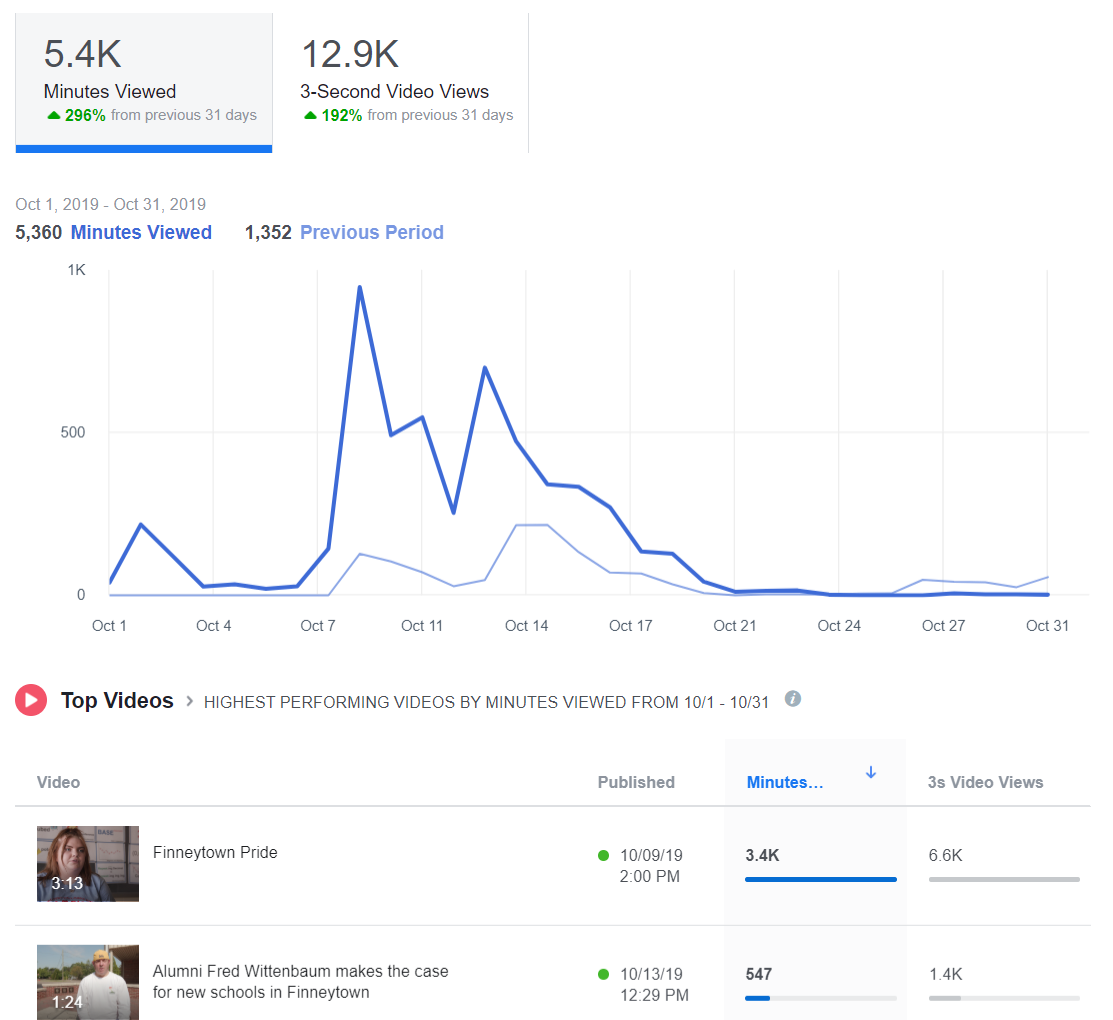
Facebook: Go to your library’s page. At the top, under the general Facebook search bar, you’ll see “Insights.” Click on that. Then scroll down the menu on the left side of the page until you see “Videos.” Click on that.

Instagram: You can see how many people viewed your live stream after it’s finished. If you post your live stream to your stories, you can see how many people viewed it. Be sure to check it before the end of your 24 hour period, because it will disappear! If you upload a video to IGTV, you can see how many people viewed the video, but there are no further analytics. You cannot track video views for videos posted to your normal Instagram feed.

Twitter: Go to Google and type “Twitter Analytics.” If you are logged into your library’s Twitter account, the URL will automatically populate with your library’s analytics. At the top of the page, to the right of the Twitter logo, you’ll see the word “More” and a drop-down menu. Click on the arrow to find “Videos.”

YouTube: Go to your channel. Click on YouTube Studio, then Video Analytics.

Side note: You can see my latest book review did not do very well on YouTube. I am comforted by the fact that it was gangbusters on Facebook. And that’s a lesson too. Different videos will work better on different platforms. You’ll learn how to pair a video to a platform by tracking video analytics.

The top three video metrics to track

#1-Video Views

Facebook and Instagram: a view is counted anytime someone watches your video for at least three seconds.

Twitter: a view counts if someone watches at least two seconds. Additionally, at least 50 percent of the tweeted video must be visible on screen to be registered as viewed. This rule is to account for the auto-play function.

YouTube: a view is counted anytime someone watches your video for at least 30 seconds.

#2-Watch Time

Facebook reports this metric in insights and calls it “minutes viewed.”

Instagram, as far as I can tell at this writing, does not report watch time. (BOO!)

Twitter reports minutes watched under the “video details” of every video you publish on the site. In addition, they have a cool graph that tells you how long the average viewer watches your video. This is reported in quarter percentages. You’ll also get the completion rate, or the percentage of viewers who watched your video from start to finish.

YouTube will tell you the average total watch time for every video you create.

Let’s say you post a 10-minute video on YouTube. You might have 500 views, which means 500 people watched at least the first 30 seconds. Then you’ll have an average watch time of say, 5:33, which means most people watched at least five minutes and 33 seconds of your video.

YouTube prioritizes videos with high watch times in its viewing suggestion algorithm.

I can tell you from my own experience posting The Library Marketing Show to YouTube each week that it’s rare for someone to watch an entire video from start to finish. I challenge myself every week to improve my watch time.

#3-Engagement

As always, you want to record likes, comments, and shares of your videos, as you would with other social media posts. These metrics can tell you how many people were compelled to act based on your video. You can help boost these numbers by actively asking your viewers to like, comment, and share.

Shares are the most important engagement metric, because that means someone liked your online program so much, they wanted their friends and family to enjoy it too.

You might also want to read theseโฌ‡๏ธ

Videos Can Reach Library Users at Home Now and in the Future. Hereโ€™s Your Starter Kit.

The New Guide to Library Marketing Social Media for 2020! Part Four: Maximizing YouTube for Video Plus What About Tumblr, Snapchat, and TikTok?

Subscribe to this blog and youโ€™ll receive an email every time I post. To do that, click on the โ€œFollowโ€ button in the bottom left-hand corner of the page. Connect with me on YouTube, Twitter,ย Instagram, and LinkedIn. ย 
Videos Can Reach Library Users at Home Now and in the Future. Here’s Your Starter Kit.

In a time of social isolation, video is a great way to communicate with patrons. A video can help you provide service to the community without having an open physical building.

If you are nervous about using video for marketing, I’ve got a secret for you. Video, whether live or recorded and edited, is easy and relatively inexpensive. During the COVID-19 crisis, it’s now necessary for you to produce videos. And, when things return to normal (and they will) you will have the skills to extend the reach of your library to home-bound customers through video.

Using video for library outreach

This list will help you brainstorm specific videos to fill your library marketing content editorial calendar.

Demos: You can show library users how to navigate your digital resources. You can show them how to use specific platforms, like Overdrive, LearningExpress Library, or Lynda.com. Demonstrate how to search a database, like NoveList or Consumer Reports. Make a video to show how patrons can talk to a librarian through chat or email while buildings are closed.

Programs: Many libraries are moving their planned program presents online right now. And this is a great video opportunity. You can record a teaser video, then the actual event, and a highlight reel for further promotion of more presenters. You can also move your story times to video format.

If you do these videos live on Facebook, Instagram, or YouTube, your viewers can still ask questions by commenting. In fact, live videos are a great option for library reach.ย  Viewers spend up to eight times longer with live video than with video-on-demand.

Book reviews: Turn the camera on yourself or a fellow book lover and record a review! I have started doing this on my YouTube channel. It took me about five minutes, once I figured out what I was going to say. Writing a Goodreads review of the book first helped me to organize my thoughts.

What equipment do you need?

In the past, producing video was expensive and difficult. But that is no longer the case. If you have a smartphone, you’re set. You can also record video on most DSLR cameras.

If you have an Adobe Creative Suite license already, you can use that to edit. You can also use iMovie or a host of other online editing software pieces, many of which are free. Here’s a great list. I edit the Library Marketing Show videos on my iPhone or using YouTube studio. And that’s really all you need!

Before you begin

Before you record anything, it’s important to identify who your target audience will be, and what the goal of the video will be. What do you want your audience to do after watching the video? This will help you plan the script, the call to action, the setting, and the goals by which you’ll measure the video’s success.

You should also decide where the video will live… on Facebook, on Instagram’s IGTV, on your library’s webpage, on YouTube, etc. Decide on one target location for your video.

Writing a script or outline

Most library videos will need a script or, at the very least, an outline. If you skip this step, you’ll may spend more time than you want editing. You may even discover you have to re-record certain sections. Your video might end up being longer than necessary. It might not be as engaging as you hope.

When I do the Library Marketing Show, I write a script. Sometimes it’s just an outline with key points. And sometimes it’s a word-for-word account of what I want to say. The script or outline helps me to formulate my thoughts. It also helps me time the video so I’m sure I’m not babbling on for longer than I need to be. But I don’t memorize my script. You know those cards with key points that I hold up during the video? Those are like slides in a conference presentation–they are visual cues to me so I can remember what I need to say.

As with any kind of library marketing, the language of your video should be relaxed, clear, and conversational. Avoid complex sentences and industry jargon or buzzwords. Speak to your video audience as you would to a customer at the front desk.

Also remember that the written word will sound different when you read it out loud. I rediscover this every time I do a webinar or a video! Be sure to read your script out loud before you record.

If your video features an outside presenter, write an introduction, as you would if you were doing the program in person. Be sure to tell your viewers how they can contact you with questions or comments during the video, if it’s live, or later if they are watching on-demand.

Time to record

Before you start recording, be sure your device has enough storage. If you’re using your smartphone, turn on the “Do Not Disturb” feature to avoid distracting notifications. When I shoot my videos, I also do a few test recordings to make sure the lighting, the background, and the sound are the best they can be.

Record horizontally. This gives your video the best viewing experience on most platforms. If you are recording yourself speaking, be sure your camera is on a level surface and won’t fall over! And don’t forget to focus on the object that’s most important, like your face.

If you are shooting a video of yourself, be sure to look at your phone’s camera… not at yourself on the screen. This may feel like the weirdest thing ever. But it looks more normal because it mimics looking someone in the eye.

It may take a couple of takes to get a video right. Don’t despair… and don’t erase any bad takes until you publish your finished video officially. You never know what footage you may need in editing.

If your video needs music

The right music can set the mood and tone for your video. Do you need background music or something that will manipulate the mood of your viewers? Will someone be speaking in the video? What kind of pace should your music have–fast, steady, ethereal, dramatic? These are all factors to consider when choosing your music.

Most music isn’t free. If you use an artist’s music without permission or proper licensing, you risk legal action against your library and your video may be removed from social media channels. Look for royalty free tunes to fill your music needs.

Royalty free songs aren’t free to use; they’re quality songs available for a single flat fee. This means you don’t have to worry about paying additional licensing fees or royalties in the future. YouTube, Shutterstock, and Epidemic Sound are all great sites to find royalty free music.

Posting your video

You’ve got a couple of good options for housing your finished video. YouTube is the largest video hosting platform It’s free to upload your videos to YouTube and optimize them for search. I created this guide for optimizing your videos on YouTube.

Vimeo is another choice. There is a free option, with limited storage space. During the COVID-19 crisis, videos on Vimeo might be higher quality because YouTube has reduced its streaming quality to deal with bandwidth issues.

You can also post videos on Facebook, IGTV (this is Instagram’s version of YouTube), and of course, your library’s own website.

Pick one spot to house the full-length video. Then use your other marketing channels to drive traffic to your video on that one, main location.

It doesn’t have to be perfect

We all have this idea that the video must be narrated by the perfect person with the perfect hair in front of the perfect background. That’s old school TV thinking and it’s no longer necessary. In fact, the best videos are the ones that show your library’s authentic self. Don’t worry about getting every little hair to lie in place, having the right clothes, or always saying the right thing. You’re talking to real people, even if they are on the other end of a video screen. And they’ll forgive you–and love you–if you aren’t robotic. You will find fans will love you just for being you!

More Library Marketing Help During the COVID-19 Crisis

Recording of live session on promoting your online resources through social media.

Self-Care for Library Social Media Staff in the Midst of a Crisis like #COVID-19

Library Marketing During a Pandemic: Tips for Working from Home or the Office and Dealing with the Stress of a Crisis

How #COVID-19 is Impacting Social Media Marketing and What That Means for Libraries

Subscribe to this blog and youโ€™ll receive an email every time I post. To do that, click on the โ€œFollowโ€ button in the bottom left-hand corner of the page. Connect with me on YouTube, Twitter,ย Instagram, and LinkedIn. ย 


A WordPress.com Website.

Up ↑