Search

Super Library Marketing: Practical Tips and Ideas for Library Promotion

Category

Marketing Basics

Seven Cheap and Clever Ways to Bridge the Digital Divide and Promote Your Library to People Who Don’t Have Internet Access


If I had a nickel for every time I was asked, how do we promote our library to people who don’t have internet access or who choose to live offline?, I’d be a rich woman.

This problem has always plagued libraries. By nature, our services are needed most by those who struggle with economic disadvantage. And it’s a huge concern of many librarians right now. Some libraries in the United States are reopening their physical buildings and returning to services involving in-person interaction with patrons, like curbside pickup or drive-thru windows. But there seems to be no way to make sure our offline community members know we have returned to service.

I’ve always been a fan of digital marketing because it’s targeted, effective, and easy. The problem of reaching people who don’t have access to Wi-Fi and will never see those messages has always bothered me.

What’s a library to do?

I decided to stop letting it bother me. It’s time to solve the problem. 

Prepping for promotion

First, concentrate on your core message. If you only had 10 seconds to tell someone about your library’s reopening, what would you say? Boil your message down to the most important points. Then create a few, highly focused and easy-to-deliver print pieces to carry that message. Good choices are a bookmark, a quarter-sheet flier, and a postcard. These will be your library’s main promotional vehicles for non-digital marketing efforts.

Second, adopt an outreach attitude. Many libraries are hesitant to market themselves. They worry they are intruding. They don’t want to seem pushy or salesy. They are convinced their promotional efforts will be viewed as “spam”.

You are not spam. You are not intruding. You are not selling a product. You are promoting a service that is free and necessary. 

Your community is already paying for library services in some form or fashion. They need to know what they’re paying for. They need to know how you can help them. They are grateful to learn how to access the services they are funding.

It’s more important than ever to promote your library. We need to make sure, at the very least, that our community understands what we do and why our work is important. So, make a commitment to banish humility! Don’t be timid!

Now, here are seven relatively cheap, yet clever ideas for promoting your library. And they all have nothing to do with the internet.

Non-digital promotional tactics

Mail your postcard. If you have the budget, now is a good time to try mailing your postcard to people in your community. Start with your patrons. And if you have leftover money, a mailing house can help your library secure addresses for people who are not patrons.

In some U.S. states, your library can request a list of voter addresses from the Board of Elections for free. You can reach people who aren’t library patrons but who are registered voters, legally and cheaply.  

Canvass. Adapt this political campaign strategy for library awareness! Distribute your printed piece door-to-door.

Now, I know it’s time-consuming but it’s also effective. In my former job at a large metropolitan library, our outreach librarians went to apartment complexes and hung door hangers with information about the library. Door hangers are relatively cheap. If you can’t spring for them,  slip your postcard into screen doors. This is a great job for libraries looking for ways to keep their staff busy. And, of course, you will reach people who have forgotten the library or who have never interacted with the library.

Buy a print ad. Many newspapers will give your library a discount on ad space. Try to use your limited space to the full advantage. Use a catchy graphic to draw the eye.

Put your partnerships with local businesses and other non-profit organizations to use. Ask partner organizations to distribute a bookmark or some other kind of small print promotional piece to their visitors. Ask local businesses, like restaurants, to include a small promotional piece in their takeout bags. Ask local realtors and rental agencies to give your promotional piece to prospective homeowners or new renters. Give some of your print pieces to day care providers, teachers, summer camps, and recreational centers. Seek the help of any business or organization with a physical location that is open in some capacity and ask them to distribute your material to people who use their services.

Place signs outside your building. A banner in your front yard or a sidewalk sign can help spread the word to people in the neighborhood. There are lots of online stores that will sell you weather-proof signage for a reasonably cheap price.

Pitch to the media. Despite what you may see on the news right now, journalists are always looking for good news stories. And your library offering services is good news. Try pitching to individual reporters. Keep THEIR audience in mind and make sure you point out how a story about your library will be beneficial to their audience.

And be helpful. If they need photos but can’t make it over to your branch, offer to provide some. Have staff members who are comfortable on camera at the ready to deliver soundbites to local TV news crews. You might even offer to write a piece for your community paper. Free press is a great form of marketing.

Call patrons. I spoke to some librarians this week who called people to let them know that their library had reopened. They clearly identified themselves at the beginning of the call and asked permission to proceed with the call. If the receiver said “yes”, the library staffer proceeded to relay the information about their library’s new hours and service requirements and asked the receiver if they had any questions. Like canvassing, this is a time-consuming tactic, but it may be necessary in a community without internet access.

Related Help

Email vs. Social Media: Which is Better for #LibraryMarketing Right Now?⚔️

Marketing is Not a Dirty Word! Why Libraries Need to Promote Themselves Now, More Than Ever

Latest Book Reviews

You Don’t Look Your Age and Other Fairy Tales by Sheila Nevins.

Postscript by Cecelia Ahern.

The Familiars by Stacey Halls.

Find more 60-second Book Reviews here.

Subscribe to this blog and you’ll receive an email every time I post. To do that, click on the “Follow” button in the bottom left-hand corner of the page. Connect with me on YouTube, Twitter, Instagram, and LinkedIn.  

Three SUPER Easy Ways to Get More Results from Your Library Email Marketing!

WATCH NOW

The #LibraryMarketing Show, Episode 43 In this episode, Angela shares three very simple ways you can add punch to your email subject line and header text. Doing one of these three things every time you send an email will increase the chances your recipients will open and engage with your emails. Here is the article with all the fantastic magnet or trigger or power words Angela mentions in the video, broken up into charts that will help you create an emotional reaction in your readers. Also Kudos to all the libraries creating backgrounds for Zoom and Teams meetings using photos of their libraries. Library Journal has a great list of them. Here’s another great list from the Library Land project. If you have a topic for the show, kudos to share, or want to talk to me about library marketing, contact me using this short form.

← Back

Thank you for your response. ✨

Want more Library Marketing Show? Watch previous episodes! Check the Upcoming Events page to see where I’ll be soon. Let’s connect! This blog consists of my own personal opinions and may not represent those of my employer. Subscribe to this blog and you’ll receive an email every time I post. To do that, click on “Follow” button in the bottom left-hand corner of the page. Connect with me on Twitter, Instagram, and LinkedIn.     

The One Social Media Shortcut That Can Tank Engagement and Cost Your Library in a Pandemic–or Anytime!

I know work is hard right now. But there is one time-saving social media marketing technique that libraries should avoid at all costs.

Libraries should avoid cross-posting on social media. Cross-posting is when you post the same text and graphics in a message across multiple social media networks.

I get why many libraries cross-post. Cross-posting is easy. It saves time and energy. And library staff have a lot of work to do. Even when there is no pandemic to deal with, librarians are often asked to take care of marketing along with their regular duties. But the detrimental effects of cross-posting outweigh any time you might save doing it.

Why cross-posting is a bad idea

Cross-posting is a bad idea because social media platforms are different. They have different standards for post length, image size, hashtags, links, and captions.

For example, LinkedIn is more copy-heavy and formal. Instagram is more visual and informal. Twitter is more suited to short quotes, threads, and GIFs. Pinterest is graphic-heavy. One post with the same text and photo can’t be all those things.

An image you post on one platform may not be sized for another platform. It may end up stretched, pixelated, or squished. This will hurt your ranking and engagement.

Speaking of engagement, the metrics are different for each platform. On Facebook, you’re aiming for likes, comments, and shares. On Twitter, you want retweets and replies. On Pinterest, you want comments and re-pins. One post can’t generate all those things.

Your followers are also different depending on the platform. Twitter users are overwhelming between the ages of 18 and 44. LinkedIn users are more likely to have a college degree than users of other platforms. 70 percent of Pinterest users are women. Every platform has a unique demographic with different needs.

When you cross-post, you risk looking inauthentic and spammy. Your posts will feel like they’re auto generated and robotic. It may look like you don’t care about what you post on your account or worse, that you don’t know you to use social media.

Your audience will respond negatively by not responding at all. That hurts your standing in the algorithm. It can have a negative effect on your reach.

What to do instead

Cross-promotion is better! Take your message and adjust it slightly to suit each social media platform. It’s much easier than it sounds.

First, you need a base message. What is the basic info you wish to convey? What is the action you want your followers to take? Answer these two questions in a two or three sentence nugget. This is your base message.

Then take that base message and adjust it for each of the social media platforms you wish to use. A tweak of a word or phrase here and there, an adjustment of an image, and a unique call to action are all you need to be authentic.

Westerville Public Library in Westerville, Ohio did a great job of tweaking this promotion for Twitter…

…and Facebook.

Here’s another good example of cross-promotion from Barlett Public Library District in Illinois. This is their Twitter post…

..and the same message tweaked for Facebook.

Decide how much time your library is willing to invest on social media. Smaller libraries will want to concentrate on the platform or platforms that will give their library the most benefit. If you are pressed for time, pick the platforms that perform best for you or the platforms where the audience you wish to target is using. If that means you only post on one social media network, it’s okay. Quality is better than quantity.

Use a scheduling tool. There are plenty of free scheduling tools that will help you to share your social media messages without cross-posting. I have used the free version of TweetDeck for my personal social media for years. You can schedule lots of posts in advance and the metrics are great. I recommend it for libraries without the budget for scheduling software.

At my former library job, we had a paid account with Sprout Social. It was easy to use and had more cross promotion capabilities than TweetDeck. I recommend it if you have money for a paid scheduling platform.

More library social media advice

How #COVID-19 is Impacting Social Media Marketing and What That Means for Libraries

Self-Care for Library Social Media Staff in the Midst of a Crisis like #COVID-19

What Metrics Demonstrate Your Library’s Social Media Marketing is Working?

How to Reverse Engineer Your Library Marketing Social Media Audiences!

Subscribe to this blog and you’ll receive an email every time I post. To do that, click on the “Follow” button in the bottom left-hand corner of the page. Connect with me on YouTube, Twitter, Instagram, and LinkedIn.  

The Complete List of Free Online Tools to Help You Do Your Job as a Library Marketer

Your work as a library marketer is no walk in the park in the best of circumstances. But it’s especially difficult right now.

I started compiling a list of tools for library marketers before COVID-19 turned our world upside down. Now I want to share them.

Each tool is free. And I hope they make it easier to do your job, wherever you are.

But first, I have a question.

Tools for Writing

Grammarly. Grammerly is a plug-in. It scans what you are writing as you write it. It points out common grammatical mistakes, like subject-verb agreement, article use, and modifier placement. You can also upload documents for scanning. For remote workers or library marketers handling all the work alone, it’s a lifesaver.

Hemingway Editor.  The Hemingway Editor grades your writing for readability and points out the excessive use of adverbs, passive voice, and complex sentences. Use it to improve your social media posts, web content, blog posts, and press releases.

I have a love/hate relationship with this website. I love it because it forces me to become a better writer. I hate it because every time I use it, it’s clear what an awful writer I am without it!

BrainyQuote. A directory of inspirational quotes for web, email, and social media content. This is a great site to visit when you’re feeling creatively drained. They verify all quotes. There are plenty of quotes about literature, books, reading, and learning.

The Secret Language of Books by NoveList. This little guide helps you create engaging emails and social media posts about books. It can help you craft language for genres, mood, and styles. It expanded the vocabulary I used to entice readers to check out our collection.

Disclaimer: I work for NoveList. But, I got my first copy of this handbook last year, before I worked for them, and it changed my life.

Tools for Graphics, Videos, and Photos

Emojim. This website is my go-to source for finding emojis. I search what I need and then hit copy. Then I insert the emoji in my platform of choice. The selection on this site is better than Emojipedia.

Use of emojis on social media platforms like Instagram increases engagement by 48 percent. My own data from my time at my former public library job showed that the use of an emoji in an email subject line increased open rates by as much as 60 percent.

HTML Color Codes. Use it to find the exact HTML color of any section on an existing graphic or photo. Upload a photo or graphic, then hold your mouse over the section you want to match and click. The HTML code will appear in the box.

When I worked at the Public Library of Cincinnati and Hamilton County, I would use this to create a call to action button for my emails that matched the accompanying graphic or photo.

Iconfinder. Iconfinder is a database of almost one million icons. Don’t be fooled by the priced sets at the top of the page. Scroll down to find their selection of free downloadable icon sets. Right now, they have lots of free choices for hand washing, social distancing, and public health.

Trace by Sticker Mule. This tool will let your library remove a background from a picture.

Giphy GIF Maker. This site allows you to easily create animated video GIFs and GIF slideshows with captions.

Lumen5. Lumen5 is a video content creator. There is a free version that lets you create five videos each month. You can choose clips from a standard video library and get access to free music.

RecordScreen.io. This site lets you record your screen and your webcam at the same time. There are no bells and whistles and no other features. It’s great for demos and tutorials you might want to create to help patrons learn how to navigate your digital resources.

Tools for Organization

Otter. This cool app is a transcription service. It lets you record meetings or conversations on your phone or browser and then turn those conversations into notes that can be shared. The free plan lets you record 600 minutes of conversations per month.

Andrew and Pete’s Content Editorial Calendar. Andrew and Pete run a marketing agency in the UK. I had the pleasure of meeting them in person at Content Marketing World in 2018. They are sweet, funny, and smart. They created this free template for download. I know many library marketers who can put it to use to organize and manage their editorial calendar.

URL List. This website is a revelation. It creates one URL for a list of pages. For instance, I entered all the articles I’ve written on Super Library Marketing about COVID-19 before today and created this URL: https://www.theurlist.com/covid19. It also generates a QR code for use on print materials. To keep your URL lists, just create an account. Use this to promote multiple blog articles or programs happening at multiple branches in your library system.

Subscribe to this blog and you’ll receive an email every time I post. To do that, click on the “Follow” button in the bottom left-hand corner of the page. Connect with me on YouTube, Twitter, Instagram, and LinkedIn.  

Videos Can Reach Library Users at Home Now and in the Future. Here’s Your Starter Kit.

In a time of social isolation, video is a great way to communicate with patrons. A video can help you provide service to the community without having an open physical building.

If you are nervous about using video for marketing, I’ve got a secret for you. Video, whether live or recorded and edited, is easy and relatively inexpensive. During the COVID-19 crisis, it’s now necessary for you to produce videos. And, when things return to normal (and they will) you will have the skills to extend the reach of your library to home-bound customers through video.

Using video for library outreach

This list will help you brainstorm specific videos to fill your library marketing content editorial calendar.

Demos: You can show library users how to navigate your digital resources. You can show them how to use specific platforms, like Overdrive, LearningExpress Library, or Lynda.com. Demonstrate how to search a database, like NoveList or Consumer Reports. Make a video to show how patrons can talk to a librarian through chat or email while buildings are closed.

Programs: Many libraries are moving their planned program presents online right now. And this is a great video opportunity. You can record a teaser video, then the actual event, and a highlight reel for further promotion of more presenters. You can also move your story times to video format.

If you do these videos live on Facebook, Instagram, or YouTube, your viewers can still ask questions by commenting. In fact, live videos are a great option for library reach.  Viewers spend up to eight times longer with live video than with video-on-demand.

Book reviews: Turn the camera on yourself or a fellow book lover and record a review! I have started doing this on my YouTube channel. It took me about five minutes, once I figured out what I was going to say. Writing a Goodreads review of the book first helped me to organize my thoughts.

What equipment do you need?

In the past, producing video was expensive and difficult. But that is no longer the case. If you have a smartphone, you’re set. You can also record video on most DSLR cameras.

If you have an Adobe Creative Suite license already, you can use that to edit. You can also use iMovie or a host of other online editing software pieces, many of which are free. Here’s a great list. I edit the Library Marketing Show videos on my iPhone or using YouTube studio. And that’s really all you need!

Before you begin

Before you record anything, it’s important to identify who your target audience will be, and what the goal of the video will be. What do you want your audience to do after watching the video? This will help you plan the script, the call to action, the setting, and the goals by which you’ll measure the video’s success.

You should also decide where the video will live… on Facebook, on Instagram’s IGTV, on your library’s webpage, on YouTube, etc. Decide on one target location for your video.

Writing a script or outline

Most library videos will need a script or, at the very least, an outline. If you skip this step, you’ll may spend more time than you want editing. You may even discover you have to re-record certain sections. Your video might end up being longer than necessary. It might not be as engaging as you hope.

When I do the Library Marketing Show, I write a script. Sometimes it’s just an outline with key points. And sometimes it’s a word-for-word account of what I want to say. The script or outline helps me to formulate my thoughts. It also helps me time the video so I’m sure I’m not babbling on for longer than I need to be. But I don’t memorize my script. You know those cards with key points that I hold up during the video? Those are like slides in a conference presentation–they are visual cues to me so I can remember what I need to say.

As with any kind of library marketing, the language of your video should be relaxed, clear, and conversational. Avoid complex sentences and industry jargon or buzzwords. Speak to your video audience as you would to a customer at the front desk.

Also remember that the written word will sound different when you read it out loud. I rediscover this every time I do a webinar or a video! Be sure to read your script out loud before you record.

If your video features an outside presenter, write an introduction, as you would if you were doing the program in person. Be sure to tell your viewers how they can contact you with questions or comments during the video, if it’s live, or later if they are watching on-demand.

Time to record

Before you start recording, be sure your device has enough storage. If you’re using your smartphone, turn on the “Do Not Disturb” feature to avoid distracting notifications. When I shoot my videos, I also do a few test recordings to make sure the lighting, the background, and the sound are the best they can be.

Record horizontally. This gives your video the best viewing experience on most platforms. If you are recording yourself speaking, be sure your camera is on a level surface and won’t fall over! And don’t forget to focus on the object that’s most important, like your face.

If you are shooting a video of yourself, be sure to look at your phone’s camera… not at yourself on the screen. This may feel like the weirdest thing ever. But it looks more normal because it mimics looking someone in the eye.

It may take a couple of takes to get a video right. Don’t despair… and don’t erase any bad takes until you publish your finished video officially. You never know what footage you may need in editing.

If your video needs music

The right music can set the mood and tone for your video. Do you need background music or something that will manipulate the mood of your viewers? Will someone be speaking in the video? What kind of pace should your music have–fast, steady, ethereal, dramatic? These are all factors to consider when choosing your music.

Most music isn’t free. If you use an artist’s music without permission or proper licensing, you risk legal action against your library and your video may be removed from social media channels. Look for royalty free tunes to fill your music needs.

Royalty free songs aren’t free to use; they’re quality songs available for a single flat fee. This means you don’t have to worry about paying additional licensing fees or royalties in the future. YouTube, Shutterstock, and Epidemic Sound are all great sites to find royalty free music.

Posting your video

You’ve got a couple of good options for housing your finished video. YouTube is the largest video hosting platform It’s free to upload your videos to YouTube and optimize them for search. I created this guide for optimizing your videos on YouTube.

Vimeo is another choice. There is a free option, with limited storage space. During the COVID-19 crisis, videos on Vimeo might be higher quality because YouTube has reduced its streaming quality to deal with bandwidth issues.

You can also post videos on Facebook, IGTV (this is Instagram’s version of YouTube), and of course, your library’s own website.

Pick one spot to house the full-length video. Then use your other marketing channels to drive traffic to your video on that one, main location.

It doesn’t have to be perfect

We all have this idea that the video must be narrated by the perfect person with the perfect hair in front of the perfect background. That’s old school TV thinking and it’s no longer necessary. In fact, the best videos are the ones that show your library’s authentic self. Don’t worry about getting every little hair to lie in place, having the right clothes, or always saying the right thing. You’re talking to real people, even if they are on the other end of a video screen. And they’ll forgive you–and love you–if you aren’t robotic. You will find fans will love you just for being you!

More Library Marketing Help During the COVID-19 Crisis

Recording of live session on promoting your online resources through social media.

Self-Care for Library Social Media Staff in the Midst of a Crisis like #COVID-19

Library Marketing During a Pandemic: Tips for Working from Home or the Office and Dealing with the Stress of a Crisis

How #COVID-19 is Impacting Social Media Marketing and What That Means for Libraries

Subscribe to this blog and you’ll receive an email every time I post. To do that, click on the “Follow” button in the bottom left-hand corner of the page. Connect with me on YouTube, Twitter, Instagram, and LinkedIn.  


You Can Do It! What Library Marketers Need to Know About Promoting Books

The Library Marketing Show, Episode 34

WATCH NOW

This week, we talk about the work of Becky Spratford from RaForAll.Blogspot.com. She is a reader’s advisory expert. Her seminar made me think about how to improve library book promotion. You’ll learn four things that can help you with your library collection promotion.

Also, KUDOS in this episode go out to Greenfield Public Library in Greenfield, Massachusetts which recently received great press for their pop-up library initiative. Get out of your building and reach out to the community. That’s good marketing!

If you have a topic for the show, kudos to share, or want to talk to me about library marketing, email me at ahursh@ebsco.com.

Want more Library Marketing Show? Watch previous episodes!

Check the Upcoming Events page to see where I’ll be soon. Let’s connect!

This blog consists of my own personal opinions and may not represent those of my employer. Subscribe to this blog and you’ll receive an email every time I post. To do that, click on “Follow” button in the bottom left-hand corner of the page. Connect with me on Twitter, Instagram, and LinkedIn.  Need help with your library marketing? Email me at ahursh@ebsco.com.

Seven Big Revelations I Had About Library Collection Marketing and How You Can Avoid Making the Same Mistakes

Photo Courtesy Public Library of Cincinnati and Hamilton County

Four weeks ago, I started my new job.

In my previous role at a major metropolitan system serving a population of nearly a million people, I thought I knew people who were wild about books. But these folks at my new company love books on a whole new level.

I have learned so much in my first month. And I’ve come to realize that, as much as I loved collection marketing, I was making mistakes. In fact, I did a lot of things wrong.🤷

Because promoting the collection should be the core of any library’s marketing efforts, I want to make sure I pass on what I’ve learned.

Seven Mistakes to Avoid When Promoting Books

What I did wrong: I recommended books.
What you should do instead: Suggest books.

It sounds like semantics, but there is a real difference between recommending and suggesting books to potential readers.

Readers advisory consultant Becky Spratford of RA for All points out that library anxiety is a real thing. People come into your building or log onto your website to find a book they love. But they have a certain amount of anxiety. They feel like they absolutely must read a book that is recommended to them by a library staff worker. If they don’t finish it, they worry that we will judge them.

So, let your library users know that your book recommendations are just suggestions. No one will judge them for not reading the titles you suggest. And let your customers know it’s okay to return books unread!

What I did wrong: I used plot to promote books.
What you should do instead: Use story elements to promote books.

Most readers advisory experts rely on something called the Vocabulary of Story Appeals to make books suggestions. This is a way of describing the book without talking about the plot.

When picking their next book, readers don’t look for a certain plot line. They are looking for factors that appeal to them, including pacing, characters, tone, style, and the story line. Story line, I have learned, is different from plot in that it focuses on the WAY the story is told, as opposed to what happens in the story. Mind blown.

Library marketers can learn about story elements by requesting a free copy of The Secret Language of Books. I got my copy at the 2019 Library Marketing and Communications Conference. It expanded my vocabulary and gave me new words to use when marketing my library’s collection.

It’s so much more interesting to describe a book in terms of story elements. It intrigues readers and may lead them to place holds on books they would otherwise ignore.

What I did wrong: Promoting only new books.
What you should do instead: Promote new books AND offer a readalike available right now on the shelf to help soften the hold wait.

At my library job, I stopped promoting older books because the data told me that new books were the ones that got the most circulation from my targeted email marketing.

My change in philosophy doesn’t mean that the data was wrong. But there was a piece I was missing.

Sometimes, the most popular books are also the ones with the longest hold list. Most library lovers are, in my experience, okay with waiting awhile for a book they really want to read.

In the meantime, library marketers can do a better job of suggesting a currently available readalikes to our readers. This helps to create satisfaction for our readers. It also can expand their worldview. It keeps them engaged with the library while they wait for the new title. And, it helps our circulation numbers!

What I did wrong: Thinking I really didn’t have the skills to suggest books.
What you should do instead: Everyone in your library can suggest books. And I mean everyone!

I had a real hang-up with suggesting books to others. I can’t tell you how many times I said the words, “I’m not a real librarian but…”

But what I’ve come to learn is that I am a book expert because I love reading! I don’t have a degree, but I do read… a lot.

I also read about books a lot. I listen to podcasts about books. I talk to other book lovers. I have resources at my disposal that I can use like NoveList and Goodreads.

You don’t have to have a degree to be passionate about books or connect with another reader.

What I did wrong: Limiting the book genres I suggest to what I have know or read.
What you should do instead: Use resources to make recommendations from genres you’re not familiar with.

Consciously push yourself to suggest books outside your own comfort zone. It’s better for you, for your friends, your fellow readers, and for the world in general, when we broaden our horizons to suggest books outside our comfort zone. We should strive for equity, diversity, and inclusion in all areas of our lives—and that includes our reading materials.

What I did wrong: Putting more weight on New York Times bestsllers list for book suggestions.
What you should do instead: Promote books on the USA Today best seller list and on Amazon.

By using more than just one list of bestsellers, I could have gotten a better idea about what was truly a best seller. Lists from USA Today and Amazon include books from every age, genre, and publishing house.

Don’t discount sales of a book. If a book is making money, it’s popular. And your community is full of people who can’t afford to buy those books. But that doesn’t mean that people don’t want to read those books. We need to let them know they have access.

What I did wrong: Not asking my readers often enough what kind of books they like.
What you should do instead: Ask your readers about the books they love!

Survey your patrons. And do it regularly, because their tastes change. Your population changes. You don’t even have to do this using a formal survey. Just ask on social media. People love to talk about what they’re reading or what they want to read!

Subscribe to this blog and you’ll receive an email every time I post. To do that, click on the “Follow” button in the bottom left-hand corner of the page. Connect with me on YouTube, Twitter, Instagram, and LinkedIn. For more help with your library marketing, email me at ahursh@ebsco.com.

The Best Posts and Videos to Get Started in #LibraryMarketing! The Library Marketing Show: Episode 28

WATCH NOW

The #LibraryMarketing Show, Episode 28: Brenna Jaco at the Lubbock Public Library in Lubbock, Texas submitted this question: “I just discovered your blog and I wish I had the time to go back and read all your posts from the beginning. In your opinion, what are the most important/useful/favorite blog posts and YouTube videos you’ve done over the years?”

Thanks for the question, Brenna! I give the top three blog posts and videos, ranked by views. That means other library marketing pros found them helpful. I hope you will too!

The Top video was Fighting Back Against the Endless Poster-Flyer-Bookmark Cycle! #LibraryMarketing Show: Episode 8.

A close second was Best Free Ways To Reach Non-Cardholders! #LibraryMarketing Show: Episode 13.

And finally, people love Advice for Digital Signage in Libraries! The #LibraryMarketing Show: Episode 21.

Now for the top three blog posts. The top post is The Best Library Customer Service Advice from an Expert! I interviewed Dan Gingiss, author of Winning at Social Customer Care: How Top Brands Create Engaging Experiences on Social Media.

People also love my early list of the best conference for library marketers. There’s no link because it’s outdated now, but a new list for 2020 is coming out on February 3rd!!

Finally, one of the most popular posts is about how my library increased participation in our summer reading program by 97% one year!

And KUDOS go out to the East Baton Rouge Parish Library System because they have a Library Road show! It’s a whole 30-minute show on YouTube.  It’s well-produced and informative. Great job!

Want more Library Marketing Show? Watch previous episodes!

Check the Upcoming Events page to see where I’ll be soon. Let’s connect!

Subscribe to this blog and you’ll receive an email every time I post. To do that, click on “Follow” button in the bottom left-hand corner of the page. Connect with me on Twitter, Instagram, and LinkedIn.  

The Top Eight Free Websites to Spy on Competitors and Get Ahead in the Library Marketing Game!

Eight Free Websites to Use to Spy on Your Library Marketing Competition

Library marketers are asked to make a lot of miracles happen. We are asked to grow circulation, drive attendance at programs, and increase the visibility of our libraries.

To reach your goals for 2020, your library marketing needs to stay ahead of your competitors. Who are you competing with? You’re fighting with independent bookstores, Amazon, Audible.com, video streaming services like Netflix, museums or other local attractions, genealogy websites like Ancestry.com, language apps like Duolingo, retail stores, and co-working spaces for your cardholders’ time and attention.

But don’t be discouraged! You can spy on your competitors and identify their areas of weakness. Then, you can use those weaknesses as an opportunity to promote your library. And you don’t have to pay to find out how to target your competitors.

I found eight websites that will help you gather intelligence on your competition’s website and social media presence. Most of these sites require you to sign up with an email and password for free access but their information is extensive. They also have paid plans (most are very affordable) that give you access to more data. I use all of them.

Here are my top picks to help you spy on your competitors in 2020!

SEMrush: This is my favorite tool. I check it frequently. Their analytics are incredibly robust. You can compare your own website and your competitors’ website in several areas, including keywords, traffic, where your page ranks on Google, what websites are sending traffic to your library’s website, and so much more. The colorful charts will tell you how well your website is positioned on the internet in comparison with your competitors. And it will even show you the cost, in dollars, that your library is losing in traffic to other websites. That’s a great statistic to have if you’re trying to advocate for additional resources for your library’s online presence.

SpyFu:  Use this tool to check how high your competitors rank in SEO keyword search. Get insight on keywords that lead people to your competitors’ site, including any paid keywords they may be using. You can plot the reach of any website on a timeline, giving you an idea of when the site is seeing a spike in traffic. The graphic below shows you what that looks like for this website!

My favorite feature on SpyFu is the keyword analysis. I found out that people searching for “free downloads,” “free download music,” and “free faxing” are most likely to end up at my library’s website. Now I know that I need to make sure the word “free” appears frequently on every page of my library’s website to drive more traffic!

Social Searcher: This real-time social media search engine allows you to quickly pull all recent mentions of a competitor from the major social media platforms and the internet together into one dashboard. You can search for keywords and hashtags to see recently published posts. You can also set up email alerts to keep track of what people are saying about your library, a competitor, or a service, like Audible or DuoLingo.

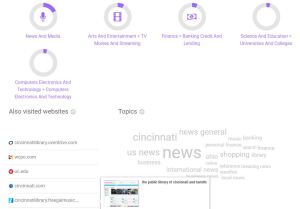
SimilarWeb: This tool reminds me of Google Analytics, but with prettier graphics. You can see all kinds of useful information about your competitors including where their customers live, how much of their website traffic comes from social media, what keywords people are using to find their website and more. You can also see the top five “interests” of visitors to your competitors’ websites. And of course, you can compare that with your library’s website.

Moz: The site is focused on links and can tell you how other websites are linking to your competitors’ website, and how your competitor is using anchor text to drive traffic. You can also download their reports for free as a CSV file. You can also find out your website’s Spam Score!

Alexa:  This site will show you how your bounce rate and traffic sources compare with your competitors, as well as how much of your audience overlaps with that of your competition. Best of all, Alexa will identify keywords to drive more traffic to your website, based on what people in your area are searching for on Google and Amazon (Alexa is owned by Amazon).

TalkWalker: An alternative to Google Alerts, it lets you search blogs, websites, and news for posts about your competitors. You can have the alerts delivered to your inbox once a day or once a week.

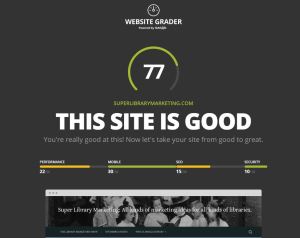
MarketGrader: This free tool from Hubspot grades your website or your competitors on factors like how fast the pages load, keyword ranking, and security.

I did an analysis of this website and found that 30 percent of my traffic comes from mobile devices. That’s incredibly important information because that means that I must make sure everything I do on this website is responsive. This tool also gave me tips on how to increase my SEO ranking and security. All of those tips would be invaluable for my library’s website as well.

Check the Upcoming Events page for a list of webinars and conferences where I’ll be next. Let’s connect! Plus, subscribe to this blog and you’ll receive an email every time I post. To do that, click on the “Follow” button in the bottom left-hand corner of the page. Connect with me on YouTube, Twitter, Instagram, and LinkedIn.   

A WordPress.com Website.

Up ↑